Skip to content

Photography Gear and Technique / Archived topic

Which memory card(s) for Sony A7R5 (size and brand)?

Started by Architeuthis ·

  • 37Posts
  • 37Replies

Read-only discussion

Which memory card(s) for Sony A7R5 (size and brand)?

37 posts
  1. I must say I agree with @makar0n, why spend extra $ for little benefit?  On the topic of the buffer it is certainly inter related to the card as far as how many you can take before buffering begins.  Typically the rate into the buffer is higher than card write speed, so if the card if faster it can empty the buffer faster, the other variable is the size of the buffer and even if we don't know that you can measure the impact by testing how many images can be taken before the camera starts buffering. 

    I don't believe anyone is saying the card impacts how many images fit in the buffer, what they are saying is that the card write speed impacts how many images you can take before the buffer fills.  This is due to emptying the buffer faster with a fast card.


  2. I must say I agree with@makar0n, why spend extra $ for little benefit?  On the topic of the buffer it is certainly inter related to the card as far as how many you can take before buffering begins.  Typically the rate into the buffer is higher than card write speed, so if the card if faster it can empty the buffer faster, the other variable is the size of the buffer and even if we don't know that you can measure the impact by testing how many images can be taken before the camera starts buffering. 
    I don't believe anyone is saying the card impacts how many images fit in the buffer, what they are saying is that the card write speed impacts how many images you can take before the buffer fills.  This is due to emptying the buffer faster with a fast card.


    Which part exactly you agree with?
    Card and buffer are unrelated a camera always writes into buffer it can’t write directly to card
    If a camera has a very slow sensor readout it will never buffer
    As I said for the A7RV a CF express card would be an overkill as the camera is absolutely slow to read the sensor
    From here to go all the way down to some obscure brand V60 card to save €20 is a very long step
    There are reasonable V90 card and the files of this camera are big. If you are the person that downloads file to the computer and formats the card every day you will probably be ok with 128 GB in total 2x64 GB
    If you want for some reason to store your entire trip 2x128 or more may be needed
    Saving little to restrict a use case of the camera and prevent you to even try is very limiting on a £3999 camera
    All the guys who take the low cost approach seem not to own one so give importance to something that a person who has decided to invest in that camera may find trivial
    Even if just to try why have a £3999 device with some functionality removed at cost of saving £25?
    Horses for courses


    Sent from my iPhone using Tapatalk
  3. 8 hours ago, Interceptor121 said:


    Which part exactly you agree with?
    Card and buffer are unrelated a camera always writes into buffer it can’t write directly to card
    If a camera has a very slow sensor readout it will never buffer
    As I said for the A7RV a CF express card would be an overkill as the camera is absolutely slow to read the sensor
    From here to go all the way down to some obscure brand V60 card to save €20 is a very long step
    There are reasonable V90 card and the files of this camera are big. If you are the person that downloads file to the computer and formats the card every day you will probably be ok with 128 GB in total 2x64 GB
    If you want for some reason to store your entire trip 2x128 or more may be needed
    Saving little to restrict a use case of the camera and prevent you to even try is very limiting on a £3999 camera
    All the guys who take the low cost approach seem not to own one so give importance to something that a person who has decided to invest in that camera may find trivial
    Even if just to try why have a £3999 device with some functionality removed at cost of saving £25?
    Horses for courses


    Sent from my iPhone using Tapatalk

    I know that works well for you, just presenting an alternate view.  I think also costs will vary quite  a bit depending on what market you are buying in for example is $AUD over here, these are some example prices from a well known on line retailer:

    160GB Type A Sony Tough :  $599

    128GB Sony Tough SD V90 $349

    128GB Sandisk SD 300MB/s (219 tested write) V90 $319

    256GB Sandisk (200MB/sec) $129 

    So in this size card a significant difference between all tiers, maybe $4-500 difference buying two cards between CF typeA > v90 SD card > V30 SD cards.  I like a 128-256 GB size card as I can fit a dive trip on one card easily, so the card acts as a full backup copy.  For me the downsides for the cheaper cards don't seem overly onerous.

  4. I know that works well for you, just presenting an alternate view.  I think also costs will vary quite  a bit depending on what market you are buying in for example is $AUD over here, these are some example prices from a well known on line retailer:
    160GB Type A Sony Tough :  $599
    128GB Sony Tough SD V90 $349
    128GB Sandisk SD 300MB/s (219 tested write) V90 $319
    256GB Sandisk (200MB/sec) $129 
    So in this size card a significant difference between all tiers, maybe $4-500 difference buying two cards between CF typeA > v90 SD card > V30 SD cards.  I like a 128-256 GB size card as I can fit a dive trip on one card easily, so the card acts as a full backup copy.  For me the downsides for the cheaper cards don't seem overly onerous.

    The op if I remember correctly lives in Austria

    https://amzn.to/3yxkvLd
    Kingston v90 128 GB €89

    I guess my point is this is not a generic discussion on memory cards
    Is about the A7RV a premium camera that creates big files and has some nice video features that need a V90 card
    Lexar V60 128GB is €40
    Saving of €98 euros and you can’t use all the camera features
    A camera you paid €4500 you are now limiting to save €98
    If we are having a generic discussion about a €1399 camera that doesn’t even require a v60 card and has 20 Mb files that are never going to clog a card or only records 200 mbps there would not be a need for a v90 card and the card itself is a much heavier weight on the rig costs but the op asked for cards for a specific premium device and €89 are not going to be a problem in fact will be aligned to what most people do
    I am not suggesting to spend €139 or more for sandisk or sony tough i use those Kingston cards in my own A1 for video


    Sent from my iPhone using Tapatalk
  5. 43 minutes ago, Interceptor121 said:


    The op if I remember correctly lives in Austria

    https://amzn.to/3yxkvLd
    Kingston v90 128 GB €89

    I guess my point is this is not a generic discussion on memory cards
    Is about the A7RV a premium camera that creates big files and has some nice video features that need a V90 card
    Lexar V60 128GB is €40
    Saving of €98 euros and you can’t use all the camera features
    A camera you paid €4500 you are now limiting to save €98
    If we are having a generic discussion about a €1399 camera that doesn’t even require a v60 card and has 20 Mb files that are never going to clog a card or only records 200 mbps there would not be a need for a v90 card and the card itself is a much heavier weight on the rig costs but the op asked for cards for a specific premium device and €89 are not going to be a problem in fact will be aligned to what most people do
    I am not suggesting to spend €139 or more for sandisk or sony tough i use those Kingston cards in my own A1 for video


    Sent from my iPhone using Tapatalk

    I've lost track of where we are up to, exactly what would someone be giving up?  The highest published video bit rate requirement  is 75 MB/sec, after that there is high speed still capture where the buffer might fill.  I've never been a pray and spray shooter - too many near identical frames to sort through.

  6. I've lost track of where we are up to, exactly what would someone be giving up?  The highest published video bit rate requirement  is 75 MB/sec, after that there is high speed still capture where the buffer might fill.  I've never been a pray and spray shooter - too many near identical frames to sort through.

    V60 card is 60 MB/s as the difference is small no point not getting a kingston v90 and you have the benefit to speed up transfer to your PC
    If you use compresses raw and jpeg sony indicates 1000 images for a 128 GB card. So each write is 128MB
    If you go one week on a live aboard and make 20 dives you will even risk filling up your cards
    The total transfer time of two 128GB cards is not short either a 50% speed increase is welcome
    I have provides cost effective and high performance options that don’t break the bank. The difference is minimal I see no point buying a V60 card and neither see a point buying a sony tough or sandisk
    The kingston are excellent value and high performance
    The transcend 64GB are even better value but with the A7RV and A1 64GB feels small


    Sent from my iPhone using Tapatalk
  7. Ok but video needs only 75 MB/s  and the write rates for the Sony and Sandisk and Kingston cards is between  200 and 240 MB/sec while the USB write rate for the Sandisk card I quoted (v30 or U3 rates) is 140 MB/sec.  Only advantage I see is download speed and the slow card is 256 GB.  Is V60 actually 60 MB/sec or am I missing something?

    We have at least established no need to spend up on CF type A card.

    Edited by ChrisRoss
  8. 23 minutes ago, ChrisRoss said:

    Ok but video needs only 75 MB/s  and the write rates for the Sony and Sandisk and Kingston cards is between  200 and 240 MB/sec while the USB write rate for the Sandisk card I quoted (v30 or U3 rates) is 140 MB/sec.  Only advantage I see is download speed and the slow card is 256 GB.  Is V60 actually 60 MB/sec or am I missing something?

    We have at least established no need to spend up on CF type A card.

    No for video you need to look at V60 or V90 not the random read and write. You need sustained write speed

    It is the same for burst

    A card may do 300 MB/s read and stop recording video at 400 Mbps it has happened it has been the issue with Sandisk

    I never said a CF Express Card was needed right at the outset I said for the A7R5 it may not be required but V90 card is suggested

    I have used those kingston cards for a few years in my GH5 and now in the Sony they are extremely performing and cost effective 

    I use blackmagic speed test and on my macbook pro I get 225 sustained write and 250 MB/s sustained read with 5 GB stress those cards have done better than my angelbird which at the time were much more expensive

    https://www.cameramemoryspeed.com/reviews/sd-cards/kingston-canvas-react-plus-64gb-uhs-ii-memory-card/

    €89 in Europe a no brainer really compared to Sandisk and Sony Tough travelling a 139-169 euros

    The obscure brands @makar0n suggested do no cost less in Europe and less proven. Kingston has made memory for apple and windows computers makes SSD and all sorts of other memories and is extremely reliable

    Edited by Interceptor121
  9. 2 hours ago, ChrisRoss said:

     I've never been a pray and spray shooter - too many near identical frames to sort through.

    That’s the point :good:

  10. 4 hours ago, Interceptor121 said:

    No for video you need to look at V60 or V90 not the random read and write. You need sustained write speed 

    Nobody mentioned any random read/writes. Similarly like nobody has said that card size impacts how many images fit the buffer. Yet here we are.

    4 hours ago, Interceptor121 said:

    A card may do 300 MB/s read and stop recording video at 400 Mbps it has happened it has been the issue with Sandisk

    Details please, otherwise is the same as statement on using V90 cards on GH5 and "never having to stop recording". Or a statement in other topic about "60MB/s external NVMe speeds" and how they are "waste of time".

    Quote

    Card and buffer are unrelated a camera always writes into buffer it can’t write directly to card

    How to contradict oneself in one sentence or less.

    Quote

    Even if just to try why have a £3999 device with some functionality removed at cost of saving £25?

    As mentioned, prices paid will vary a lot based on how/where gear was acquired. Also now 20 Euro mentioned before becomes 25 pounds it seems. Not to mention clearly in your eyes anybody who gets such camera must be very wealthy and read to throw money around left and right as I assume you do ?

    5 hours ago, Interceptor121 said:


    V60 card is 60 MB/s as the difference is small no point not getting a kingston v90 and you have the benefit to speed up transfer to your PC
    If you use compresses raw and jpeg sony indicates 1000 images for a 128 GB card. So each write is 128MB
    If you go one week on a live aboard and make 20 dives you will even risk filling up your cards

    So now we are assuming V60 is 60MB/S max ? Huh? Didn't i just touched on that when talking about your Sony "minimum" specs? Those are the speeds set by standard as minimum guaranteed. But as we can see from actual card  benchmarks, those are more often way above that.
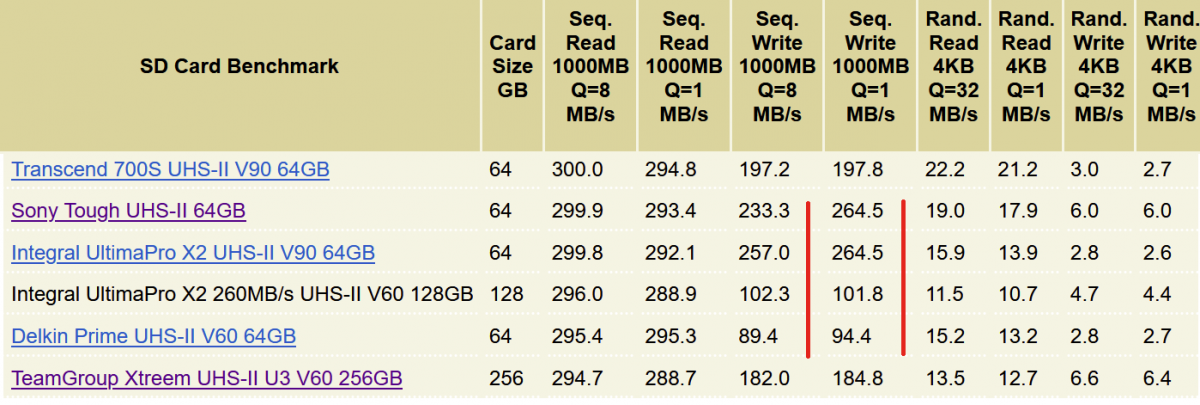
    Let's have a look at the card you have been so much promoting, Transcend (which is actually one of the worse performing V90 cards)
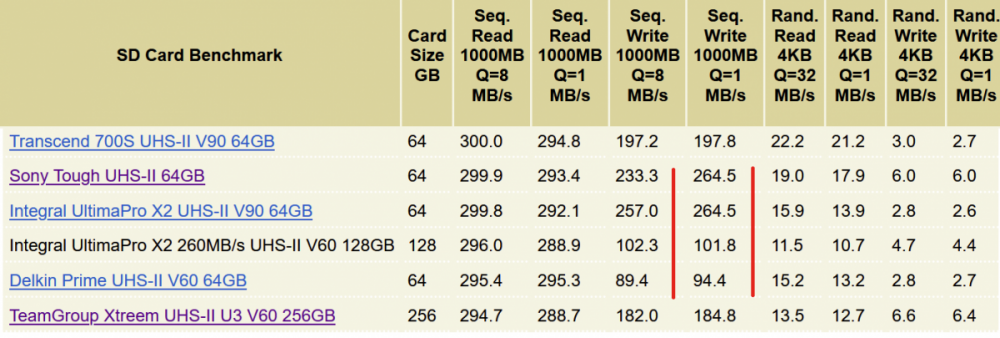
    image.thumb.png.c4c2f745511ae4c439bf7bd2ef8505b6.png

    Barely over 10MB/s difference, even in Sequential Q8 benchmark. Now should we extrapolate the price (as I am failing to find a 256GB version), it would be on average 3-4x more expensive than Team Group V60 card, while providing barely any benefit.

    And again we are at the question, would getting super fast card have any measurable benefits (since we already know our bitrate, even went for 2x that in case). Unlikely. However getting a lower one and then going for capacity instead would.
    One can then fit whole trip (even with Sony humongous sizes) then have a copy on the laptop, in other words each one acting as a backup of the other. With tiny sizes you constantly have to juggle things around, and in case of a backup, are forced to get yet another external drive to achieve that, meaning extra hassle and cost.


    5 hours ago, Interceptor121 said:

    The total transfer time of two 128GB cards is not short either a 50% speed increase is welcome

    Not sure transfer time is the holy grail of photography. And where is that 50% coming from ? From now conveniently quoted standard V60/V90 speeds? Looking at real benchmarks (like vs Transcend) difference is a few percent if that.
    Would you really fill 128GB card a day? That is lots of shots. And clearly shows a need to think about larger capacity perhaps. And if the transfer speed, as in a few minutes extra is such an important factor, then again, that is something to consider indeed. Or hiring an assistant that does it for you.


    4 hours ago, Interceptor121 said:

    I have used those kingston cards for a few years in my GH5 and now in the Sony they are extremely performing and cost effective 

    I use blackmagic speed test and on my macbook pro I get 225 sustained write and 250 MB/s sustained read with 5 GB stress those cards have done better than my angelbird which at the time were much more expensive

    https://www.cameramemoryspeed.com/reviews/sd-cards/kingston-canvas-react-plus-64gb-uhs-ii-memory-card/

    €89 in Europe a no brainer really compared to Sandisk and Sony Tough travelling a 139-169 euros

    Make sure to compare similar sizes, meanwhile you quote prices for different sizes left and right. If we look at Kingston in 256GB size, that is 184 Euro on geizhals (or 191 Euro on Amazon).
    In addition, CrystalDiskMark is the golden standard in testing storage performance. Plus make sure to explain what kind of sequential speeds you are quoting.
    Also amazon is not everything, use price comparison engines relevant to OP geographical location like idealo/geizhals.


    4 hours ago, Interceptor121 said:

    The obscure brands @makar0n suggested do no cost less in Europe and less proven. Kingston has made memory for apple and windows computers makes SSD and all sorts of other memories and is extremely reliable

    This is by far my favorite sentence, as it literally illustrates the problem here.
    So let's talk about those "obscure brands" (I will show mercy and skip "apple and windows computers")
    Both manufacturers are well known in computing world for producing top tier NVMe storage. Heck, ever heard of Puget Sounds? They have just abandoned usage of Samsung 980 Pro series in favor of those "obscure brand" Sabrent drives.
    But it gets better, you claim Kingston makes SSDs and "all sorts of other memories". Sure, but you know what SSDs (or "all sorts of other memories" ) are made of? NAND memory and controller in general. And Kingston does not directly manufacture these per se, but through a stake in Kioxia (formerly Toshiba). And in case of the SD cards it actually uses yet another company controllers, Phison.
    Now guess which memory and controllers are used in Sabrent for example? Och wait, would that be also Kioxia and Phison?
    Indeed totally unreliable then. Let's all now pile up and buy Kingston, of course via your affiliate link cleverly hidden there.


    Quote

    I guess the op was asking people that either have the same camera or similar for opinions and I have given one which takes into account the fact that my camera is similar and more demanding than the one he talks about

    I am not sure I understand what camera you have or shoot and the basis of your comparison as I said you need to look at the entire pipeline 

    What camera do you shoot what files does it produce and what equipment you have for processing? If you are far away from the op case I do not think other than reading 3rd party sources you are in a position to advise better than someone who has a very similar rig

    Have you ever used any other type of card than SD card that you have an appreciation of the physical and logical differences?

    If your starting point is a camera that produces 16-20 MB files and all it supports is an SD maybe not even UHS-II is a very different situation than the camera of the op

    Lots of assumptions what OP thinks again. And nothing like a good old personal attack when running out of arguments. While dishing out advice NOT having the actual camera, and not only for this model, nor only on this website.
    <sarcasm start>

    Sarcasm removed. Decided not to get personal.

    </sarcasm end>

    Edited by makar0n
  11. 6 hours ago, Interceptor121 said:


    https://amzn.to/3yxkvLd
    Kingston v90 128 GB €89

    I am not suggesting to spend €139 or more for sandisk or sony tough i use those Kingston cards in my own A1 for video
     

    Quote

    The kingston are excellent value and high performance

    Quote

    I have used those kingston cards for a few years in my GH5 and now in the Sony they are extremely performing and cost effective  

    I use blackmagic speed test and on my macbook pro I get 225 sustained write and 250 MB/s sustained read with 5 GB stress those cards have done better than my angelbird which at the time were much more expensive

    https://www.cameramemoryspeed.com/reviews/sd-cards/kingston-canvas-react-plus-64gb-uhs-ii-memory-card/

    €89 in Europe a no brainer really compared to Sandisk and Sony Tough travelling a 139-169 euros

    The obscure brands @makar0n suggested do no cost less in Europe and less proven. Kingston has made memory for apple and windows computers makes SSD and all sorts of other memories and is extremely reliable

    Now this deserves a separate mention:

    First you promote Transcend left and right, then suddenly find a deal about Kingston and now that is the recommended thing:
    I wonder why...lets see:

    https://amzn.to/3yxkvLd

    leads us to (bold added by myself for visibility):


    https://www.amazon.de/dp/B09XC5FX1Z/ref=cm_sw_r_as_gl_api_gl_i_Q5GXD4Y46C088N0NJ0BJ?linkCode=ml1&tag=interceptor0d-20&th=1

    Now what do we see here? Och wait, would that be an affiliate link?
    In other words, would you have a direct financial interest in promoting a given card model/manufacturer? Now the question is, how should we look at your other posts? Are those a factual advice and a mere attempt to help a fellow photographer or perhaps advice that is to benefit you financially or help you build your "guru" image and post count?


    Similar to disclosing manufacturer links when reviewing gear, as mentioned in other topic, a common decency would require the same when posting any links containing your affiliate data. At the very least post a full link so it is immediately obvious if it has an affiliate tag or not.
    But not only you do not do that, you actually hide it behind a link shortener then proceed to write multiple posts advertising Kingston cards all of a sudden.

    I will leave it here without any further comments. No clue what is the official Wetpixel policy on posting affiliate links by users (not staff i.e. not a link that would for example benefit Wetpixel itself for example to help cover hosting costs). Assume that is something admin/mods can clarify.

    Edited by makar0n
  12. integral ultima pro V90 128 GB £114

    https://www.amazon.co.uk/Integral-UltimaPro-Endurance-memory-UHS-II/dp/B074M64L1K/ref=sr_1_6?crid=3JMFZMKVZ5KKN&keywords=integral%2Bultima%2Bpro%2B128gb&qid=1678639552&sprefix=integral%2Bultima%2Bpro%2Caps%2C86&sr=8-6&th=1

    Sabrent V90 128 GB £99

    https://www.amazon.co.uk/SABRENT-Rocket-UHS-II-Memory-SD-TL90-128GB/dp/B09WLWWL9B/ref=sr_1_6?crid=MEVZUYE1402D&keywords=sabrent+SD+CARD&qid=1678640130&sprefix=sabrent+sd+card%2Caps%2C82&sr=8-6

    Kingston Canvas V90 £92

    https://www.amazon.co.uk/Kingston-Canvas-128GB-Memory-UHS-II/dp/B09XC3D96V/ref=sr_1_3?crid=2DUKSYT4NAIMT&keywords=kingston+canvas+react+plus+uhs-ii&qid=1678639620&sprefix=kingston+canv%2Caps%2C82&sr=8-3

    Transcend V90 64 GB £34

    https://www.amazon.co.uk/Transcend-TS64GSDC700S-Extreme-Memory-UHS-1-Class/dp/B07DSV9HG2/ref=sr_1_3?crid=22BGUONBAVH9E&keywords=transcend+v90+64&qid=1678640291&s=computers&sprefix=transcend+v90+64%2Ccomputers%2C77&sr=1-3

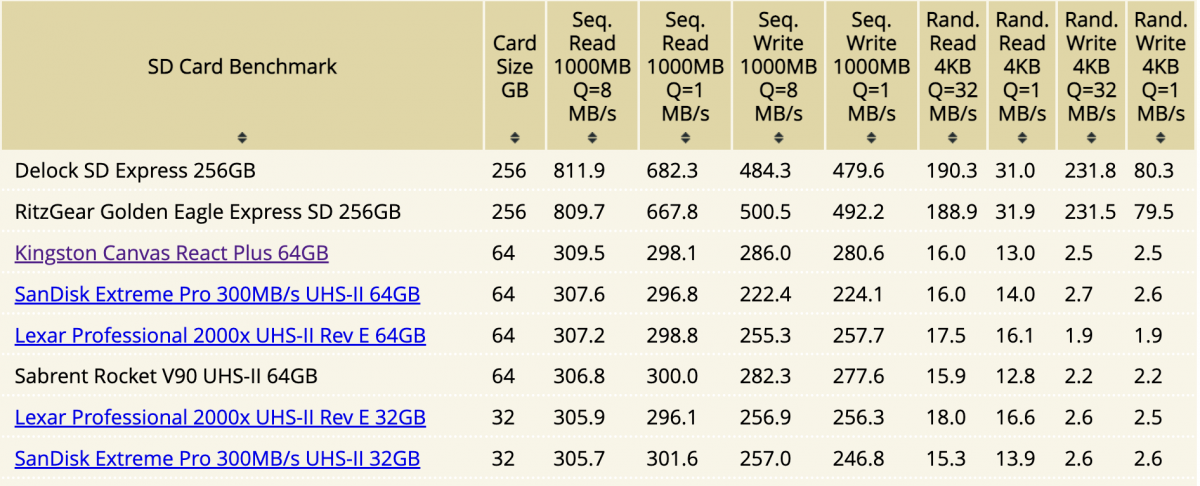
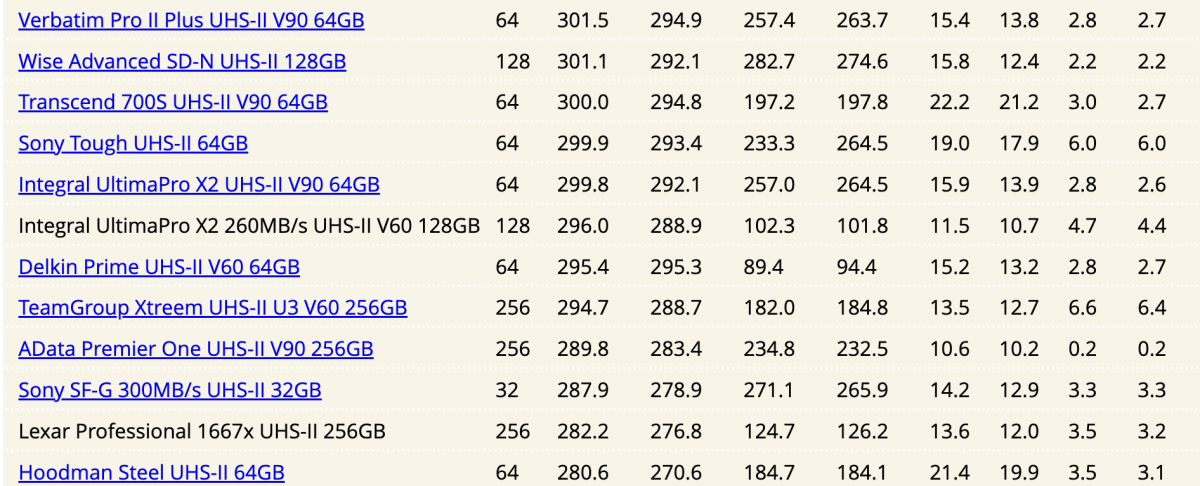
    Your own website benchmark shows where those stand

    Some facts about Kingston Technology America 23 largest company

    https://www.forbes.com/companies/kingston-technology/?sh=62d7aea12c00

    Sabrent SSD use Kingston components...

    https://www.techpowerup.com/review/sabrent-rocket-1-tb-m-2-nvme-ssd/2.html#:~:text=The four TLC flash chips,to store the mapping tables.

    Teamgroup is V60 just below the transcend. But again why v60?

    Speed classes for video recording from the SD Association

    https://www.sdcard.org/developers/sd-standard-overview/speed-class/

    The standards for video are not the same for the bus speed 

    https://www.sdcard.org/developers/sd-standard-overview/bus-speed-default-speed-high-speed-uhs-sd-express/

    I am going to leave it here but yet I would like to know what camera have you got? Anything producing an image at least 50 MB or recording video at 75 MB/s?

    Screenshot 2023-03-12 at 16.56.53.png

    Screenshot 2023-03-12 at 16.59.06.png

    Edited by Interceptor121
  13. 3 hours ago, Interceptor121 said:

    So I see you have removed your affiliate links, well that is certainly a good thing.
    However, as I have said before:
    1) Amazon is not everything, use price comparison engines relevant to OP geographical location like idealo/geizhals. Especially that UK sadly is no longer in the same economic area as Austria for example. On that basis I can look into SD card prices in upper Mongolia.
    2) Make sure to compare similar sizes and not quote completely different ones ie. 64/128GB vs 256GB

    Yes, they do perform fast, but that was never the question. And to add:

    3 hours ago, Interceptor121 said:

    Teamgroup is V60 just below the transcend. But again why v60?

    And the point being, which is what I've been trying to make since the beginning, instead of getting those expensive V90s for example, one can get 3x cheaper V60s, with almost the same performance (at least vs Transcend). Plus the fact that in most of the cases said performance is more than enough. So let me rephrase: "But again why v90?".

    3 hours ago, Interceptor121 said:

    Speed classes for video recording from the SD Association

    https://www.sdcard.org/developers/sd-standard-overview/speed-class/

    The standards for video are not the same for the bus speed 

    https://www.sdcard.org/developers/sd-standard-overview/bus-speed-default-speed-high-speed-uhs-sd-express/

    And where do you get with that? UHS is a technology, Vxx are standards, merely meaning a minimum guaranteed speed. While certainly important, majority of the manufacturers exceed such speeds anyways, so you can have V60 cards with 3x the speed of such standard, or V90 with 2x+, up to a theoretical maximum of 312 MB/s if we go for half-duplex speed. Heck, I have a V30 card that does pull almost 82MB/s in a sequential Q8 write benchmark.

    3 hours ago, Interceptor121 said:

    I am going to leave it here but yet I would like to know what camera have you got? Anything producing an image at least 50 MB or recording video at 75 MB/s?

    I think you know that since you visited my profile yesterday (Saturday) and it is noted there :P. But I do love, what some could call, "elitist" attitude. Anybody with less than full frame (and ideally Sony a1 - begone peasants!) has no right to say anything, since those cameras seem to work totally differently than any other ones, making any calculations useless. But wait, did OP ask for A7V5? Camera you do not have? Hence extrapolating like all of us based on a different model?


    Also glad you finally admit it is the 75 MB/s number that we should be concerned about.

    And my favorite :

    3 hours ago, Interceptor121 said:

    So we are seeing some google skills, well that is good. However reading seems to be not a strong thing.
    Based on that SSD review you have quoted (note SSD, and not SD card, but since it is a similar if not the same technology we can certainly go with that):
     

    Quote

    The four TLC flash chips are made by Micron, built using 64-layers on a 3D NAND production process.

    A Kingston DDR3-1866 chip provides 512 MB of fast DRAM storage for the controller to store the mapping tables.

    At this point I am afraid to ask if you know the difference between flash (made by Micron....) and DRAM in the context of SSDs (though again, SD card would apply here too, to a degree though, since those are DRAMless usually).

    Gets funnier:

    Quote

    The flash controller is made by Phison and their latest model with support for QLC and PCI-Express 3.0 x4.

    Phison you say ?

    So a Kingston SSD made out of non Kingston parts really....I'll be damned.


    3 hours ago, Interceptor121 said:

    Some facts about Kingston Technology America 23 largest company

    https://www.forbes.com/companies/kingston-technology/?sh=62d7aea12c00

    From Kingston own website, about DRAM (https://www.kingston.com/en/company/why-choose-kingston)


    Quote

    DRAM Suppliers

    Kingston has developed long-term relationships with the leading DRAM manufacturers. Our DRAM chips are purchased directly from these manufacturers, which include Micron, SK Hynix, Powerchip, Nanya and others. The components are shipped directly from the manufacturer's facility to Kingston's facility minimizing handling and exposure to damage.

    In other words, Kingston gets their DRAM chips from other manufacturers. External ones. They make DRAM modules but using chips from other manufacturers. I cannot speak for chip D2516ECMDXGJD  used in that SSD review you have quoted of course, but the above could suggests it is made of externally made chips.


    I must say I admire your tenacity. Some could have given up by now but you just keep on digging  :P

    Edited by makar0n
  14. In other words, Kingston gets their DRAM chips from other manufacturers. External ones. They make DRAM modules but using chips from other manufacturers. I cannot speak for chip D2516ECMDXGJD  used in that SSD review you have quoted of course, but the above could suggests it is made of externally made chips.
     

    I must say I admire your tenacity. Some could have given up by now but you just keep on digging  [emoji14]

    Sorry your camera produces 16 MB files and last time I checked doesn’t deliver more than 200 Mbps
    Your situation is that of a v30 card

    My camera produces 50-100 MB files and goes up to 600 Mbps
    I have another one with CF Express type B too
    Fair to say you have no practical experience in anything you predicate and you don’t need to
    It is quite entertaining that you want to argue am not in a position to comment with what you have got
    You go figure


    Sent from my iPhone using Tapatalk
  15. Guys, can we end this "Hand Bags at Ten Paces" here, please? Folks can read what you have both set out and make up their own minds.

    You both are very knowledgeable and generous contributors - and often quite humorous . 

    Let's move on.......


  16. I thank everybody for the input and the lively discussion. This is a great help for choosing the right memory card...


    Wolfgang

    Edited by Architeuthis
  17. Here I found a test/comparison for memory cards on A7R5 that is also interesting: https://www.alphashooters.com/cameras/sony-a7rv/memory-cards/


    As you all said, it is mostly the time for clearing of the buffer, where the card type matters...


    Bottom line of the test is, that with CFexpress Type A cards the buffer can record approx. 90 - 200 uncompressed raw images until the buffer is full. The buffer clearing lasts then between 7s - 11.5s, depending on brand...

    For UHS-II cards, these values are approx. 40 - 50 photos and buffer clearing times between 20s and 50s...


    Wolfgang

Retra

Account

Navigation

Search

Search

Configure browser push notifications

Chrome (Android)
  1. Tap the lock icon next to the address bar.
  2. Tap Permissions → Notifications.
  3. Adjust your preference.
Chrome (Desktop)
  1. Click the padlock icon in the address bar.
  2. Select Site settings.
  3. Find Notifications and adjust your preference.