Skip to content

Photography Gear and Technique / Archived topic

Sony A1 - Canon 8-15 vs. Sony Primes for Wide Angle

Started by Lasongo ·

  • 23Posts
  • 23Replies

Read-only discussion

Sony A1 - Canon 8-15 vs. Sony Primes for Wide Angle

23 posts
  1. 7 hours ago, Phil Rudin said:

    Hi Julian,

    Lots of useful information has been suggested above and I would add this. Before you invest in anymore equipment you may want to see if adding the tele is going to suite your needs. This can simply be done with the basic Nauticam setup for the Canon 8-15mm. If you already own the lens, gear and N100 to N120 35.5 port adapter, N120 30 extension and 140mm dome. On the A1 assign a button for APS-C to one of the housing controls and toggle between the lens shooting in full frame and the APS-C. In APS-C you will get the same file size as your D500 and you will get an idea how this will actually work for you looking into the EVF/LCD underwater. I am well aware that this can be done in post by popping a full frame image but it's just not the same as doing it in the water. The APS-C mode is a 1.5 rather than the tele 1.4 but you can get an idea if this difference works for you before you make any further investment.

    This where calculations come in,  The OP has already said above he was happy with the view offered by the Tokina 10-17 at 10-12mm range.  This range is 15-18mm on a full frame system and the 8-15 with a 1.4x gives a lens with  11-21mm focal length range.  The 11-15mm range is not usable as it doesn't fill the frame or provide a circular image, but 15 -21 mm is perfectly usable.  It's not quite as much reach as 10-17 on APS-C. 

    You can certainly try it out and using APS-C crop is perfectly viable way to test it, but if you have to go on a 2 week trip to Tonga for humpback whales for example you won't have the optimum solution with you for that trip and you may not have whales to play with close to home to test.

  2. 19 hours ago, Interceptor121 said:

    .......may act as a mix of extension tube and teleconverter and non longer focus at infinity
    This is not an issue inside the dome provides the lens can still focus at the virtual image infinity point
    Few questions

    1. How does the zoom gear work?
    2. At which point it stops vignetting?
    3. How does the focus work?

    I know it doesn't matter behind a dome port but just for interest sake this combination does focus at infinity (at least the lightpole a100m up my street :) )

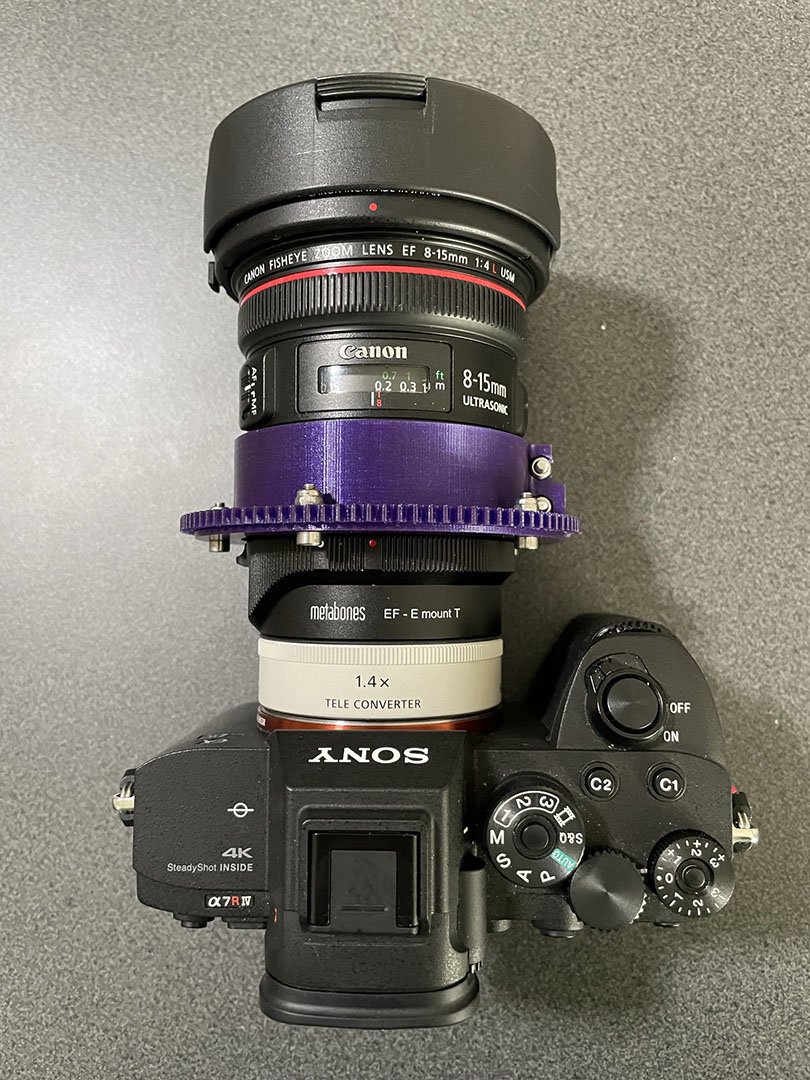
    1. I made my own custom zoom gear.  It has the advantage that if I want to use the 8-15 without the 1.4X teleconverter all I have to do is fit it in reverse on the lens.:

      IMG_1436.jpeg
    2. It stops vignetting at 11.2mm set on the lens.  Vignetting is quite strong at 11mm
    3. Autofocus speed is good, I don't really notice any difference between using the lens with and without the teleconveter.
    17 hours ago, fruehaufsteher2 said:

    You all are aware that the Sony-TC does not fit to all lenses because it protrudes far into the lens...?

    Yes, see photo above.


  3. Yes, see photo above.


    Thanks for the photo
    For clarity to others here you don’t need to use N100 20mm extension you can use N120 and have the same set up of the kenko
    My question was if the nauticam zoom gear worked and the answer is unknown as that is a custom gear
    The vignetting comes from the fact that the sony tc is 2mm shorter so the lens is slightly behind the ideal point this combination will not offer the same field of view of the kenko but the difference is small
    As I see it if you already had the sony TC this is a viable option
    However if you only had to get the teleconverter for underwater use it would not make sense as the kenko is substantially cheaper I bought mine new for £149


    Sent from my iPhone using Tapatalk
Backscatter

Account

Navigation

Search

Search

Configure browser push notifications

Chrome (Android)
  1. Tap the lock icon next to the address bar.
  2. Tap Permissions → Notifications.
  3. Adjust your preference.
Chrome (Desktop)
  1. Click the padlock icon in the address bar.
  2. Select Site settings.
  3. Find Notifications and adjust your preference.