




Posts posted by bghazzal
-
-
1 hour ago, d2b said: Sorry, I mis-typed the part number (which is pretty bad because the plastic package is sitting on my desk). The actual smaller Nauticam spacer ring is 81222. I got it in order to have a compromise between no spacer and the big spacer that comes with the CMC-1. The 81222 is smaller in outside diameter and in the amount it moves the lens back, so maybe worth a look.
I see, thanks - but it's fine with a o-ring on the thread - the adapter almost works with the CMC-1 as it's intended do, the only issue is the it sticks a a little blocking the locking mechanism and creating a gap. The AOI adapter is just a few mm too shallow for the CMC-1.
An o-ring on the mounting thread as posted solves the issue - you can screw the CMC-1 seecurely down to the o-ring, and no need for a spacer ring.
This solution is better because it reduces vignetting. I vignette to 45mm with the CMC-1 with the big spacer ring onto the port, but am down to 36mm with the CMC-1 mounted direct to the adapter with the o-ring.-
 1
1
-
-
16 hours ago, d2b said: Which Nauticam m67 adapter did you try? Looking at the 81228 on my CMC-1, it doesn't look like it extends further than the rim on the CMC-1 itself. Maybe I misunderstand the problem. I ask because I am considering a dual flip adapter for my 120mm front diameter macro port.
Basically the CMC-1 and CMC-2 comes with a 67mm adapter (Nauticam), to use it directly on any 67mm port - you remove it to use the lens on a flip mount - this adapter doesn't fit on the AOI flip adapter (it's too big, so the adapter's locking mechanism gets in the way.
Meaning you can only use the diopter without it (which is normal, this is the way you're supposed to mount it on the Nauticam flips),
However, without it, the CMC1's lens end extends to far from the flip holder, as seen in the picture, meaning you can't close the flip and there is a gap.
The solutions is not to screw it in fully, or rather to put an o-ring on the tread so you can screw it in but it doesn't extend as much, then you can close the flip and not have a gap.15 hours ago, Babydiver said: I had had an inexpensive flip adapter I bought off AliExpress. It worked great until it didn't. Then, I decided I wanted to be able to switch between my MFO-1 and Fantasea/AOI +6. Got the SAGA dual flip adapter. The lenses fit well, but I returned it before using it. It just seemed too bulky and cumbersome. Instead, I'll use the Fantasea/AOI bayonet mounts like I already use for my AOI UWL-09 PRO WACL.
Other than this CMC-1 issue, the AOI is really nice. I use it with the same lens, Fantasea/AOI +6 and it's perfect. Vignetting is pretty much the same as without the flip adapter.
But it is 300g or so, plus the weight of two lenses, so this is something to take into account for rig balance/trim -
Edited by bghazzal
16 hours ago, d2b said: Which Nauticam m67 adapter did you try? Looking at the 81228 on my CMC-1, it doesn't look like it extends further than the rim on the CMC-1 itself. Maybe I misunderstand the problem. I ask because I am considering a dual flip adapter for my 120mm front diameter macro port.
Basically the CMC-1 and CMC-2 comes with a 67mm adapter (Nauticam), to use it directly on any 67mm port - you remove it to use the lens on a flip mount - this adapter doesn't fit on the AOI flip adapter (it's too big, so the adapter's locking mechanism gets in the way (it hits the adapter's dented thing), and you can't screw it on the flip.
Meaning you can only use the diopter without it (which is normal, this is the way you're supposed to mount it on the Nauticam flips),
However, without it, the CMC1's lens end extends to far from the flip holder, as seen in the picture, meaning you can't close the flip and there is a gap.
The solutions is not to screw it in fully, or rather to put an o-ring on the tread so you can screw it in but it doesn't extend as much, then you can close the flip and not have a gap. -
Edited by bghazzal
If this helps anyone, I just received an AOI AD-M67-04 double flip.
Well designed, but some things to be wary of:
I use a Nauticam CMC-1, which is a fairly common diopter.
The AOI's design means that the back-protuding part of the Nauticam lens sits too deep in the mount, it creates a gap and it is not possible to lock it.
And it's not possible to use the Nauticam 67mm adapter, as it is too big to screw into the flip (doesn't fit because of the hinge.)
CMC-1 protruding: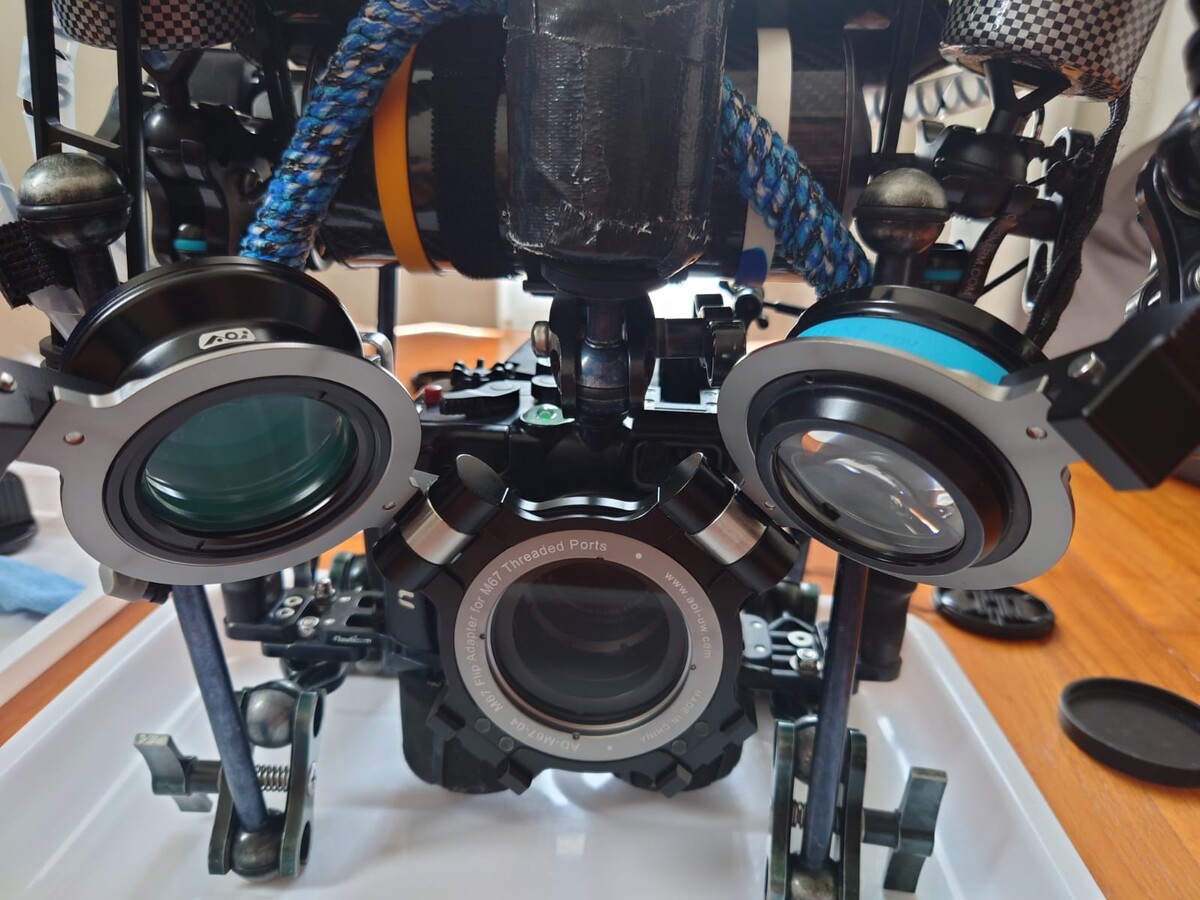
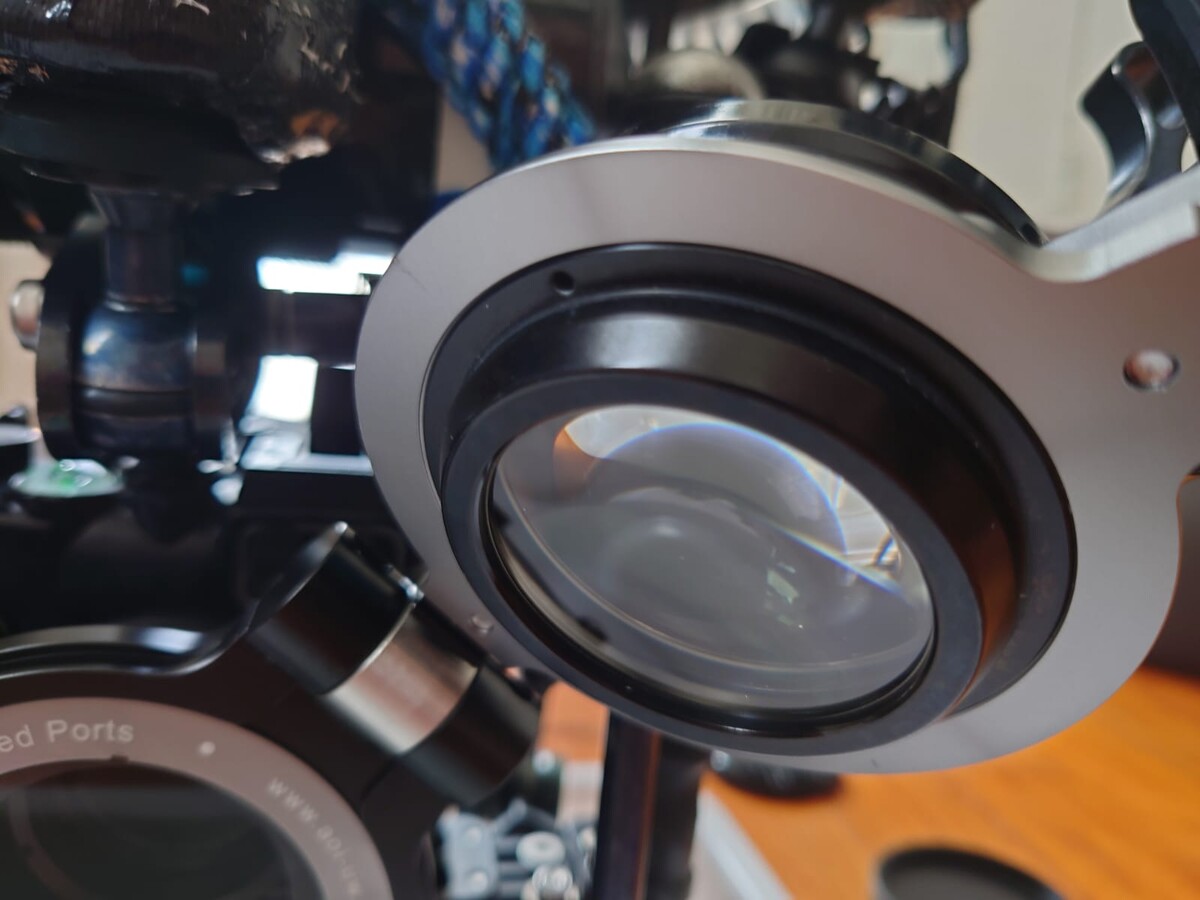
Meaning you need to either not screw the CMC1 diopter in fully, which means it rattles and can unscrew (but then you can lock), or screw it in fully and not lock it (which leaves a gap)
However, I found a workaround, by adding an o-ring around the CMC1's thread, which restricts how deep it goes in the mount - now I can screw it in fully (to the o-ring), and lock it.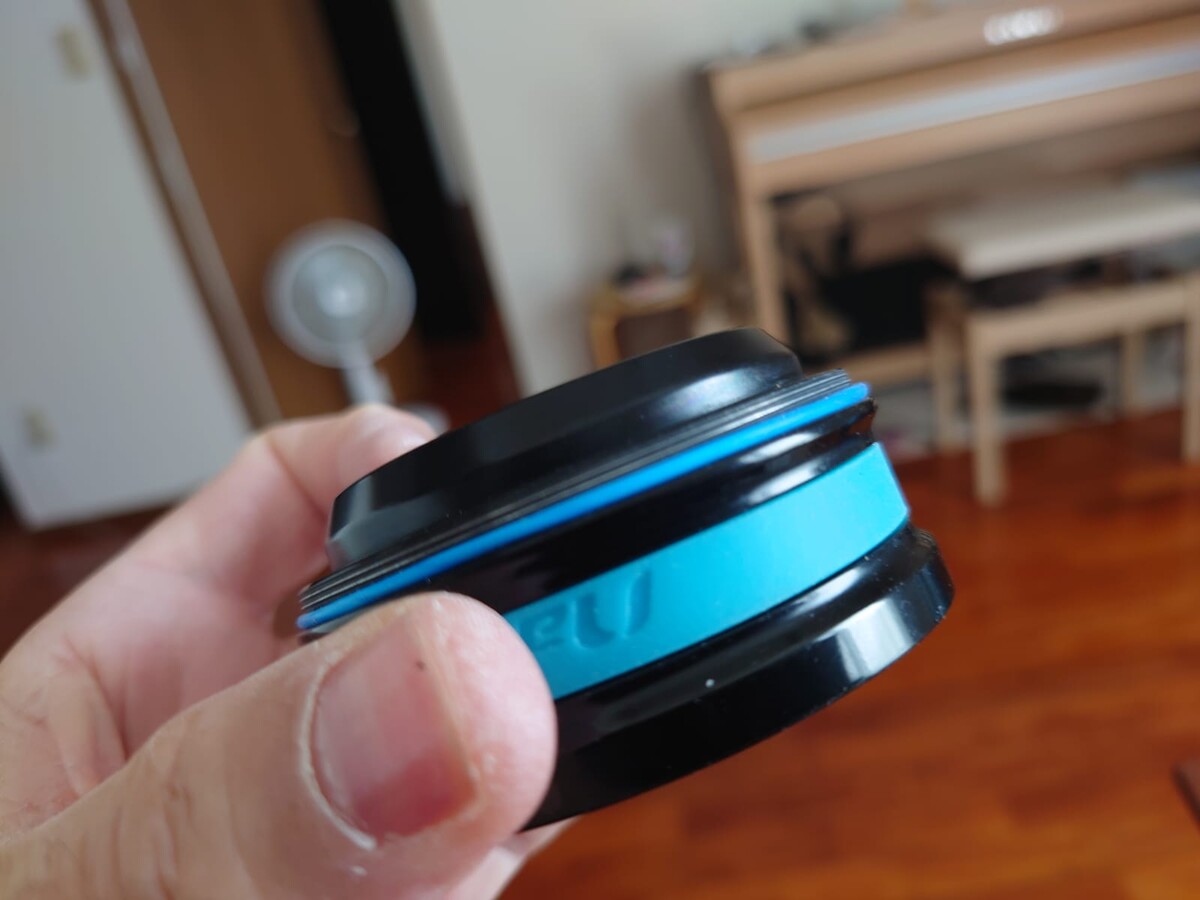
The other thing to look out for is the bright aluminium ring which holds the mount in place.
This is fine when the diopters are in use, but could cause reflection issues if not using any diopters (so a little black pain or tape might be required).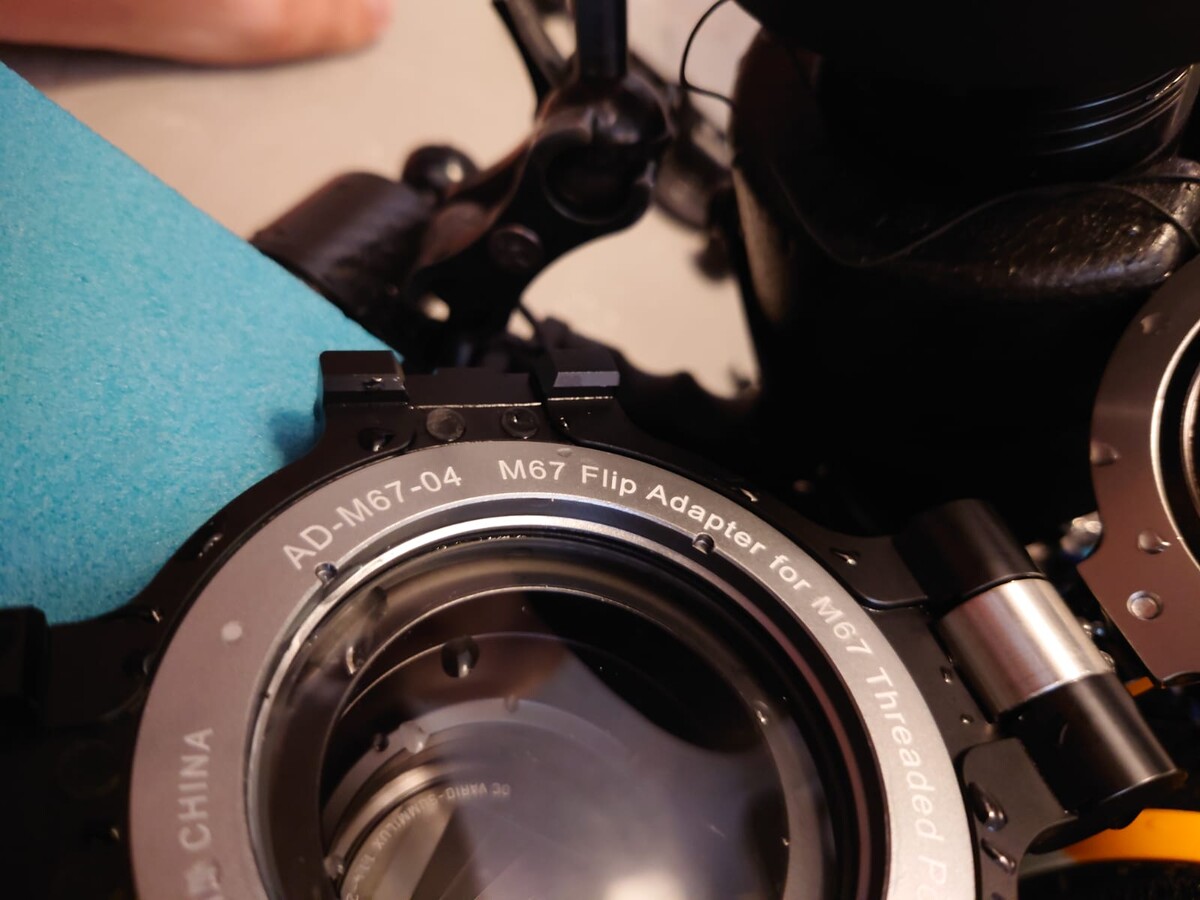
Otherwise as expected, adding 600g to the short port destroyed my camera's trim, making it super nose heavy, but I managed to make some adjustments which need to be tested in the field.
Hope this helps-
 2
2
-
-
23 hours ago, humu9679 said: Dunno how you do it with the diopters and all - and no tripod. One day I hope to shoot video as nice as that.
Thanks Craig, appreciate it - oh, and I just sacrifice a few chickens under a full moon, usually does the trick 🐔🌕🎎
😉
More seriously, the rig’s bulked up like a souped-up hot rod - almost neutral and nicely balanced, which helps a lot.
It looks ridiculous and weighs about 10 kg on land, but underwater it’s a real pleasure to handle.I acquire focus manually and then follow the peaking with the elbows, which usually involves plenty of moaning and cursing… sometimes miracles happen, and critters actually stay on their Y-axis for more than a few seconds.
I, for one, will welcome fast shallow-plane video autofocus 😅18 hours ago, Davide DB said: Wow, terrific video!
Half man, half gyroscope!
I wish I could be as stable as you, shooting freehand with the diopter lenses!
Thanks! It’s all in the careful calibration of lunar cycles and chicken sacrifices.
But not to worry, soon enough, AI will handle all the dirty work anyway - and probably hallucinate a few extra critters along the way 👾😅
-
1
-
 1
1
-
-
5 hours ago, PeterN said: Wow great capture such fine detail. I like the black negative space in the end clip it really showcases the subject well. Nice work you have a lot of patience!
Thanks Peter. One of the major issues I had was that they love their little overhang spaces, which were too tight to fit my camera rig - I couldn't close enough to focus with the diopters. Luckily this one went on a stroll all around the rock, stopping in a few spots around the way, and we spent a good hour and a half together!
Yes, I was happy to get a bit of black negative space at the end, for a little blackwater feel.
-
1
-
-
5 hours ago, Troporobo said: Very nice indeed, especially for a challenging scenario! I love weird and wonderful macro subjects, and the way you captured the head-on shots seeming to look into the camera gave it impact. Well done.
Thanks a lot. It was my first time finding these guys, so I gave it some time.
The “face” they have is really odd - almost bird-like but with an almost mammalian snout… quite cute in their way 😁
-
19 hours ago, Chris Ross said: Nice work Ben, I saw their relatives in Lembeh a couple of weeks ago, indeed quite tiny. Impressive keeping it in focus during the swim.
Thanks Chris - the more tropical species we get here thanks to the Kuroshio / Blackcurrent flow are really great, just not as common (though Okinawa is definitely a blue-ring octopus hotspot!).
The bonfire dives helped for the swim, I use backbutton focus to aquire in MF, then try to anticipate the movement and follow the peaking - the problem is Z-axis movement on such a shallow focal plane...
This is where fast-video tracking autofocus would be a game changer, but it seems to be something of a unicorn for video, as most useable lenses would not support it apparently. -
Edited by bghazzal
Here's some Okinawan macro, shot last week on a shore dive at Okinawa Main Island, Japan.
The Ryukyu Seadragon - also known as the Japanese Pygmy Seadragon - is a species of thread pipefish (Kyonemichthys rumengani) found in the Okinawa Archipelago. Well camouflaged and quite small (adults reach up to 2.5 cm in length), it is elusive and somewhat difficult to spot in the wild.
This little guy had a pregnant partner (not sure if it’s the male or female in their case…), which I didn’t include in the clip for continuity ^^Technically, the bonfire/planktonic video shooting I’ve been doing is helping with handheld macro shots using diopters, and I’m happy I was able to follow a freeswimming critter this small, as it was really in a walkabout mood that day! 😅
🎧 Music : "Through the green Thicket" by Tomotsugu Nakamura (sound on please)
🎥 Shot on a Lumix LX10 in Nauticam housing, 4K, 30fps,
⚙️ Nauticam CMC-1 and the lovely AOI UCL-05 closeup diopters (well, the old AOI/fantasea version, UCL-05LF to be precise, budget, budget...), two Kraken Hydra 8000v2 and one Backscatter MW4300 video lightsCheers! Ben
-
5
-
3
-
-
Edited by bghazzal
10 hours ago, Gmsalterego said: I found 1 piece of INON mega float 70 €, 4 pieces STIX jumbo float at 50 €. I found 4 pieces FLEX-ARM float at 30 €. By the way I wonder which is the best setti g in arms I.e. number, lenght and so on.
To solve my doubts I wrote the post.
120g and 175g stix-like foam floats are now sold real cheap on Aliexpress, and they're fine for rec depths.
search for: 4Pcs Underwater Camera Buoyancy Float Kits Aquatic Light Arm Diving Tray Float Kit for Seafrogs/nitescuba/Starbea Floating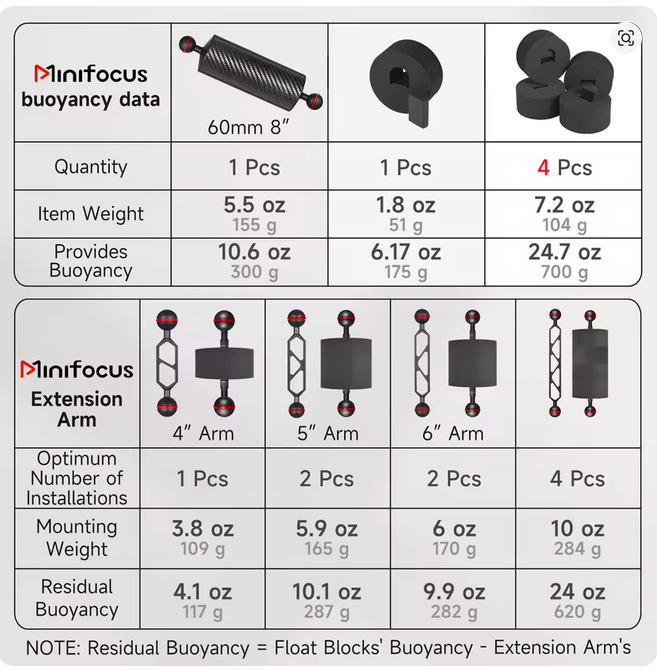
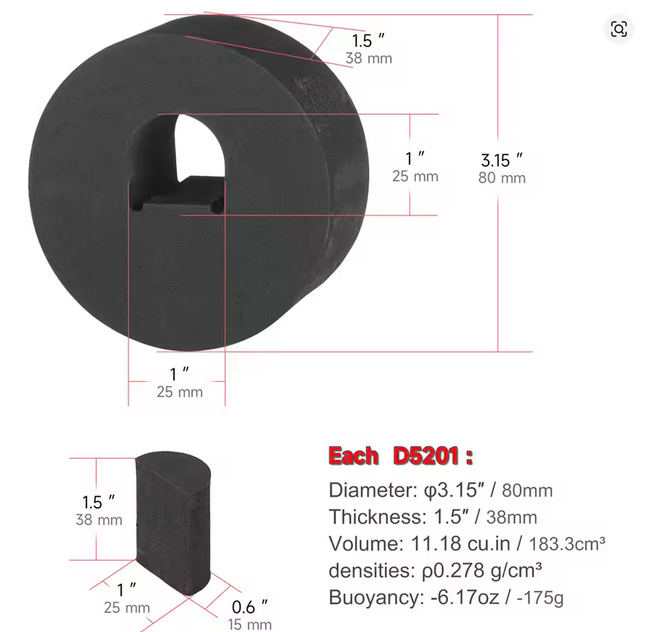
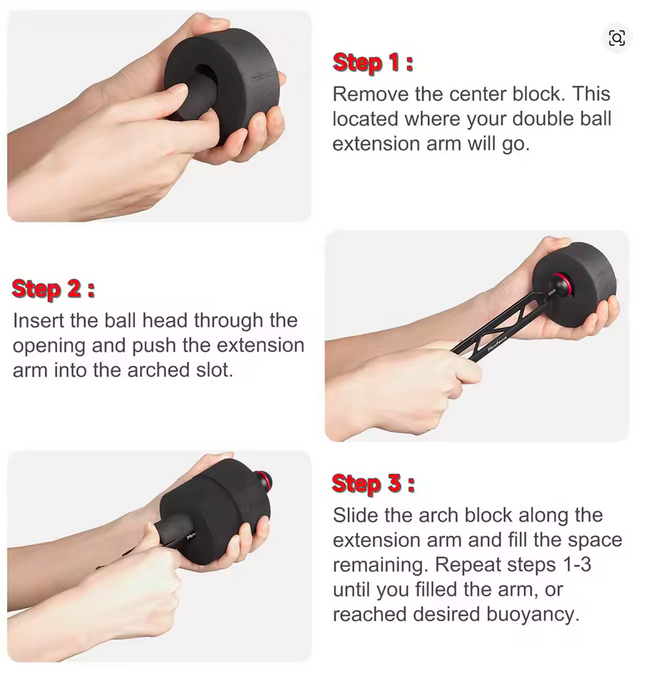
Otherwise 10bar as lots of interesting foam float options, their catalog can be downloaded here:
https://www.10bar.com/wp/with a bit of DIY you can also make the light itself neutral - this an MW4300 light (-250g in water) with an adapted 10-bar float - not the prettiest but does the job:
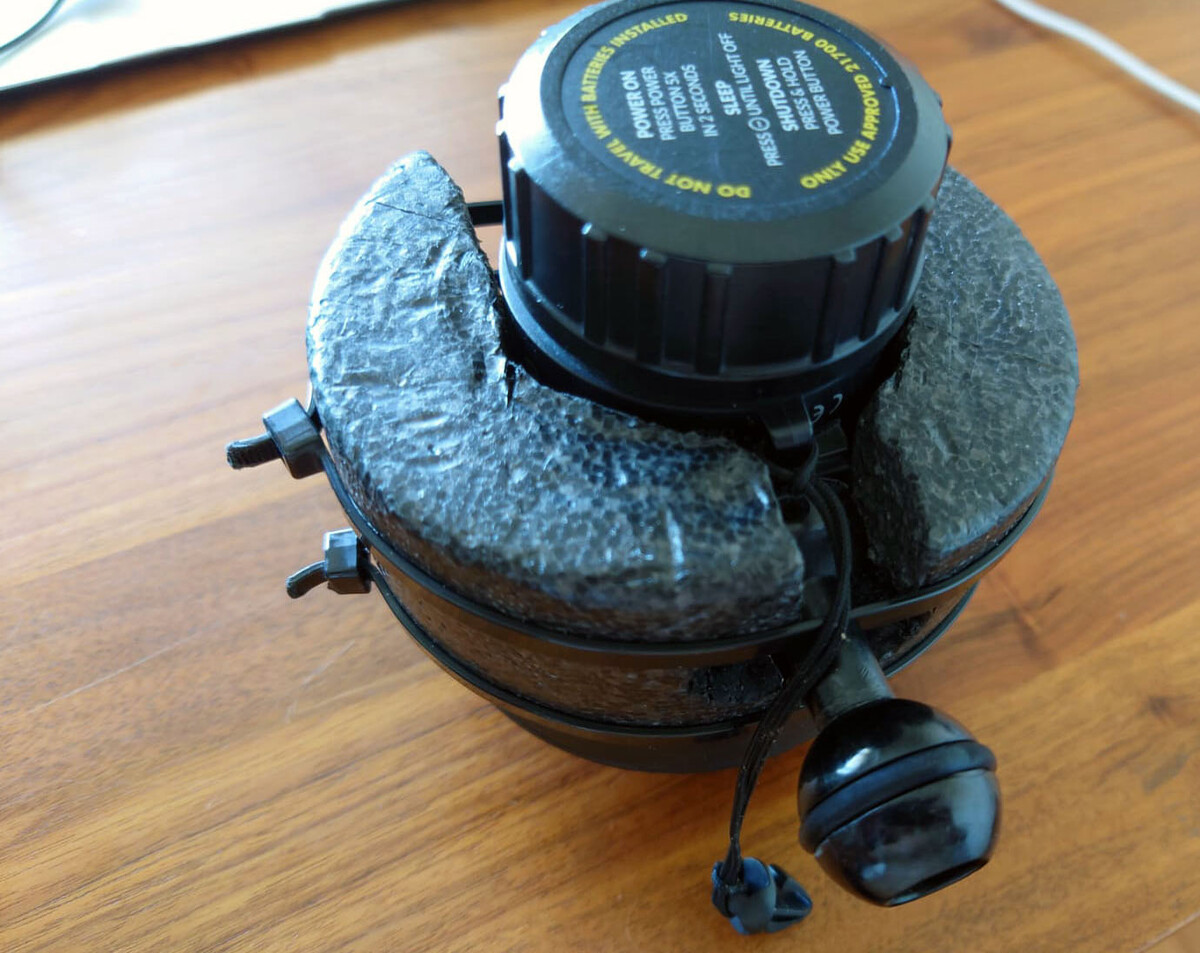
cheersb
-
1
-
1
-
-
Edited by bghazzal
As an update, I ran a few more tests with the Keldan Spectrum filter + DIY ambient light filters, mostly the Rosco 4360 and Rosco 4390, in the slightly bluer waters of Okinawa main island.
The 4360 was ok, but did let too much reds through, 4390 less conclusive...
I finally bit the bullet and bought sheets of the above Dreifish formula: a Rosco 4330 + Lee 353 filter gel combo
Tested it this morning at a rather murky site but results were excellent (I shoot with a Keldan SF-1.5 gel on the lens, as a Panasonic manual WB does not do great without one, leaving a cast).
With the ambien filters on the lights, I could move from full ambient wide to closeup shots with no red-peak, film under corals and under overhangs without changing the white balance.
Waaaaay better than a single Rosco, and just hits the right notes spectrum-wise, neutralising the red spike.
Even with my limited lighting (2x Kraken Hydras 8000lm and 1x Backscatter MW 4000lm),it works fine the setup gives you highlights, details, and lets you film where the sun don't shine...
So everything I wanted...¥Having access to "Portable sunlight" would be a way to describe it.
This was a quick-and-dirty test - I'll post some clips when I can test in better conditions, with a wide-lens instead of naked port.
Until then, Long Live The DreiFilter! 🤩
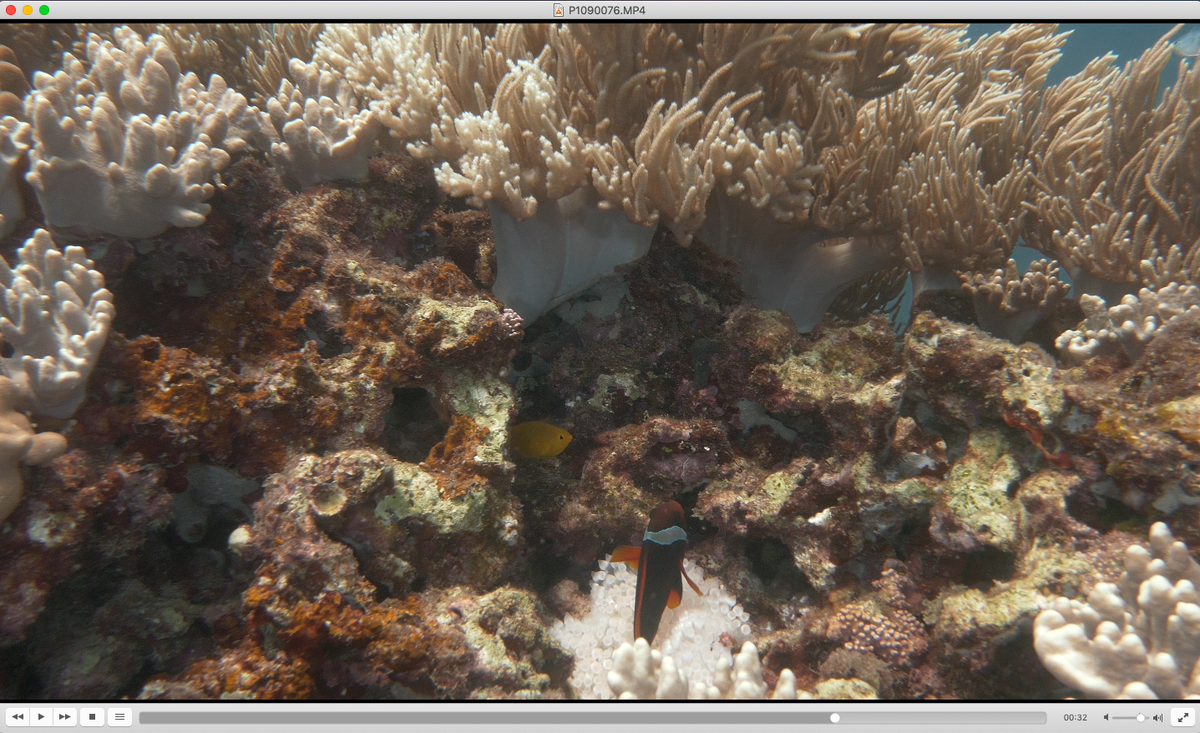
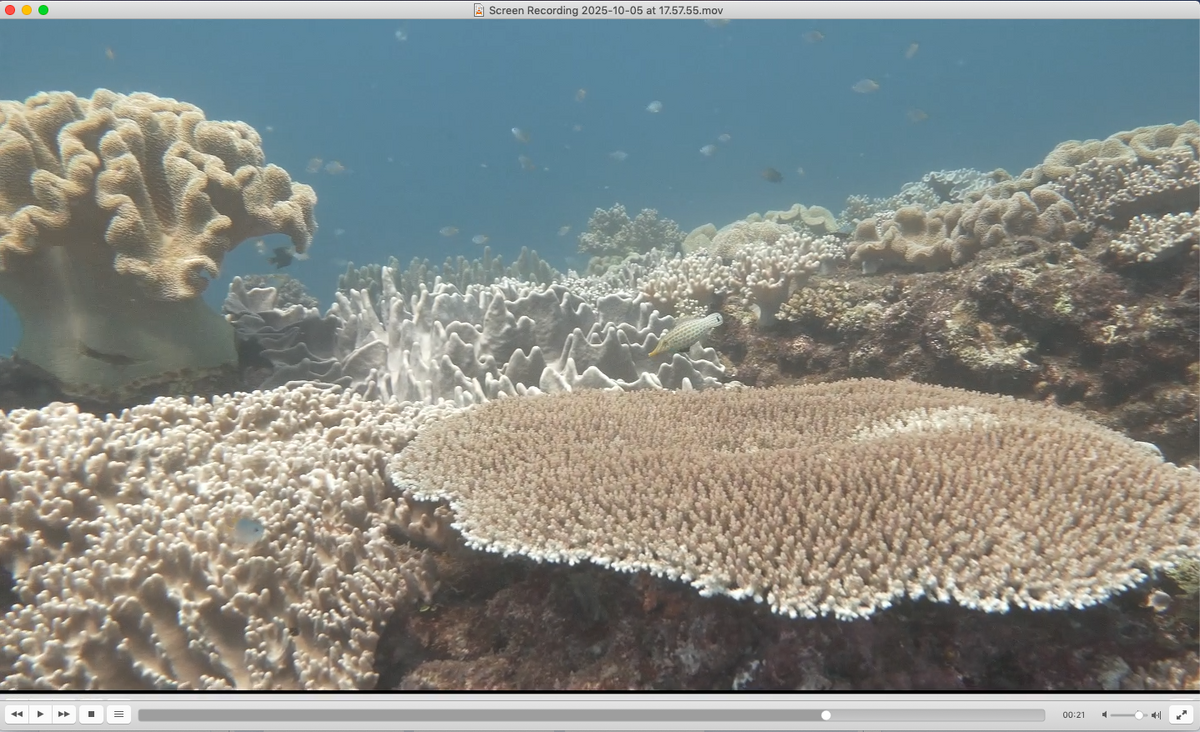
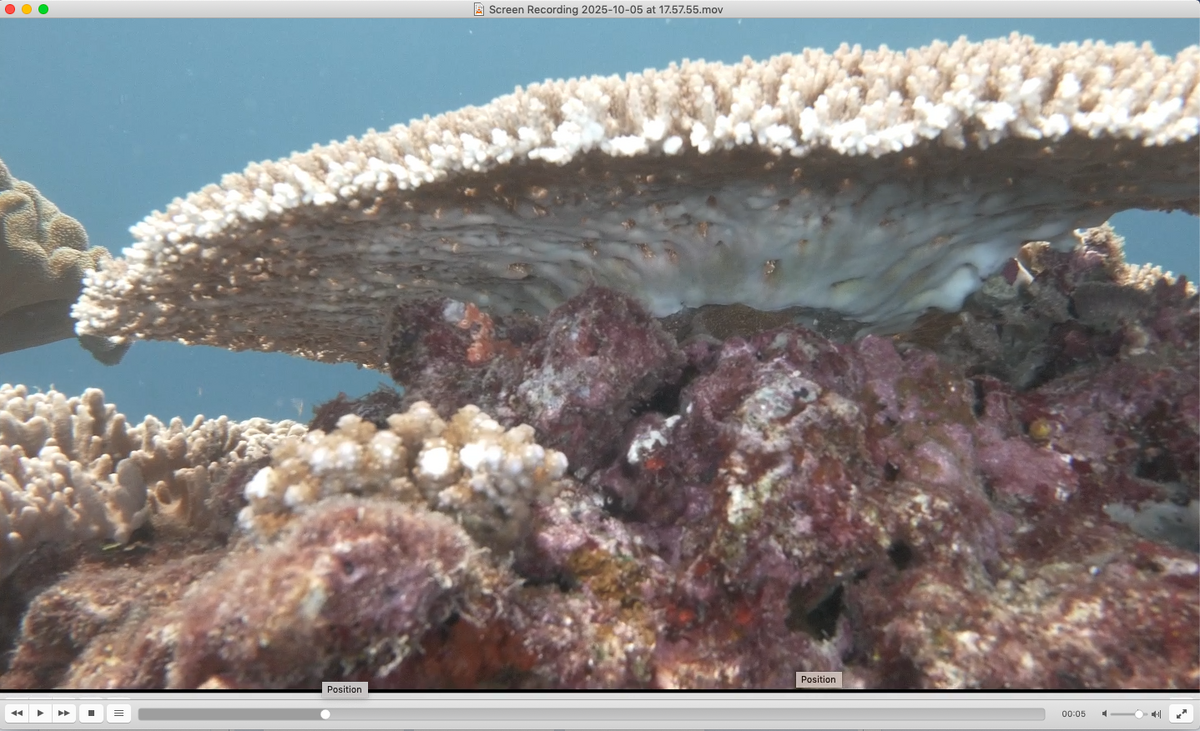
Here are some unedited video screen caps, straight out of camera:
Parameters: Keldan SF -1.5 on the Lumix LX10 flat port, Dreifilter on my 3 lights, white balance to ambient light with a Whibal card, 10m depth, ISO 400, f/6.3, lights at 80% power to get highlights and fills.
moving out (close-up to wide scene - note: the bubble anemone is bleached out, and white as it should be)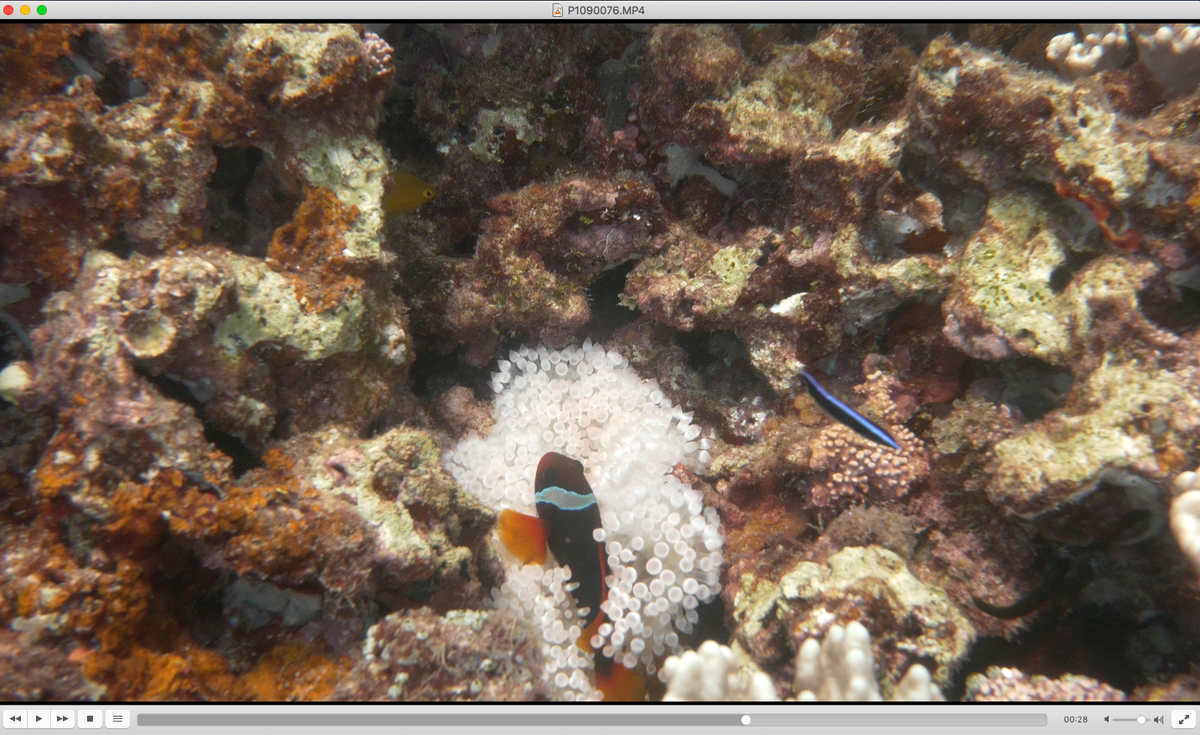
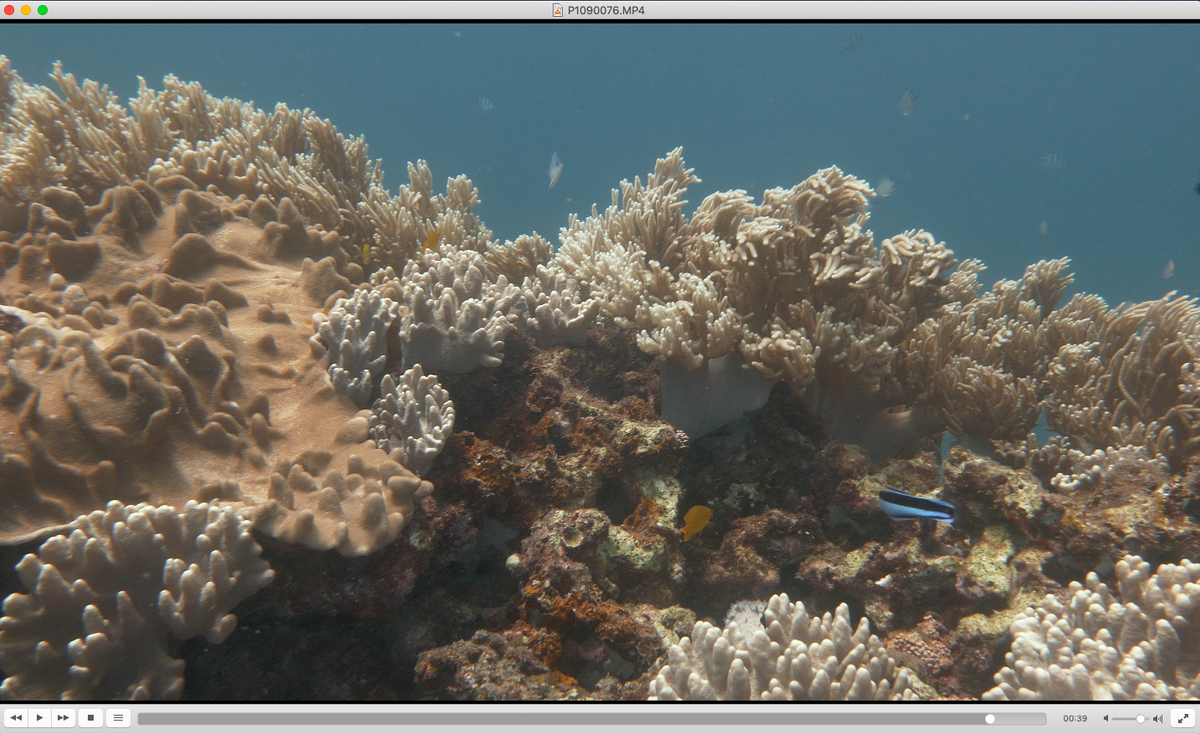
peeking under a coral, with an ambient light WB!
ye ol' mask shadow test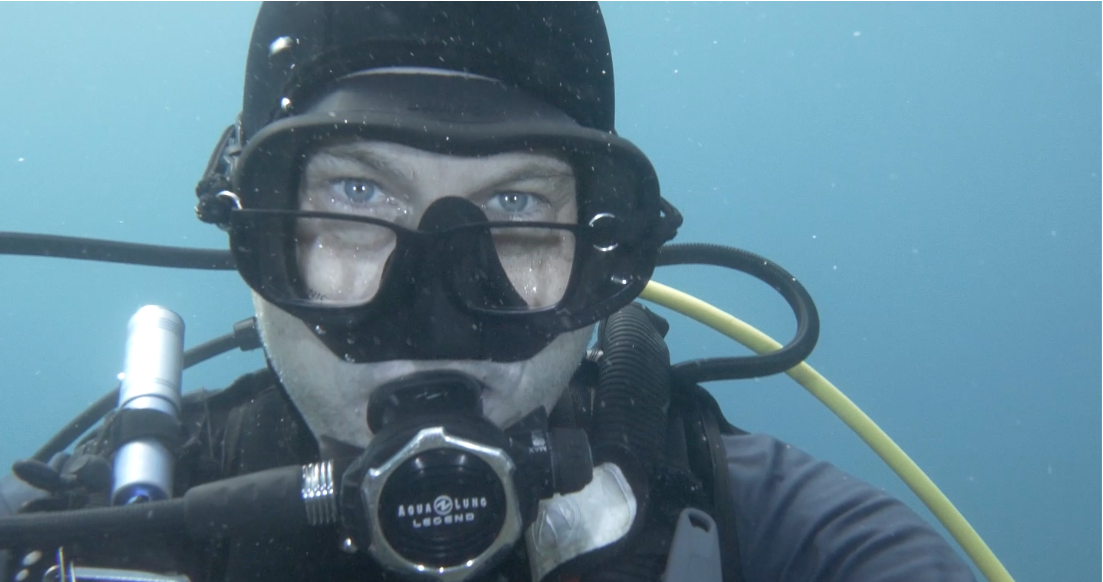
3 Dreifilters + Keldan SF-1.5 (DIY filter mounts using step-up / step down adapters and an o-ring)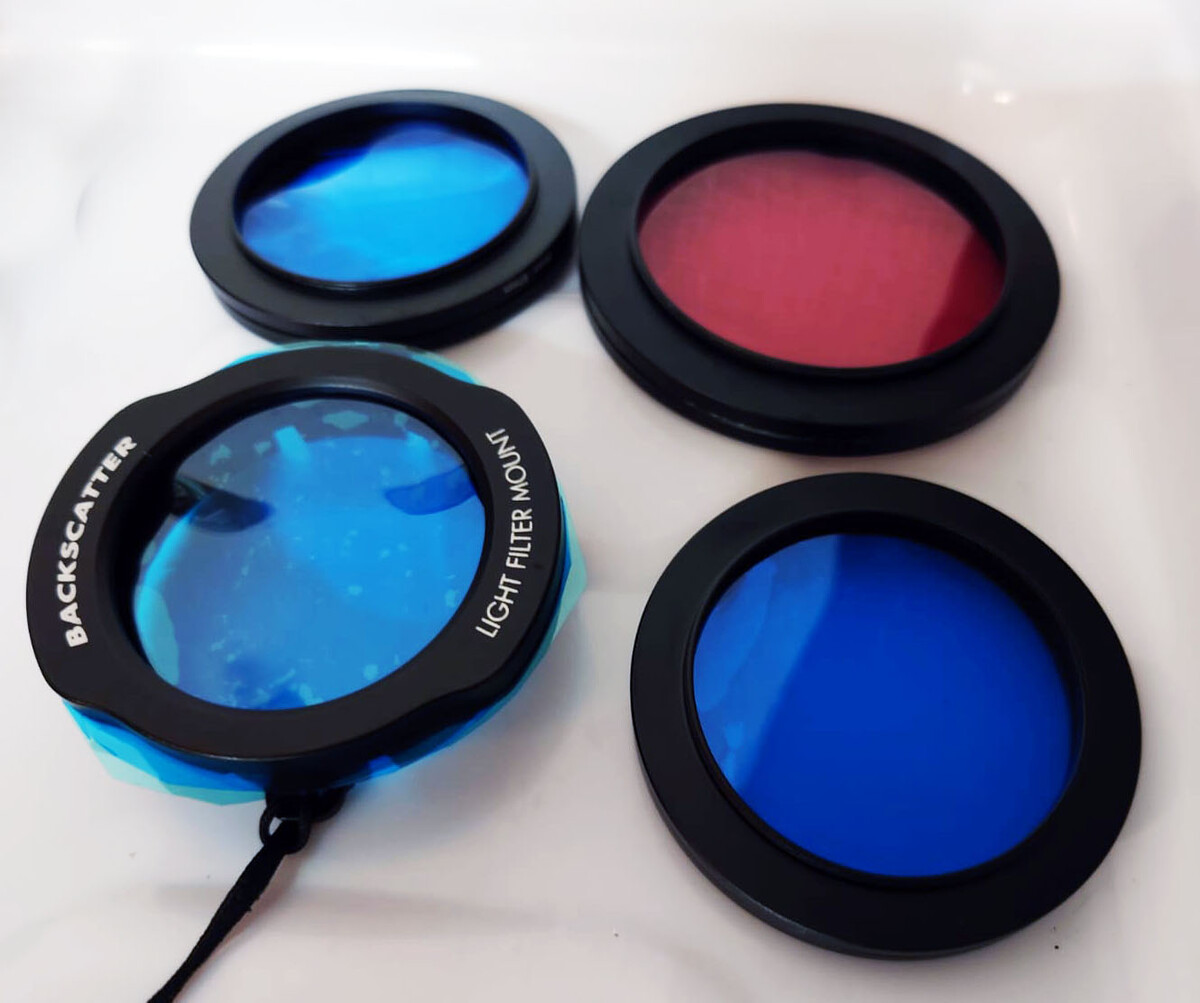
cheers!
Ben-
1
-
1
-
-
Edited by bghazzal
One other aspect to consider as well is that customs have become very strict with inbound travellers in general, including Mexican nationals.
I've heard some pretty sketchy stories, non–UW-related, from Mexican friends entering the country - confiscations, taxes to pay, and so on.
Of course, well-off foreign tourists with imaging gear are easy targets, but it also seems to be part of a broader trend.As for whether it’s legal or not, I very much doubt it, but given that interpretation of legislations is up to the customs or immigration agent - and that they all appear to be on the same page - it would be very difficult to challenge, and quite possibly a good way to be refused entry.
As others have said, I think pressure needs to come from operators, aiming to reach a working agreement with the Ministry of Tourism to issue clear directives to customs or amend current legislation for personal equipment, to be used in a non-professional context in the country during a tourism visit (and not imported to remain or be sold in the country).
I wouldn’t hold my breath, though, especially given the current domestic and international context...-
6
-
-
Edited by bghazzal
Hi,
I'm on Okinawa main island and yes, early November should be fine though the northern winds might start blowing, difficult to predict in the current situation. Water should still be somewhere between 28° and 25°C. Viz should be getting better with less plankton in the water, and typhoon season is over.
Local diving is divided between shore dives (and yes there are easy dives, even if the wind has picked up, like Gorilla Chop, and otherwise the Seawall dives, the East coast for macro) and boat dives (wave/wind dependent).
Best coral will be in the Keramas (boat), but it's the end of the season, so you might end up doing local boat dives like Manza, Nakijin, Minna, etc...
Zamami I'm less familiar with as I shore dive here. Quite a few shore entries are tricky, and with only one day of diving the weather might not cooperate.
cheers!
ben-
2
-
-
Edited by bghazzal
Very interesting subject - but pricing-wise, are they competitive?
Their website lists the Sony A6700 at $2423 USD (love the $3, guess it must be an automatic conversion)
https://www.seafrogs.com/products_details/Sea_Frogs_Aluminum_Alloy_Underwater_Housing_For_Sony_a6700.html
where as the Nauticam NA6700 is at $2300 or so (edit - this is the price in JPY, I guess the low yen is favourable - it's more in the $3000 range apparently)
https://www.nauticam.com/products/na-a6700-housing-for-sony-a6700-camera
and maybe the the Seafrog comes with the port and dome like on the pic?-
2
-
-
Edited by bghazzal
Hi Kristin,
with a $1500 USD budget, the main options i would see would be:
an action cam rig (GoPro, DJI) with the wide angle lens or - erhm, a mobile phone in a housing.
Why not stay with the TG for stills, macro stills and macro video and stick a gopro or similar on top (with the wide angle accessory lens) for wide angle video?
Compact, cheap and best of both worlds, since she'd still keep the current rig.
Or:
a second-hand compact rig, which would allow her to do video, stills and macro / wide angle on the same dive.
Canon G7, Sony RX100Va or above for instance.
The issue is that compacts are really bricks in the water and need a lot of floats to be neutral and balanced in the water for video, which effectively kills off the compact-form factor...
But other than that they are great, and indeed way better than a TG for video.
I shoot on a Lumix LX10 compact and happy with it (you can see clips shot on it here) despite have given up on the compact form long ago, and missing features I would need (extended battery life, HDMI screen connectivity, 4K 60fps...) - my " compact" rig weighs over 10kg on land, to give you an idea...
A more recent compact like the Canon V1 would be great, would set you back more than $1500, and micro four-thirds rigs (GH5) are not really compact either.-
2
-
-
Hello all,
I'd be interested in buying a 67mm double flip holder, ideally an AOI double-flip or a Marelux (Nauticam will probably be out of my current price range)
I've ruled out the Saga double flip because of design issues (no locking mechanism).
If anyone has one to sell and ok with shipping to Japan (Okinawa), please get in touch.
Cheers!
Ben -
-
Hello again Dan - we've already exchanged by FB pm on Okinawa so I won't be much more help as i dive independently, but I think @shokwaav 's been diving with local operators (39ers?) quite a bit if I'm not mistaken!
I've just returned for two days diving Ie island, and the coral was really super healthy (but fished out, unfortunately). Ie, then Nakijin have had the best coral coverage on main island so far.
cheers
ben-
2
-
-
-
Regarding the Saga dual flip, it would be great to confirm if mounted diopters are flush to the port like on the Nauticam flip, or if there is a little gap as some users have reported. Seemed to be linked to the mounting design IIRC
-
1
-
-
Edited by bghazzal
Hi Kristin and thanks for sharing this.
I think the graded version is on the right track, but I also see two technical problems in the footage itself:
- the white balance on the SOOC camera footage is a little off - basically it is too warm on the artificially-lit part, and this is causing issues in the grading because of the strong contrast with the ambient lit background (which has a major colour cast).
The foreground looks better on the graded version because you fixed the white-balance by removing the warm cast - but there shouldn't be a warm cast to begin with.
And this de-warming of the foreground in the graded version, by cooling the image, has increased the colour cast in the ambient light lit background...
- you're only using one light, meaning the foreground is a little underlit or rather not lit evenly, creating something of a hotspot to the left of the image.
A second light would help light it more evenly, and then you could focus on grading to the artificially lit area.
The main solutions in my opinion would be to choose to shoot in a full artificial light dominant scenario, but then you need a second light, and importantly to get the correct white-balance on the lights.
The other solution, since this seems quite shallow, would actually be to shoot without the light (ideally with a good filter), after locking the white balance (say to 5600K).
You could then rebalance the white-balance point of the image in Resolve and would get more even results between foreground and background I think.-
3
-
-
Edited by bghazzal
7 hours ago, Troporobo said: Guys - Thanks a lot for the super helpful advice!
Ben - Do you recall the focal length used for your video? You got some great action.
Tim - I’ll be diving the day before the new moon so maybe there’s a chance to see the bumpheads in action, to contribute to your proposed “fans only” mating thread!
I was guiding so these clips are composed of sneaky 10 second shot mostly shot on an old GoPro7 😄
If you can do the bumpheads, definitely go. It's an incredible experience, very moving. Palau's topography/currents turn it into some sort of redlight district for fish, there's a lot of visible courting and spawning going on! ❤️
The bumpheads congregate on an easy shallow and rather protected site (Grassland/Sandy Paradise), and shoot up from about 30/40m depth below right up to the surface, and can range from hundreds to thousands.
You go to the site, guides swim out on snorkel to watch the aggregation and how it builds up, and when it starts to happen (the fish change colour and start chasing), everyone gets in the water and follow the fish aggregation, hovering in the shallows.
The males are chasing a females up to the surface where they spawn, and completely focused on what they're doing.
It's still quite dark and fast so strobe placement is important, and after a bit the water really gets cloudy with the spawning fireworks, but once you understand how it works you can get quite close.
So the idea would be to try and capture the firework run to the surface, and some wider shots. It's not easy photography, but the show itself is incredible.
Also before the action starts, the males actually compete by bumping their bony humps like buffalo horns, but this is very deep so you just hear the sound.
The occasional bullshark or (oceanic) blacktip cruises by, but the bumpheads are not easy preys so you don't really get that much hunting action, unlike with the snapper spawning.
cheers
b-
1
-
-
Edited by bghazzal
If this helps, I've worked in Palau and pelagics will be mostly roughly 1.5m grey reef sharks passing by close when you're hooked-in (Blue Corner, Siaes Corner), some barracudas or jacks and turtles on the plateau, and otherwise mantas passing over your head at German Channel (which can be seen at the cleaning stations or feeding in the shallows, which is spectacular, but means swimming against the current).
The grey reef sharks are always there and will get close if there's current.
I have some clips here which can maybe give you an idea of what to prepare for (the bumphead / snapper spawning are on specific full/new moon related mornings only).
Hope this helps!
cheers
ben-
1
-
1
-
-
Legendary RED Color Science, Built-In
The new ZR features a full-frame sensor for excellent depth of field and video quality and supports internal recording up to 12-bit RAW 6K/60p. This is the first camera to use the new 12-bit R3D NE RAW codec, a new RAW format which REDCODE RAW users will find familiar. By leveraging its broad 15+ stop dynamic range, it achieves well-balanced image quality from highlights to shadows. Support for Log3G10 and the REDWideGamutRGB gamut reproduces exposure standards and colors consistent with RED color science, with true RED color tonality, skin tone integrity and tonal roll-off – similar to the output of RED’s cinema cameras such as the V-RAPTOR [X] and KOMODO-X. Two base ISO sensitivities are available, ISO 800 and ISO 64005, allowing users to choose the best option for a particular scene or situation such as bright daylight or low-light interior scenes. However, just like REDCODE RAW, ISO in R3D NE files is fully adjustable in post for maximum flexibility.Furthermore, users also have the option to shoot in N-RAW, ProRes RAW, and other formats to best suit their production and workflow. The camera also features a new view assist function which allows the user to store and select from up to ten LUTs in the camera. This will let the filmmaker preview the effect of the color grade in real time using the monitor. Three types of LUT data (17-point, 33-point, 65-point6) can be loaded into the camera. RED’s Creative LUT Kit is available for free via the RED website here.
The ZR features a new Cinematic video mode, a user preset for those who want to easily enjoy the RED cinematic look with a faster workflow in less data-intensive non-RAW formats. Cinematic mode automatically adjusts the shutter angle to 180 degrees, changes the frame rate to 24 fps, and applies the RED Cine Bias Picture Control for gorgeous yet simple cinematic color. What’s more, nine RED-curated cinematic Picture Controls based on RED creative LUTs will be available for free download via Nikon Imaging Cloud, expanding possibilities for more diverse imaging expression.
Additional Features of the Nikon ZR
Super lightweight with small footprint at just 1.19 lb. (body only).
A short 16mm flange focal distance (the shortest among full-frame cameras) offers greater flexibility in the lenses that can be used, allowing filmmakers to make the most of their existing lens assets.
Slow-motion presets: Instant access to 4K/119.88p12 and Full HD/239.76p cinematic motion, as well as user modes for 4x and 5x slow-mo.
Price and Availability
The new Nikon ZR Cinema Camera will be available in late October 2025 for a suggested retail price of $2,199.95* for the body only. Additional kit configurations include: the body with the NIKKOR Z 50mm f/1.8 lens for $2,749.95*, with the NIKKOR Z 35mm f/1.4 for $2,849.95*, or with the NIKKOR Z 24-50mm f/4-6.3 for $2,499.95*.
https://www.nikonusa.com/press-room/zr
-
1

The Oceans Are Changing - Let's Document It
in Conservation and the Environment
·
Edited by bghazzal
Thanks Rune - really striking pictures - the filamentous algae situation is dreadful in some areas of Okinawa main island as well.
I've been diving on the Pacific coast a bit, and with constantly high water temperatures (29°C+), growth was really fast, and a lot of healthy hard coral colonies were quickly covered in algae, and there was a lot of silting as well which probably comes from industrial activity (dredging etc, and the Sesoko US military base expansion a little further north)
Last week or so water temperatures are dropping (down to 27° now) and will continue to do so, so we will see how that evolves...