-
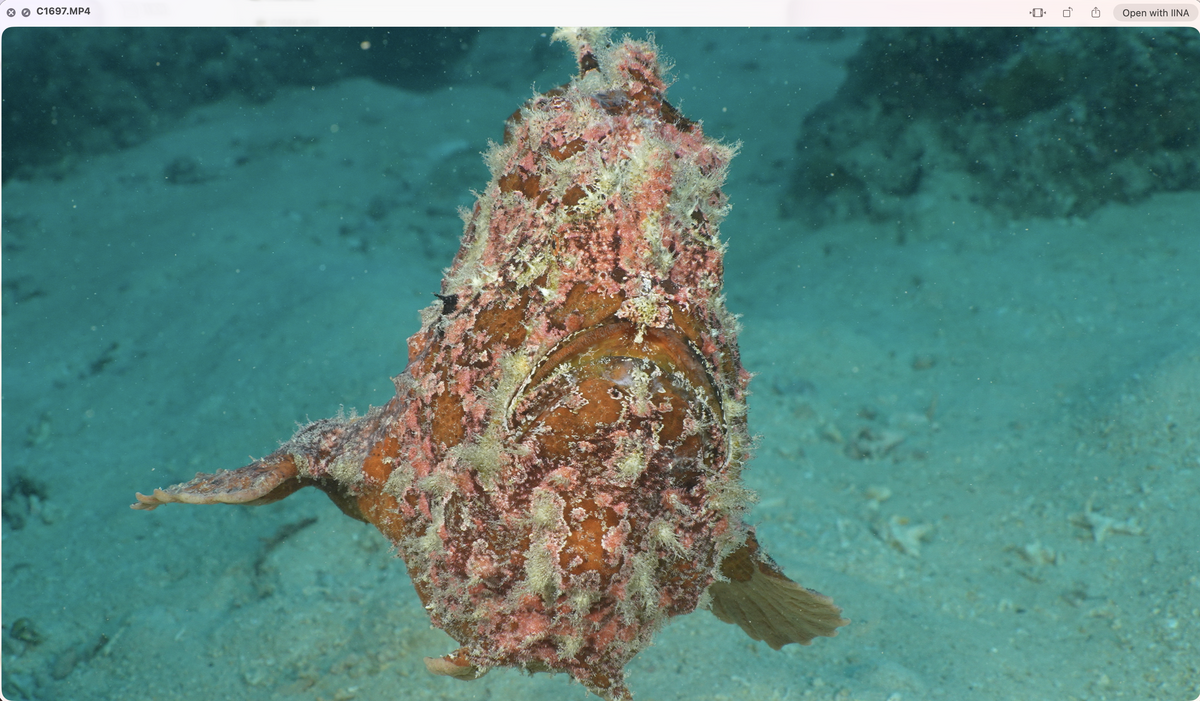
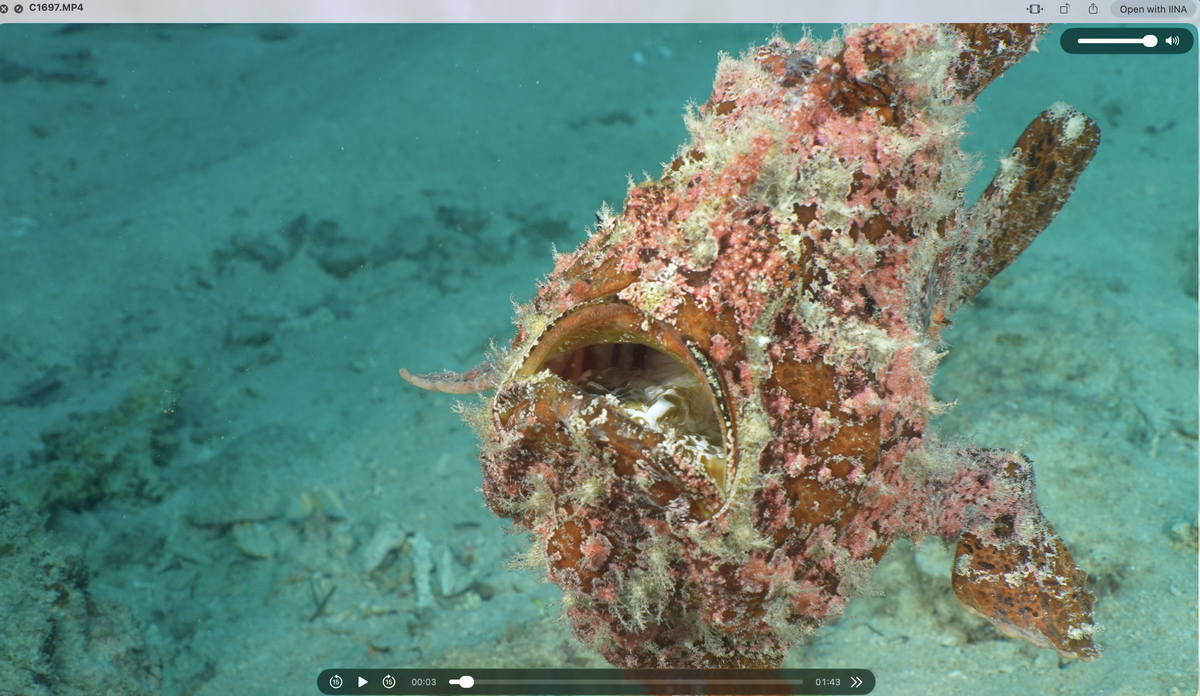
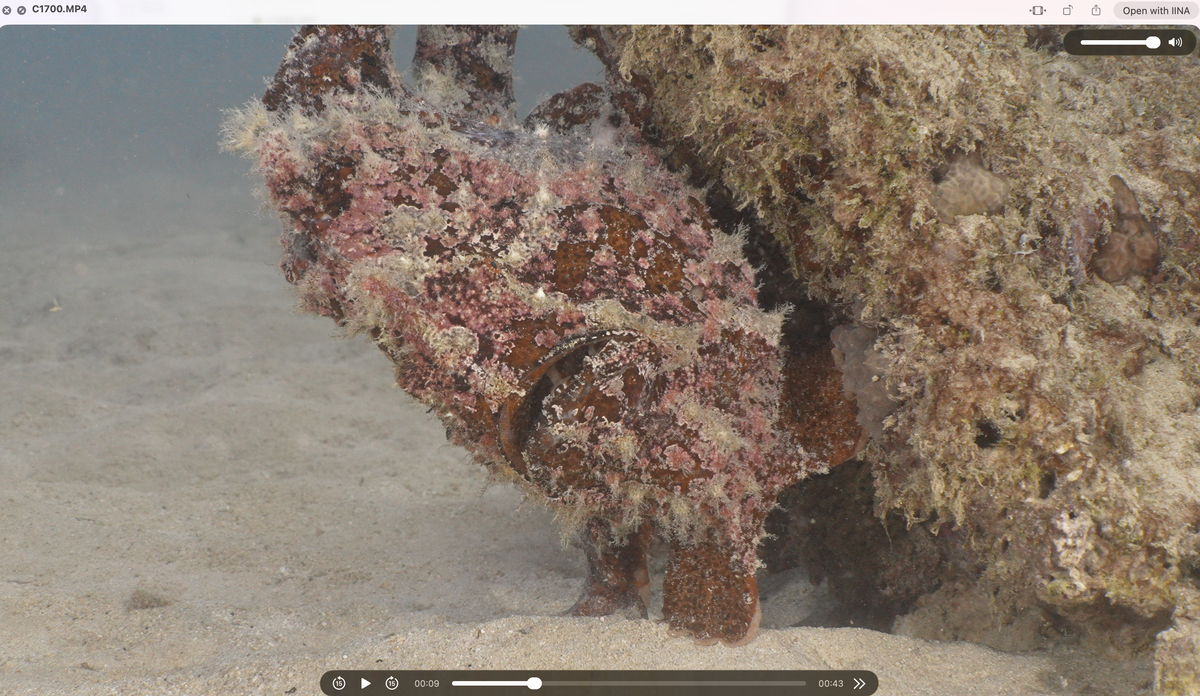
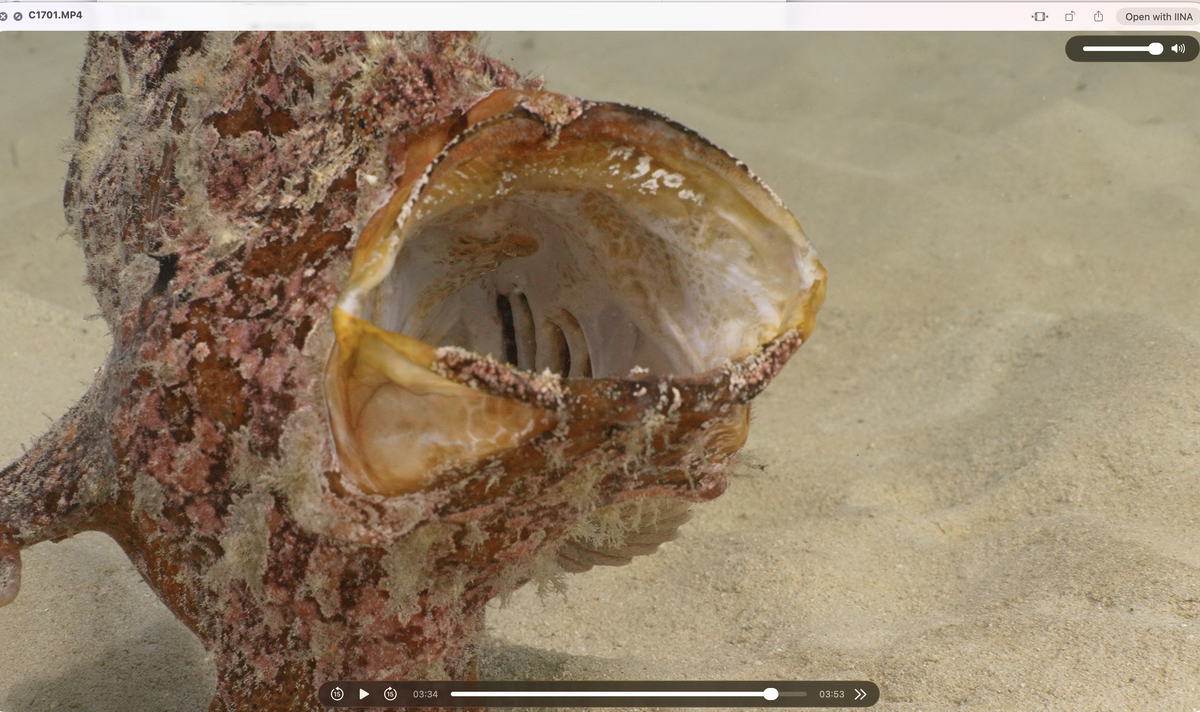
As a follow-up to this post, here's something I shot this morning to illustrate the technique. These are straight-out-of-camera (A7SIII, Sony 100mm macro with MFO3) video screenshots taken on my laptop. This giant frogfish was swimming around and was very active. I first filmed it using a standard setup, white-balanced to my artificial lights: Basically, to avoid a green background when white-balancing to artificial light, the solution would have been to blast it with more lumens. But even then, given that video lights have a limited throw of around a meter, the background would still have been green in wider shots or at certain angles (green that I would probably have made bluer in post). It's less a problem for closeups of subject say sitting on the reef or sand, but this guy was swimming around, off the ground, which means a more present unlit background. I then took a manual white balance for ambient sun light and added ambient filters to my video lights. Same subject, same depth, etc.: I find the mixed lighting solution much more pleasant and natural-looking. You can see the filtered lights at play on the frogfish's shadow, texture, and inside the mouth on the yawn. cheers Ben
-
Yes, they're very tempting - if video isn't your main focus I'd definitely go for these. The issue for me is that video is my focus and I dive a lot, and have been having serious durability issues with video lights. The Seafrog look less well finished than similarly designed, Shenzhen-made products Kraken or Weefine, and given that I'm getting a lifespan of under 2 years on these products, I'm a little worried that it will be wasted money if they only last me less than 12 months or so... It's a really difficult decision, more recent remote-compatible Keldan models are completely out of my reach financially (and inexistent second-hand), otherwise I would definitely go for this to stop stressing about light issues. I'm afraid of having even more issues with Seafrog lights, and there's very little feedback. Sure, design and specs are similar, but finishing, and possibly quality control is unknown. Beyond durability, it's not even clear if the Seafrog are constant output, and how the light quality actually is (CRI is a bit of a hoax tbh ˆˆ), as well as battery pack design, which are all crucial aspects.
-
On constant-output video lights (i.e. lights that maintain the same output as the battery discharges), we have a thread on the subject here: Keldan, Kraken, Weefine, RGBlue, Backscatter, Light & Motion, and possibly Seafrogs are confirmed to offer constant-output video lights. Otherwise Kraken, Weefine and Seafrogs offer wired (optical cable) remotes for their lights, which are a real game changer for video. I really couldn't imagine shooting plankton without one now. Keldan is the only brand I know of that offers a wireless remote.
-
Yes, as Chris wrote, video lights are very limited in terms of throw, so it really depends on your usage. For wide angle, your lights will mostly be used to bring out highlights of subjects in the foreground (a large animal passing by, say a manta or a whale shark, or a fan coral for a reef shot). This is not without complications, as if you're mostly shooting in ambient light and white balancing for this, you have to avoid a red spike caused by the difference between sunlight filtered by blue seawater and your much less filtered artificial lights (hence the idea of using filters on the lights, or filtered LEDs, an idea that Keldan pioneered and developed). For medium shots, you can be artificially dominant, but will need a lot of power, around 2 x 10K lumens to light things properly. This is, of course, depth- and condition-dependent. Deeper dives will be closer to night dives, with less ambient light, for instance. As for the choice of lights themselves, Keldans are great, high-quality lights that will last. There's not much competition on the durability front, but this comes with a price tag that makes them out of reach for quite a few of us.
-
Thanks for sharing! Really interested to hear your long-term impressions of the Seafrogs aluminium housing. Who cares, seriously? I guess we don't share the same footage storage concerns 🤣 I found some nice subjects last week, spent a little time with them on a dive, and came back with 100 GB of footage from that dive, and that's with the A7SIII's most compressed HEVC codec! I archive everything I shoot, so at that rate, with usually 3 to 4 diving days per week, ouch... Otherwise shoot video only as well, using the Sony 100mm macro on the A7SIII, with the MFO3, MFO1 and a +10 diopter for smaller subjects, mounted on a triple flip. It's great because you can go from medium shots to super macro. The Marelux 60mm is also very nice, and I'm looking forward to adding the Marelux 24mm converter in the future for even wider shots (I don't really do wide-angle, so I'm happy to stick with the 100mm). Just make sure to turn off lens stabilisation when using the 60mm converters, as camera stabilisation gets confused by change in focal length. cheers, ben
-
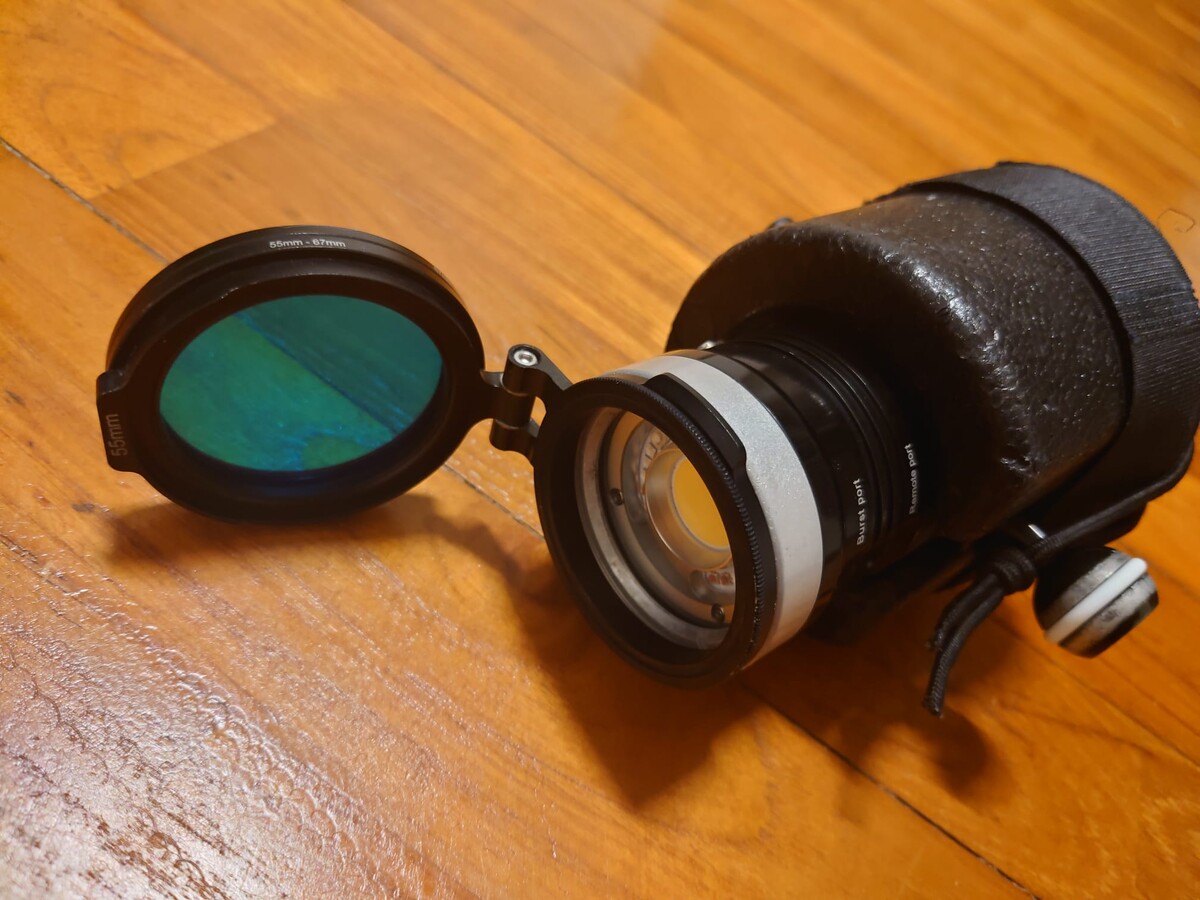
Yes, it's mostly useful for mid-range shots, and also allows you to use weaker powered lights closer to the subject and include the background in wider shots - i started thinking about this in east Bali, when I was regularly filming mimic octopuses. Everyonce in a while one would get comfy, leave its burrow and start hunting around. If anyone's interested, here are the Dreifilters homemade ambient filters mounted on my Kraken Hydra 8000v2, using 55mm flip adapters. If just flip them off for super macro. Never turn the light on with the filters in place on land, as the gels melt in a few seconds. cheers b
.jpeg.22897b34032cefc1c757cdaa304c02d8.jpeg)
.jpeg.82907765be531fcb434ec3e615f4df2e.jpeg)
-
Lovely, thanks. Brings back lots of memories from when I used to work there, and happy to see the hunting pack is still making the rounds at Richelieu 😊
-
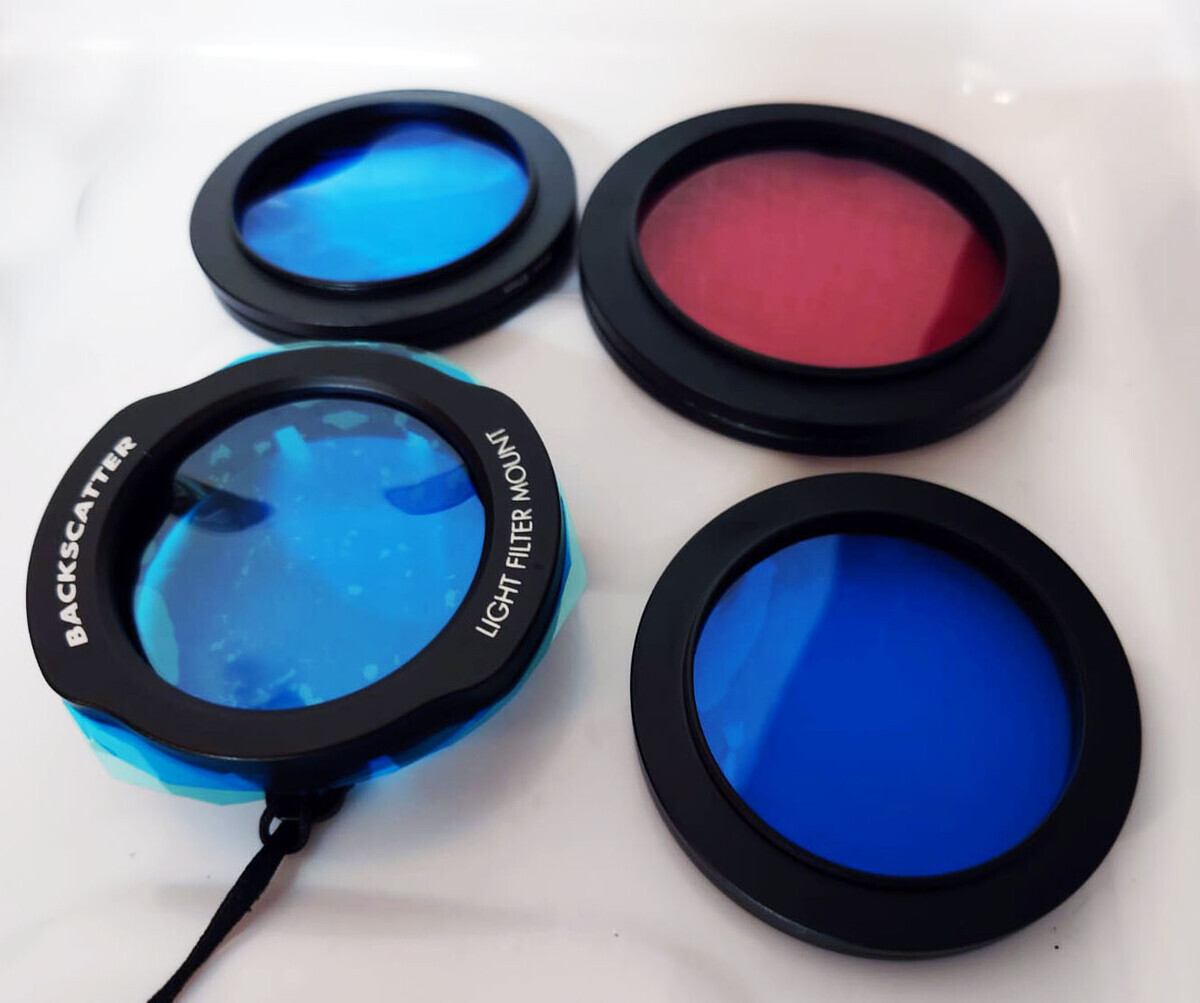
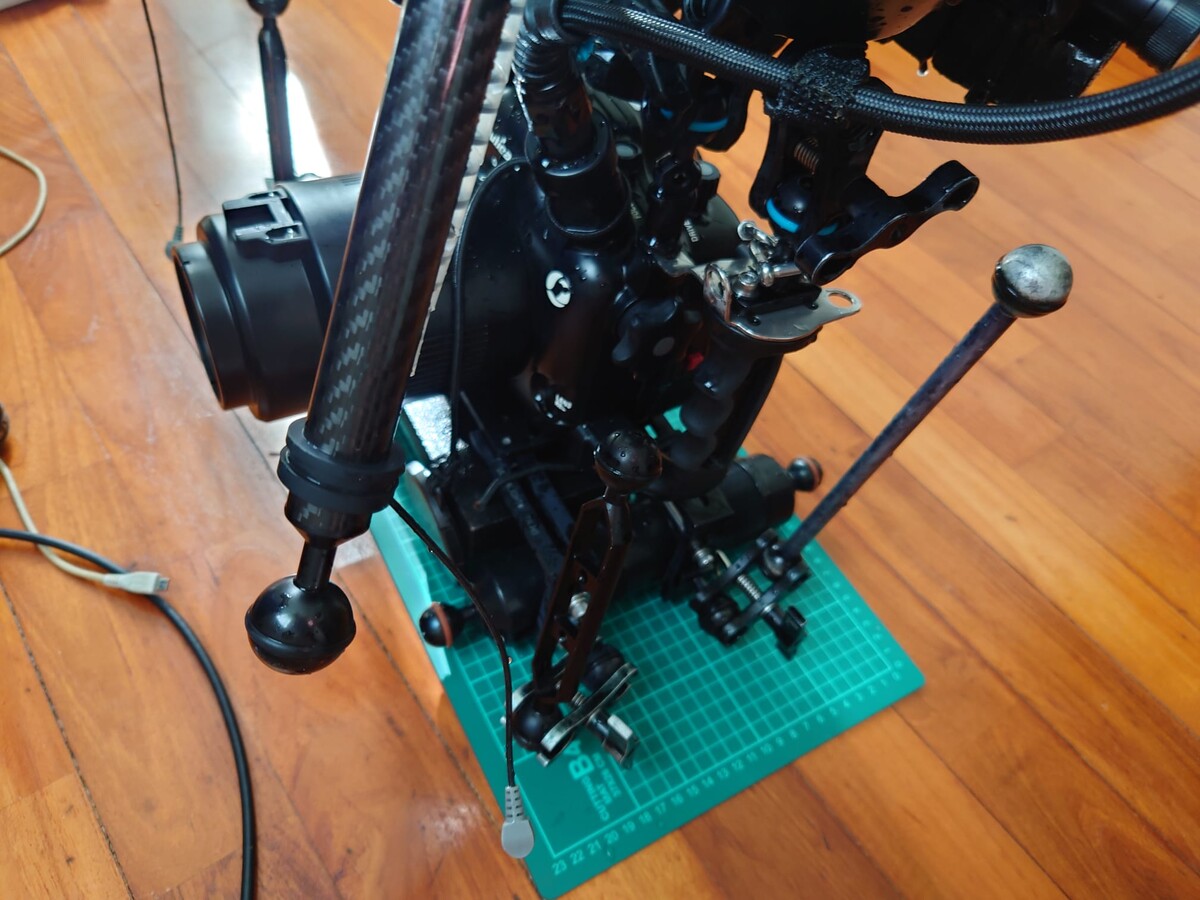
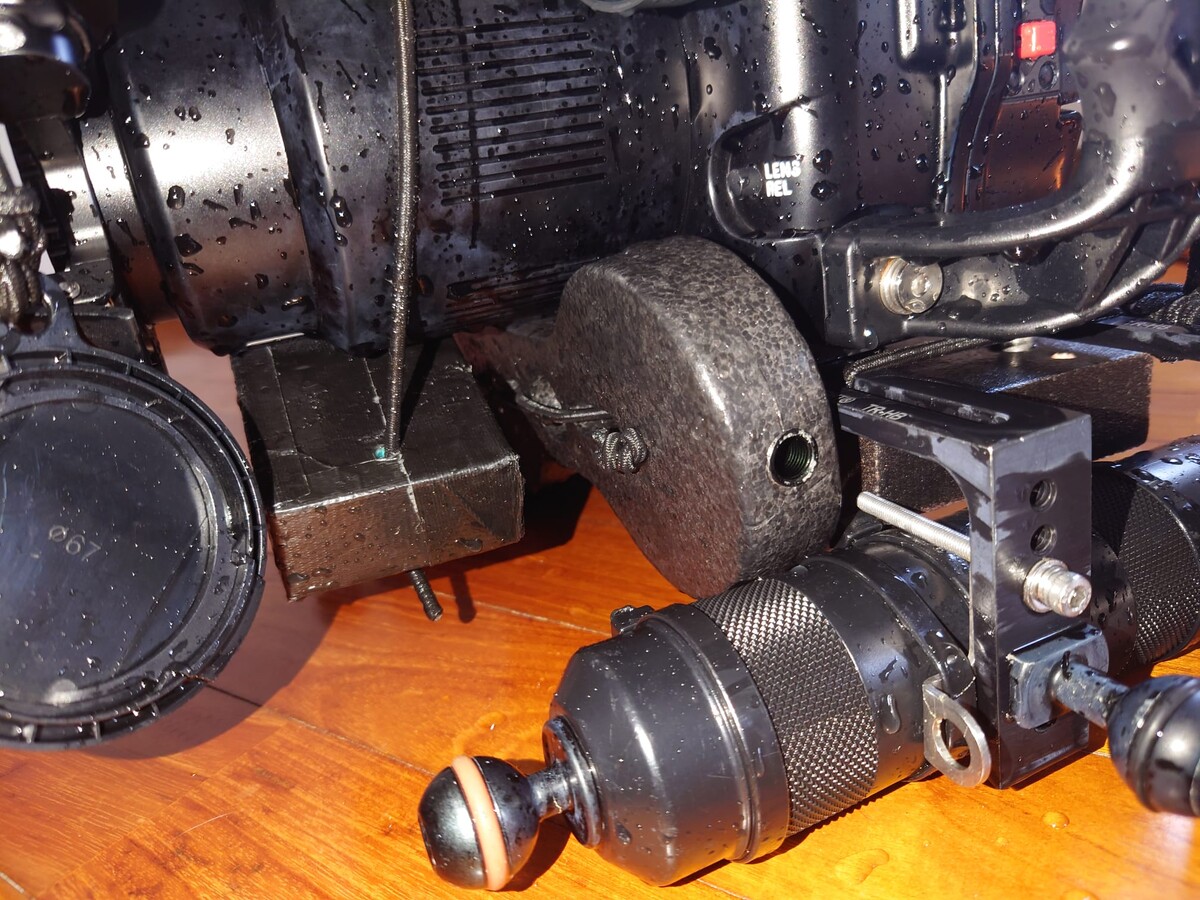
Thanks, Craig! Nope, not Kraken filters. I’d love to try them, though. My primary lights, the Kraken Hydra 8000 V2s, have a flat port with a 55 mm thread, which is fantastic. I just wish the newer / larger Kraken models also had a flat port with a thread instead a of dome port with no thread, as I find this super useful for my shootin purposes. This threaded flat port is great for filters and blackwater barndoors, for instance, and flat ports are nice really for macro shooting and blackwater too. The threaded flat port is much easier to tinker with than slip-on alternatives designed for dome ports. I actually found 55 mm flip holders designed for lenses, so I now have the ambient filters on a flip mount on the lights (!) and can switch easily 🤙 I'm using homemade ambient filters based on the formula discovered by Dreifish, which involves mixing Lee and Rosco filter gels, plus a bit of frog’s spit and some mandragora under a full moon 😁 More details here: https://waterpixels.net/forums/topic/1413-red-filters-and-blue-ambient-light-filters-for-mixed-light-shooting The filters are made using a step-down ring and a step-up ring, with an O-ring to keep pressure on the gels. For the Backscatter MW4300, I use Backscatter;s coloured filter mount to hold the gels in place. It looks like this: I’m not using the red filter on the lens, as the A7SIII handles manual white balance well at depth without one, unlike the Lumix LX10. Tripod wise, it's a little complicated - I use a setup similar to Ryo Minemizu's, ie. an ULCS sled kit, where I replaced the side-rails with Inon floats - I have 4 ball-mounts on the side onto which I can attach 4 legs
-
Thanks for the kind words, and thanks again for coming up with the magic formula Andrei! Hope you'll return to the dark side and get back to shooting moving pictures underwater soon! 😁
-
Hello all, Here's a little something I shot on the A7SIII last week, here on Okinawa main island. I don't usually like sharing vertical-format posts and will work on a horizontal edit of this footage, but I thought I would share it anyway because, technically speaking, it highlights something I've been playing with for a bit that is starting to come together: mixed lighting for medium / closeup shots. So here is a vertical clip of pair of Devil scorpionfish (Scorpaenopsis diabolus, false stonefish), with a large white female seemingly not too bothered by the smaller male following her around ... All in love is fair, after all ^^ Music track is “Reasons to Be Cheerful” by O’Brien & Carvis https://www.youtube.com/watch?v=CwI0DFC4h98 Now to get down to the nitty-gritty, the clip was shot with a manual white balance set to ambient light, along with three filtered light sources (two Kraken Hydra 8000 V2s and one Backscatter MW4300). The light sources are filtered with @DreiFish formula filters, i.e. Dreifilters (see here for more details: https://waterpixels.net/forums/topic/1413-red-filters-and-blue-ambient-light-filters-for-mixed-light-shooting Macro and closeup footage is usually shot with full artificial lighting, which is fine for smaller critters and tighter shots, night dives, blackwater etc. However, when we move to larger subjects, say in the 10 cm+ range, things become a little more complicated. Keeping the lighting fully artificial-light-dominant means using a lot of light, and for wide shots in daylight (say, a mimic octopus hunting), we get a strong spotlight effect, with an artificially lit foreground and a dull greenish background where artificial lighting doesn't reach. It is not possible to move from close-up shots to wider shots using the same white balance, and blasting artificial light can also be harsh on our subjects. To try to work around these limitations and also use less artificial light, I started playing with mixed-lighting techniques, applying the technique Keldan and others have developped for wide-angle shooting: white balancing to ambient light, but using filtered artificial light to roughly match sunlight (and thus avoid the warm red spike resulting from the difference between the artificial light source's unfiltered spectrum and sunlight's spectrum as filtered by seawater at depth). This mixed-lighting technique using ambient filters on the lights is normally used mainly for wide-angle shots, but it also works for mid-range to close-up shots. The technique is the same: manually white balance to ambient light (sunlight) and use filtered artificial light. The role of the light is to bring out the textures and highlights and make the footage pop, avoiding the slightly washed-out pastel tones of full ambient light (the "ambient light look" ) At the same time, white balancing to ambient light allows us to move seamlessly from close-up to wider shots, including a nicely balanced background. The effect is subtle, but definitely there. The footage pops in the foreground, and you can film in darker areas, under rocks or coral, and, more importantly, keep the same white balance when moving from close-up of your subject to a wider, contextual shot, which is super useful for video shooting. The way I would describe it is having portable sunlight underwater. And as you can see, the background and water column match the foreground white balance. And no, it's not just ambient light. It was a cloudy morning, and If you look closely, you can see the shadow cast by my light at 24" in, on the body of the white female devil scorpionfish ( here https://www.youtube.com/watch?v=CwI0DFC4h98&t=24s = ) as well as the details of the animal's surface where the light is hitting it. One thing I also appreciate is that filtered light seems to be less aggressive on our subjects, because its power is diminished by filtering of course, but also perhaps because artificial light spectrum is roughly the same as that of ambient sunlight. I use long arms to get the lights close to the subject. Gear-wise, this was filmed on the Sony A7SIII with a Weefine WED-5 Pro monitor, in manual mode, with Picture Profile Off and the Standard Creative Look, at 4K60p, using a Sony 100mm macro lens with the Nauticam MFO3 converter, f/13 and MF if i remember correctly. It is lit by ambient sunlight as well as two Kraken Hydra 8000 V2s and one Backscatter MW4300 video lights, all equipped with ambient Dreifilters, and the manual white balance to ambient light was done without a filter on the lens, just using a Whibal slate, as the A7SIII balances well without one. Depth was around 10 m, on Okinawa main island on a cloudy day. The nature of the footage made it difficult to work with in vertical format (which I mostly deeply hate, o tempora, o mores), but it forces us to be a little creative with zooms, pans etc. Editing was done in Final Cut Pro X 12.0 I thought I'd share this as is to illustrate the technique of using mixed lighting for closeup shots medium range footage, and I'll be sharing more mixed-lighting medium-range footage in the near future, as it is finally coming together. Cheers! Ben
-
Thanks. Terrible news about the missing DM... These boats really struggle around Batu Bolong and Tatawa Besar. I remember being in situations where the captain had to fight the currents for a while before managing to manoeuvre out.
-
Be careful with Sony purchases in Japan. Only certain non-Japanese models (“international models”) are sold in Japan, and domestic models have Japanese menus only. I wanted to buy what they call an “international model” of the A7S III in Japan, but it wasn't on the list of international models authorised for sale here. I can read Japanese, so Japanese menus aren't an issue, and got a Japanese model because it was cheaper and under local warranty, but I would have preferred English menus for a wider resale market.
-
Wow, reminds me of when Napster came out... 😄 I hope they do a FinalCraft and VinciCraft...
-
Not really, but I haven't shot a lot of wide angle ambient light with it. The A7SIII initially had a very specific MWB colour shift issue ( see https://www.youtube.com/watch?v=NMsrDxw0FZ8 ), but this was resolved through firmware updates what I did find was that setting MWB gave quite different results at depth, even if environmental changes were small. What picture profile are you shooting in? I started in HLG3 but this caused custom white balance issues - I'm in picture profile off now, since I don't want to deal with S-log3 and ETTR for what I do, which is mostly artificial light dominant or mixed lighting macro
-
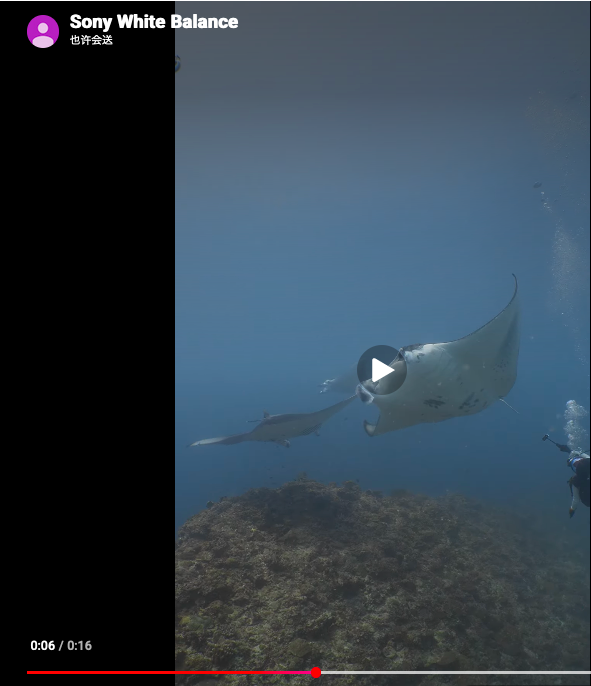
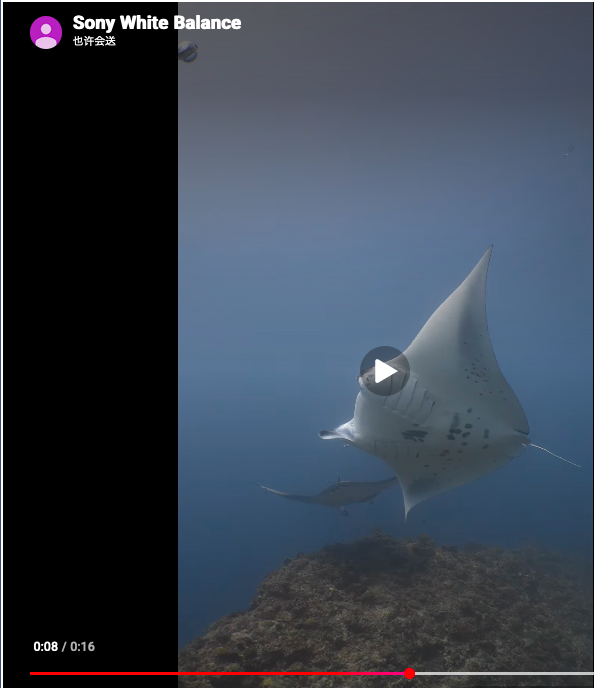
I had to take screenshots to see it, but I think I see it now. You're referring to the magenta spike in the water column, right? I'm on the A7SIII and did quite a lot of manual (custom) white balance tests recently. The camera sets a Kelvin value and usually a magenta adjustment, say M2 or M4. But this is strongly related to light intensity. A change in angle or clouds overhead will affect this, as will changes in exposure. Like Ron wrote, auto-ISO is the strongest culprit here, since you're not changing angles. My theory is that as the manta hides some sunlight, auto-ISO adjusts exposure, but this affects the overall light, and your custom WB's magenta correction gives you a magenta spike in the water column. It could also be compounded a slight change in angle as you tilt upwards. Manually setting ISO could probably help.