Everything posted by Peter Vanek
-
I've run into the same white screen issues when overexposing S-Log3.. My other setup uses the older NA502, which makes switching between stills and video settings pretty easy. I already had the Ninja Ultra for topside use and wanted to start shooting RAW underwater, so I figured I'd give it a shot. I also know exactly what you mean about the original A1 housing. I have one of those too, with the HDMI 1.4 bulkhead nd given the location of the M14 port I don't think this USB-C solution would work. I get your point about dedicating a dive to either stills or video. They're definitely different mindsets, although I still like having the flexibility to do both. In fact, I've been working with ULCS to fabricate a solution for mounting video lights, strobes, action cams, and a monitor to a UW cage system so I can bring all of my toys into the deep. 🤣 I'm looking forward to getting my hands on the FX5. The RAW options look promising, hopefully they don't disappoint!
-
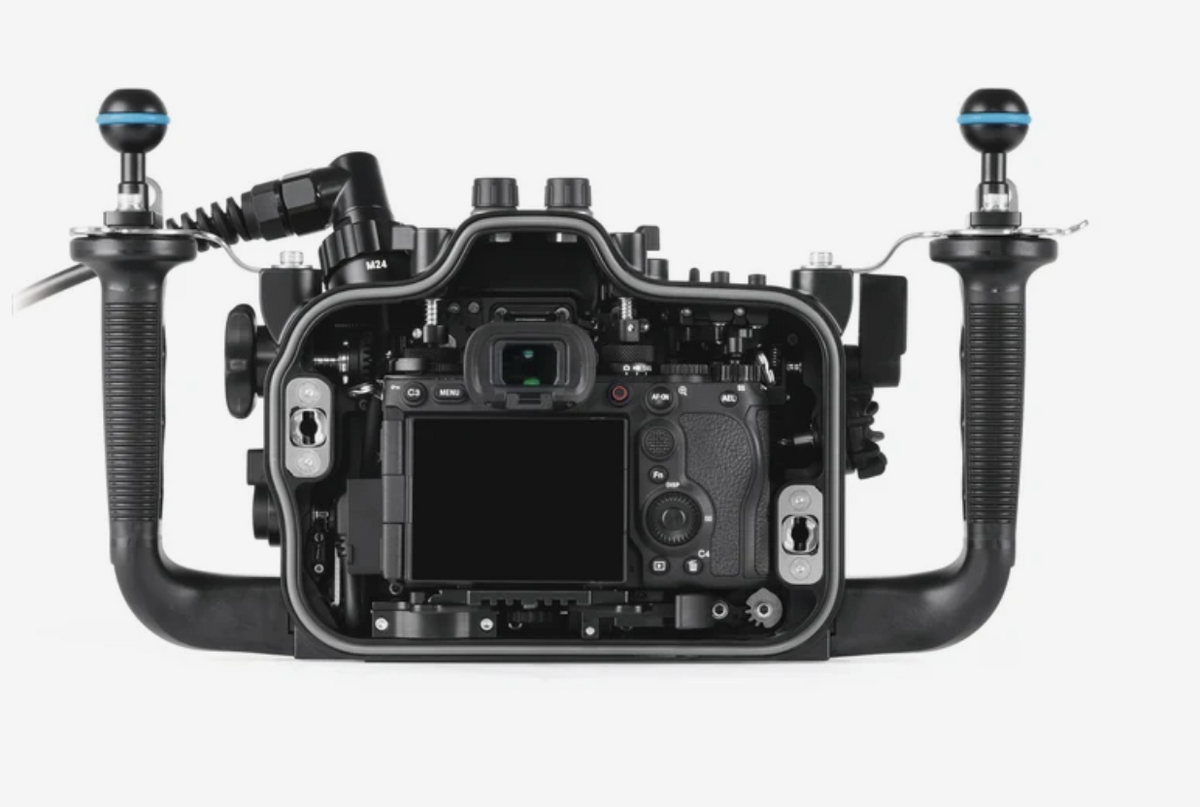
Hi RomiK, Thanks for getting back to me! Nauticam confirmed that the cable exits from the underside, leaving the USB-C port above it unobstructed. See the attached picture. I've also got a custom USB-C bulkhead on order that uses the Nauticam M14 offset adapter, allowing both the vacuum valve and USB-C connection to share the same M14 port. Fingers crossed it all works out! I typically don't monitor with a LUT, relying instead on scopes to judge exposure. RAW S-Log3 certainly isn't the prettiest thing to look at, but as long as my framing is right, exposure is correct, and white balance is reasonably close, I'm happy to make that compromise and handle the rest in post. Your point about the FX5 is valid, and I actually have one on order. That said, I really enjoy the flexibility of switching between stills and video during a dive without having to commit to one or the other beforehand. Thanks again! Peter
-
I'm also shooting the A1 II underwater and have gone pretty far down the rabbit hole with wide-angle optics. I've used the 16–35mm GM, WWL-1 and WACP-2, and recently added a WACP-1B. I've dived Galápagos and shot the 16–35mm GM behind a 180mm dome on that trip. Honestly, I found the range more than sufficient, including for sharks that weren't particularly close. These days I've mostly moved toward water-contact optics, although I wouldn't dream of dragging my WACP-2 around many of the Galápagos dive sites. The currents can be challenging enough without that monster! I'd also seriously consider the 28–60mm behind a WWL-1 or WACP-1B. And while getting a nice shot of an individual hammerhead is great, the real magic of Galápagos is seeing them in enormous schools. That's where having a really wide field of view pays off. Same goes for whale sharks if they decide to grace you with their presence! I don't think you can go wrong with the 16–35mm, but if I were heading back today, I'd probably be leaning toward the 28–60mm with a water-contact optic. Just another option worth considering!
-
Hey everyone, I’m upgrading my Sony A1 II rig for RAW recording and have the Nauticam HDMI 2.0 cable assembly on order. Has anyone used it with a USB-C cable connected to the camera at the same time? Does the HDMI connector obstruct the USB-C port directly above it? My current HDMI 1.4 connection leaves the USBC port clear. The reason I'm asking is because I’m working on a custom USB-C charging/data bulkhead installed through the Nauticam vacuum valve offset connector. The goal is to charge and offload files without opening the housing or releasing the vacuum. I’d appreciate any firsthand experience or photos showing the clearance with both cables installed. Thanks!
-
Thanks, that's really helpful insight, especially coming from someone who owns and regularly shoots with both. It's interesting to hear how you prioritize one over the other depending on the destination and subjects. At less than half the cost, and a fraction of the weight, the new Sony 8–14mm fisheye is another option I'm seriously considering. Even with the dome and associated hardware, the complete setup comes in around $3,400, with the added benefit of being useful topside as well. I know it has nowhere near the flexibility of the FCP, but it ticks the beyond 130 degree FOV box. Like you, I travel extensively to dive, and between dive gear, UW photography equipment, and topside camera gear, I frequently find myself traveling with three or four 32 kg bags. Adding another large optic to the mix is no small consideration! I'm still intrigued by the FCP, but I'm trying to be realistic about how much equipment I want to haul around the world. Your experience has definitely given me more to think about. Thanks again for sharing!
-
@ChipBPhoto Thanks, Chip! I appreciate you sharing Nicolas's review. It's very helpful to see the technical comparisons alongside the firsthand experiences from owners here. The flexibility is certainly impressive, and I'm getting a much clearer picture of the tradeoffs involved.
-
Hey @Brandon Cole, thanks for such a detailed response! I really appreciate hearing from someone who has extensive firsthand experience with the FCP. Just to clarify my thinking a little, I was initially looking for a way to get a wider FOV than the 130 degrees I can already achieve with the WACP-2/WWL-1, particularly for wrecks and megafauna. That search naturally led me to the usual fisheye suspects. As I weighed those options and looked at the associated costs, I stumbled upon the FCP-1. I was vaguely familiar with it, but hadn't fully appreciated its capabilities in terms of flexibility. That flexibility is precisely what caught my attention. Given how much of the FCP's range overlaps with what I already own, I was really just trying to better understand the tradeoffs involved in gaining that additional field of view. My takeaway from the various reviews and experiences shared here is that one of the more significant tradeoffs seems to be the light required to achieve comparable depth of field, particularly when stopping down to f/13–f/16. Out of curiosity, between your WACP-1 and FCP-1, which gets more bottom time? Thanks again for sharing your experience. It's exactly the kind of firsthand insight I was hoping to get from this discussion!
-
@JMC22I'm curious, as someone who's owned and shot with the FCP-1 for a while would you buy it again? Or would you go in a different direction?
-
Thanks for sharing! I actually watched this one as well. I thought it was interesting that Alex mentioned he doesn't dive with the FCP-1 all that frequently, yet so many of his favorite images from the year were taken with it. That's a pretty compelling endorsement of what the optic is capable of! Between this, the few reviews I've found, and the discussion on The Underwater Photography Show, my takeaway so far is that the FCP-1 offers tremendous flexibility, but with some compromises in image quality compared to its WWL/WACP siblings, along with a potential light penalty if it really needs to be stopped down to f/11–f/13 for optimal results. As a hybrid shooter, that light penalty isn't insignificant, particularly when shooting S-Log3, exposing around +1.7 to +2 stops, and being relatively locked into shutter speed for video. The FCP-1 is still very much a contender for me, but at less than half the cost, the new Sony 8–14mm fisheye is also in the running, especially given that I already have the WACP-2 and WWL-1 in my kit. Still hoping to hear from a few more long-term FCP-1 owners about their experiences with it. That might be what ultimately tips the balance one way or the other.
-
Thanks for the background! I knew Matthew was involved with The Underwater Photography Show, but didn't realize he'd joined Reef Photo. I've actually been going back and forth with Phil quite extensively about the FCP-1, particularly around lens compatibility and optical performance. Matthew's comments above were definitely helpful. I'm still leaning toward the FCP-1. For an optic that's been out for a couple of years, I'm a little surprised there aren't more firsthand accounts from owners using it regularly. I'd love to hear from a few more people who've spent significant time shooting with it. The depth-of-field concern seems to be a recurring theme, and I'm just trying to better understand how much of a limitation it is in practice. Given the investment, I want to make as informed a decision as possible. It ain't cheap, but then again, nothing about diving or underwater photography is—you even have to pay for the air you breathe! 🤣
-
Hi Matthew, this is super helpful and reinforces why I'm interested in the FCP-1. If its optical performance is comparable to traditional fisheyes, the additional versatility is a pretty compelling advantage. The alternative I've been considering is the new Sony 8–14mm, but that largely locks you into a particular field of view for an entire dive. I'm not looking to replace either my WACP-2 or WWL-1, but rather to expand my shooting options. I wouldn't expect the FCP-1 to match the WACP-2 optically, particularly given the differences in size, weight, and price. If achieving that level of performance required an equally massive front element, I'd be less interested. Traveling and diving with the WACP-2 is challenging enough! Your comparison to the WWL lenses does give me some pause, though. I'd be more hesitant if there were a noticeable drop in image quality compared with my WWL-1. Is that primarily a matter of corner sharpness, or do you see differences across the frame? I'm also curious about your comment that the FCP-1 needs f/13 for good corner sharpness. Is that primarily in CFWA situations where depth of field becomes a factor, or do you find the corners noticeably soft even if the subject is several feet away? And is that mainly at the widest end of the zoom? I shoot both stills and video, so understanding how it performs around f/8–f/11 in more typical wide-angle situations would be especially helpful. Thanks again for sharing your experience!
-
Interesting point about diagonal vs. horizontal FOV. I hadn't really considered how much the different projections could affect the relationship between the two. I'd assume Nauticam measures diagonal FOV consistently across the FCP, WACP and WWL, so the published figures should be directly comparable, even if the horizontal coverage doesn't scale proportionally. With the FCP offering 170° diagonally versus roughly 130° with my WACP-2 setup, I wonder how much additional horizontal coverage that actually translates to. A side-by-side comparison would be interesting. I have yet to find one. On the DOF question, I'm curious if the FCP actually limited in how much depth of field it can achieve, or is it more a matter of having to stop down further to get comparable results, with the obvious penalty in light? I've read a few discussions about this on the forum, but the real-world reports are inconsistent. Some users reporting good results from F8-F11 while others stopping down in the F13 to F16 range.
-
This is really helpful! I'm really after immersive shots that go beyond the field of view I currently get with my WWL-1 and WACP-2. If the FCP-1 can deliver a 170° perspective without the pronounced distortion of a traditional fisheye, that's actually a huge plus for me, particularly for video.
-
Hi @JMC22, great pics! Love the color rendering. Thanks, that's really helpful, especially hearing from someone who's used it since launch. I'm curious about your comment that it isn't a true fisheye. Are you referring to the amount of barrel distortion or something else about how the FCP renders images?
-
Hi @Grantmac, thanks for your reply. I'll give it a read. Do you shoot video as well as stills? I've heard Fisheye-TC-Metabones can introduce video AF challenges.
-
Hey everyone, an upcoming return trip to Truk Lagoon has got me looking at adding an ultra-wide option to my kit and would love to hear from anyone with firsthand experience shooting the Nauticam FCP-1. I currently shoot an A1 II and A1 with the WACP-2 and WWL-1B respectively, both of which I love. I'm looking to supplement them with an ultra-wide perspective for megafauna, wreck interiors, and CFWA as well as to mix things up creatively. I've always been intrigued by fisheyes, but committing to that perspective for an entire dive has held me back. Commitment issues? lol. Enter the FCP-1. The ability to go extremely wide and then tighten up the composition without changing optics seems like a real advantage. Is it too good to be true? My biggest questions are about optical performance throughout the zoom range. Some reviews suggest stopping down to f/11–f/16 for acceptable corner sharpness, while others seem happy at f/8. Does sharpness improve as you zoom in? And at the narrower end, do you find yourself happy with the results? I'd also be interested in hearing how it performs for video. I understand that the FCP-1 isn't a replacement for the WACP-2 or WWL-1B, and I'm not looking for a do it all optic (would be nice though). I'm also realistic about the tradeoffs involved in such an extreme field of view. What I'm trying to understand is whether the FCP-1's flexibility makes it a genuinely versatile addition to my existing kit, or whether the new Sony fisheye would be the better performer at substantially less cost. Would really appreciate any real-world feedback, particularly from anyone who's spent significant time shooting the FCP-1.
-
Hi everyone, just wanted to say hi. I’m an NYC-based photographer and videographer, Sony Alpha shooter, and always up for an adventure. I dive all over the world and love photographing everything from megafauna and apex predators to the tiniest macro subjects. When I’m not underwater, you’ll often find me chasing wildlife with a camera topside. I'm excited about joining this community!