
Everything posted by Isaac Szabo
-
Thanks Phil. I really appreciate that, though I'm up in Arkansas and am not sure when I'll next make it down to Florida.
-
Using two rulers like that is not a very accurate method. It's probably fine if you want an estimate within 5mm or so but not if you need high accuracy. The ruler laying flat across the housing is certainly not rigid and unlikely to be flat. Turning the ruler on its side would at least make it fairly rigid. Also, viewing the ruler from an angle that is not perfectly perpendicular will result in a reading error. Another source of error is if the vertical ruler is not perfectly perpendicular to the camera mount (this can't be seen in these photos). And like you said, cheap rulers are not guaranteed to give very accurate readings, especially from the end which is often not perfectly aligned with the zero mark. A more accurate method is to place a precision depth gauge on a flat, rigid, metal object spanning the housing opening (and then subtract the thickness of the metal object). I don't say these things to disparage Phil. I really appreciate his effort, and his result would probably suffice for help with choosing a proper extension. But for what I do with the Nikonos 13mm (I'm currently making a Marelux version) a 4mm error means vignetting in one direction or the inner lens crashing into the dome in the other direction. It's also possible that Phil's housings have different dimensions than the housings of my client and the Marelux engineer, though that would be pretty concerning. And I should note that my client's housing is the same as one of Phil's (Sony A1), and he used the method I described above. Anyway, thanks again to Phil and everyone else here for taking the time to share this helpful information.
-
I have gotten confirmation from a Marelux engineer that the distance for Sony is 39mm (the 4mm disparity is very significant for what I do).
-
1) I'd tend to recommend going without the relay (unless the used price is quite good). In my experience, the relay has some downsides, including reducing the image quality a little and making the system awkwardly long (though with some skittish subjects the extra length could sometimes be helpful). Going without the relay and flipping the image on your LCD is a viable option. Moving the focus point, reading the settings, and navigating the menu will all be inverted in that configuration, but in my experience that's not too difficult to adjust to. On the other hand, I don't think trying to compose without fixing the inverted image is viable. If you can't fix the inverted image, I find it's better to not even look at the image and just watch the front of the lens in relation to your subject instead. 2) It depends on what kinds of photos you're wanting, but most people much prefer the 160 over the 100. If you're wanting the EMWL for extreme wide angle perspectives of small animals, I'd think you'd want the 160. The 100 is just not that wide. But again, if you can get the 100 at a considerable discount, it could maybe make sense to use it for a while and save up for the 160 later on. Or if you're not a big fan of fisheyes and prefer more moderate wide angles, the 100 might be a good fit.
-
Thank you!
-
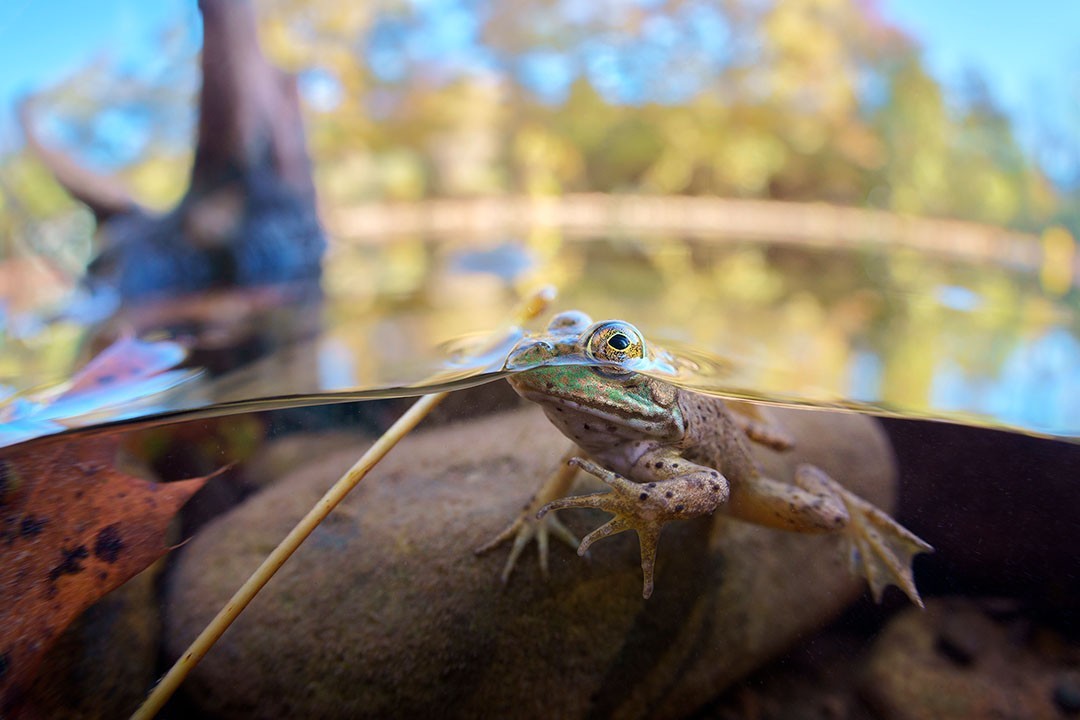
With a small "dome" of less than 4in/100mm, the RS 13mm is never going to be as good for splits as a large dome. A large dome makes the water line smaller and easier to keep positioned where you want it - especially in wavy conditions. A large dome also decreases the focus difference between underwater and topside portions (so the topside is less blurry). That said, splits are possible with the RS 13mm, and a small dome actually has a couple of advantages in that you can do splits of smaller subjects and in shallower water. Here are a few examples. Note that I didn't stop down the aperture very much for these (f/5.6-f/.8). Obviously, shooting at something like f/16 would give a less blurry topside if that's what you're going for.



-
You might be able to use the Canon version of the 10-17mm on a Canon EF to Nikon Z adapter, though I have no idea how well those adapters work.
-
Can I ask where you found 43mm for Marelux? And what camera system that is for? I'm trying to confirm the distance for Marelux Sony full frame mirrorless. One person measured their housing for me and came up with 39.1mm. It would be great if anyone here can confirm that.
-
I've been using a monitor for all my shooting for around 4 years, and I really like it. I love being able to see the image no matter what weird position/angle I have my housing. A common example for me is being able to get really low perspectives without having to press my face down next to the substrate. However, a monitor won't be for everyone as there are some significant downsides: increased size/weight of the system - I made my own monitor housing and kept it fairly small, but many commercial models are surprisingly big/heavy increased complexity of the system - more things to setup/maintain and more things that can potentially go wrong reduced visibility in bright sunlight - my monitor isn't super bright, so visibility can be affected by bright/direct sunlight. I think many newer monitors are brighter and may not suffer from this as much. increased cost of the system - most underwater monitor housings aren't cheap With the EMWL some of the size/weight/cost downsides of a monitor are offset by not having to use the middle relay lens, so I think a monitor is a particularly good option for EMWL users.
-
OK good. Yeah the 100 objective isn't super wide to begin with, so it makes complete sense that you wouldn't want to lose any FOV.
-
Hopefully you find someone to swap with you. In the meantime, I'll mention that I believe your focus unit will work with your D850, it just will be slightly less wide than if you were to use focus unit 1. So if you want you could likely get some use out of it while you wait for a potential swap.
-
I believe the M67 thread pitch is 0.75mm.
-
In my testing I also found that the relay lens reduced image quality a little, so I too went with a monitor instead. To me it makes perfect sense that adding in a lens with 14 additional elements whose only purpose is to invert the image can only have a negative impact on image quality. Nothing in optics is perfect, and I think there are bound to be slight errors that accumulate with so many elements. I have not tried the angled relay, but I am not at all surprised if it degrades the image a little more than the straight relay. After all, it is manipulating the image to an even larger extent, and again, not in an effort to improve image quality. So I personally trust your results. If you do more testing, I would recommend starting at f/8 instead of f/16. Peak sharpness in my testing was around f/8-f/11, and by f/16 I noticed a significant reduction in the sharpness of fine details due to diffraction. So image quality comparisons done in the f/8-f/11 range will likely give clearer results than those done at f/16 and above. That said, obviously for real world shots you may sometimes value the extra depth of field over peak sharpness.
-
Me too! Hopefully it delivers on the claim.
-
Image quality is claimed to be far better than shooting through a flat port. It's clear from Edward's post that this is the main reason for this lens. A secondary benefit for some is reducing working distance by shifting the focus range a little closer which helps in poor visibility (so you're shooting through less water). This is a common issue where I shoot but isn't a factor in locations with great visibility. I don't shoot blackwater, but I gather this might help with that too. There is a slight increase in max magnification, but it's not very significant and probably won't be a main reason people buy this lens. There are stronger diotpers available for that purpose. I'm guessing this lens is probably not going to interest people who are already happy with the sharpness of their macro setups, shoot in really clear water, and/or want really high magnification.
-
Thanks for the info @Edward Lai! It sounds like just the thing I (and others) have been wanting. Do you know if it will also work with 60mm macros on full frame?
-
What primarily interests me is improving the image quality without losing focus range (though being able to focus closer is nice too). A 60mm on full frame behind a flat port loses quite a bit of sharpness towards the edges. I notice the same thing with the Sony 90mm though to a slightly lesser degree. Does the SubSea +5 improve image quality or just allow you to focus closer? And does it also maintain focus range out to a meter or so?
-
Wow that does sound fantastic!
-
Yeah Chip that's how I interpreted it too - with the important addition of improving image quality. I've long been bothered by the sharpness loss towards the edges with macros behind flat ports. Some diopters improve that, but then I lose the ability to focus on many of my normal macro subjects. So if this does what I think it does, it will be a welcome addition for me.
-
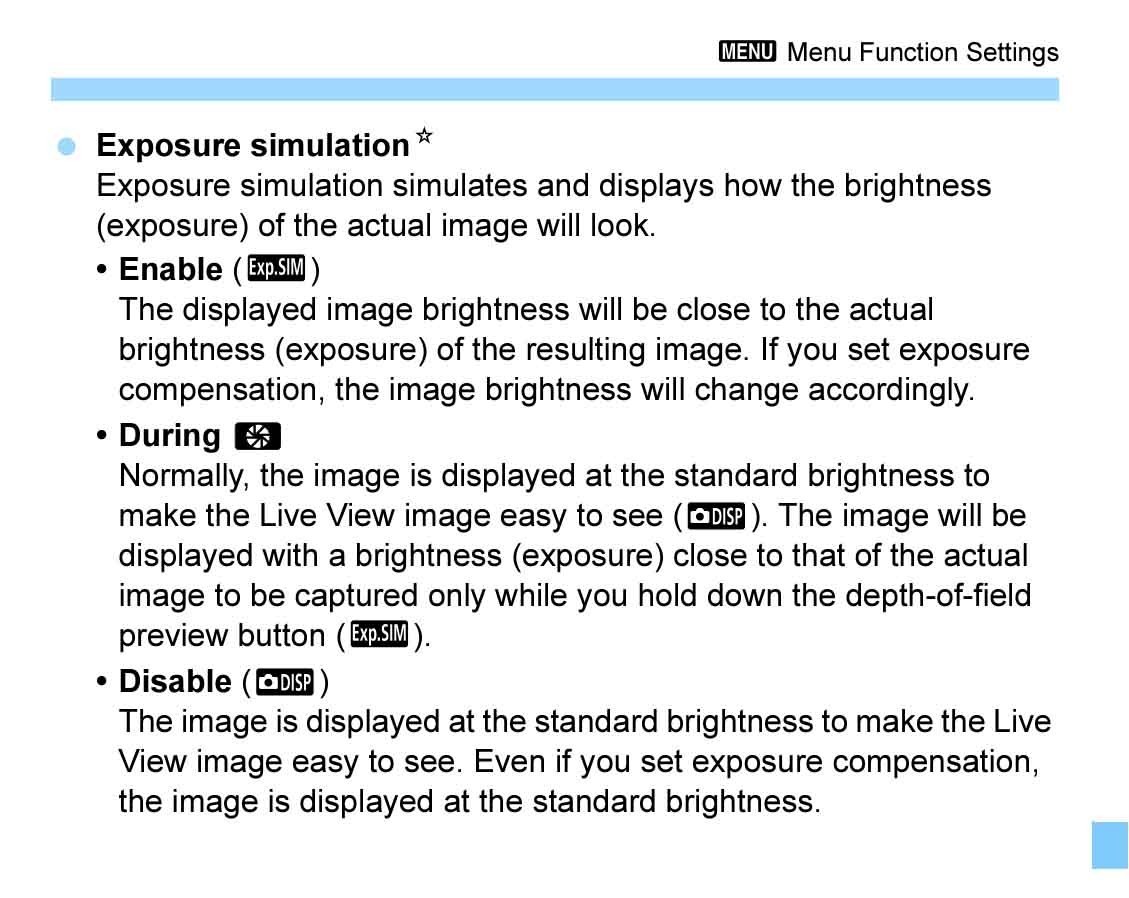
As a point of clarification, it is the camera that is making the auto adjustments to the liveview image. The monitor just displays the signal that the camera sends it. I don't think there's any way to output the auto liveview settings to your shooting settings, other than maybe setting the camera to a fully automatic mode. Short of that, you could temporarily turn exposure simulation back on which might help you dial in your settings more quickly than reviewing test shots. You can likely assign it to a custom button or menu so that you can quickly turn it on or off. As for your second question, my guess is that an HDMI cable or connector could be slightly loose or damaged. If you use a monitor long enough, it tends to happen eventually. While it could be any part of the HDMI pipeline, the ribbon cable and connectors are the most fragile. I have learned from experience to travel with spares for those. It might be a good idea to ask Kraken if they have seen this issue and know what might be causing it.
-
In the live view shooting settings, try setting exposure simulation to disable.
-
Yeah Chris I don't know exactly why this happens. I'm just relaying that it has happened to me a couple times and to one or two other people I know. Sealed Nauticam optics, heated up in the sun, fogged inside when taken into cold water. Same Nauticam optics have not fogged if kept covered/shaded from the sun before taken into cold water.
-
I have seen it cause fogging in other circumstances. Most recently with Nauticam optics like the WWL-1 and EMWL. After they have heated up in the sun they can develop internal fogging when you take them into cold water. It can take quite a while for the fogging to clear (30 minutes or more). I think I have also experienced this kind of fogging with regular wide angle lenses and dome ports, but it has been quite a while ago, so the details are not clear in my memory.
-
Here are some tips to reduce the chance of fogging. The first two are generally the most significant: 1. If possible, seal cool, dry air inside the housing (such as from an air conditioner). 2. If you have a vacuum system, the more air you vacuum out, the lower the chance of fogging. 3. When opening up the housing to change batteries, make sure no drops of water fall in. 4. When the housing is out of the water, don't let it heat up in the sun. 5. Silica gel packets can help but in my experience are less significant than some of these other things. Since it sounds like the air temperature will never be much warmer than the water temperature, I doubt you will have fogging issues if you follow a few of these tips. The biggest risk of fogging comes when the housing is filled with humid air that is significantly warmer than the water.
-
Sure, I'll send you a PM. I'm not sure what you have available in the EU. Here in the US I order Overture PETG from Amazon (or Polymaker PETG, which is identical).