



Skip to content

Photography Gear and Technique / Archived topic

Canon 5D Mark II, eta on housings?

Started by Drew ·

  • 140Posts
  • 140Replies

Read-only discussion

Canon 5D Mark II, eta on housings?

140 posts
  1. It looks like the Ike housing is available for the 5DII now but....


    They don't make a port for the Canon 16-35 II lens! I was ready to get a new housing and port for my 5DII but now I don't know what to do. I'm not interested in buying more lenses right now. The Ike web site says the 16-35II lens diameter is "too large to operate in port system".


    Time to do more research.....


    I'm also interested in this, as I have the 16-35mkII since before, and just got a 5dmkII. Seems silly to have to downgrade the zoom lens just for UW-photography (uses the mkII for landphotography a lot).


    /Björn

  2. In my experience with a 5D, the 16-35mkII isn't overly practical underwater. The biggest issue is the problem of diopters - you'll have a hard time finding a diopter that fits the 82mm thread 16-35II, not to mention the issues with fitting into some port systems. The 17-40 offers the potential for adding diopters (yes, it's a stop slower and slightly less wide, but it's got good corner to corner sharpness and performs well for a wide-angle rectilinear lens. YMMV.


    Brian

    Edited by bacripe
  3. I liked my 16-35 in the UK-Germany housing.


    I was previously shooting the 14mm and could never get acceptable sharpness in the corners.

  4. In my experience with a 5D, the 16-35mkII isn't overly practical underwater. The biggest issue is the problem of diopters - you'll have a hard time finding a diopter that fits the 82mm thread 16-35II, not to mention the issues with fitting into some port systems. The 17-40 offers the potential for adding diopters (yes, it's a stop slower and slightly less wide, but it's got good corner to corner sharpness and performs well for a wide-angle rectilinear lens. YMMV.


    Brian


    The problem I have is that I already have this lens (16-35II). Oh well.


    /Björn

  5. Any pics anywhere of the 5dmkii housing.. particularly the back... can you tell us where the buttons for Live View, AF on, picture styles, and button on are? Have they made an attempt to shade/hood the LCD?

    darren


    Pics are right there on Ikes website. looks like all the needed buttons are available.


    http://ikelite.com/web_two/can_5dmkii.html

  6. Pics are right there on Ikes website. looks like all the needed buttons are available.


    http://ikelite.com/web_two/can_5dmkii.html


    Maybe I am seeing things, but I can't see how IKE are providing access to the "AF on" button which is critical...

  7. Darren,


    Large black knob on upper right side of housing controls a shaft (coming in from the right side) with a "tip" that swings down and contacts the "AF On" button. Right under your thumb when your hand is on the right handle.


    The tip is swung UP out of the way in the enlarged Ikelite Canon 5D MK II housing photo.


    Believe me, it's there :)


    dhaas

  8. Believe me, it's there :)


    dhaas


    that's good news, thanks for the clarification!

  9. Hey Jean, I know you're out there somewhere... can you explain how you are accommodating the video functionality in your Aqautica housings for the 5dmkii? Will the "AF on" and "Button on/off" controls be straight-through the back of the housing or closer to the handle? And will you have a shade of some kind for the LCD?

  10. Pretty hard to hide from you guys :) I am working with engineering to get me a rendering by early next week (read monday), the pre production prototype is being machine as I write this, so pretty soon (read late next week) I should be able to shoots some pictures and post them. I think you'll like how we adressed the video function, i'll post as soon as I can, then you will be able to see for yourself.
  11. Pretty hard to hide from you guys ;) I am working with engineering to get me a rendering by early next week (read monday), the pre production prototype is being machine as I write this, so pretty soon (read late next week) I should be able to shoots some pictures and post them. I think you'll like how we adressed the video function, i'll post as soon as I can, then you will be able to see for yourself.

     

    Thanks Jean, keep hassling them..can't wait to see it.

    Have a nice weekend!

    darren

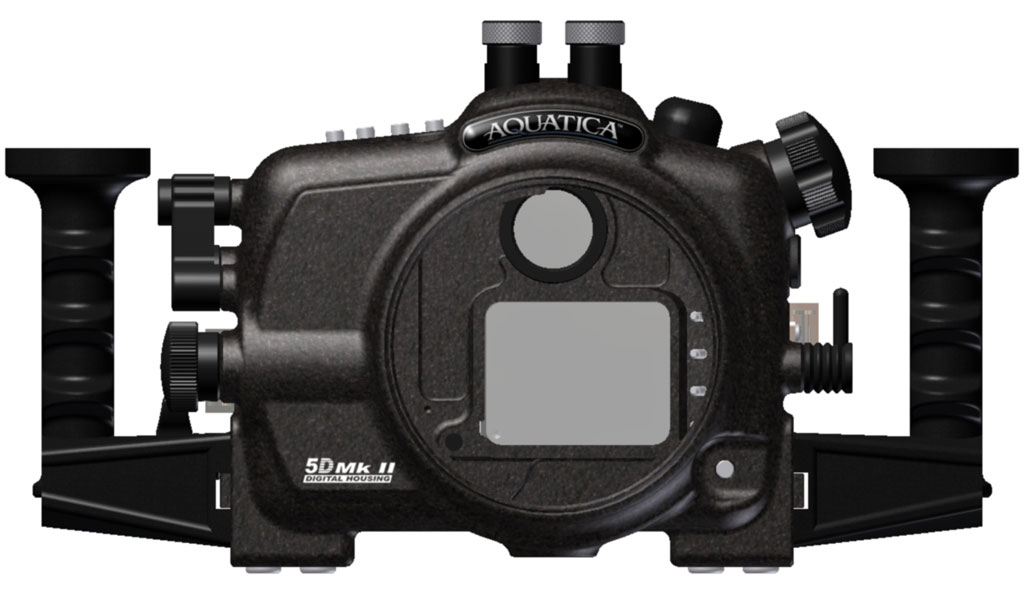
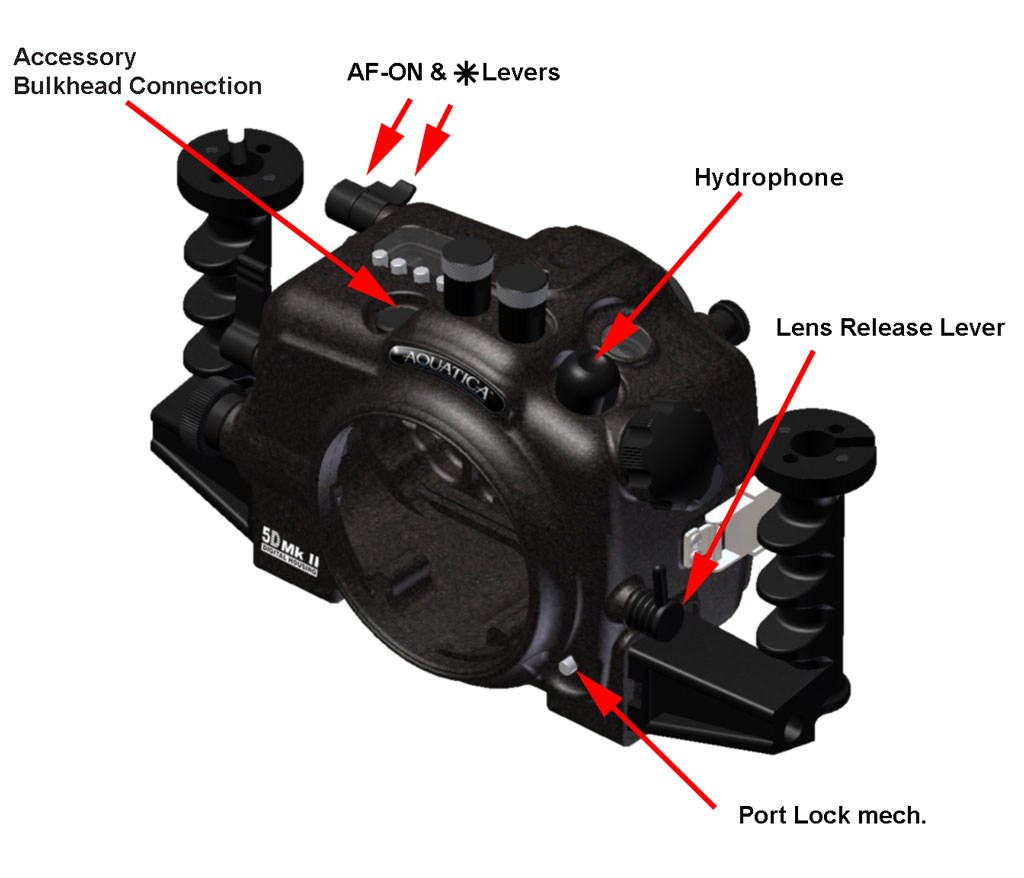
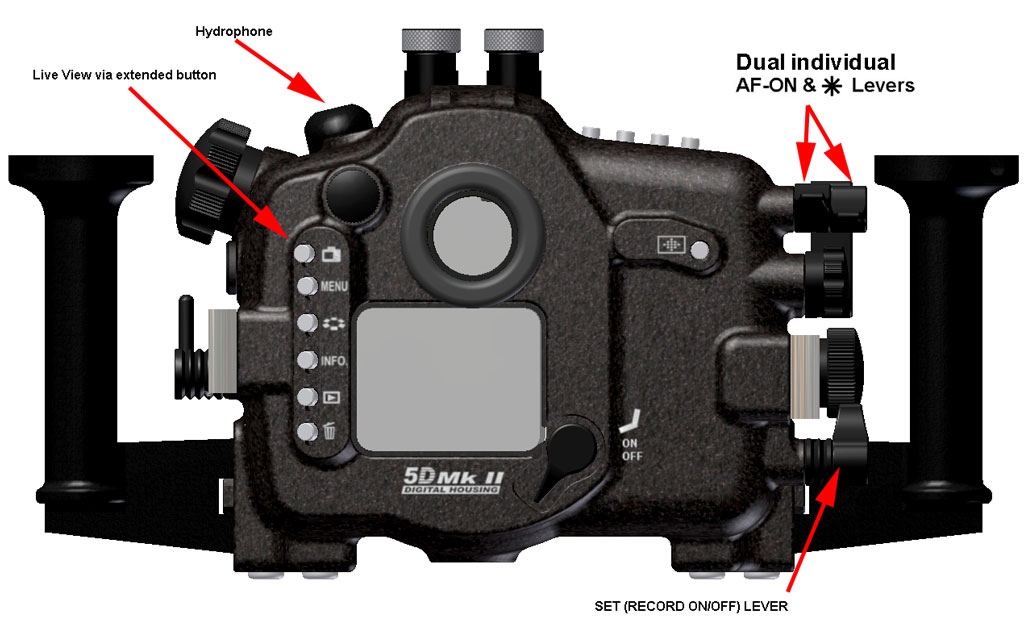
  12. Well you know what, I pulled a few favors, (blackmail pictures from the last office party ;) ) and got the rendering in time for the week end. It has a Hydrophone, and you can initiate video mode and access all related controls (live view activation button, set/record on & off, and AF-ON) without loosing your grip on the handles. Given that the Star button on the camera is quite a versatile feature we have given it its on separate lever as well.


    Left hand menus button as well as the Live View access button have been positioned at an angle to bring them closer to the grip for easier operation.


    It will by the way accept the 16-35mm Mk II which is being discussed on other 5D Mk II thread, moisture alarm is included, and a variety of bulkhead connector will be offered (Nikonos V type, Ikelite and S6) and two extra bulkhead access hole are supplied for additional accessories (third bulkhead connector for our remote grip or third party accessories...),


    have a nice week end and i'll catch up with you all on Monday morning (Eastern frozen time)

    post-1676-1232741565.jpg

    post-1676-1232741575.jpg

    post-1676-1232741581.jpg

    Edited by Viz'art
  13. One word Jean - wow!


    I receive my 5DII on the 28th - I'm excited!


    Cheers

    James

  14. Thanks Jean. Good to see Aquatica managed to fit the hydrophone. What kind of material is the LCD window going to be made off? Hopefully high quality non-reflective coated because reflection is going to kill any chance of wysiwyg through liveview.

  15. Well you know what, I pulled a few favors, (blackmail pictures from the last office party ;) ) and got the rendering in time for the week end. It has a Hydrophone, and you can initiate video mode and access all related controls (live view activation button, set/record on & off, and AF-ON) without loosing your grip on the handles. Given that the Star button on the camera is quite a versatile feature we have given it its on separate lever as well.


    Left hand menus button as well as the Live View access button have been positioned at an angle to bring them closer to the grip for easier operation.


    It will by the way accept the 16-35mm Mk II which is being discussed on other 5D Mk II thread, moisture alarm is included, and a variety of bulkhead connector will be offered (Nikonos V type, Ikelite and S6) and two extra bulkhead access hole are supplied for additional accessories (third bulkhead connector for our remote grip or third party accessories...),


    have a nice week end and i'll catch up with you all on Monday morning (Eastern frozen time)


    Gotta love waking up on a Saturday morning and getting a surprise like this... great work jean!

    Looks like some very nice video control solutions, and wow the hyrophone is a nice touch.

    darren

  16. Question to the video gurus; does the position of the hydrophone make any difference?

  17. Looks very nice, indeed!

  18. Wow! Excuse my ignorance (I'm not a video guy), but what's a Hydrophone? By the name I'd guess it's some type of uw mic?


    Ryan.

  19. Wow! Excuse my ignorance (I'm not a video guy), but what's a Hydrophone? By the name I'd guess it's some type of uw mic?


    Ryan.


    that's it. Can't wait to get it to Tonga this season. You know hangin' right above a singer, when the sound is so loud that your internal organs vibrate.

    Edited by photovan
  20. that's it. Can't wait to get it to Tonga this season. You know hangin' right above a singer, when the sound is so loud that your internal organs vibrate.


    Can't wait to see/hear the results!


    By the way Darren, do you ever dive locally? I have a vague memory of meeting you a few years ago in a dive store I worked at, you were telling me about your wildlife photography I think.

Isotta

Account

Navigation

Search

Search

Configure browser push notifications

Chrome (Android)
  1. Tap the lock icon next to the address bar.
  2. Tap Permissions → Notifications.
  3. Adjust your preference.
Chrome (Desktop)
  1. Click the padlock icon in the address bar.
  2. Select Site settings.
  3. Find Notifications and adjust your preference.
