Skip to content

CaolIla

Members
  • Joined

  • Last visited

  • Country

    France

Everything posted by CaolIla

  1. It works.... in consequence It was not the local Swiss-French setup of my PC (or perhaps but your change solve the problem)
  2. You see I made a screenshot and with paste....
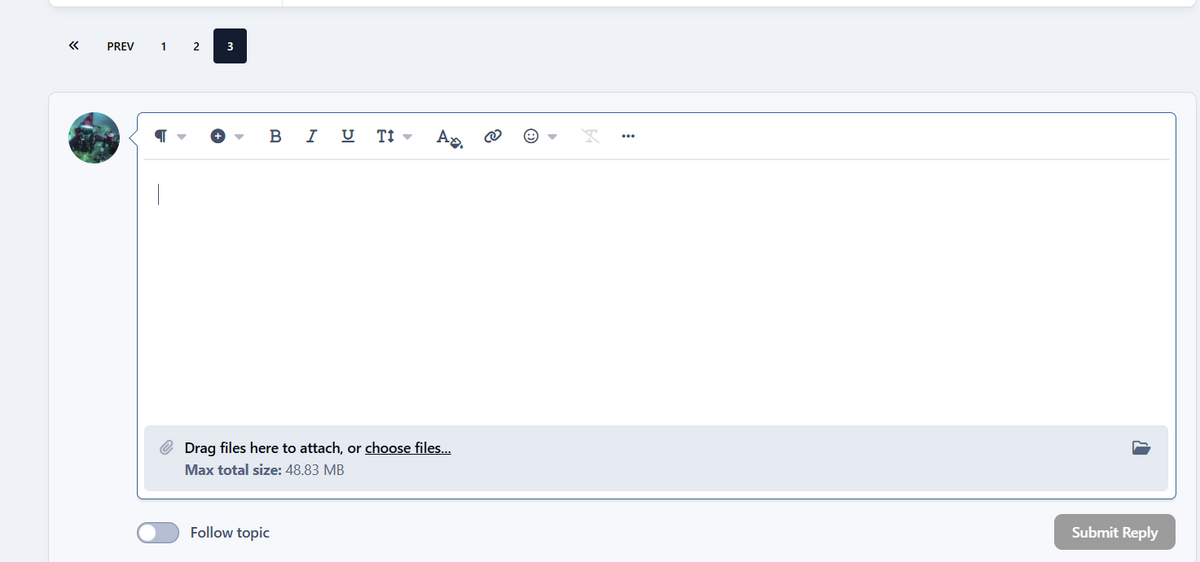
  3. An idea... I'm using a PC with the language set to French... just as info... If I have time I'll switch to English and show if something change ( I had in my work life some trouble with Swiss-German language setup together with Time I need to be sure that the reason of the problem is not a "setup" problem... that is not handle in the good way. Sorry but my PC is configure as Swiss-French it is certainly a test to do to change it to English
  4. I waited 20 seconds ?... nothing appear
  5. @RichN I know you are and other volonteer I appreciate the work you all have done That's not the problem ;) On the other side all the member writing reviews, share some DIY etc... are also volonteer we participate to the life of the site, putting some intersting stuff on it. It's like for you time we "invest" to make the site living Thanks for try to solve "my" problem.
  6. Cut&Paste + Drag&drop it doesn't work.. it's the same probleme. If the banner appear I can paste if it's not I Ican't paste. Why I use Paste : Easy, I use Greenshot and when I select a region I configure Greeshot to put it in the clipboard... It's fast and that's a important point for me.
  7. [Violation] Forced reflow while executing JavaScript took 93ms [Violation] Forced reflow while executing JavaScript took 83ms root_front.js?v=4c29a2ba741785983349:258 Uncaught (in promise) TypeError: Cannot convert undefined or null to object at Object.assign (<anonymous>) at BaseControllerClone._updateTimestamp (root_front.js?v=4c29a2ba741785983349:258:449) at BaseControllerClone._doAjaxRequest (root_front.js?v=4c29a2ba741785983349:250:6) at BaseControllerClone._checkNotifications (root_front.js?v=4c29a2ba741785983349:249:6) updateTimestamp @ rootfront.js?v=4c29a2ba741785983349:258 doAjaxRequest @ rootfront.js?v=4c29a2ba741785983349:250 checkNotifications @ rootfront.js?v=4c29a2ba741785983349:249 setInterval setInterval @ rootfront.js?v=4c29a2ba741785983349:240 setup @ root_front.js?v=4c29a2ba741785983349:236 initialize @ root_front.js?v=4c29a2ba741785983349:233 initControllerOnElem @ root_framework.js?v=4c29a2ba741785983349:156 initializeControllers @ root_framework.js?v=4c29a2ba741785983349:126 init @ root_framework.js?v=4c29a2ba741785983349:122 (anonymous) @ root_library.js?v=4c29a2ba741785983349:70 e @ root_library.js?v=4c29a2ba741785983349:2 t @ root_library.js?v=4c29a2ba741785983349:2 setTimeout (anonymous) @ root_library.js?v=4c29a2ba741785983349:2 c @ root_library.js?v=4c29a2ba741785983349:2 fireWith @ root_library.js?v=4c29a2ba741785983349:2 fire @ root_library.js?v=4c29a2ba741785983349:2 c @ root_library.js?v=4c29a2ba741785983349:2 fireWith @ root_library.js?v=4c29a2ba741785983349:2 ready @ root_library.js?v=4c29a2ba741785983349:2 P @ root_library.js?v=4c29a2ba741785983349:2
  8. When I click in this box after 10 or 15 sec this message main-mfr2DxeI.js?v=4c29a2ba741785983349:130 [Violation] 'setTimeout' handler took 71ms [Violation] Forced reflow while executing JavaScript took 57ms [NEW] Explain Console errors by using Copilot in Edge: click to explain an error. Learn moreDon't show again root_front.js?v=4c29a2ba741785983349:258 Uncaught (in promise) TypeError: Cannot convert undefined or null to object at Object.assign (<anonymous>) at BaseControllerClone._updateTimestamp (root_front.js?v=4c29a2ba741785983349:258:449) at BaseControllerClone._doAjaxRequest (root_front.js?v=4c29a2ba741785983349:250:6) at BaseControllerClone._checkNotifications (root_front.js?v=4c29a2ba741785983349:249:6) updateTimestamp @ rootfront.js?v=4c29a2ba741785983349:258 doAjaxRequest @ rootfront.js?v=4c29a2ba741785983349:250 checkNotifications @ rootfront.js?v=4c29a2ba741785983349:249 setInterval setInterval @ rootfront.js?v=4c29a2ba741785983349:240 setup @ root_front.js?v=4c29a2ba741785983349:236 initialize @ root_front.js?v=4c29a2ba741785983349:233 initControllerOnElem @ root_framework.js?v=4c29a2ba741785983349:156 initializeControllers @ root_framework.js?v=4c29a2ba741785983349:126 init @ root_framework.js?v=4c29a2ba741785983349:122 (anonymous) @ root_library.js?v=4c29a2ba741785983349:70 e @ root_library.js?v=4c29a2ba741785983349:2 t @ root_library.js?v=4c29a2ba741785983349:2 setTimeout (anonymous) @ root_library.js?v=4c29a2ba741785983349:2 c @ root_library.js?v=4c29a2ba741785983349:2 fireWith @ root_library.js?v=4c29a2ba741785983349:2 fire @ root_library.js?v=4c29a2ba741785983349:2 c @ root_library.js?v=4c29a2ba741785983349:2 fireWith @ root_library.js?v=4c29a2ba741785983349:2 ready @ root_library.js?v=4c29a2ba741785983349:2 P @ root_library.js?v=4c29a2ba741785983349:2 Good night... Need to go
  9. Same reaction it doesn't work It's late I need to go to bed now. Wakup in 5 hour to go to work. I paste the console output to Copilot... (I know copilot is copilot ;) ) the result is what I gave you.
  10. No frustration is not the good word. I gave you all the information I have / found and the problem is that you ignore / exclude that the problem can be on your side. But it's ok (may be not) Bye
  11. The problem is not obligatory visible in the logs, server side. If some problems are on the client side you will never see anything. What I (copilot) found is that some script crashed client side, as consequence the upload is disactivated. The problem is NOT firewall or such things... I try from 2 PCs booth on the last version of Win11, and Edge... No change if I go over different connections... also from an other country (not over a VPN but really in an other country) For your information I'm working in the IT world ( a worked in different branches, and have a little bit know-how in firewall / PC's and as developer )
  12. Yes I write that before
  13. Thanks, but if the problem is in the script on the side of Waterpixels... I can't do anything. Only try to localize the problem... the ball is on the side of the administrators of the site.
  14. Hi @Dave_Hicks I found something When I make a new message to a person.. I can Paste When I try to reply it didn't work When after sending the answer with texte only, I edit this message I can Paste. Now I send this message in this topic and try during a futur edit of it. ---------------------------------------------------------------------------- Edit Yes it works... For me the problem is in a JS or other script on Waterpixel....
  15. @Dave_Hicks Sorry but 1) I have 2 PC with the problem 2) an old tablet work with my user, but not up to date iwth the last version (and Win 10) 3) I made some test (forgot to write here from an other country (CH) from my Surface Win11 (network from the compagnie No access, Android hotspot can reach the site, nothing changed no Paste from pictures. 4) if I use some VPN same it didn't work better When I search with copilot (ok it is microsoft and ? ) I allways found information that there is a known problem with Invision + Win11 + Edge. I made test on other Invision Forum like Plongeur.com It's the same in the background Copyright © 2023 PLONGEUR.COMPowered by Invision Community Also on an other forum I found (forgot the name) it was possible to paste pictures. For me with the information I found the problem is on "your" side. In the past I used Chrome, Firefox and other... since more or less 5 years... one browser...the one installed on windows. (it is my decission and I assume, and i'm happy with that. ) At work we switched from Firefox to chrome.. and now the move to Edge form secondary browser to the main is started. Why it is not the question , but it is a big international inssurance compagnie near 20 000 workers in Europe.
  16. Copilot answer Summary of the Issue Image attachments cannot be inserted in replies, even though they work correctly when creating a new topic. This is not caused by browser settings, cookies, cache, or Edge’s tracking prevention. The failure is caused by a JavaScript error inside root_front.js, which prevents the CKEditor attachment module from loading in reply forms. 🔥 Critical JavaScript Error The console shows repeated errors: Code Uncaught (in promise) TypeError: Cannot convert undefined or null to object at Object.assign at BaseControllerClone._updateTimestamp This error occurs every few seconds, meaning the controller responsible for AJAX updates and editor initialization is failing continuously. Because _updateTimestamp() crashes, the reply editor never completes its initialization, and the attachment subsystem is never activated. 🎯 Why attachments work in new topics but not in replies In Invision Community: The new topic editor loads in “full mode” with all scripts and plugins. The reply editor loads inside an AJAX wrapper and depends on BaseControllerClone for notifications, timestamps, and editor initialization. When root_front.js throws an exception inside _updateTimestamp(): The reply editor loads in degraded mode CKEditor plugins (including attachments, paste‑image, drag‑and‑drop) do not initialize The attachment bar does not appear Pasting images is disabled Uploads fail silently This perfectly matches the behavior observed. 🧩 Likely Root Causes One of the following is happening: 1) Corrupted or modified root_front.jsA custom theme or manual edit may have introduced a faulty Object.assign() call. 2) A plugin or theme override is returning nullIf _updateTimestamp() receives null instead of an object, Object.assign() will throw exactly the error you captured. 3) An AJAX endpoint is returning an empty or malformed JSON payloadIf the notifications/timestamp endpoint returns null, the controller crashes. 4) Lazy‑loading or placeholder scripts are interferingYour console shows: Code Images loaded lazily and replaced with placeholders. Load events are deferred. This can break editor initialization in replies. 🧪 Developer Verification Steps Your developer should check the following: 1) Inspect root_front.js at line ~258Look for something like: js Object.assign(target, data); If target or data is null, this will crash. 2) Check the AJAX response for the notifications/timestamp endpointVerify it returns a valid JSON object. 3) Disable theme overrides temporarilyIf the issue disappears, the theme is the source. 4) Check CKEditor initialization in repliesConfirm that the attachment plugin is actually being loaded. 🛠️ How to Fix Depending on the cause: ✔️ If the theme overrides _updateTimestamp()Ensure the function checks for null: js if (data && typeof data === 'object') { Object.assign(this.timestampData, data); } ✔️ If the AJAX endpoint returns nullFix the backend so it always returns a valid object. ✔️ If root_front.js is corruptedReplace it with the official Invision Community version. ✔️ If lazy‑loading interferesDisable lazy‑loading for editor‑related scripts. 🎯 Conclusion The inability to insert images in replies is caused by a JavaScript exception in root_front.js, not by browser settings. Until this error is fixed, the reply editor will continue to load in degraded mode and attachments will remain broken.
  17. And they is an other problem... some of us works... and that's take a big part of our time 😁
  18. but here not... IT is not the entire waterpixel who have the problem... only in the replies I'll make the other test after my work
  19. I tried to send you an screenshot here.... It works
  20. I will do that Please send me your email that I can send you a screenshot
  21. Nobody have a PC under Win 11 with edge ? If yes please try to upload here a picture
  22. from my android phone I se the upload banner
  23. In Edge I can paste picture on other forum and in Copilot... that's not a blocking problem from Edge on my side I checked all I receive to check.
  24. Some other search result. I gave the code to Copilot for analyse Invision Community – Missing Attachment Upload UI in Replies (Technical Report) SummaryThe reply editor does not display the attachment upload bar. The user can upload images when creating a new topic, but cannot upload or paste images when replying. The HTML structure captured from the reply editor confirms that the attachment upload container is missing entirely. 1. What the HTML shows The reply editor currently renders: html <div class="ipsComposeArea ipsComposeArea--reply ipsClearfix"> <div class="ipsComposeArea__photo"> <a href="https://waterpixels.net/profile/319-caoilla/" data-ipsHover data-ipsHover-target="https://waterpixels.net/profile/319-caoilla/?do=hovercard"> <img src="..." alt="User photo"> </a> </div> <div class="ipsComposeArea_editor"> <div class="ipsEditor" data-ipseditorv5-postkey="reply-..." data-ipseditorv5-autosavekey="reply-..." data-ipseditorv5-name="comment"> <!-- CKEditor instance --> </div> </div> </div> Critical observationThe expected upload bar container: html <div class="ipsComposeArea__attachments"> ... </div> is completely missing. This is why the user cannot upload files in replies. 2. What should normally appear In a fully functional Invision Community editor, the reply box includes: html <div class="ipsComposeArea__attachments"> <div class="ipsAttachmentDropZone">...</div> <div class="ipsAttachmentUpload">...</div> </div> This block is responsible for: drag‑and‑drop uploads file selection button attachment list paste‑to‑upload support Since this block is not present, the editor cannot display any upload UI. 3. Why this block is missing There are only three possible causes in Invision Community: A. Group permissionsIf the group does not have: Can upload attachments in comments/replies then the template removes the entire attachment block. This is the most common cause.
  25. Hi admins Invision Community – Image Upload Issue (Replies Only) Environment: Browser: Microsoft Edge (latest version) OS: Windows 11 (fully updated) Platform: Invision Community (version unknown) Symptoms: When creating a new topic, the user can upload images normally. When writing a reply, the upload banner/button is missing. Copy/paste of images does not work in replies. Drag‑and‑drop also fails. 1. Summary of the IssueThe user cannot insert images when replying to an existing topic. The upload UI is visible and functional in new topics, but not in replies. Additionally, Microsoft Edge blocks image pasting inside the editor. This indicates two separate issues: Invision Community configuration/theme issue (upload bar missing in replies) Microsoft Edge clipboard permission issue (image paste blocked) 2. Technical Causes (Confirmed Patterns) A. Missing Upload Bar in RepliesThis behavior is known and documented in several Invision Community installations. It is caused by one of the following: 1. Group permissionsIn ACP → Members → Groups → (User Group) → Attachments Some installations have different permissions for: “Upload attachments in topics” “Upload attachments in comments/replies” If the second one is disabled, the upload bar disappears only in replies. 2. Theme template conditions Some themes hide the upload bar in replies using conditional logic. Example found in custom themes: html {{if $reply}} <!-- Upload bar hidden --> {{endif}} If the theme or a template hook modifies the editor layout, the upload UI may be removed. 3. JavaScript errors in the reply editorIf any editor-related JS fails to load, the upload bar does not appear. Files involved: ckeditor.js root_front.js editor.js Any custom JS from the theme A single 404 / 502 / blocked script will break the upload UI. The user previously reported 502 Bad Gateway errors on JS files, which strongly suggests this is happening again. 4. Application or plugin modifying the editorEven a small plugin can alter editor behavior. If a plugin affects posting or attachments, it may disable upload in replies only. B. Image Paste Not Working in Microsoft EdgeEdge has known restrictions affecting web editors: Clipboard API blocked by default Enhanced Security Mode disabling paste of images Domain-specific clipboard permissions Edge refusing base64 image insertion in some contexts This is browser-specific. If the same action works in Chrome/Firefox, Edge is the cause. 3. Recommended Diagnostic Steps (Admin) A. Check Group PermissionsACP → Members → Groups → (User Group) → Attachments Ensure the following are enabled: Can upload attachments Can upload attachments in comments/replies Allowed file types include JPG/PNG/GIF Maximum upload size > 0 B. Check Theme TemplatesACP → Themes → Edit HTML/CSS → front → posting → editor Look for conditional blocks hiding the upload bar in replies. C. Check JavaScript ConsoleIn Edge or Chrome: Open a reply form Press F12 → Console Look for errors related to: ckeditor.js editor.js root_front.js Any custom theme JS If any script fails to load, the upload UI will not appear. I checked when I create a new topic I have the banner and I can Paste "Drag files here to attach, or choose files... Insert existing attachment Max total size: 48.83 MB" It seems to be a config problem... (for a part of the problem )

Account

Navigation

Search

Search

Configure browser push notifications

Chrome (Android)
  1. Tap the lock icon next to the address bar.
  2. Tap Permissions → Notifications.
  3. Adjust your preference.
Chrome (Desktop)
  1. Click the padlock icon in the address bar.
  2. Select Site settings.
  3. Find Notifications and adjust your preference.