




Posts posted by Chris Ross
-
-
1 hour ago, Davide DB said:
Out of curiosity, What's wrong of this native lens?
No stabilization, huge MFD?
https://www.bhphotovideo.com/c/product/1277527-REG/sony_sel50m28_fe_50mm_f_2_8_macro.html
Very slow AF I believe.
-
 2
2
-
-
Not an easy choice, there's trade offs a-plenty in APS_C. Canon allows good WB, probably good AF with the old EF-S 60mm macro on their adapter, the 18-45 lens is also listed with the WWL. Sony allows you to use the WWL with the 28-60 which is a good solution by all accounts - the Zeiss 50mm seems to work well with the A1 - but how is it with the A6700? As I recall the 90mm was regarded as a bit slow until the A1 came along so AF seems to be a bit body dependent.
On housings I see Marelux now has an R7 housing with an A6700 coming soon.
If you were looking at photos I'd be suggesting m43 as a good option plenty of lenses to choose from there, but for video OM system doesn't have the reputation that Panasonic does and AF might be lacking with the Panasonic bodies for macro. If the OM-1 were good enough in video the 30mm Panasonic lens is very snappy AF and a wide choice of rectilinear wides available.
-
 1
1
-
-
7 hours ago, Davide DB said:
Mindset
Even though today’s rebreathers are much more reliable than in the past, they still require attention and a certain mindset for care and maintenance, which not everyone has. Open-circuit gear is infinitely more resistant to rough handling and neglect. A rebreather requires the same care and upkeep as your very expensive photography equipment. Let’s be clear: it’s nothing out of the ordinary, or all that different from what many of us are already used to doing.I think this is probably the real key to whether you should go for a rebreather - there are some people who just shouldn't consider them. For myself I'm fairly meticulous and if ever I've had UW issues come up I've coped quite well, but I'm not sure I'd trust myself to be as meticulous as I need to be all the time. I can 100% see the advantages but for 90+% of the diving I do I wouldn't be taking advantage of the long dive times and depth capability.
-
3
-
-
-
56 minutes ago, bghazzal said:
This type of workflow is very commonly recommended for video editing from a laptop (similarly, for desktop, dual drives setups are typically the way to go for video).As you edit, the computer is reading footage off the drive it was imported to. So importing to an SSD, and running everything from there saves a lot of internal HDD space (FCP library of imported work files and renders, FCPX's motion capture folder), and this essential on laptops with less than 5TB of disk space.
And as mentioned, on slower machines like mine, this workflow (editing from external) also helps the computer with buffering issues - it's really night and day for integrated software like FCPX (as in I can't run FCPX and edit from libraries on the internal HDD without everything freezing as the project develops, but this doesn't happen when running from an external disk).
There are plenty of hits on this subjects explaining how to set this up and why:
https://duckduckgo.com/?t=ftsa&q=why+edit+video+from+external+hard+driveSo yes, it's certainly a workaround in a way, but pretty much a necessary one for regularly editing video on a laptop (one of the reasons prompting the upgrade) so it probably would be worth looking into even on a newer machines.
cheersI can see why they are recommending it - seems mostly around space due to big file sizes and relatively small SSD internal drives from the reading. I do keep forgetting that you are quite constrained with a laptop, I do all my serious editing on a desktop and you can readily install a 4 or 8 TB SSD internally which you could edit from.
-
1
-
-
1 hour ago, ChipBPhoto said:
Aside from the normal theoretical speed increase, Thunderbolt 5 seems to be the big advance for the M4s. Again, much of that is theoretical unless using dual 8K monitors and perhaps a few other minor options that may eventually become available.
Again the interface speed is much faster in general than what is connected to it. I don't know what the price difference between the various models is but it always used to be the very top model was a sizable premium over a mid range one with a real world benefit that was rather small.
Looking at those benchmarks if I'm reading them correctly, I'd be seriously looking at 3rd column 16C/40C model if could be had a decent discount, the last column M4 16C/40C model seems faster but not that much faster, and processing time seems connected to GPU cores for video rendering. Unless of course you see a pair of 8K monitors in your near future.😂
-
1
-
-
5 hours ago, bghazzal said:
For me more than speed, it's actually a question of making editing possible or not on my machine and its 8GB of ram for a 1.8 GHz Intel Core i5 processor. If I am doing everything internally, it saturates all read/write buffers.
Running FCP and its library externally on an SSD works fine to edit 4K video (I do need to work with proxies for HEVC codecs though), so it might be worth a shot on a more powerful machine as well (there are plenty of videos on how to set this up, this one for instance)
DaVinci Resolve, however is not an option - I have never managed to get fluid playback, even after tweaking and working with proxy files.
I'm not sure I understand what the issue with this machine is, but it sounds to me like a workaround rather than something you'd want to adopt regardless on a more capable machine.
-
4 hours ago, bghazzal said:
One thing which might be interesting to take into account for video editing on a laptop: running Final Cut from an external SDD drive, instead of internally will help a lot with processing speed.
This is how I manage to edit 4K video on a 2017 Macbook Air...
And nothing stops you from running Lightroom and Photoshop from the SSD ( I do this as well).What I do is partition a Samsung T7 SSD, one small partition for running apps and one for storage (and FCP libraries), and just run from that.
cheers
Whether this is actually faster depends on the drive read/write speed rather than the bus speed. The T7 SSD will read/write at around 0.5- 1 GB/sec according to specs I found. Typically the internal NVMe SSD is faster at 2-3 GB/sec, the M3 is rated at 2.8 GB/sec. Whether this translates into a faster experience on one or the other depends on a number of factors, mostly around overhead that the bus and processor are handling. The Thunderbolt interface is very fast but typically it's not the limit.
-
2
-
-
I think for still images, these days it's not a very demanding task unless you are focus stacking or sometime like that with multiple images. Otherwise fast storage helps load big files faster. So the biggest gains would be in video rendering.
I don't now if your current Macbook is portable size, but if I was considering it, I'd be inclined to go for a desktop and relegate the laptop to travel support.
-
2
-
1
-
-
Not the best view for ID, but it looks like a triplefin, perhaps the Highhat triplefin - Enneapterygius tutuliae
-
1
-
-
5 hours ago, Dave_Hicks said:
Look up Boeing 787 lithium ion battery fires. They grounded the planes for quite some time.
Or Samsung Phone fires.
Etc...
Yes I know, but the 787 needs it batteries to fly and banning phones or laptops would create a huge uproar. Hopefully it never happens but never under estimate what might come about from a knee jerk reaction.
-
2 hours ago, Dave_Hicks said:
This is already a problem for airlines. I doubt if a few strobe batteries in bags are going move the needle vs. the millions of phones flying.
Phones and other lithium-ion powered devices ignite on planes from time to time. Recently you may have noticed a new announcement on flights, especially for planes with first class. "If you drop your phone behind the seat, don't try to retrieve it. Call the flight attendants." These airline seats are motorized, and they can pinch, fold, and mangle the lost phone, causing a fire.
The planes all have battery containment gear now:

It's not the strobe batteries I'm concerned about almost certainly it will be some other battery, just due to the numbers around. Yes they have equipment to deal with it, but if we get a bad incident that is not well handled there always the possibility of a knee jerk reaction which makes flying with Li-ion more difficult.
-
14 hours ago, Architeuthis said:
I am not in the Nikon system, so others have a better overview - but I just see that Nikon came out with a new APS-C model (unfortunately not with a smaller stacked sensor, similar to Z8 and still with 20 Mpixel): https://www.dpreview.com/reviews/nikon-z50ii-initial-review#II
Depending on how good the AF works UW, it may be a good camera for UW. I am not sure, but I believe that the old Nikon 8-15mm fisheye and the Tokina 10-17mm fisheye (Nikon version) are not usable on the Z mount, but as far as I know, one can use the Canon EF version of Tokina and the Canon 8-15mm via adapters on Z-mount (plus all Z mount lenses and also the old Nikon lenses that work via adapter)...
Maybe worth a consideration?
Wolfgang
The Tokina can't be used as it's screw drive lens, but I believe the 8-15 is fine and AFs well on the FTZ adapter. Might be the old 16mm fisheye, that is also screw drive you are thinking of that doesn't work on Z cameras.
-
The huge rain event in Spain was also related to warm seas. The seas off the east coast of Australia are getting warmer too and this is behind all the floods and wet summers we have been having.
-
1
-
 2
2
-
-
2 hours ago, TimG said:
Dave, why are you so certain AA powered strobes are over? They are such a simple solution. Easy to obtain, inexpensive, unlikely to explode, no issues of moving them by air (or mail!), and as far as I can tell for most uses, deliver sufficient power. Am I missing something? Other than my dive computer and camera battery, I use AAs for everything and standardising makes charging and cable management so much easier.I have to agree, I can do 3-4 dives on my INON Z-240s - admittedly its shooting m43, so mostly f8 so not as demanding, but they do the job. I don't need a strobe to have a video quality light so that's not important for me. Dealing with 16 batteries is obviously time consuming but totally manageable. There's certainly applications where you want more power, but not for everyone.
I agree there's different qualities in batteries, especially worrying is the cheap Li-ion, people will buy them from the cheapest online source they can find. all it will take is one bad incident with a cheap Li-ion to make air travel more difficult.
-
2
-
-
Sony hotshoe contacts are known to be finicky - examine them closely to make sure they are all straight.
-
1
-
-
On 11/5/2024 at 9:16 AM, Hiloboy said:
I can get through the day without ever worrying about changing the batteries but I heard from someone the power of the strobe may less with “old” batteries. I do notice on my Inon Z330, I am using them more on full power than I used to. Maybe it is my strobe and not the battery.
A myth, it may charge slightly slower but the flash light output remains as it is - set by the capacity of the capacitor. If it's doing what you want I see no reason to change batteries. It is quite possible the capacitor on the strobe degrades over time however. But checking it you would need to compare known flash power images against each other. Are you still using the same ISO and aperture as previous? Are you shooting different subjects which require you to be further away? Are you more diligent about getting the strobe power right in camera and not relying on boosting brightness in post processing? All these thing can of course impact and strobe power relies on your memory as it's not in the EXIF. I'm not 100% sure I can recall what strobe power I used in shots taken a few years back🤷♂️.
-
3
-
-
3 hours ago, humu9679 said:
The Sony 20-70mm covers a good range on full frame, but likely not a good fit for APS-c. It would be a 30mm to 105mm equivalent - not wide enough and not close focusing enough to make it worth your while.
It's also a big lens which you would have fit from the front of the housing with the N85 port system I would expect, probably need an expensive N85-N120 adapter and N120 dome as well.
-
1
-
-
5 hours ago, HCIdiver said:
For focus i might try subject detect on animal with expandable flexible spot in the middle to begin with. Im hoping to keep iso at 800 or less this time, but thats hope.
Whales are fairly slow moving so im going to use live view on and see how low i need to go. F8 is the goal but willing to drop.
Hoping im spoiled for targets, no garuntees.
I would hope ISO3200 would be perfectly usable on a full frame Sony, as long as it's well exposed, I've shot in rainforests using much older equipment at ISO 3200 (the old 1D MkIV ) and as long as I didn't pull the shadows up too much results were quite good. Stretching out you shutter speed should also help, limited by subject movement rather than the diver. This image was shot at 1/100 f7.1 ISO3200 on the 1D mKIV and is cropped a bit:
https://www.aus-natural.com/Ecuador/Hummingbirds/slides/Gorgeted Sun Angel.html
Underwater the even expanse of dark water is more prone to noticable noise but also easier to process it out. The Sony A7RV should be at least two stops better on noise.
-
1
-
-
It's not that you can't shoot the 16-35 wide, more if you would want to. Well if you are shooting wide open the 16-35 has an advantage for sure, but a rectilinear in a dome has major edge issues at f2.8, so it depends if there's anything important there. If you were happy with 16-35 at f2.8 then the WWL combo at f4 should be a little better on the edges. But basically means with the WWL you would need to shoot 1 stop higher ISO or one stop slower shutter speed compared to the 16-35.
You didn't say what ISO you were shooting, if you believe DXOmark, the noise performance of the RII and RV are very close, the RV has an edge in dynamic range but only at low ISO and the two cameras are quite close beyond ISO1600. Noise should all be in the dark water (mostly) so processing to clean that up selectively should be possible.
-
1
-
2
-
-
The WWL has slightly wider coverage compared to a 16-35, something like the same horizontal field as a 14mm rectilinear, but the advantage for low light is you don't need to stop down as much with the WWL where you should be able to shoot at f5.6 or so. I imagine corners will be dark water though - what f-stop did you use with the 16-35 previously?
-
2
-
1
-
-
13 hours ago, sacha said:
Coming with an extra question as you're all very helpful ! To pack as light as possible, I have decided to start with one strobe only. I have got a backscatter Mini Flash 1 for now.
This is what my tray and strobes look like :
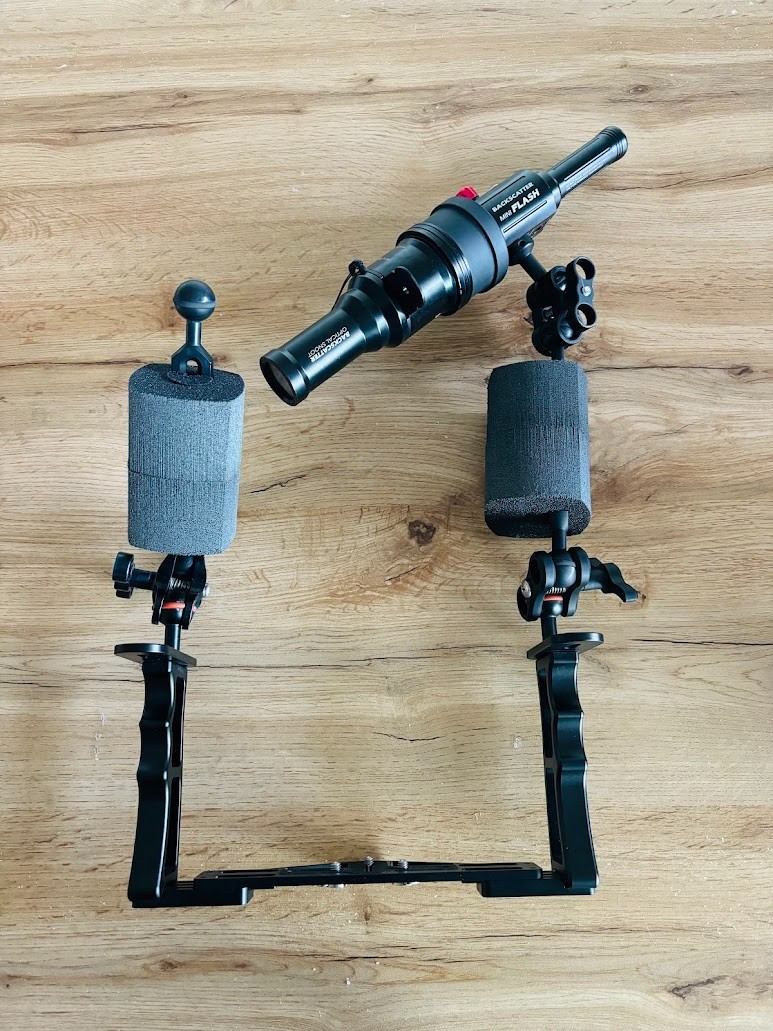
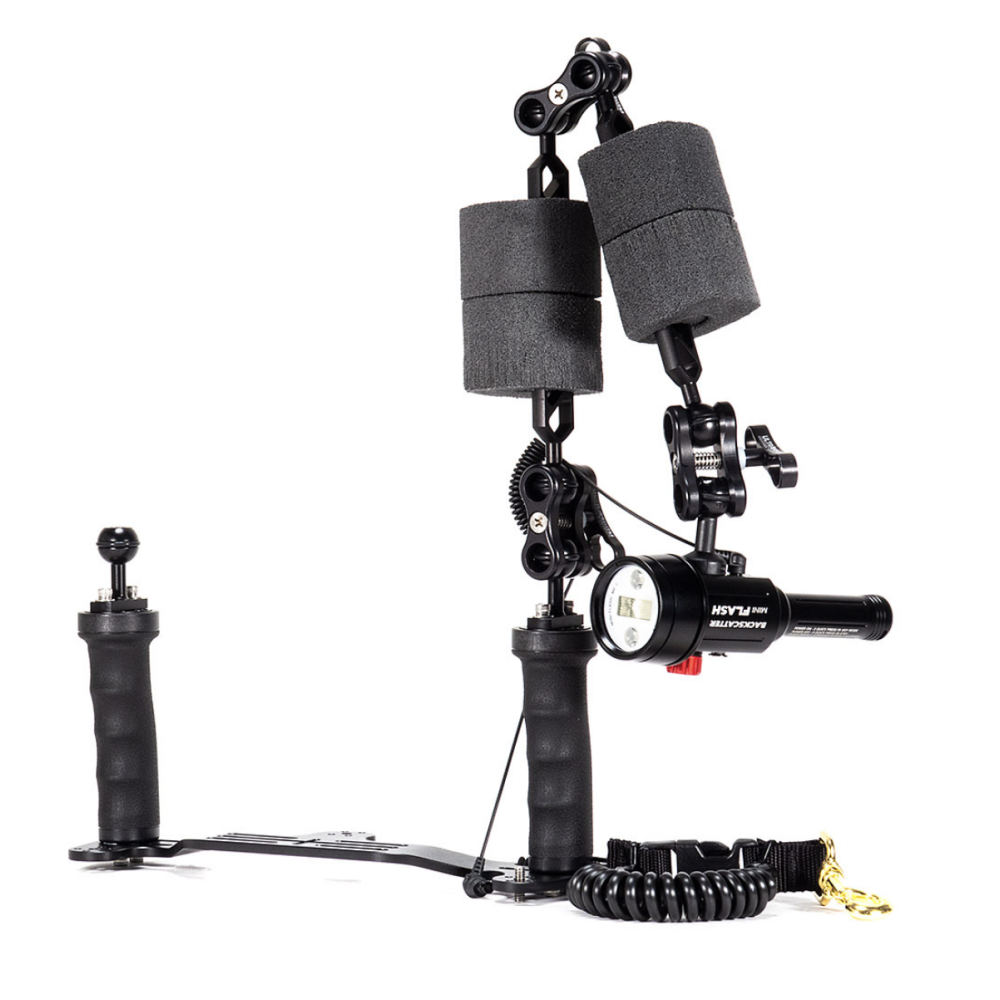
I'm worried of not having enough amplitude in the arm. I have seen some examples from backscatter where both arm floats are on the same side. Doesn't that make the camera float in a strange way that needs to be pushed hard with one hand ? Like this :
And then one final question. It feels like the balls on my arms are smaller than the ones on the strobe and on the tray. Is this possible ? Are there different type of balls ?
If yes, is this an issue ? I feel like it then rotates easier there than in other places but it doesn't feel like it will falls off.
Thanks again !It will want to float with the LH handle (with both floats) upwards, but there's not much buoyancy in 4 stix floats. 4 large floats is +320gr while the strobe is -150gr. So with 2 on one side it's +170 gr on the left.
In the configuration with two floats on each side it's -150+160 = 10gr positive. while the RHS is +160gr a difference of 150 gr more bouyancy on the RH than the LH side.
So the unbalance from side to side is very close in both configurations, a difference of 20 grams.
On the balls perhaps change all the o-rings to be the same type if they are not already. I would also add that the float each side configuration might need something to keep th floats from floating off the bare of the arm, it's only a push fit as shown in the photo.
on a single strobe, should be fine for macro, but probably will struggle for wide angle shots with the mini strobe. Two of them is probably just adequate for WA
-
2
-
-
13 hours ago, JustinO said:
Thanks Chris, will give that a go. Interestingly, I see that quite a few sites specify sRGB as the profile, presumably to save a few bytes of space. So perhaps might also be worth embedding the original profile in as well to enable correct rendering by browsers.
The image will either be sRGB or Adobe RGB, whether you want to use one or the other as I said is down to how the images will be used. If you are using the Lightroom, you can keep the Master image in AdobeRGB and export in sRGB, once you have produced an sRGB image there's no going back on that file.
I also don't believe you need to have two different calibrations for your monitors, a monitor calibrated in AdobeRGB will render an sRGB image just fine, it just doesn't use all the colour space it is capable of. If you want to work in sRGB to avoid the change when the image is converted just start your processing in sRGB. I think it's approaching the time when publishing in Adobe RGB will work for many people. If you entering competitions then I would certainly want to work in AdobeRGB and also if ever you were printing on a high end inkjet printer, their colour gamut is certainly bigger than sRGB and you would be missing out on those extra colours.
When you are working in lightroom, the raw image doesn't have a colour space and tell it what colour space to use when you start the processing. You can then process and export the image and the conversion to sRGB can be done then. I use Photoshop which is a little different so I keep a full resolution Adobe RGB master and make a web version in sRGB.
-
1
-
1
-
-
The basic problem with sRGB is that is a smaller colour space than others available, it was built around what CRT monitors could do at the time. The problem I see regularly when processing and converting to sRGB to produce a web version is that the blues in reef shots go off. You can remedy this a bit using the selective colour tool in photoshop adding a lot of cyan to the blues and playing with magenta in cyans and blues but it's not perfect. Don't know if LR has a similar tool.
The reason for converting to sRGB is solely due to the default behaviour of browsers when serving the image - if colour management is not enabled they assume the image is sRGB and if you post for example an Adobe RGB image if does weird things to the colours.
I'm not sure what the current situation with browsers is, a few years ago it was a bit of a mess, I think most browsers are now colour managed, but necessarily on by default.
what to do? depends on what you are doing with your images! If posting to Facebook, to some extent it doesn't matter as FB strips profiles and re-processes the image to it's own profile(saves a few kB of storage - a lot spread over millions of images). Instagram probably does something similar.
You could save in adobe RGB and I think nowadays Chrome, Edge and Firefox and possibly Safari will render that correctly. Adobe RGB is a good choice I think as a great many monitors can display that these days. Going on percentages I would guess 95% of people will see a correctly rendered image on their setup these days if it's in Adobe RGB (ignoring the gamut their monitor is capable of) . There would not be many people on older versions as Windows forces updates on most people and Edge updates along with it. Plus among non-photographers most probably won't notice the colours being off a bit.
-
1
-
1
-

wide+macro lens recommendations for a Sony APS-C video system?
in Video Gear and Technique
Looking at the port charts I see it suggests the CMC-1 will give you 1.3x and 17-75mm working distance which is a little tight on max magnification. The CMC-2 it lists magnification as 1.0x and 30-130mm working distance - the working distance is more usable, but the magnification at 1.0x is the same as the bare lens, which seems a bit odd?