




-
My workflow differs a little for land and underwater but not hugely. On both i import the RAW files (if its a big shoot or sport i use Photo Mechanic first to star rate). The keepers then go through DxO PureRAW to produce a "raw" DNG as i find Adobes raw engine pretty awful these days. Then editing in LR. If i need to go into PS for Backscatter exterminator (which contrary to the above i find very good, if you mask it). Then sometimes Nik Color Efex or Topaz sharpening/denoise if required. Generally i dont use Color Efex underwater, land only. If PS isnt needed its RAW > DxO PureRAW > LR > Export. Keywords, titles/description and ratings all handled by the LR catalogue. Its 100% the most important part of my workflow. I couldnt operate without this.
-
The same group have released reverse engineered Office today. I suspect an absolute mountain of patent/IP infringement claims, DMCA issues etc to start shortly. (and yes given Adobe betting the farm on AI which is based on IP theft, i do see the irony).
-
Exactly how i use it too. All my unedited/backlog lives in a Photo Temp/2026/yyyymmdd structure on the laptop. Once done that is moved to the NAS, path updated. Finished path likely P:/2026/20261011 - Rugby or whatever. Perfectly navigable both outside and inside LR. If i need to do FS stuff outside LR its just a case of going to the relevant directory. I also have LR import add filenames of where/data as well. My LR goes back to 2010 so not quite 20 years but works in the same way for the north of quarter of a million assets. I DO use the LR metadata and tags those as i often get asked for a particular place/subject and so on and its faster (unless they give me an exact date).
-
Id agree. The main reason im still tied to paying Adobe every month is the catalogue handling. There are better raw converters, decent enough processing alternatives but none of them have the catalogue handling to allow me to find and organise images rapidly. Ive got about 280,000 images spread across a laptop, 2 x NAS and 8 or so external hard drives. I often get asked for specific topics or images from the past and i need to be able to find it easily. LR Library allows that. Absolutely nothing else on the market does.
-
Id be dubious. My experience with cheaper/no brand white/grey balance cards is they arent in fact neutral. The cheaper plastic ones ive seen on Amazon are distinctly warm when you check them with scopes for example. Also remember UW the distance plays a massive role. 10cm vs 1m is a significant difference. Even just turning around can change it.
-
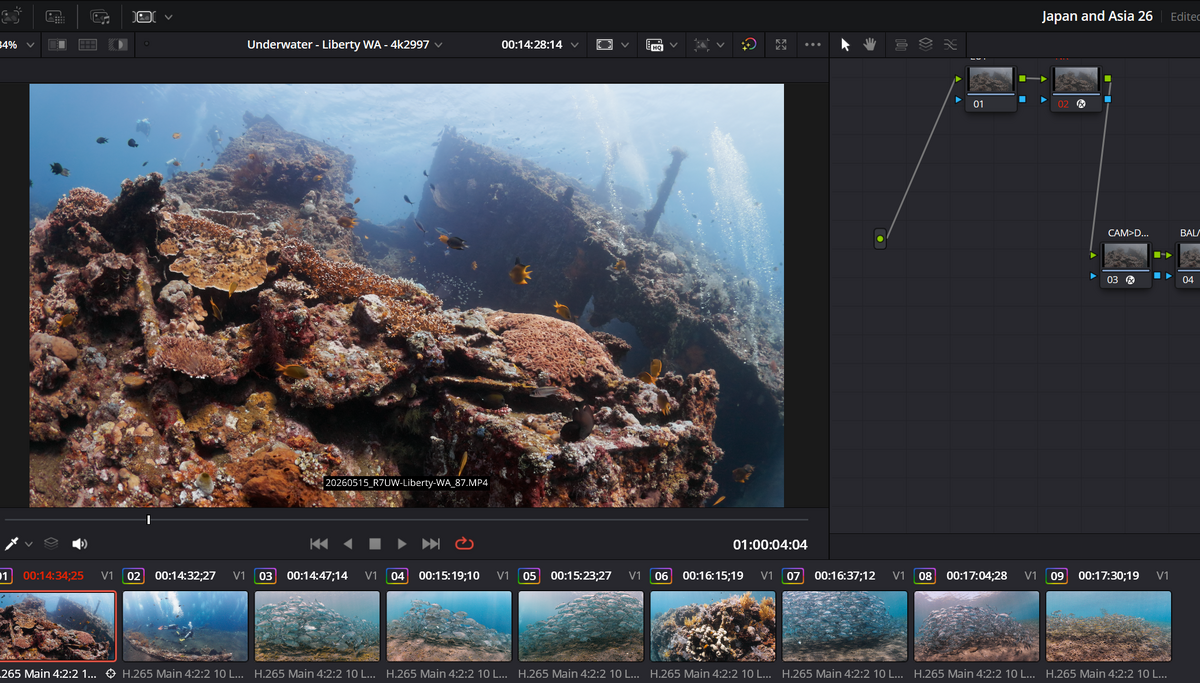
Just playing with the colour slice and it seems to do a decent job. Particularly in lots of my clips the Cyan shifting towards blue and altering density. Combining that with a hue v lum curve seems to be working OK without artefacts.
-
Started playing with my new R7 setup with CLOG3 video and wondering on underwater workflows. Im very familiar with clog workflow on land and Resolve to an extent but U/W is a bit different here. Specifically, the ability to deal with a washed out/bright water column, in particular ambient light shots. Scenario, 5-10m deep tropical waters, ambient light, no filter, no video lights. Manual WB set at the time on a white card. Water column often too bright, too washed out (and sometimes not blue enough). What sort of techniques for addressing this exist in studio? Colour slice? Colour Waper? Just the hue v sat/lum curves? Something funky with depth maps? I assuming bog standard qualifiers arent going to cut it due to reflection off fish and so on creating artefacts. So in short, what techniques are good for 10bit log u/w to do the above? Im running in YRGB with a DWG/Intermediate timeline (input CST for cinema gamut/clog3) (I do also have deeper video light shots but those are easier). Just an example here of some test shots.
-
Canon appears the same. It's one or the other. Not both and not different things on each screen.
-
Yup it an R7 and that might be the best compromise option i suspect even if doing it every shot may get very annoying rapidly. I like glancing at the screen to see or change all my settings without looking through an EVF and just using it to frame the shot. The Canon setup appears to just be "big screen, small screen" with no difference in what each displays when the face detect sensor is triggered. (on land i can configure both to show different things). First dives in 2 days time and i know its a much overdue and substantial update but also know its going to be a frustrating nightmare getting buttons, workarounds and changes into my head vs years of DSLR muscle memory.
-
Thanks for that. I hadnt considered putting the rope on the strobe arms to stop it flopping. Not sure if i tries it not to just pull the clamps off though (?). Changing O-rings is needed if i can source them (arms are different brands) and i suspect my 15 year old clamps arent great. I have to tighten to the point i need a large screwdriver to lever them open and it still flops. Any suggestions as to which are length combo to use for WA/10mm fisheye on APS-C (180 FOV or so)? Both long arms? Long and short each side ? Overriding factor is the massive, heavy (and for me, underpowered) Ikelites need to be supported. Video lights are fairly lightweight.
-
As above, transitioning from 2 decades of DSLR to Mirrorless underwater (have used Mirrorless on land for 6 or so years so comfortable). Generally on my DSLR setup underwater and on land mirrorless i use the screen to shot the settings and menus but then look through the OVF/EVF to compose and take the image. This isnt going to work now underwater as the face detection means i have the choice of screen OR EVF but not both or a different function on each. What are people generally using? EVF for everything or screen? Im aware i can map a button to toggle between but that sounds fiddly for each shot.
-
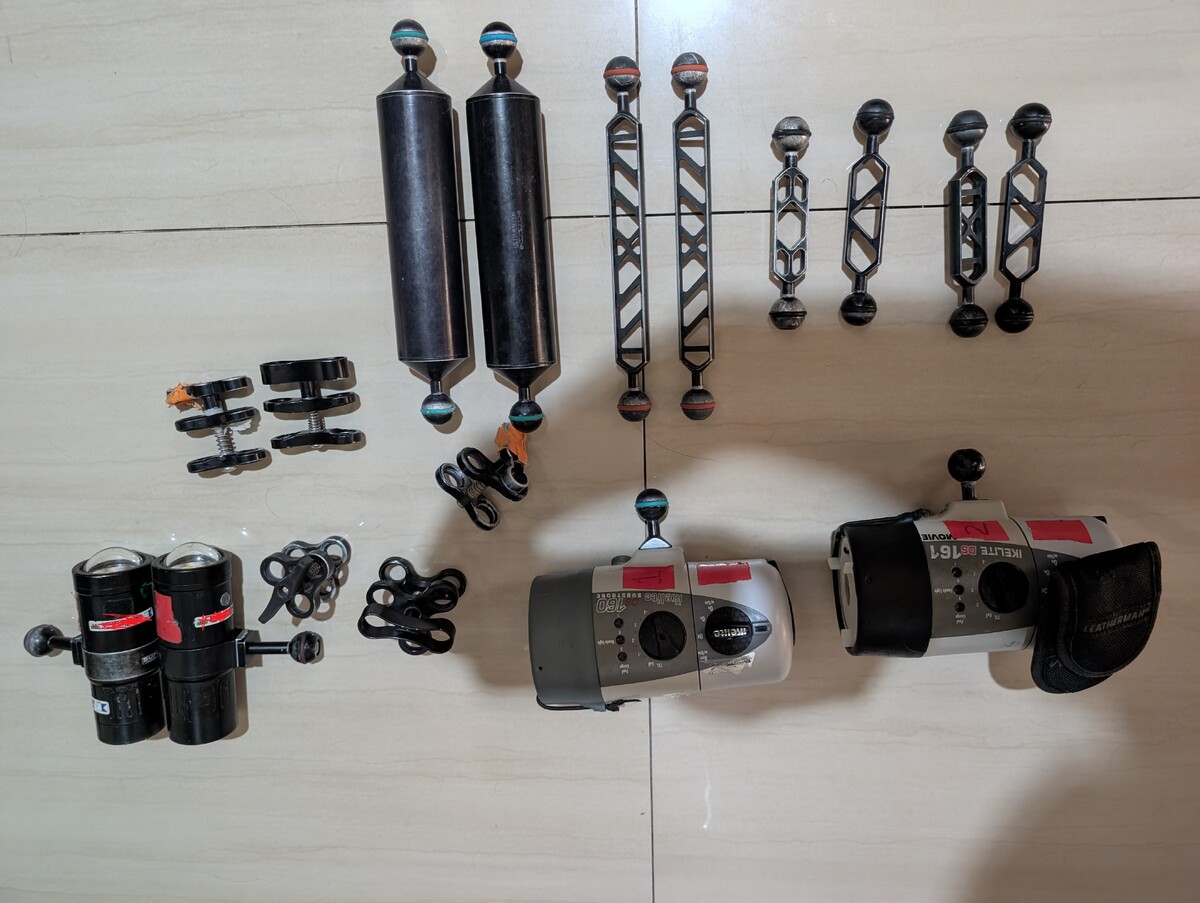
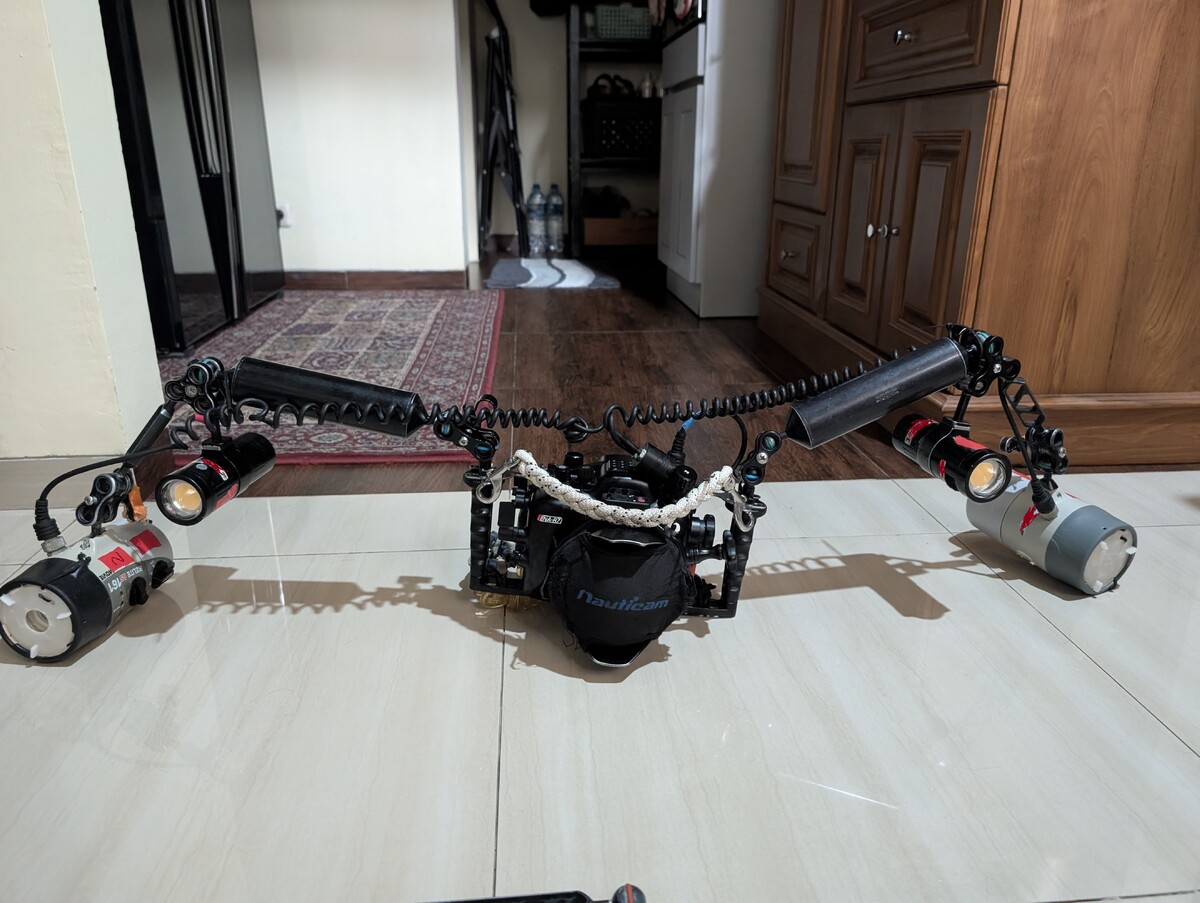
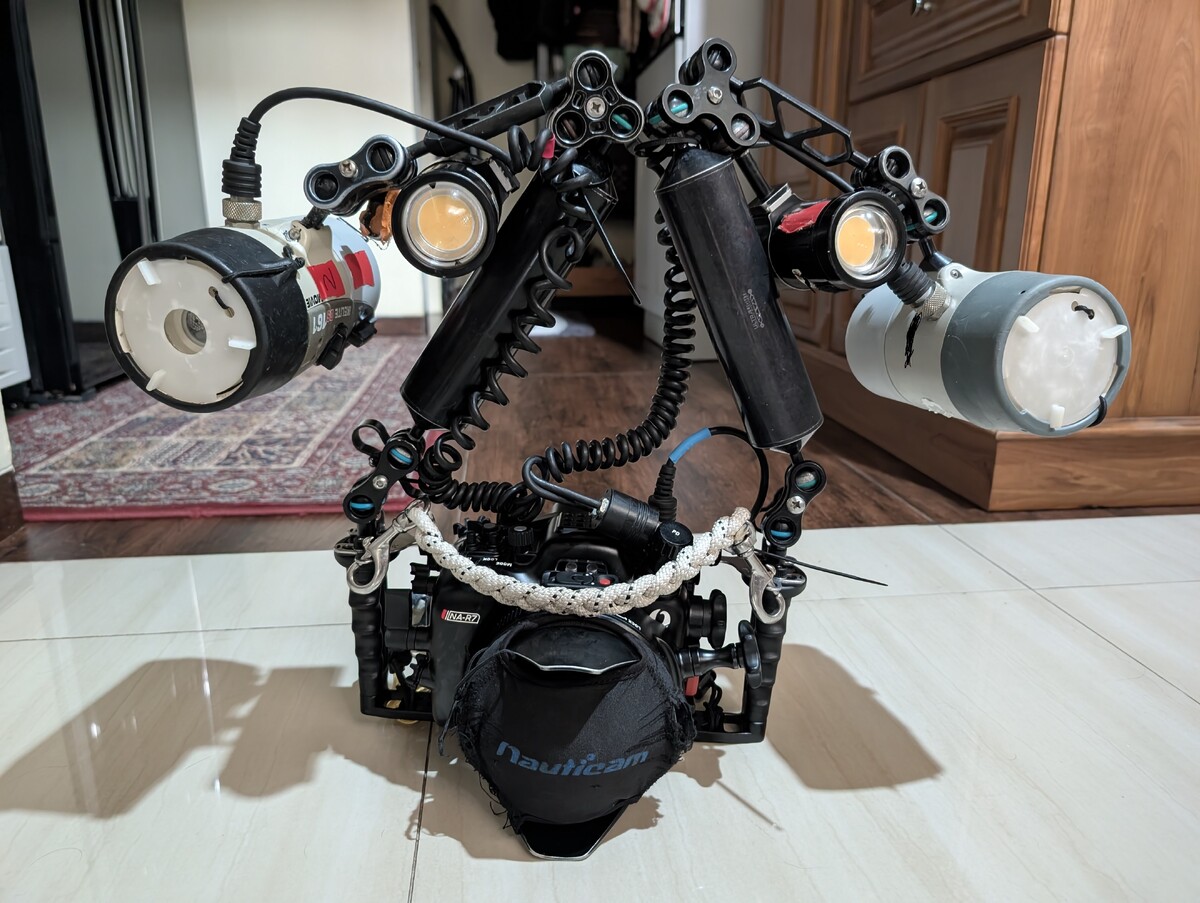
I'm in the middle of upgrading housing (first dives this week) and next task will be strobes and arms. BUT im currently stuck with my old setup. I find it VERY bulky and messy, especially "folded" (it doesn't - it flops). Its huge, its bulky, its negative. They're DS161s from Ikelite. I currently have: 2 x 8" Float arms 2 x 7" normal arms 2 x 4"ish normal arms I use 2 x SUPE video lights on a 3 way elbow mid arm. This is my WA setup for a Tokina 10-17 on APS-C to give FOV ideas. Its bulky, messy and due to 10 year old clamps, floppy. For my wide angle, am i better off keeping this setup OR make it neater by replacing the 7" normal size arms with my 5" arms i found in a cupboard (so 1 x 8 and 1 x 5 per side). Are there any real trade-offs for WA here vs improved in neatness? Now I've gone mirrorless the abomination of strobe wiring and arms is even more obvious. Pictures are the 8" and 4" on the WA setup. Can see its not neat at all, especially when "stowed" and holding the camera by the rope it just flops forward off balance. No easy way to carry. I find it ridiculously ungainly and so do boat crew trying to handle it. So sugestions: (i) best compromise WA arm length combo (ii) Best order of arms and clamps to make it usable U/W but also neater to stow/fold.
-
They're so far behind the competition now time wise this has to work or the company is finished.
-
Ive work on liveaboards so from that point of view, generic advice, deck space is limited. You might get away with 1 person with a personal tank but if more than that have the same idea there really isnt space. Theres also the issue fresh water is a finite resource so constantly refilling/emptying personal rinse tanks isnt great for that. Depends on the boat of course. Decent boats will have a rinse tank thats clean, fresh and hopefully policed so people arent putting mask soap or god knows what in it (all boats im on camera buckets are separate from the rest of dive gear buckets...and dive gear is only rinsed at the end of the trip). As a photographer, ive had a camera setup destroyed in a rinse tank. Left it there while i legged it to help untie the mooring line. Came back and a "helpful" entitled teenager with parents had put their dslr setup in the tank on top of mine (a Canon 70D in ikeite housing, 8" dome and 2 DS161 strobes in a black bin isnt hard to see), found resistance to their housing so rammed it as hard as they could. This crushed my at the time ikelite, snapped the dome port off and flooded/destroyed the whole setup. Rinse tanks are for rinsing not leaving. Swill it, remove it, take it away. If it needs further washing use the shower (if fresh water) when you wash or whatever. If you bring anything at all, make it a cooler bag type thing and nothing rigid. And be mindful of fresh water usage etc.
-
Im in Japan and buy a load of stuff there. Just ordered a Nauticam. Websites are indeed awful. Not sure about Retra but Mic21 (big dive shop chain) are the nauticam main dealer and they do answer in English to emails. They have some English speaking staff in shops at certain times too. Fisheye are the distributor/importer and they organised my housing, in English via Mic21. If theres something specific there you want its worth contacting Fisheye https://store.fisheye-jp.com/ (distributor) or Mic21 ( https://www.mic21.com/foreign/english.php ) via the emails. Replies are quick. You'll get 10% tax free. Unsure about Retra though - maybe contact Retra themselves and see if there are dealers? If its general electronics, Bic Camera (10% tax free plus 7% for no clear reason if foreign), Yodobashi (tax free) etc. Websites are woeful but good enough to find stock in which shop. Shops themselves you can get by with English and translation apps. FWIW tax free currently you dont pay it at all. Its deducted at purchase. From October its changing to claim back at airport.

.jpg.857dbbfbdc4d79d9c6ebf7b4ba96ed1b.jpg)

