That video really shows how good RAW format can be for underwater filming.
It will be very interesting to see whether the Nikon Z series with the Ninja V will offer similar quality with ProRes RAW.
It may be a sign that RAW video formats are (finally) becoming a realistic option to deal with color issues. If so, this is a huge (and important) development.
Adam
If you are a GH5S 100% video guy the bmpcc seems to make sense
If you ditched the GH5s because of lack of IBIS or take still images the bpmcc doesn’t make much sense
The housing seems really well conceived but having one slot sd and another CF Doesn’t make much sense for me
Does this housing have an m27 port or still m16?
Sent from my iPhone using Tapatalk
Very interesting the bpmcc uses USB C for recording raw therefore kills entirely the whole atomos trend
Actually this is a very smart move as SSD tough drive are also IP65 amd are small I wonder if it can fit the housing?
Sent from my iPhone using Tapatalk
The original prototype only had M16/M18 ports (and no tripod support) - however the retail / final version does indeed have the new M24 port - probably so they can sell you an NA-NINJAV as a viewfinder
However the BMPCC4K only outputs 1080p 10bit via HDMI - so the need for HDMI2.0 and thus the fullsize HDMI cable isn't needed. (But is more durable - so welcome)
CFast was indeed a weird choice (not a card I'm going to buy! $$$$) with XQD / CFExpress becoming the more go-to card due to being PCI based and not SATA so more future proof for data rates.
As to the SSD - yes the housing is designed to fit one on top. I've ordered a couple of 1TB T5 Samsung drives, from my understanding they can support Q5 quality and 5:1.
Although a very big fan of the BMPCC and knowing it is still too early I still haven't seen UW footage that convinces me. I 've seen equal or better footage from GH5 users in this forum. Comparing image to image the footage from the GH5S is equal quality even if not raw same goes to the GH5. Yes if you pixel peep blah blah you can find small differences in the image quality but who does that? On the other hand, the flexibility, tools and options given by the GH5, GH5S are way ahead of the BMPCC. Not even talking about the QA issues with it. Exciting times for sure but I would prefer to spend my $ in some lights at the moment.
The issues with quality will be sorted by the workflow. As these formats become more prevalent, the workflow will get easier and the quality gains more. I remember having to edit original Blackmagic RAW footage in Lightroom in Komodo in 2014, so we have come a long way already!
The issues with quality will be sorted by the workflow. As these formats become more prevalent, the workflow will get easier and the quality gains more. I remember having to edit original Blackmagic RAW footage in Lightroom in Komodo in 2014, so we have come a long way already!
Adam
That 4x 3400 mah battery pack is interesting
The space for the hard drive seems only to accomodate tiny ones without case that would not be my preference
Sent from my iPhone using Tapatalk
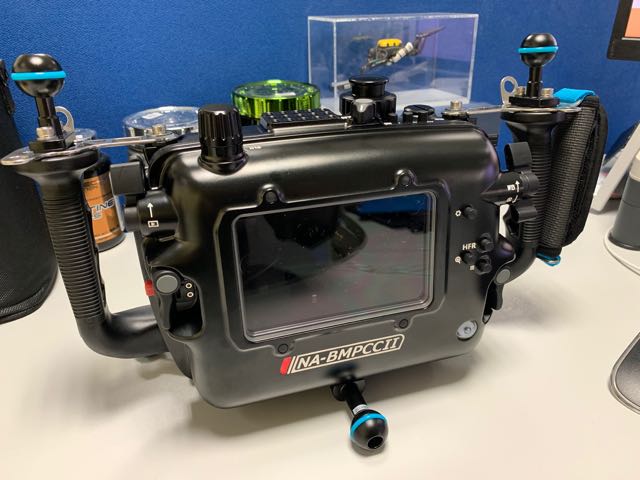
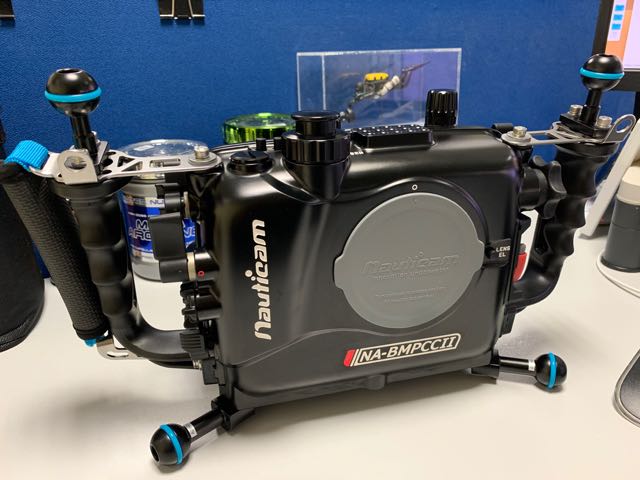
Housing Arrived
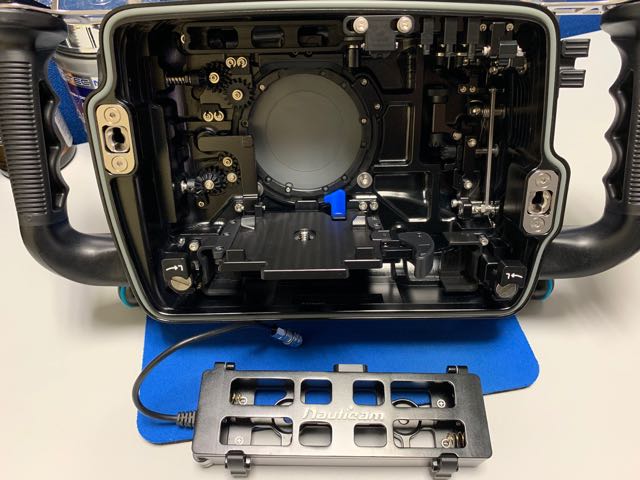
Some interesting observations -
a) it seems there is a switch now for activating the vacuum alarm only when the housing is closed - clever b) The new M24 port is massive!
c) Lovely battery holder
d) Bulit-in holder for Samsung T5 drives - was just expecting to stick it in the housing, no there is a dedicated holder
e) Holding it in my hands - I can still see a monitor will be required
Looks good. A well thought out design for video work and that camera specifically.
What lenses were you going to use with the camera?
What lenses were you going to use with the camera?
At the moment the same as my GH5.
14-42mm II with the Macro 35 Port and the WWL-1.
At the moment the same as my GH5.
14-42mm II with the Macro 35 Port and the WWL-1.
I'm looking forward to buy your GH5 rig
I'm looking forward to buy your GH5 rig
Alas I'm saving it as a Macro Rig - sorry!
Ouch!
seems well realised in a few week we will see how it compares with the GH5 on the same dive just dont come near with your 4 lights
This is Uber interesting ! Will be very interested to see how this works out - this cam in the hands of a capable operator....going to be very interesting to see the footage.
How long before you get it wet ?
Ouch!
Sorry Davide!
Sent from my iPhone using Tapatalk
Will the new BM battery solution fit in the housing ?
Will the new BM battery solution fit in the housing ?
No, the housing has been made to take a 4x 18650 battery pack under the camera (which provides more run time than the just announced grip)
Will be getting the grip thou in August for land based shooting. Very useful!
Sent from my iPhone using Tapatalk
Richard,
Please let us know your feedback on the camera once you get it wet