Skip to content

Photography Gear and Technique / Archived topic

Full Frame Upgrade for Hybrid Shooters - Sony A1 vs. Canon R5 C vs Nikon Z9 (AMA)

Started by dreifish ·

  • 68Posts
  • 68Replies

Read-only discussion

Full Frame Upgrade for Hybrid Shooters - Sony A1 vs. Canon R5 C vs Nikon Z9 (AMA)

68 posts
  1. 1 hour ago, Barmaglot said:

    Regarding laptop and screen sizes - have you considered adding a portable USB display to offload the editing UI onto, while keeping the video on the main screen? My day job is as a sysadmin, and I carry two of those whenever I travel - this gives me a triple-screen setup wherever I can get a desk that's at least a meter or so wide, and they easily pack into the same compartment as the laptop in my carry-on backpack.

    Thanks. Was not conscious that they existed. Will look into them.

  2. If going the MacBook route which seems sensible as a travelling editing machine you can use an iPad as an additional screen. 
     

    Btw: If you really want to crop you would have to shoot at 8k or 6k - 6k probably giving plenty enough leeway considering the problems @Interceptor121 mentioned with regards to cropping. 
     

    Generally it seems the gains you can make from your current setup moving to an A1 are marginal at best in terms of video quality (stills is another matter entirely ). I guess this is no problem for you financially but if I were in search of ultimate quality without regards for money I’d look at the other options tested in this thread. 

  3. 27 minutes ago, Interceptor121 said:

    Codecs are essential there is no point capturing data and compressing it into a substandard container. All it will be left is the resolution and the black and white which you can get from your current set up

    All I need is 1 that is good enough. I think the A1s XAVC HS 4K 60P 200M 4:2:2 is good enough.

    30 minutes ago, Interceptor121 said:

    I never crop anything to be frank I think this is one of the most overrated feature as framing is done when you shoot. So unless your lens was too wide you will not crop (I do this with far distant birds not underwater as far distant subjects are not visible and have no colour)

    My lens is usually too wide for small things like nudies so I employ a 2x crop for them. I also crop to center subjects. Once I have the subject in the frame, I freeze in order to keep the video as stable s possible. Cropping allows me to centre the subject.


    37 minutes ago, Interceptor121 said:

    The GH5M2 shoots 60p HEVC at 420 200 mbps. Only in that scenario you will get something more for all the rest the codecs are inferior. For 422 24/25/3- fps you need to look at all intra or prores as in water it does make a difference to have codecs that manage movement without predictions 

    Hmm. I had a look at my camera. MP4 HEVC has 4K 72M 30p and 4K 72M 24p. Perhaps my camera is the GH5, not the GH5M2.


    49 minutes ago, Interceptor121 said:

    When you travel you look at proxies on your laptop and then you do the edit at home (not on a laptop) you need a big screen that is color correct and a good environment that is not bright 

    I don't edit video after my diving trip.


    58 minutes ago, Interceptor121 said:

    With those codecs you are unlikely to see any benefits because the compression applied will destroy lots of the info. This is especially true for the H264 422 codec

    I am looking at XAVC HS, which I believe is H.265, not H.264.


    1 hour ago, Interceptor121 said:

    In addition all those benefits will go away unless you shoot in log if you don't there is no point as you will not see the extra info being captured and all you will get are 10 stops of dynamic range no matter what the camera is able to produce

    I was actually looking at slog3 which is pp8 and pp9 in the Sony picture profiles.

    1 hour ago, Interceptor121 said:

    If I was doing video I would look at the A7S3 it has better codecs, better recorder support and less rolling shutter 

    That would be the right choice for you but the wrong choice for me. The right choice for me is the A1.


  4. Looking at your most recent Videos, I think an investment in Workshops or Post-Processing-Courses would make much more sense than a new camera. You are not nearly maxing out the potential of the GH5. It looks like you're pushing the files hard in post. Are you using custom white balance for each depth?

  5. 4 hours ago, WK's Gone Diving said:


    I don't edit video after my diving trip.


    You don't need a better camera if all your do is to edit on the fly during the trip as you are not going to shoot log

    This means you will record a like 709 curve with 10 stops dynamic range, the only thing you will see with the A1 is improved SNR in those situations where a larger sensor matters which are not as many as you think

    I would urge you to reconsider your set up, your lenses (why crop?) and understand how your workflow can improve

    Your videos are ok but they are not well graded they seem straight off the bat, if this is what you want buy a Sony or panasonic camcorder and house it. Easier to do decent results and lots of noise reduction in camera that will help

    Really no reason to go for a digital camera get something simpler and basic and focus on getting it right in camera

  6. 8 hours ago, hyp said:

    Looking at your most recent Videos, I think an investment in Workshops or Post-Processing-Courses would make much more sense than a new camera. You are not nearly maxing out the potential of the GH5. It looks like you're pushing the files hard in post. Are you using custom white balance for each depth?

    Thank you for  your critique. I drop my videos in the Video Showcase sub forum, usually on the day I step off the LOB, to invite critique because that is the only way I will learn. I have actually looked for scuba video workshops but have only found photo workshops, but I will certainly keep looking for a video workshop that teaches Final  Cut because that is what I am using.

    You mention my most recent videos. I have been on two trips recently, firstly to Fiji, then to Indonesia In Fiji, I took with me the LX10 and a GoPro10. Unfortunately, the on off control on the LX10 malfunctioned early in the trip, therefore all of the footage from Beqa Lagoon was from the GoPro for which there was no white balance and the same lack of white balance applies to some 90% of the footage from the LOB.

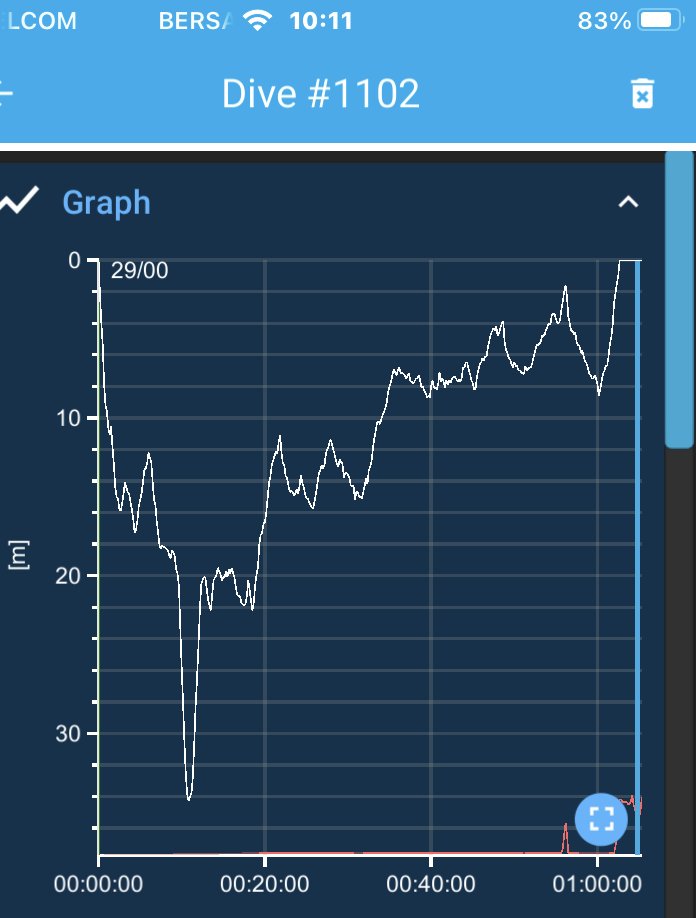
    As for custom white balance, I do not do a new custom white balance for each depth. The attached jpg shows the dive profile of the dive in which I recorded the eagle rays in my most last video. I was at 18m when I spotted rays below me, so I went negative and dropped nearer the rays. I began recording the rays on the way down, probably beginning at about 22m, so my right hand was holding the camera whilst I monitored the computer on my left wrist. My left hand was also engaged in controlling buoyancy with the inflator. My max depth was 34m and the rays were probably another few m below me when I first reached my max depth. I believe that all the footage that ended up in my video was taken whilst I was at 34m, but I did not stop recording in order to do a white balance. Doing a white balance at 34m did not appear to be a priority to me at that time.

    77152.thumb.jpg.dfce8fc2ab158c3d73d0f38c7cbf4195.jpg


  7. 7 hours ago, Interceptor121 said:

    You don't need a better camera if all your do is to edit on the fly during the trip as you are not going to shoot log

    You will be correct if I find log to time consuming to edit and decide not to shoot log.


    7 hours ago, Interceptor121 said:

    This means you will record a like 709 curve with 10 stops dynamic range, the only thing you will see with the A1 is improved SNR in those situations where a larger sensor matters which are not as many as you think

    I have no idea what a 709 curve is. What I can say is that on the Flores to Banda voyage, there was a rebreather diver on the boat with an A1 and he was shooting at XAVC HS 4K 60p 200M 4:2:2. I don't know which picture profile he was using, but I don't think it was slog. I will ask him though. Whatever settings he was using, it gave him the results that I am after.

    7 hours ago, Interceptor121 said:

    I would urge you to reconsider your set up, your lenses (why crop?) and understand how your workflow can improve

    My setup for the A1 will basically be 1) 28-60, 2) 28-60 + WWL1, and 3) 28-60 +SMC-1. I will consider your advice about not cropping.


    7 hours ago, Interceptor121 said:

    Your videos are ok but they are not well graded they seem straight off the bat, if this is what you want buy a Sony or panasonic camcorder and house it. Easier to do decent results and lots of noise reduction in camera that will help

    I did consider a camcoder and looked at housings such as Gates, but I never pulled the trigger because they were bigger than I was willing to consider. The A1 is the same size as the GH5, which is a size that I am happy with. My videos are not well graded but I am learning and am hopefully improving with each new video. That is why I post my videos and invite critique.


    7 hours ago, Interceptor121 said:

    Really no reason to go for a digital camera get something simpler and basic and focus on getting it right in camera

    Thank you. I will give this advice every consideration.

  8. Behind the mask offer dedicated video trips. If you don’t want to take the time to white balance at depth your priority feature beyond all else should be a camera that shoots raw internally. Getting it right in camera should be preferred but getting the most pushable files possible seems like the way to go for you. I would look carefully at the white balance tests in this thread. 

  9. 7 minutes ago, hyp said:

    Behind the mask offer dedicated video trips.

    Thanks. I will have a look at Behind the mask.

    8 minutes ago, hyp said:

    If you don’t want to take the time to white balance at depth your priority feature beyond all else should be a camera that shoots raw internally. Getting it right in camera should be preferred but getting the most pushable files possible seems like the way to go for you.

    I tend to change levels in order to get the best vantage to video palegics. What are the most pushable files?


    10 minutes ago, hyp said:

    I would look carefully at the white balance tests in this thread. 

    I will  do that.

  10. 10 minutes ago, hyp said:

    Behind the mask offer dedicated video trips. If you don’t want to take the time to white balance at depth your priority feature beyond all else should be a camera that shoots raw internally. Getting it right in camera should be preferred but getting the most pushable files possible seems like the way to go for you. I would look carefully at the white balance tests in this thread. 

    RAW actually requires setting the white balance or using a set color temperature. AWB no longer works so at the end you are always better off white balancing especially as most cameras allow change of temperature but not tint

    Quite a few people are too lazy to do proper grading of the footage which is like for photos equally important as the quality of what you capture

    Using a subpar codec is like getting a super camera to shoot jpegs, if you shoot log you need 422 10 bits and you must grade, there is no easy way out

  11. 4 minutes ago, WK's Gone Diving said:


    I tend to change levels in order to get the best vantage to video palegics. What are the most pushable files?


    Changing levels destroys the clips if you did not white balance in camera because in most cases blue is high and red is low

    When you up the red you increase the noise. White balance before shooting applies a multiplication that to some extent rebalnces things before they are written into the file and increases the headroom in post

    If you shoot underwater video including RAW you must white balance in camera


    Edited by Interceptor121
  12. The Test of the Canon R5C on page one of this thread suggests, that it is in fact possible to replicate the custom wb results in post, though apparently not with all raw formats and all cameras, e.g. not with the A1. If I knew that I often do not find the time to WB in the action, I know this would be a deciding factor for me. 

  13. 1 hour ago, hyp said:

    The Test of the Canon R5C on page one of this thread suggests, that it is in fact possible to replicate the custom wb results in post, though apparently not with all raw formats and all cameras, e.g. not with the A1. If I knew that I often do not find the time to WB in the action, I know this would be a deciding factor for me. 

    When you shoot RAW the AWB function stops working. So one way or another a setting is required it may be a preset color temperature but you need to do it

    It is easy to replicate something you know it is not easy to replicate something you don't know so a test on land in controlled situation does not really tell you much on how it will work afterwards

  14. 15 minutes ago, Interceptor121 said:

    When you shoot RAW the AWB function stops working. So one way or another a setting is required it may be a preset color temperature but you need to do it

    It is easy to replicate something you know it is not easy to replicate something you don't know so a test on land in controlled situation does not really tell you much on how it will work afterwards

    Still would make it easy to get close and then adjust. It might take some skill to replicate the proper white balance, but at least the files won't fall apart. Just to reiterate: I absolutely agree that it is always better to get it right in camera, but RAW footage will absolutely allow you to safe an incorrect white balance setting and that is not possible with other formats. 

    I don't recall AWB working particularly well underwater anyway, so having to set it at least once seemed a given to me.

  15. 6 hours ago, Interceptor121 said:

    Changing levels destroys the clips if you did not white balance in camera because in most cases blue is high and red is low

    When you up the red you increase the noise. White balance before shooting applies a multiplication that to some extent rebalnces things before they are written into the file and increases the headroom in post

    If you shoot underwater video including RAW you must white balance in camera


    I understand the importance of white balance.

    The above very short video shows actual diving situations in blue water and channel diving that I love to do.

    In blue water diving, I'm typically cruising at between 20m and 25m to conserve air and bottom time. Quite often the pelagics are below us. In the short clip of the hammerheads, we were probably at 20m when we saw the hammerheads and everyone descended until they hit MOD, but the hammerheads were probably another 15m below us. Assuming that MOD is 35m and the hammerheads were at 50m. You can do WB after you have descended to 35m, but the light entering the camera has travelled 50m from the surface to the hammerheads, plus another 15m from the hammerheads to the camera. This is a total of 65m traveled through the water column and there is no way that I am aware of that you can do a manual WB for light that has traveled 65m through the water column when you are at 35m.

    In channel diving, I'm typically hooked in at 30m so there is no change in dept involved. The grey reefs are at 30m depth, but they are probably 15m away from the camera. Light has traveled 30m from the surface to the grey reefs, then another 15m from the grey reefs to the camera. How do you WB for light that travels 45m through the water column when you are 30m below the surface.

    Sony has underwater AWB. Perhaps that is the best option for in camera WB.

  16. I understand the importance of white balance.
    The above very short video shows actual diving situations in blue water and channel diving that I love to do.
    In blue water diving, I'm typically cruising at between 20m and 25m to conserve air and bottom time. Quite often the pelagics are below us. In the short clip of the hammerheads, we were probably at 20m when we saw the hammerheads and everyone descended until they hit MOD, but the hammerheads were probably another 15m below us. Assuming that MOD is 35m and the hammerheads were at 50m. You can do WB after you have descended to 35m, but the light entering the camera has travelled 50m from the surface to the hammerheads, plus another 15m from the hammerheads to the camera. This is a total of 65m traveled through the water column and there is no way that I am aware of that you can do a manual WB for light that has traveled 65m through the water column when you are at 35m.
    In channel diving, I'm typically hooked in at 30m so there is no change in dept involved. The grey reefs are at 30m depth, but they are probably 15m away from the camera. Light has traveled 30m from the surface to the grey reefs, then another 15m from the grey reefs to the camera. How do you WB for light that travels 45m through the water column when you are 30m below the surface.
    Sony has underwater AWB. Perhaps that is the best option for in camera WB.

    There is no color information at that depth despite camera sensors that is the physics
    You can improve SNR but the footage is monochromatic
    The solution is either lights but won’t cover more than few meters or book a trip where hammerheads are shallower though visibility may drop
    I would say again A7S3 will be better suited with log iso at 12800


    Sent from my iPhone using Tapatalk
  17. 11 hours ago, Interceptor121 said:

    I would say again A7S3 will be better suited with log iso at 12800

    I understand that the A7S3 is better than the A1 in low light. I don't question that. But I have seen the A1 perform in low light and it is good enough for me.

    Sony has a built in 1.5x APSC crop option. On the A1, this results in 21Mpixel resolution, which is above 4K standard. My understanding is that this 1.5x APSX crop option is not available on the A7S3 in 4K video mode as it results in resolution below 4K standard.

    I know that you don't crop. I cannot understand you stand but you are welcome to maintain it. Do you also object to zoom? I can engage 2x digital zoom on the A1, which should result in a 12Mpixel resolution that is above 4K standard. The A7S3 has minimal digital zoom ability that maintains 4K resolution.

    On balance, the A1 is my preferred camera. Your mileage may differ.


  18. 14 hours ago, Interceptor121 said:

    I would say again A7S3 will be better suited with log iso at 12800

    The digital zoom image appears to degrade after a zoom of about 1.5x, but Sony has a second zoom that they call Clear Image Zoom, which allows zoom up to 1.5x. The interesting thing is that you can stack a zoom on top of the crop. So if you set the APSC crop, you get 1.5x. And if you set the clear image zoom on top of the APSC crop, you get an additional zoom up m to 1.5x. Apparently this will still be 4K resolution, or so I have been told, but I will have to check if the image degrades.

    I believe that the A7S3 does not have the APSC crop, and I have no information on its clear image zoom. To me the A1 is much better to me.

  19. If you zoom in underwater your image quality goes down the drain, regardless of resolution. There is a reason people mostly use macro and wide angle lenses. Both allow you to get really close to stuff, so that you don't have to shoot through lots of water and also be able to use lights. Sometimes cool stuff is far away underwater, but no amount of money will make you able to film it at acceptable quality, because money doesn't beat physics. The long end of a 24-70 in a dome is the absolute farthest you should ever zoom in. Only in macro settings where you are already really close can cropping make sense, because you get more magnification and you are usually already really close, so it's not a problem shooting through extra water. I have a feeling though, that is not what you're after.

    If you see cool stuff that's far away underwater get closer or instead of recording with your camera, record with your memory. Image quality in there will be great!

  20. On 10/17/2022 at 12:53 PM, hyp said:

    What Interceptor is saying, (if I understand im correctly) is that with the current codecs the A1 will provide little to no improvement over what you already have, so you might just as well spend the money on another bucket list trip. To get a significant improvement with the A1 you would require an external recorder to access better codecs. 


    I think this is a highly dubious statement -- the A1 has the exact same codecs, bit depth, and bit rates as the A7S III in 4k.

    4k at 60p can be recorded in 280mbps (4:2:2) or 200mbps (4:2:0) (the Panasonic GH5 is 150mbps in 4:2:.0)

    Plus the additional 8k h.265 codecs at either 200, 400 or 540mb/s.

    There's nothing lacking in the codecs and they are similar in terms of bit rates to the h.265 codecs found on other Panasonic/Canon/Nikon cameras. Sure, perhaps the compression implementation from Sony may not be quite as good as it is from Panasonic, but in real world usage, you're not going to notice any difference. Many people, including quite discerning users, find the A7S III codecs more than sufficient for professional use, even for special shots in big budget documentaries or Hollywood films.

    So no.. you don't need an external recorder to take advantage of the sensor on the A1 or the A7S III, and the internal codecs are more than good enough. For the vast majority of people, an external recorder like the Ninja V and shooting in Prores Raw is not required and not really benefecial on the A1 or A7S III.


Account

Navigation

Search

Search

Configure browser push notifications

Chrome (Android)
  1. Tap the lock icon next to the address bar.
  2. Tap Permissions → Notifications.
  3. Adjust your preference.
Chrome (Desktop)
  1. Click the padlock icon in the address bar.
  2. Select Site settings.
  3. Find Notifications and adjust your preference.