Skip to content

Video Gear and Technique / Archived topic

Advice on compact set-up for video?

Started by shelbyrose ·

  • 90Posts
  • 90Replies

Read-only discussion

Advice on compact set-up for video?

90 posts
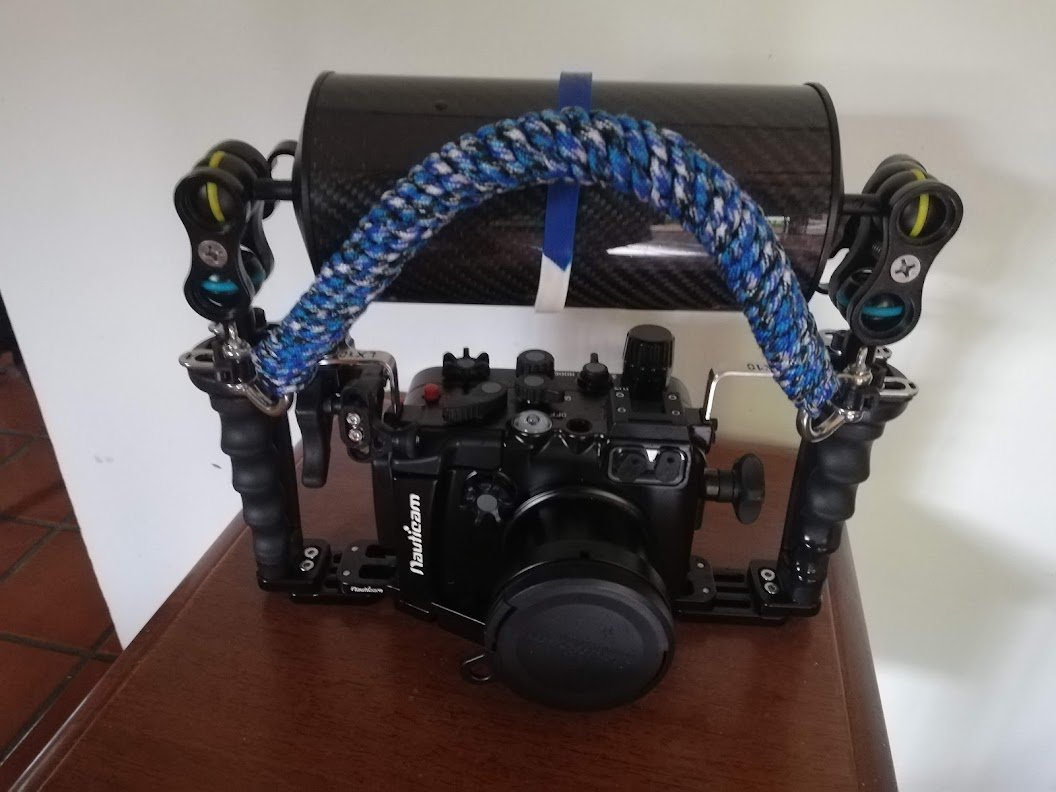
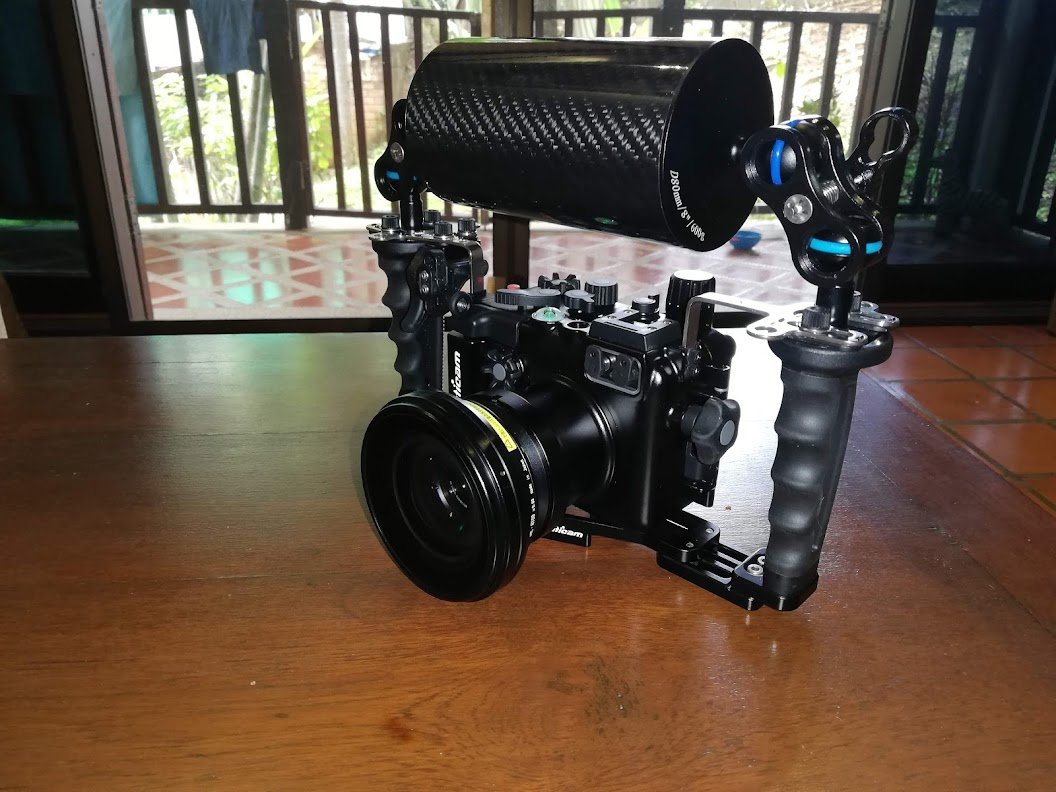
  1. Regarding flottation, I use carbon fiber float arms on my LX10 rig. The main one is a +900g Puluz 27.5cm / 80mm diameter arm

    This clamped onto the Nauticam Flexitray ball heads.

    Then I cable-tie another +400g carbon arm floater to this, and depending on the setup I add another small one either on the bottom of the tray or to the top floater.


    What's nice about this is that you can move the second float arm around to balance the rig (tilt it forward or back).
    Left to right tilt can be tuned by just moving the clamps one way or another. The rig is neutral or almost depending on setup, and balanced.

    I don't use lights for wide angle, so I don't have to compensate for the lights. For macro I don't use floats or just a small one to keep the rig negative.

    PU3026_1.jpg

    Edited by bghazzal
  2. 7 hours ago, bghazzal said:

    Regarding flottation, I use carbon fiber float arms on my LX10 rig. The main one is a +900g Puluz 27.5cm / 80mm diameter arm

    This clamped onto the Nauticam Flexitray ball heads.

    Then I cable-tie another +400g carbon arm floater to this, and depending on the setup I add another small one either on the bottom of the tray or to the top floater.


    What's nice about this is that you can move the second float arm around to balance the rig (tilt it forward or back).
    Left to right tilt can be tuned by just moving the clamps one way or another. The rig is neutral or almost depending on setup, and balanced.

    I don't use lights for wide angle, so I don't have to compensate for the lights. For macro I don't use floats or just a small one to keep the rig negative.

    PU3026_1.jpg

    Ah okay that's really helpful! Do you happen to have a photo of this set-up when you have all the various float arms? Trying to envision it. :) 

  3. 18 minutes ago, shelbyrose said:

    Ah okay that's really helpful! Do you happen to have a photo of this set-up when you have all the various float arms? Trying to envision it. :) 

    I don't have a good pic of the whole float system but I'll take one next time I assemble.
    Here's what it looks like. On the 3rd pic, which is more recent, you can see a 2nd float attached to the primary one.
     

    It looks odd but is really comfy underwater. You just need to push the camera in front of you.

    IMG_20201125_130400.jpg

    IMG_20201024_125320.jpg

    IMG_20220628_083358.jpg

    Edited by bghazzal
  4. 1 minute ago, bghazzal said:

    I don't have a good pic of the whole float system but I'll take one next time I assemble.
    Here's what it looks like.
    On the 3rd pic you can see the 2nd float attached to the primary one.

    IMG_20201125_130400.jpg

    IMG_20201024_125320.jpg

    IMG_20220628_083358.jpg

    Ahh I see! Thanks, that's really helpful. 

  5. 15 hours ago, bghazzal said:

    Regarding flottation, I use carbon fiber float arms on my LX10 rig. The main one is a +900g Puluz 27.5cm / 80mm diameter arm


    Nice setup.  I ordered a pair of 200g carbon float arms through AliExpress and they just arrived.  I thought about a horizontal float like yours, but was worried that it would significantly block my sight picture.  What have you experienced?

    When my neighborhood pool opens, I'll be able to get in there with my luggage scale and see what kind of improvement I gained.  Theoretically, I could combine these with my old foam floats, but I already have too much stuff to deal with down there.

    Edited by ROUS
  6. Hi Rous - Yes, it does reduce sight picture, but it's manageable, seeing above the float or just through the LCD screen.
    The other floats are at the front of the main large float, so it's only the large float blocking the view. Diameter is 80mm.

    I was also worried about drag underwater, but since the water flows over and under the float, it's fine.

    Having access to a pool is great. I played around with the floats in the pool for buoyancy and balance, which helped a lot.

    It's amazing how negative the rig is with the Inon UWL-H100. I started out with a single +600g buoyancy float, which was nowhere near enough with the wet lense (which is -345g in water itself) .

    I returned the first float and got the +900g buoyancy float - much better but still quite negative. I built on that, adding +400g / +600g floats, attached with cable ties....

    I now have two metal rails for the quadripod on the tray, which might my setup heavier,, but even without that you need to plan to compensate a whopping -1500g or so in water to make it neutral / near neutral with the NA-LX10, flexitray + an Inon UWL-H100 wide lense.  It balances out quite easily, doesn't tilt much with buoyancy on top

    Switching from fresh to saltwater doesn't change much otherwise, so that's not really an issue. Just get it really close to neutral, where it sinks but very slowly, and you can balance it on your pinky finger.

    Edited by bghazzal
  7. On 4/15/2023 at 9:05 PM, shelbyrose said:

    Thanks again, all super helpful. Yes I’d love to see more of your macro footage when you have the chance! Lots more to think about…!!

    Hi there.

    So here is some macro footage shot in Tulamben, Bali a few weeks back.

    The Lumix LX10 is mounted on my homemade quadripod for the Nauticam Flexitray mentioned above, shooting with an INON UCL-165 (+6 diopter) closeup lens.

    I hadn't shot macro for a while, and a lot of Tulamben critters are really tiny, which proved challenging for my aging eyes, and led to the use of the camera's digital zoom, for lack of stronger diopters... I actually managed to forget my pair of usual lights, so this was lit with a single Archon D11V 700 lumen-ish video light...

    Having only one light made it difficult to compensate Tulamben's strong daylight in the shallows (you can see the light changes as clouds pass overhead), and also accounts for lighting issues on wider shots like the Tozeuma Shrimp or the tiny frogfish - I won't be making that mistake again!

    cheers!


    Edited by bghazzal
  8. 2 hours ago, bghazzal said:

    Hi there.

    So here is some macro footage shot in Tulamben, Bali a few weeks back.

    The Lumix LX10 is mounted on my homemade quadripod for the Nauticam Flexitray mentioned above, shooting with an INON UCL-165 (+6 diopter) closeup lens.

    I hadn't shot macro for a while, and a lot of Tulamben critters are really tiny, which proved challenging for my aging eyes, and led to the use of the camera's digital zoom, for lack of stronger diopters... I actually managed to forget my pair of usual lights, so this was lit with a single Archon D11V 700 lumen-ish video light...

    Having only one light made it difficult to compensate Tulamben's strong daylight in the shallows (you can see the light changes as clouds pass overhead), and also accounts for lighting issues on wider shots like the Toezuma Shrimp or the tiny frogfish - I won't be making that mistake again!

    cheers!


    Thanks for sharing this! You got some really beautiful footage here! Love macro critters. When you use two video lights, do you use the second as a fill? 

    As of yesterday, I am officially the proud owner of an LX10 nauticam rig! Really excited to get started with it! Thanks for all of the advice. I'll next be diving in early June so have a little bit of time to get familiar with the system and hopefully fine tune buoyancy etc. If you have any tips on settings or the like that you've found particularly useful, I'd definitely appreciate any other thoughts. :) 

  9. 4 hours ago, shelbyrose said:

    As of yesterday, I am officially the proud owner of an LX10 nauticam rig! 

    Congrats!  I spent all day yesterday editing my first LX10 dive.  It was in Florida caverns, so I was asking a lot from it.  It spent a lot of its time trying to figure out where to focus.  I was continually moving and surrounded by boulders and often in silty conditions.  It probably did as good as possible.  My next ocean dive should help auto-focus calm down some.  

  10. 17 minutes ago, ROUS said:

    Congrats!  I spent all day yesterday editing my first LX10 dive.  It was in Florida caverns, so I was asking a lot from it.  It spent a lot of its time trying to figure out where to focus.  I was continually moving and surrounded by boulders and often in silty conditions.  It probably did as good as possible.  My next ocean dive should help auto-focus calm down some.  

    Awesome - Caverns are tough for sure. I only did that once with the LX10 in Chandelier Cave in Palau, and tricky it was...

    Regarding focusing (which isn't the best / fastest on the LX10) remember you can assign back button focus + focus lock on the cam's two upper buttons, that happen to fall under the right thumb on the Nauticam housing - this really helps a lot, both for wide and macro.

  11. 4 hours ago, shelbyrose said:

    If you have any tips on settings or the like that you've found particularly useful, I'd definitely appreciate any other thoughts

    Maybe @bghazzal can share his settings. I never used a LX10 but I'm a Panasonic long time user and basic settings are all the same.

    Panasonic has not updated its compact models for years. It's a shame because we could really use an LX updated to 2023 ;)

  12. 4 hours ago, shelbyrose said:

    Thanks for sharing this! You got some really beautiful footage here! Love macro critters. When you use two video lights, do you use the second as a fill? 
    (...)
    If you have any tips on settings or the like that you've found particularly useful, I'd definitely appreciate any other thoughts. :) 

    For the lights in macro, with two I usually light the scene from the sides, pivoting in, to try to get an even coverage.
    But artificual light is something I've just started playing around with and will be experimenting with in the weeks to come if all goes well.

    One thing I will try to do is to work on black backgrounds in tropical daylight, like Dustin Adamson / Oceanshutter does so well.
    Not sure how realistic it will be on a compact the LX10, as it's a combination of light positioning and small aperture, since you're not really supposed to play with shutter speed in video...

    I'll post my main settings below.


  13. 1 hour ago, Davide DB said:

    Maybe @bghazzal can share his settings. I never used a LX10 but I'm a Panasonic long time user and basic settings are all the same.

    Panasonic has not updated its compact models for years. It's a shame because we could really use an LX updated to 2023 ;)

    Yep - an updated LX compact would be fantastic...
    Otherwise sure, I actually have them on file  - it might a little difficult to read like this but should make sense scrolling the menus  camera in hand.

    -  Start in Creative Movie / motion picture mode

    photo style custom CineD (this is a small "hack", where you need to load the CineD profile on the camera, then save it to custom presets so it stays there. I posted some links on the Cine-D profile in this thread here - I save this, in movie mode to the 3 custom presets (C1, C2, C3)
    contrast  0 , sharpness/noise reduction/saturation -5

    filter off
    4k live crop off
    snap off
    rec format mp4

    I set the custom presets as follows:
    4k 30p (C1) 1080 60p (C2) 4k 30p (C3)
     C1 is Manual exposure, C2 is Manual exposure, C3 is in A mode (which gives you auto ISO - there is no auto ISO in Manual mode on the LX10, unfortunately)

    general
    high speed vid off
    sensitivity 100 ISO or auto
    AF mode custom multi
    AFS
    continuous AF off
    metering multi
    highlight shadows standard
    I dynamic off
    Iresolution off
    Diff comp off
    I zoom off
    Digital zoom off
    stabiliser on
    silent op on
    wind noise canceller off
     
    custom menu
    silent mode off
    AF/AE AF lock
    AF/AE lock hold on
    shutter AF off
    halfpress releas off
    quick AF on
    pinpoint AF time short
    pinpoint af disp PIP
    af assist lamp off
    focus release priority release
    AF+MF on
    MF assiist OFF or macro on
    mf assist display pip
    mf guide on
    peaking on – set LOW (orange, red, pink or yellow)
    histogram off
    guide line grid
    center marker on
    highlight on
    zebra pattern zebra 1 80% high
    monochrome off
    constant preview on
    expo meter on
    dial guide on
    fn button  fn1 AF- On fn2 AFL AEL Fn3 Q menu
    zoom lever magnifying glass
    lens position resume off
    lens retraction on
    q menu preset (to access shutter)
    ring dial STEP ZOOM n ring ISO on back
    self shot off
    Touch settings all off
    touch scroll L
    menu guide on
    exp comp display setting up down


    C1
    4k 30p
    Manual exposure
    high speed vid off
    sensitivity 100
    continuous AF off
    metering multi
    highlight shadows standard
    stabiliser on
    rest off
     
    custom
    silent mode off
    AF/AE AF lock
    AF/AE lock hold on
    shutter AF off
    halfpress releas off
    quick AF on
    pinpoint AF time short
    pinpoint af disp PIP
    af assist lamp off
    focus release priority release
    AF+MF on
    MF assiist OFF or macro on
    mf assist display pip
    mf guide on
    peaking on (orange, red, pink or yellow)
    histogram on
    guide line grid
    center marker on
    highlight on
    zebra pattern zebra 1 80% high
    monochrome off
    constant preview on
    expo meter on
    dial guide on
    fn button:   fn1 AFL AEL fn2 AF- On Fn3 Q menu
    zoom lever magnifying glass
    lens position resume off
    lens retraction on
    q menu preset (to access shutter)
    ring dial WB on ring ISO on back
    self shot off
    touch scroll L
    menu guide on
    exp comp display setting up down
     
    C2
    180 60p
    Manual exposure
    high speed vid off
    sensitivity 100
    continuous AF off
    metering multi
    highlight shadows standard
    stabiliser on
    rest off
     
    C3
    4k 30p
    A mode (Aperture priority)
    high speed vid off
    Sensitivity auto ISO
    continuous AF off
    metering multi
    highlight shadows standard
    stabiliser on
    rest off
     --------
    NATIVE ISO on LX10:  125
    Focal sweet spot: 5.6

    This is my base, which I'll modify depending on the type of subjects etc.

    Edited by bghazzal
  14. 10 minutes ago, bghazzal said:

    -  Start in Creative Movie / motion picture mode
    photo style custom CineD (this is a small "hack", where you need to load the CineD profile on the camera, then save it to custom presets so it stays there. I posted some links on the Cine-D profile in this thread here - I save this, in movie mode to the 3 custom presets (C1, C2, C3)

    Wow this is SO helpful. I'll definitely be sitting down and scrolling through all the settings later with your post next to me. :) For the CineD profile, do you mind reposting the link to the thread you referenced? Think it didn't come through.

    Many thanks, again!

  15. 11 hours ago, shelbyrose said:

    Wow this is SO helpful. I'll definitely be sitting down and scrolling through all the settings later with your post next to me. :) For the CineD profile, do you mind reposting the link to the thread you referenced? Think it didn't come through.

    Many thanks, again!

    No worries - I edited the link for the CinelikeD "hack", should work now.

  16. On 4/21/2023 at 1:54 AM, bghazzal said:

    Hi Rous - Yes, it does reduce sight picture, but it's manageable, seeing above the float or just through the LCD screen.
    The other floats are at the front of the main large float, so it's only the large float blocking the view. Diameter is 80mm.

    I was also worried about drag underwater, but since the water flows over and under the float, it's fine.

    Having access to a pool is great. I played around with the floats in the pool for buoyancy and balance, which helped a lot.

    It's amazing how negative the rig is with the Inon UWL-H100. I started out with a single +600g buoyancy float, which was nowhere near enough with the wet lense (which is -345g in water itself) .

    I returned the first float and got the +900g buoyancy float - much better but still quite negative. I built on that, adding +400g / +600g floats, attached with cable ties....

    I now have two metal rails for the quadripod on the tray, which might my setup heavier,, but even without that you need to plan to compensate a whopping -1500g or so in water to make it neutral / near neutral with the NA-LX10, flexitray + an Inon UWL-H100 wide lense.  It balances out quite easily, doesn't tilt much with buoyancy on top

    Switching from fresh to saltwater doesn't change much otherwise, so that's not really an issue. Just get it really close to neutral, where it sinks but very slowly, and you can balance it on your pinky finger.

    I'm working on buoyancy for my new rig and have a couple of questions if you don't mind! I bought my rig secondhand and the package included the Fantasea UWL-09F Wide Angle Lens, which is an absolute beast weighing a kilo on its own, so I'm struggling to figure out large enough floats to compensate for that plus the housing/tray. Did you consider a float collar for your lens? I'm wondering if that might be a good option paired with a couple of large floats. 

    When I weighed the nauticam lx10 housing+camera+tray with my luggage scale, even without the wide angle lens I am showing 1.8kg, which appears to be even greater than the numbers you were getting, which makes me wonder if my scale is off... Hmm...

    Thanks!

  17. Yes a lens collar is mandatory. 

    Are you weighting you rig immersed?

  18. 1 hour ago, Davide DB said:

    Yes a lens collar is mandatory. 

    Are you weighting you rig immersed?

    Okay thanks that’s helpful! I was weighing it dry—though now that you ask, I guess I need to calculate with it submerged?

  19. 24 minutes ago, shelbyrose said:

    I guess I need to calculate with it submerged?

    Yes.

    You want calculate its weight in water so you can counterbalance it with a buoyant object like floating arms, collar etc.

    Imagine you are at the swimming pool. Take some wire and tie it to the case and dip it from the edge while holding it in midwater. Hook the wire to a suitcase scale and that's the magic number you want to achieve with your buoyancy devices.

    Just leave the whole rig about 300/400 grams negative.

    Edited by Davide DB
  20. 11 minutes ago, Davide DB said:

    Yes.

    You want calculate its weight in water so you can counterbalance it with a buoyant object like floating arms, collar etc.

    Imagine you are at the swimming pool. Take some wire and tie it to the case and dip it from the edge while holding it in midwater. Hook the wire to a suitcase scale and that's the magic number you want to achieve with your buoyancy devices.

    Just leave the whole rig about 300/400 grams negative.

    Okay cool, I'll make a trip down to the river later and do this. Thank you  :)

Account

Navigation

Search

Search

Configure browser push notifications

Chrome (Android)
  1. Tap the lock icon next to the address bar.
  2. Tap Permissions → Notifications.
  3. Adjust your preference.
Chrome (Desktop)
  1. Click the padlock icon in the address bar.
  2. Select Site settings.
  3. Find Notifications and adjust your preference.