Skip to content

Video Gear and Technique / Archived topic

Advice on compact set-up for video?

Started by shelbyrose ·

  • 90Posts
  • 90Replies

Read-only discussion

Advice on compact set-up for video?

90 posts
  1. Hi all! Hoping I can tap into your expertise yet again… I have now gotten my buoyancy  dialed in for the wide angle set up and am working on my macro set up now. I weighed it today in water and it’s quite heavy between the macro lens, video lights, quadripod (thanks to @bghazzal’s guidance!), etc—a massive 1.9kg. @bghazzal I know you’ve mentioned you don’t use much if any floats for your macro set-up—how have you found that? And @Davide DB I remember you said you carry extra weight with you to add to the macro rig if needed—do you start with it neutrally buoyant and then add the weight? Really appreciate any suggestions you or anyone else might have!

    many thanks, yet again…

    Edited by shelbyrose
  2. 1 hour ago, shelbyrose said:

    Hi all! Hoping I can tap into your expertise yet again… I have now gotten my buoyancy  dialed in for the wide angle set up and am working on my macro set up now. I weighed it today in water and it’s quite heavy between the macro lens, video lights, quadripod (thanks to @bghazzal’s guidance!), etc—a massive 1.9kg. @bghazzal I know you’ve mentioned you don’t use much if any floats for your macro set-up—how have you found that? And @Davide DB I remember you said you carry extra weight with you to add to the macro rig if needed—do you start with it neutrally buoyant and then add the weight? Really appreciate any suggestions you or anyone else might have!

    many thanks, yet again…

    A good starting point is a few hundred grams negative.  If you are maintaining neutral buoyancy when diving, the camera is part of that and if you are carrying near 2kg, you'll start to float if you put the camera down on the tripod.

  3. 1 hour ago, shelbyrose said:

    Hi all! Hoping I can tap into your expertise yet again… I have now gotten my buoyancy  dialed in for the wide angle set up and am working on my macro set up now. I weighed it today in water and it’s quite heavy between the macro lens, video lights, quadripod (thanks to @bghazzal’s guidance!), etc—a massive 1.9kg. @bghazzal I know you’ve mentioned you don’t use much if any floats for your macro set-up—how have you found that?

    You're welcome - regarding my negative macro setup, well, it works fine but it's not the most comfortable.

    I'm currently in a place that's good great macro so testing things out, and my setup keeps changing, and I'm not using floats for that - I went to 2 small video lights to 4 lights (one video snoot light + my dive torch on two locline arms + the two small video lights for wider shots, directly on the housing), and I'll probably have a new macro lens coming in at some point....

    It's heavy enough for me to have to use my BCD to compensate, and to adjust my own buoyancy when setting up the quadripod - I haven't weighed it but I'd say it's around 1.5 kg negative in water.
    I'll look into adding some floats later on, and going with Davide's extra weight trick when I'm happy with the setup, but at the moment I'm not quite sure where I could put floats.

    At the moment it's fine, the legs hold fine underwater (rig isn't too heavy) and the setup is super stable even in current and surge we occasionally get here.. But it's a handful to carry around, and making a little more positive / lighter would be more comfortable when not shooting

    Edited by bghazzal
  4. 2 kg is really a lot and it becomes really uncomfortable to swim with.

    You should put a cross float bar or two float arms with a triple clamp to try to get to 500 grams negative at least.

    To save money the best thing are Stix that allow you to add and remove them as needed.

    Then I carry a 500-gram lead with a bolt snap to add to the tripod if I need additional stability.

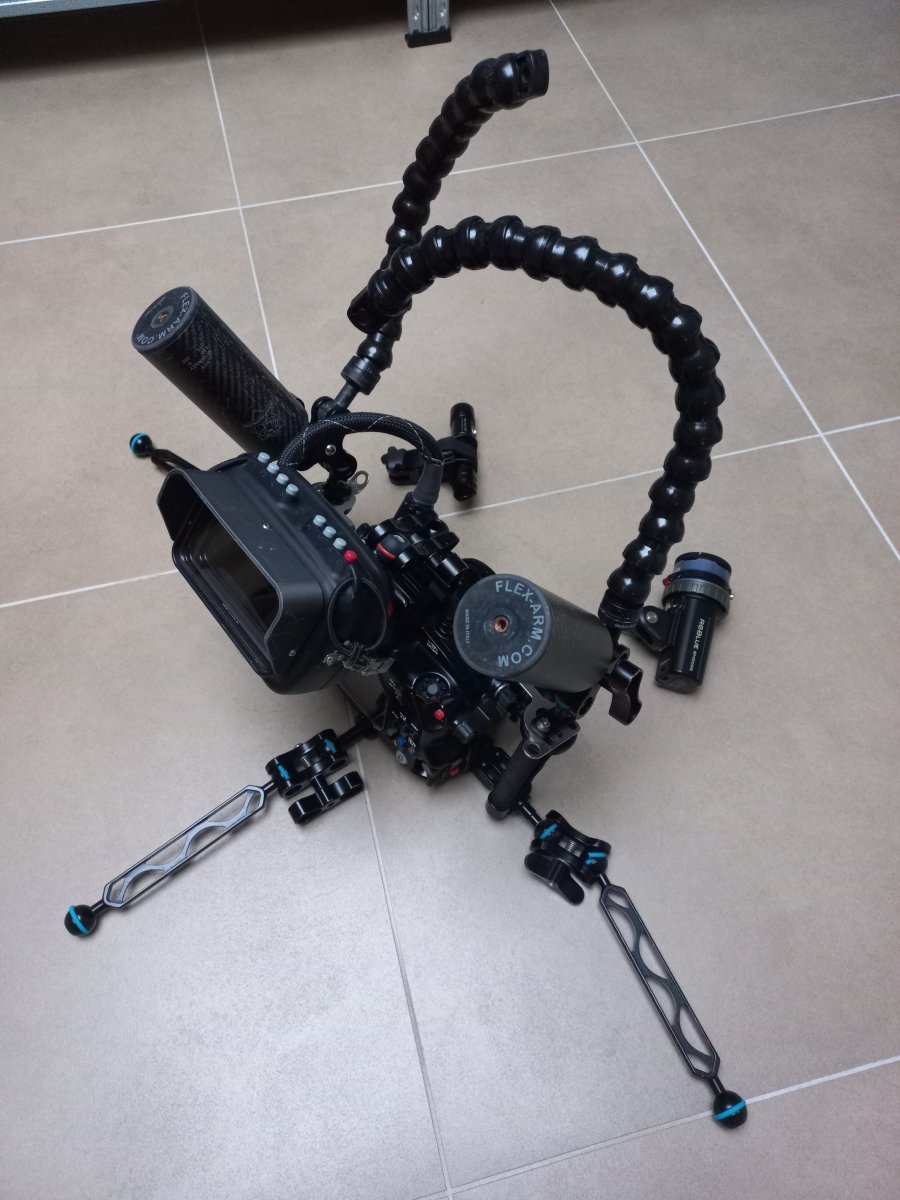
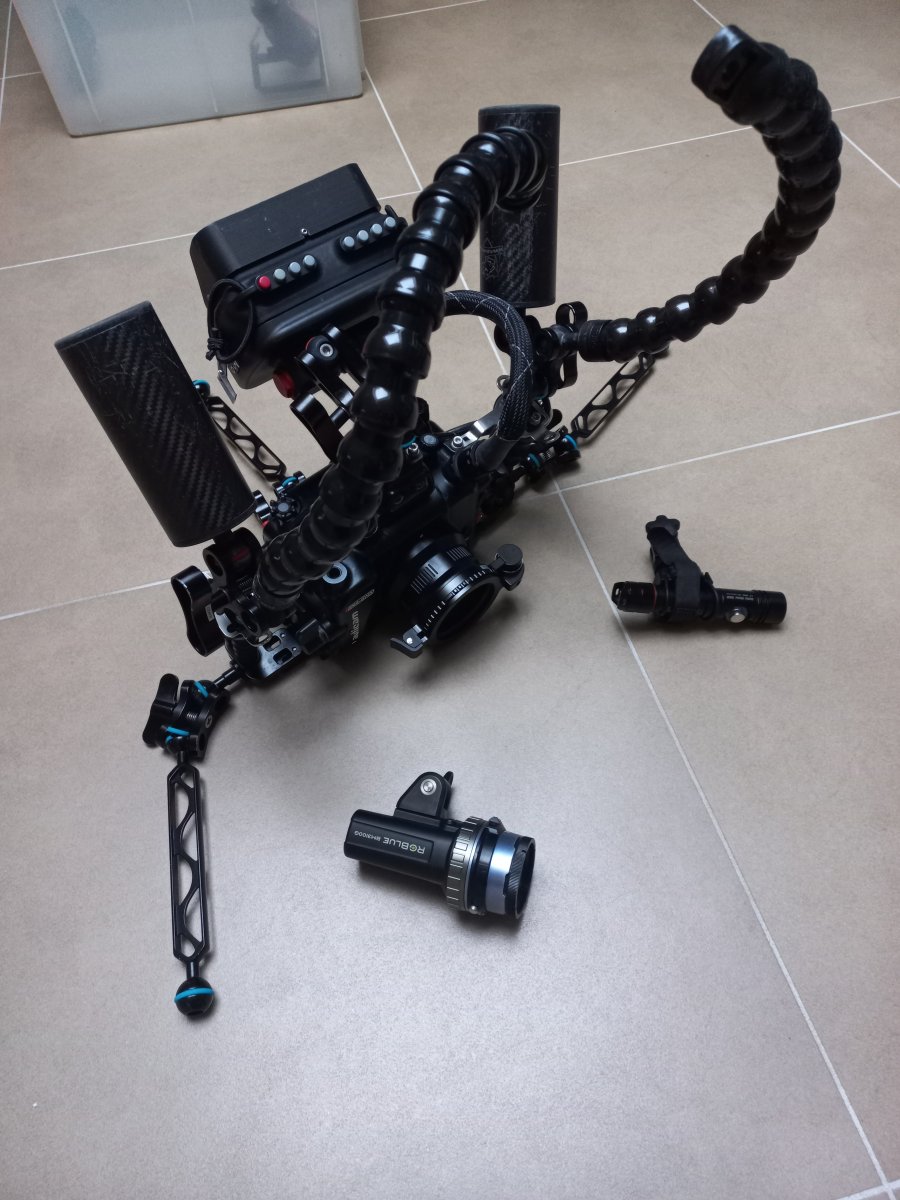
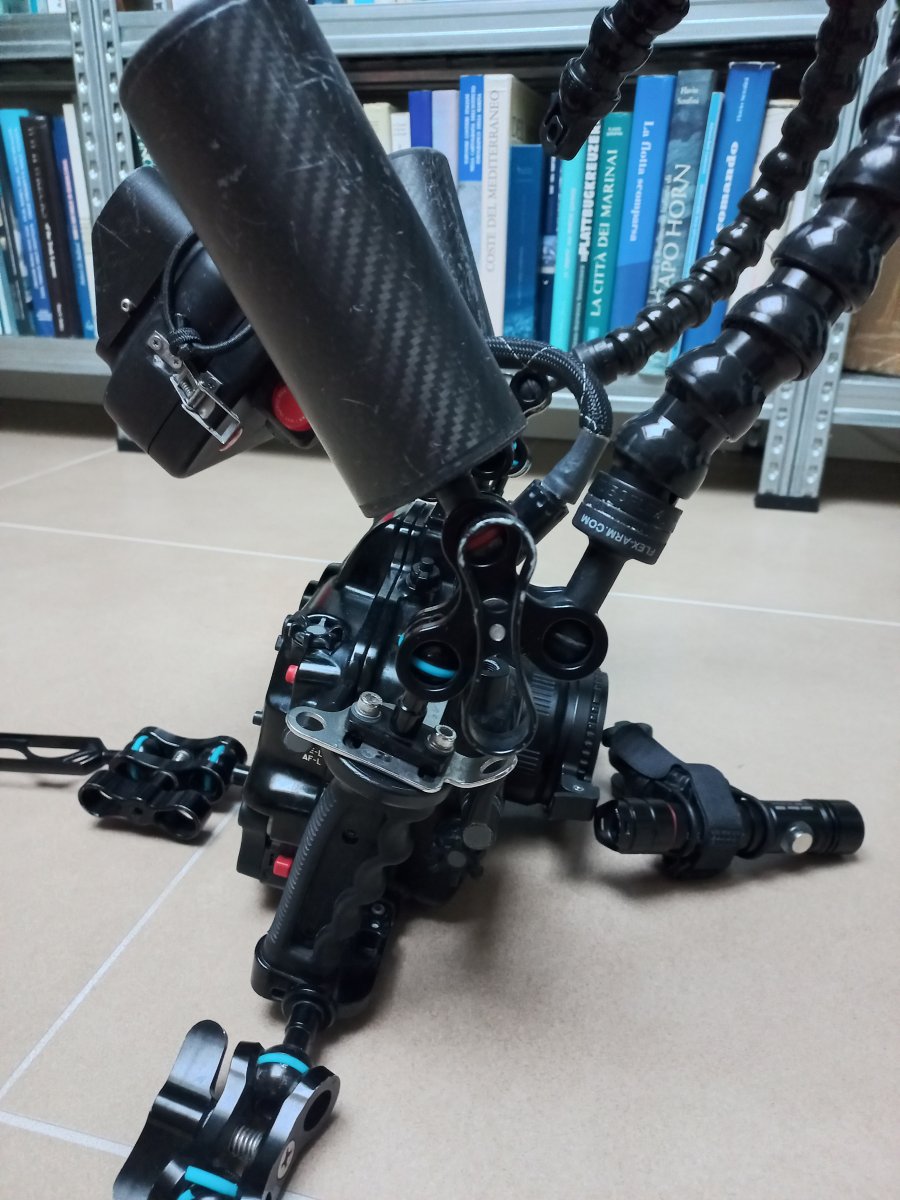
    This is my macro configuration. My case has the tripod built in.

    20230531_072707.jpg

    20230531_072726.jpg

    20230531_072829.jpg

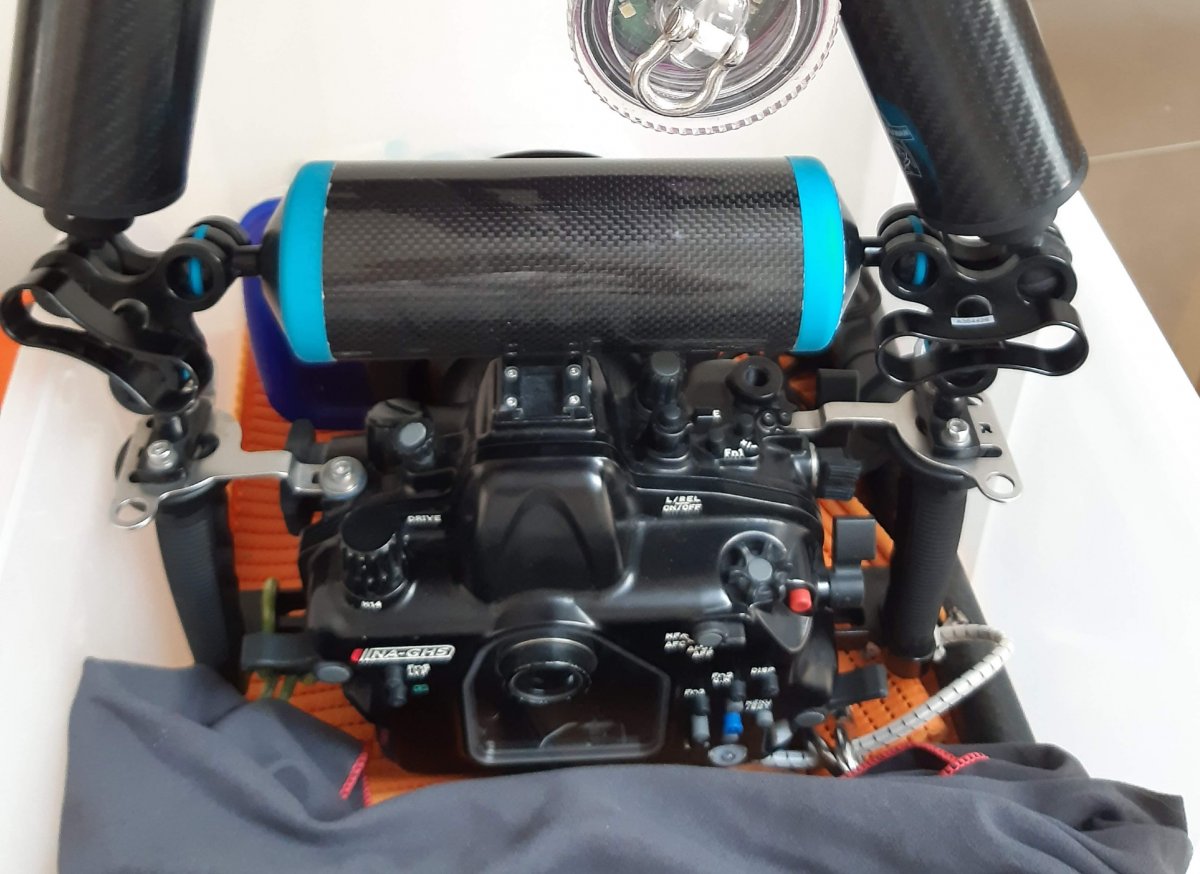
  5. A floating bar like this (made with Stix) could be a good solution.


    20200501_111027.jpg

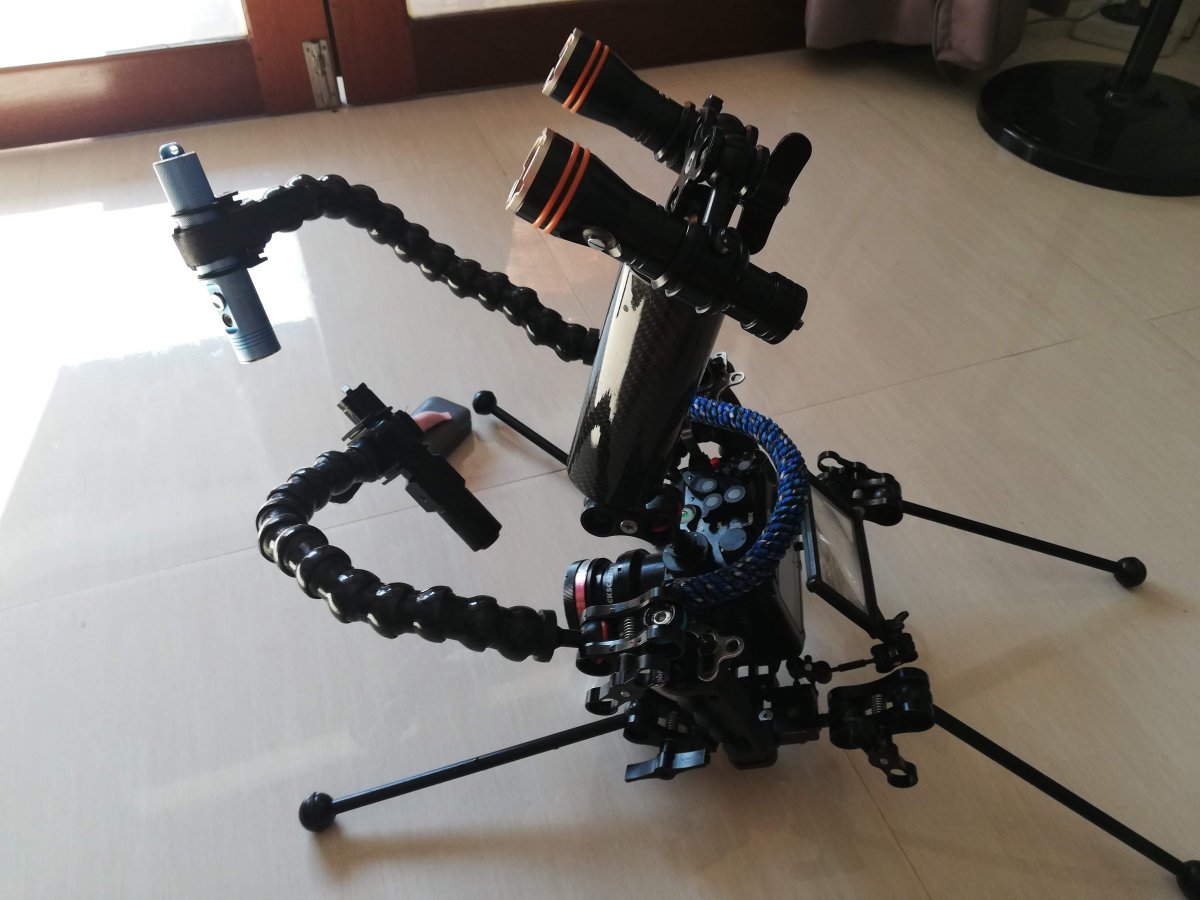
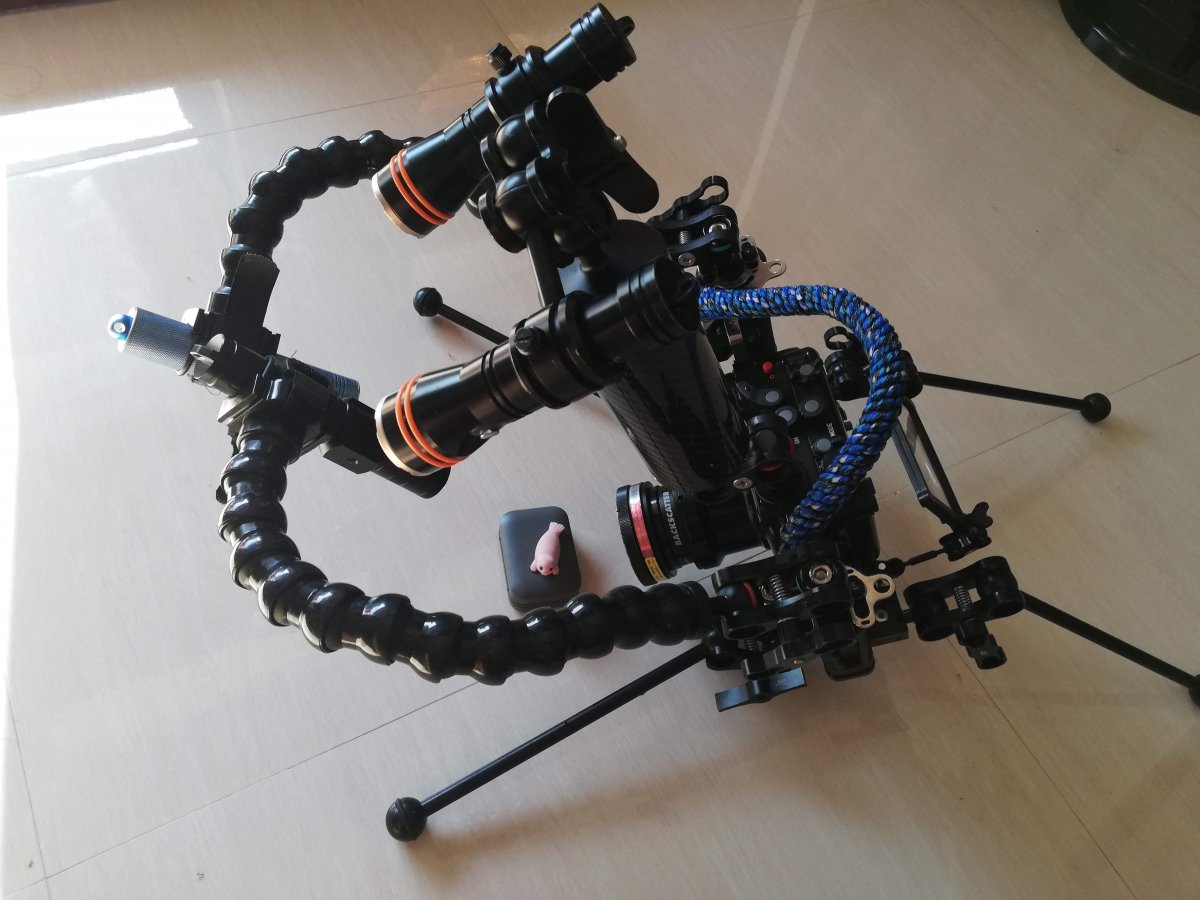
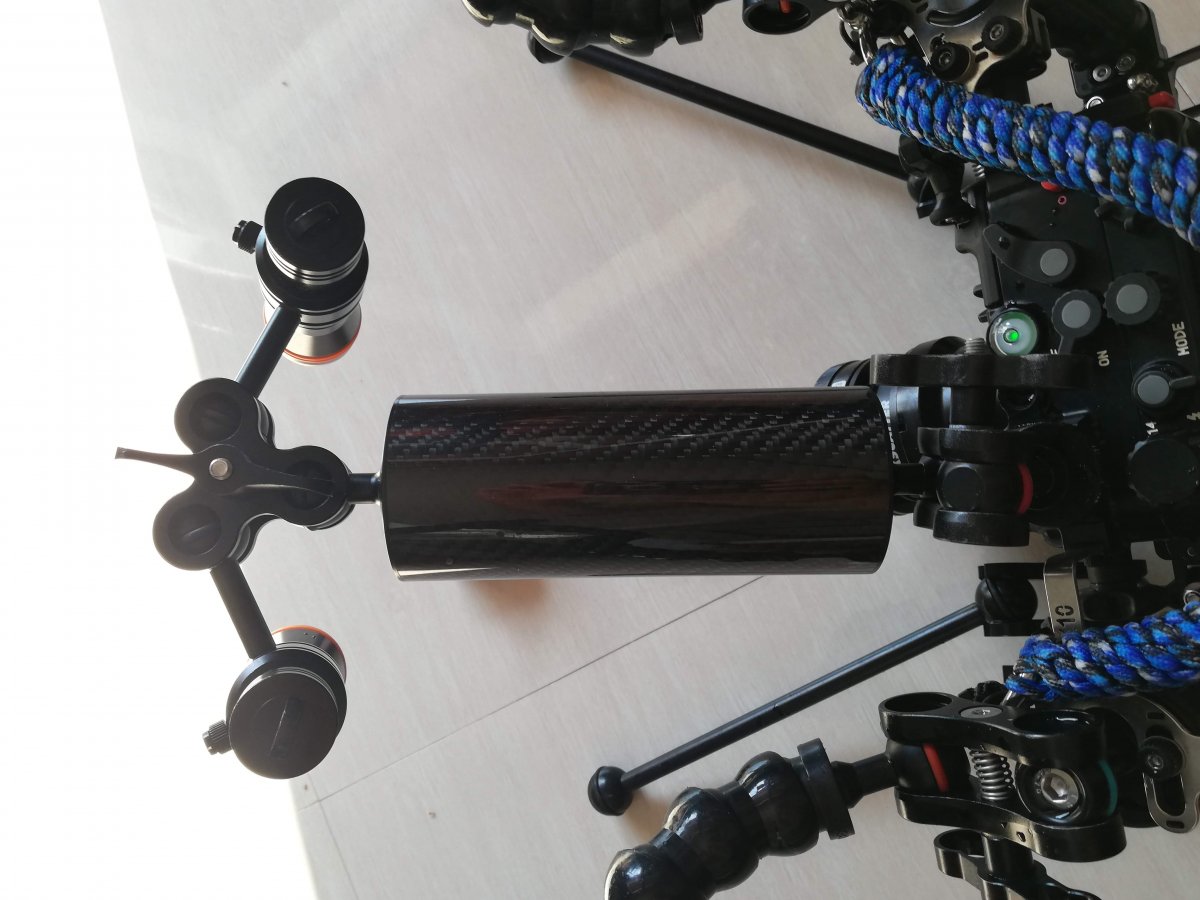
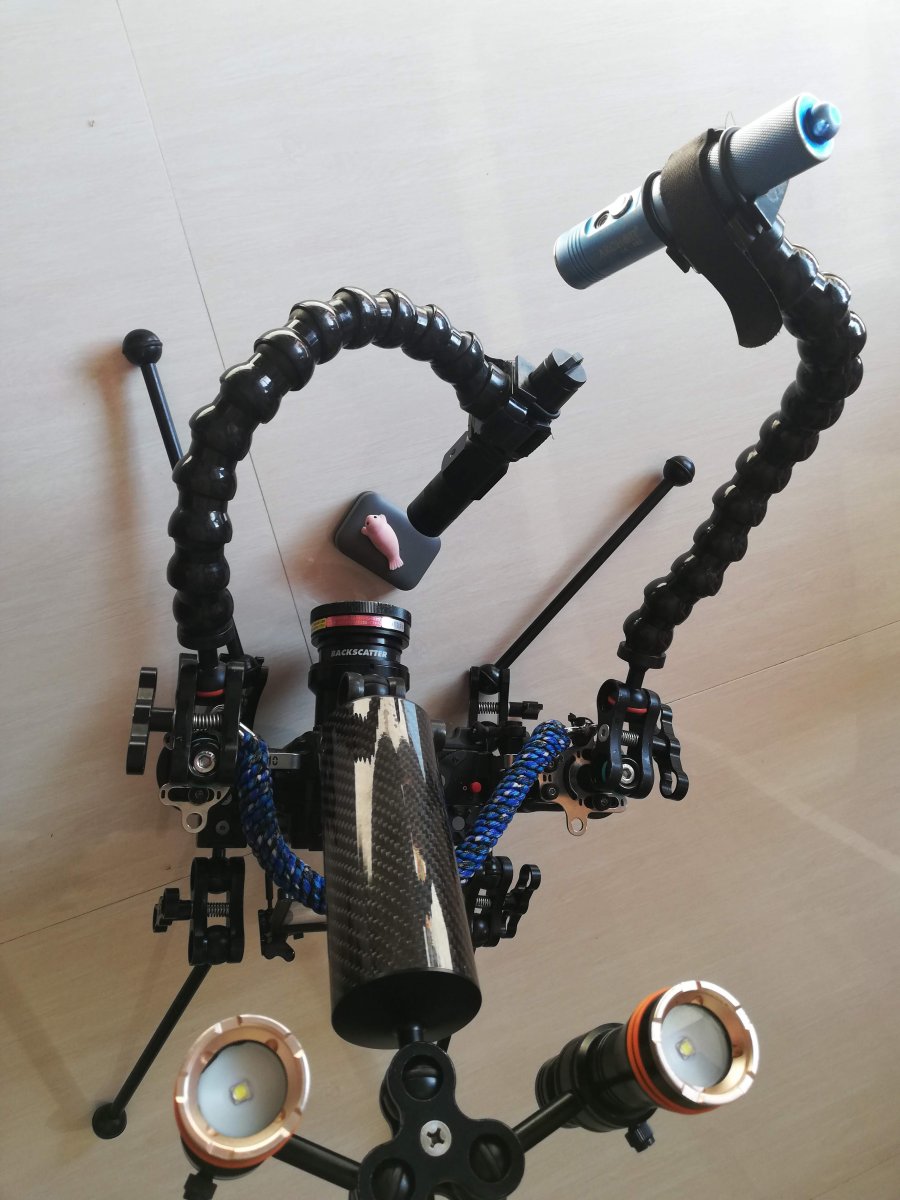
  6. Yep - I actually tried out something today right after posting this message, on our morning dive. I now have my two video lights on a triple clamp, connected to a float arm, which is itself connected to a ball post on the cold shoe - Works like a charm, and the setup is now just the right weight (negative, but comfy)

    The locline arms have my small critter / supermacro oriented lights, the float arm my bigger critter lights, so I can switch between both.

    Looks like this:

    IMG_20230531_154538.jpg

    IMG_20230531_154407.jpg

    IMG_20230531_154456.jpg

    IMG_20230531_154517.jpg

    I went from working on supermacro nudis to stalking a mimic octopus in its hole with this setup, practical.

    I initally wanted the 2 video lights on moveable arms so I could adjust positioning, but it turns out using them both in the same area works better since they're not powerful.
    So I first got them on the triple clamp on the cold-shoe mount, two days ago, but then they were a little far from the focus area.

    With the float arm added this morning, I can adjust distance and get a +400g lift which makes the rig comfortable to carry again.

    Mimic was shy, but we'll try it again tonight, see if he's still around...

    Edited by bghazzal
  7. On 5/23/2023 at 10:33 AM, shelbyrose said:

    Alright, one more Q! Does anyone use a white or gray card for manual white balance? If so any suggestions? Thanks!!

    I changed to white fins.  That way, my white card is right there on my foot.

  8. And, here's my first published video from my LX10.  I was in aperture priority mode and expected exposure to be my biggest obstacle.  But, in that confined environment, in the middle of all those rocks, focus was my challenge.  Autofocus continually hopped from rock to rock to backscatter.  The poor camera couldn't figure out what to focus on and i couldn't help it much.  I was too busy to push that back focus button as I was trying to keep from banging my head and lights on the rocks.  I think the open ocean will be easier.  (LX10, BigBlue 4600s, Nauticam housing, NA WWL-C lens, 4K 30fps)

    YouTube channel video

    Ep 70 -Thumbnail  2.jpg

    Edited by ROUS
  9. 11 hours ago, ROUS said:

    And, here's my first published video from my LX10.  I was in aperture priority mode and expected exposure to be my biggest obstacle.  But, in that confined environment, in the middle of all those rocks, focus was my challenge.  Autofocus continually hopped from rock to rock to backscatter.  The poor camera couldn't figure out what to focus on and i couldn't help it much.  I was too busy to push that back focus button as I was trying to keep from banging my head and lights on the rocks.  I think the open ocean will be easier.  (LX10, BigBlue 4600s, Nauticam housing, NA WWL-C lens, 4K 30fps)


    Thanks for posting - for wide angle scenes like this, you should really lock the focus.

    You can set one of the back-button focus buttons to focus lock, and the focus will stay locked - if you're  shooting in f5.6 and above, it should be fine. You can unlock and refocus when needed (for the sign for example)
    It's in the custom menu, AF/AE AF lock and AF/AE lock hold on.

    Not good to rely on the autofocus even in open ocean, with particules and the like you'll have a lot of chasing and ruined shots.

    Just use back button focus to lock, then refocus whenever necessary, this works well.


    Edited by bghazzal
  10. On 5/31/2023 at 10:00 AM, bghazzal said:


    IMG_20230531_154538.jpg

    Is it a display lens?

    does it work at an angled view?

  11. 8 hours ago, Davide DB said:

    Is it a display lens?

    does it work at an angled view?

    It's a Backscatter Macromate Mini for GoPros, with an Inon UCL-165 stacked on top.
    It works, but isn't the sharpest - After much tossing and turning I finally invested in an AOI UCL-09  which should ship around the 7th from the capital and get here when it gets here...

    EDIT - oh wait, it just struck me that you're talking about the screen magnifier lens - Yes, this works really well - no HDMI option on a compact, and the magnification comes in really handy, wide or macro. it's really nice.
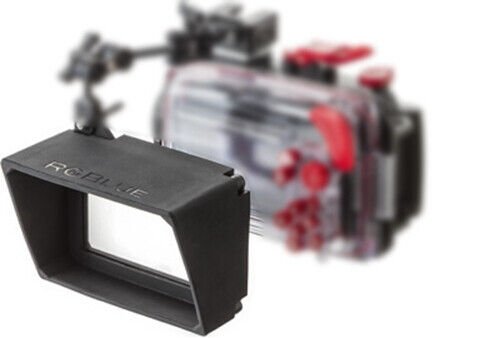
    Only problem is that RGBlue, the Japanese company that made them stopped production, so difficult to find now...

    There is one issue, which is sun reflection - the ideal angle for viewing and magnification is actually at an up facing angle, but this gets quite a bit of sun glare from above, so some compromise has to be found. I wish there was a way to put a sun-visor on the screen, but can't see a way to do so.

    Edited by bghazzal
  12. 2 hours ago, bghazzal said:

    There is one issue, which is sun reflection - the ideal angle for viewing and magnification is actually at an up facing angle, but this gets quite a bit of sun glare from above, so some compromise has to be found. I wish there was a way to put a sun-visor on the screen, but can't see a way to do so.

    Some users have adapted LCD magnifier hoods to Nauticam mirrorless housings; this gives you a magnified view of the screen and gets rid of all sun glare. You can find some examples if you dig through this forum.

  13. 3 hours ago, Barmaglot said:

    Some users have adapted LCD magnifier hoods to Nauticam mirrorless housings; this gives you a magnified view of the screen and gets rid of all sun glare. You can find some examples if you dig through this forum.

    Yes I've seen pictures, but I'm really happy with the RGBlue screen magnifier -works really well for video, and with the articulated mini ball-clamp arm you can move it around to adjust for sun glare, but you lose a little magnification. It's fine though.

    EDIT - I just found out that a hood already exist, so I'll try to source this!


    s-l960.jpg

    Edited by bghazzal
  14. 7 hours ago, bghazzal said:

    oh wait, it just struck me that you're talking about the screen magnifier lens

    Yes. 

    Wow very interesting website. A lot of custom material.For the hood it would be the perfect 3D printed DIY project.

    On a side note:

    [rant on]

    Despite the fact that during the dive I wear contact lenses for presbyopia, being able to see the camera settings well is really becoming a problem.
    I have a nice monitor sure, but it's amazing how the font size on the HDMI output is much smaller than the font size on the display. I mean one buys a monitor to see better and in reality the camera settings are almost not readable.
    My GH5 and GH5Mk2 have the most obscure settings and there is nothing to enlarge the fonts. Damn Panasonic :)
    Lately I have been trying to set clean HDMI and set the display with just the settings. It is better but still I am forced to move my head to check the display.

    [rant off]

  15. 17 hours ago, Davide DB said:

    [rant on]

    Despite the fact that during the dive I wear contact lenses for presbyopia, being able to see the camera settings well is really becoming a problem.
    I have a nice monitor sure, but it's amazing how the font size on the HDMI output is much smaller than the font size on the display. I mean one buys a monitor to see better and in reality the camera settings are almost not readable.
    My GH5 and GH5Mk2 have the most obscure settings and there is nothing to enlarge the fonts. Damn Panasonic :)
    Lately I have been trying to set clean HDMI and set the display with just the settings. It is better but still I am forced to move my head to check the display.

    [rant off]

    I recently tried something which might help - being in supermacro land, I tried being a mask with integrated half-moons (IST/ XS Scuba Gauge reader), but the angle didn't work for me, so sold it after a couple of dives.

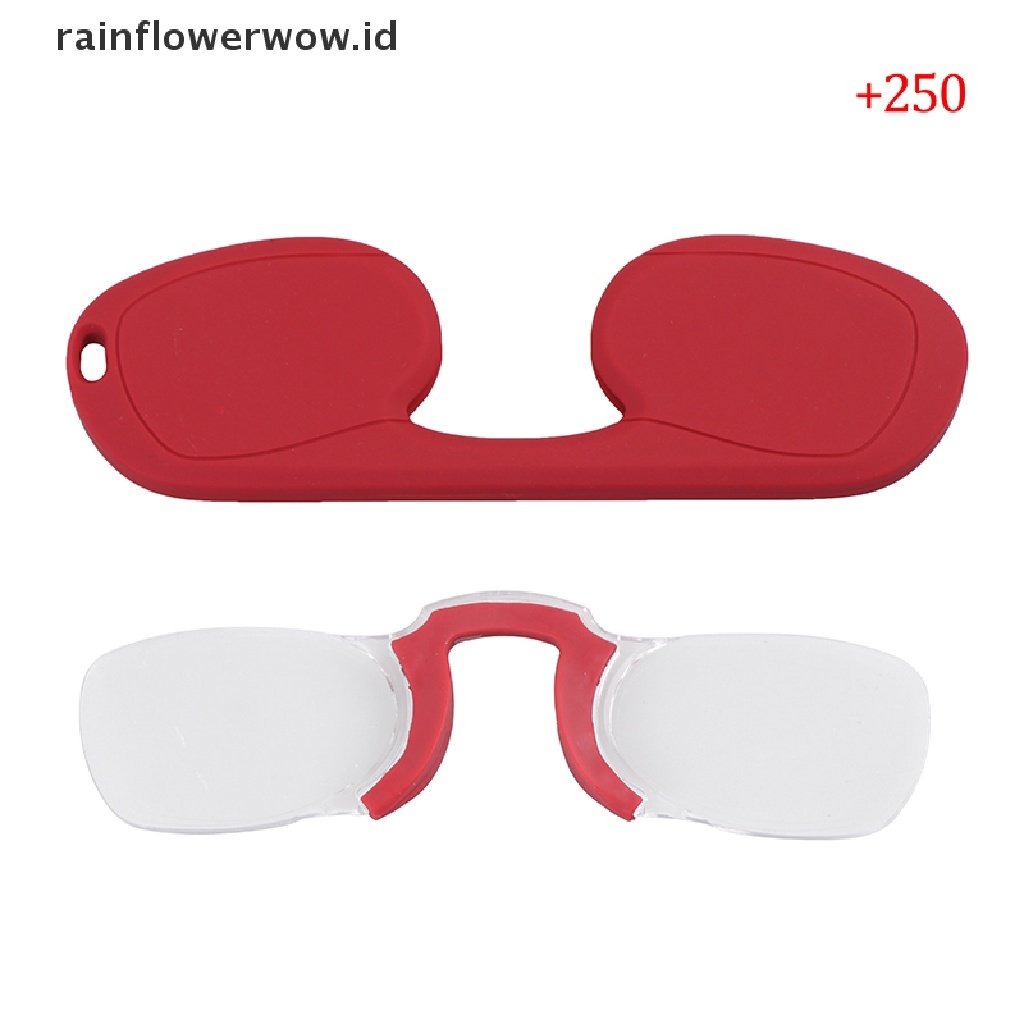
    In the meantime, I'd found these super cheap Chinese nose-clip reading glasses online, with no temples, and bought a pair (+2.50, strongest they have) to see how it would work inside my single lens diving mask.
    It actually worked quite well inside the mask, as you can position the lenses wherever you want them, and remove them - only issue were droplets on the lenses after mask clearing.
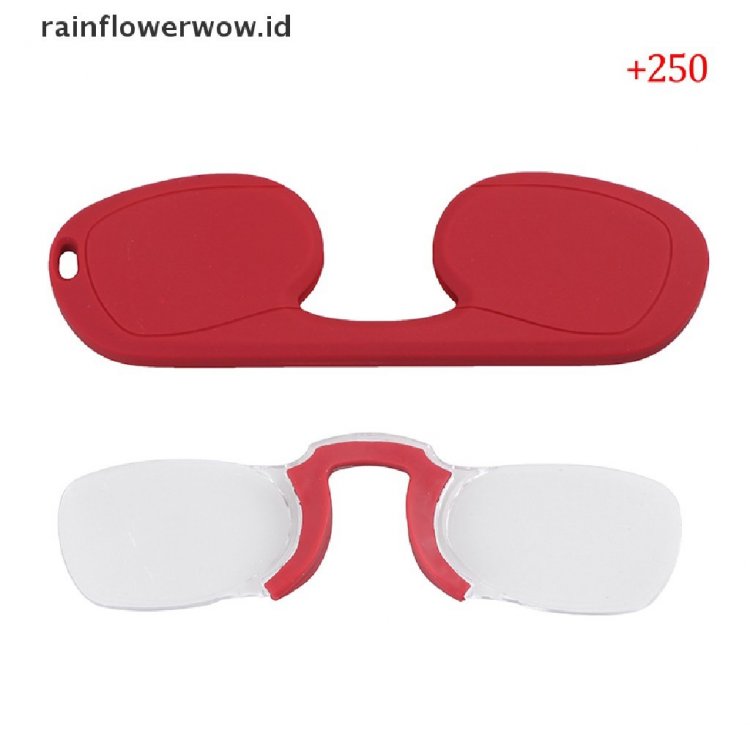
     

    cc402a5a-ca28-49a3-812c-0861ef34e4fa.jpg
    But then I tried something else - I put them outside the mask, on the nose piece, and lo and behold, despite magnification not usually working well underwater because of diffraction, it actually worked quite well that way!
    Might be proximity to the glass of the mask or something, but they do magnify.

    This might be a quick solution, as you could just put them on outside when you need them.

    I actually lost the pair I had (I clipped them on, had something else on the clip as well and they unclipped drifted off without me noticing), but I'm waiting another pair.

    Maybe you could give it a go, I'm sure ebay or aliexpress has them somewhere

    https://www.tokopedia.com/kathmandu-sport/nj808-silicone-nose-clip-pocket-reading-glasses-mini-magnifying-reader


     

    Edited by bghazzal
  16. Thanks, I already have "half moons" on my mask but I find them useful just to read my gauges. Too pain on my neck to see the monitor in front of me. Actually contact lens work very well but font size of exposure settings on monitor are about 1/3 of those on display :ninja: .

    I'll test a new idea in the next days....

  17. Many thanks for all of the advice on buoyancy for my rig, all! Got the chance to take it out in the ocean today for the first time and tested out both my wide angle and macro set-ups. Have some fine tuning to do, but was a good start!

     I’d love to get your suggestions for focusing, particularly with macro. I typically like shooting with manual focus but found it to be a bit challenging to dial in the focus. Is back button focus as I saw @bghazzalmentioned in a prior post the best way to go? Can you have the camera in manual focus and still do back button focus? (Sorry if silly questions! I’ve always just used manual focus on other cameras so learning about auto focus alternatives for the first time!) Any other tips very welcome. Many thanks, as always!!

  18. Back button focus means you activate AF with a different button to the shutter button, generally using your thumb.  When you have focus release the button.  You can then move in and out to get focus more precisely.  Compacts generally have fiddly means to achieve MF even on land - it doesn't get better UW.   Back button AF means you can get focus then release it and it stays at the same focus point. 

    You probably also have focus peaking available - this indicates what areas are in focus - you can assign that to a custom button to turn it on and off as required.  It can help quickly see which areas of the frame are in focus.

  19. Yes, it works well in manual focus, as Chris explained.

    I have backbutton and focus lock assigned to the two buttons  sitting conveniently next to the right thumb on the housing - for focus peaking, I have it assigned to the the knob wheel on the left side on the Nauticam housing.

    If I turn this knob, assigned to zoom (or the actual zoom lever as well) while focusing, I get focus peaking (mine is set to red, low), with a PIP (picture in picture) zoom window (magnification factor of which can be adjusted).
    From there you can use the knob wheel  to move / set the focus point, say to a nudi's rhinophore or the eyes of a critter.

    Peaking works well when the scene is strongly lit, likely due to contrast detection, so great for macro. For wide angle, especially ambient light you'll have less focus info detected, but it still works.

    Edited by bghazzal
  20. Ahhh thanks @ChrisRossand @bghazzal, that all makes a lot of sense. I didn’t realize you keep holding the back button for autofocus! Makes sense I was having such poor results… Will play with that more tomorrow. :) 

Retra

Account

Navigation

Search

Search

Configure browser push notifications

Chrome (Android)
  1. Tap the lock icon next to the address bar.
  2. Tap Permissions → Notifications.
  3. Adjust your preference.
Chrome (Desktop)
  1. Click the padlock icon in the address bar.
  2. Select Site settings.
  3. Find Notifications and adjust your preference.