Everything posted by bghazzal
-
Hahaha yes, I mean all manufacturers have their quirks, but the tracking thing is a letdown. If enough underwater image makers had complained back in the day, we might have had a firmware update allowing us to map a button to the tracking toggle, like in stills mode. But alas... Sure, it's very niche, but it's useful for locking onto small critters moving on a shallow focal plane, rather than having to manually follow them to keep the spot focus square on whatever you want to track. If you're filming things 10cm and above, not so much a problem. I've tried it on the A6700 and it works great btw. Map the tracking toggle to a button, press it when the square is over what you want, and boom, locked. What's super frustrating is that it works well on the A7SIII in video mode too, when you try it on land, by locking onto something with the touchscreen. I didn't punish myself further by setting up the button toggle in photo mode to get a taste of the unobtainable 😅 Today I was filming a 1 cm juvenile filefish, being a juvenile filefish, ie hiding behind ropes etc. I was mostly in MF, but the problem with that is that when the critter moves along the shallow focal plane, towards or away from the camera, at some point you need to refocus. If it's slow enough, say a nudi, you can follow focus with the gear - not easy, but if it's slow and predictable, yeah. If it's too fast, back-button focus is the way to jump back to focus. But back-button focus means a camera movement as you press the button, and an ugly refocus transition, so a cut... I switched to AF, using one of the spot focus modes. It's interesting, because it can actually be quite good... as long as you manually keep the square exaclty where you want it (the eye in this case...) You're basically working with the AF to track: the spot AF itself is dumb, it doesn't know what you want it to stay on because it isn't locked, so you're tracking with your elbows and the AF does the focal adjustments for you. For this kind of stuff, having access to the camera's tracking function like you do on land would be just great, because all of a sudden you can tell the camera to lock onto this, and this only, and stay there. It's not dumb anymore, you've given it a purpose 😆 This would be amazing for blackwater video: lock onto your little blob, close down to f/20 to get as much in focus as you can, and follow it. At least the MFO3 helps by giving you a bit more DOF! But yeah, like you say, best to focus on the strengths and what the camera CAN do, which is already quite a lot!
-
Hello all, I recently switched from my trusted Lumix LX10 compact to a Sony A7SIII (ILCE-7SM3) for underwater video. As expected, it’s a great upgrade, with features I was longing for (4K60fps, 10-bit colour, HDMI monitor connection capabilities, more battery life, workable AF…) The choice of this camera was highly motivated by a great deal on an unused Nauticam NA-A1 housing, as well as the new 100mm macro and the MFO3 coming out in a relatively short time frame. Very happy with the camera. However, I came across some very specific Sony quirks affecting UW imaging, especially video, that I would have liked to know about before building the rig. To help others, I’ll share them here for reference. I think most apply to the FX3 / FX30 and some other Alpha bodies as well, and might be worth looking into for the new models like FX5, for instance. 1. NO TRACKING AF FOR UNDERWATER VIDEO (!!!) This is the biggest letdown. While more recent Sony models like the a6700 do not have this issue, underwater shooters using the camera in a housing cannot use tracking AF. Reason is simple: for video, tracking AF can only be activated with the touchscreen. Touchscreen which we can't use in a housing (cue in sad trombone....). Yes, there is no option to map a button to a tracking AF on/off toggle in video mode (i.e. press a button to lock on / start tracking what is in the square, something which is possible on newer bodies like the a6700). The most frustrating part about this is that button-assignable tracking on/off toggle is available… in STILLS MODE. But honestly, who shoots stills on a video-centric camera like the A7SIII or FX3? Sure, standard AF, manual + back-button focus works quite well. But tracking AF would really help in some scenarios, like shooting small translucent subjects moving fast on both axes... Sounds familiar? Yes, it’s blackwater video I’m talking about. For this kind of application, not having access to locking tracking on a subject is a major letdown. And on the subject of tracking, note that ANIMAL EYE AF is NOT available in video mode. Yes, it can be selected in the menus, but Sony explains specifically that this is active in stills mode only. There are none of the more recent tracking AF options like the interesting insect AF for instance. Human eye tracking on/off, and that's it. This is a generational issue, and doesn't seem to apply to more recent bodies - unfortunately the no AF tracking issue for underwater video was barely discussed online, and never addressed in a firmware upgrade, up to the recent 5.01 Frustrating as hell. Why simply kill tracking AF for underwater video shooters by having the camera tracking only rely on touch screen settings. I'm sure this a limitation for some land applications as well. 2. NO MANUAL WHITE BALANCE IN MEMORY PRESETS The A7SIII does a good job at manual white balance underwater, as demonstrated in James Emery's tests here, for instance. The camera offers 3 physical memory presets accessible by turning the dial to 1/2/3. HOWEVER, when in these presets, setting a manual white balance is not accessible. You are locked out. No-can-do-because-memory-preset-mode message - Sure, you can switch to whatever Kelvin or WB preset you want within memory preset mode, but... you cannot manually set the white balance... Why, Sony? Just why? To manually white balance, you need to be in standard manual movie mode (there is only one), which gives you access to 3 white balance banks where you can manually set / store white balance. Practically, this means that you cannot combine your customised presets with manual white balancing underwater. Say you have a 4K60fps preset, and a 4K120fps preset, then the 3rd one in S-LOG3, well, nope, no manual white balance. You need to be in standard movie mode, and switch your frame rate, picture profile, etc. - ie rebuild your presets - from the main menus. There is an option to recall memory presets, but nope, it can only be used… in memory preset mode 1/2/3... Argh! As a side note on memory presets, you cannot assign specific button customisation for each preset, as the button customisations are global. So say you have a preset for artificial lighting where your WB balance is set, and another one where you would need to access WB more often, you can’t map a specific button layout for each mode. Or say focus options. The presets don’t record/store custom button layout options. Lastly, note that manual WB info (like say 4900K M+6) is displayed in camera when set, but not accessible in post. You cannot find this info in the exif data which will just indicate "custom white balance", but not what it was set to. Frustrating for tests, if setting the WB manually multiple times at different depth. You would need to record the data on a slate underwater to access it after shooting... 3. HDMI DISPLAY / OUTPUT ISSUES I was super happy to finally get to connect a monitor to help my ageing eyes, see what I was shooting better, have better viewing-angle ergonomics, etc… However, this didn’t come without a couple of surprises: 1. If mirroring the camera display, the camera outputs a square image, based on the camera monitor, so the mirrored monitor image is quite small on a 5” monitor, with lots of unused space - a little bigger than the camera screen, but not massively. There is the option to output a clean HDMI feed (intended for in-monitor recording), which will use the whole monitor space and look great, but this comes at the cost of camera/recording information - you do not even see if you are recording, and have to check the camera screen for that, which affects ergonomics. 2. In mirroring mode, the A7SIII does NOT output data such as focus peaking or zebras. This crucial camera data cannot be not sent over HDMI, unlike on other cameras like Panasonic and, I think, Canon. A Sony thing, apparently. This means you have to rely on your monitor for this. I use the Weefine WED-5 Pro monitor, which has acceptable peaking implementation, more or less matching the camera’s when set to level 7 (but just not as precise). However, when it comes to zebras, the way Weefine has currently implemented zebras on the monitor is the reverse of what you would expect and need, and they are basically unusable as is. This has been discussed with Weefine and we hope a firmware upgrade will fix this. 4. OVERHEATING AT 120fps WHEN SHOOTING IN A HOUSING Heat management is good on the A7SIII. I ran some land tests at 4K60fps, continuous recording, AF-C on, with no overheating at 27°C. Ran the same tests at 120fps: perfect, no overheating. However, inside a housing in water over 27°C (common in tropical / subtropical locations), with a monitor connected, the camera overheats easily at 120fps, causing shutdowns. I haven’t measured precisely, but we’re in the under-5-minutes-of-4K120fps range… be careful if planning to shoot a lot at 120fps (blackwater video, anyone?). Yes, this is with the heat warning sensor set to high... 5. BATTERY LIFE: A WORD OF CAUTION Lastly, battery life is workable, but be careful, especially with a monitor. Just to give you an idea, internal battery life for 4K60fps recording on the A7SIII is actually 135 minutes of continuous recording according to Sony. This is exactly the same on the FX3, which uses the same NP-FZ100 battery pack (and has essentially the same video implementation as the A7SIII). FX3/A7SIII: 135 min continuous / 95 min actual recording In real life, my land tests on the A7SIII gave me 95 minutes of continuous recording at 4K60, so 30% lower than the continuous quoted figure, but matching Sony's 95 minutes actual recording figure perfectly. But this is in ideal conditions, camera not in a housing, 27°C, no monitor connected, and while AF-C was on, it was on a still subject, and relatively newish battery. And then in real-life UW shooting situations, in a housing with the monitor, with less than 5 minutes of actual shooting (!) at 120fps, the battery was drained to 23% remaining on a 90-minute blackwater dive. This was for 5 minutes of shooting, with auto-off activated. I’m currently looking into battery pack options for the housing's strobe trigger space, and have found one which works but has an auto shutoff feature which cannot be disabled. I'll mention a last one: APS-C/Super 35 crop mode (super useful for macro) can only shoot 1080p video, not 4K - but this is offset by Sony's clear image zoom function, which allows you to crop in without much IQ loss due to digital upscaling (see here for more details) **** Anyway, these are the little Sony quirks and aspects to take into consideration when looking into Sony cameras for UW video. I'll flag any others that come up here. Some of these, like tracking AF toggle and animal (even insect!) eye tracking for video, have been resolved on more recent bodies like the a6700, but others have not. Definitely something to look into for underwater video, and that I certainly would have liked to know about. Hope this helps. Cheers and happy bubbles Ben
-
Combining a monitor and an external battery pack is an absolutely brillant idea. Both HDMI cables and USB power delivery supply will be routed through the same bulkhead? On battery packs, does Marelux currently have one which fits the following dimensions? 77 × 37 × 25 mm (L × W × H) The 77mm length measurement is the most restrictive. It would be to charge an A7SIII battery while it drains, PD not required. I currently use an Anker Nano powerbank which fits fine and is built around a single 21700 cell and works fine EXCEPT for it's PCB's 3 minutes auto shut-off features, which forces me to open the housing just before diving to turn it on. The camera can't be off for more than 3 minutes or else the battery back shuts down and needs to be turned back on by pressing a button, a feature which can't be disabled. I see the new MiniBatt MB1500 is only 1500 mAh, which is quite small for my application. For comparison, the Anker Nano, which is acceptable for the purpose, is 5,000 mAh - I'm currently looking into solutions based around 2x 18650 cells, rather than a single 21700. Is there a higher-capacity battery pack planned or available with similar dimensions and functionality? Thanks!
-
Yes, real life is really different. Fingers crossed, but really, a battery pack / power bank is really something I would want in a video camera housing. Just to give you an idea, internal battery life for 4K60fps recording on the A7SIII is actually 135 minutes of continuous recording according to Sony. This is exactly the same on the FX5's predecessor, the FX3, which uses the same NP-FZ100 battery pack (and has essentially the same video implementation as the A7SIII). FX3/A7SIII: 135 min continuous / 95 min actual recording So more than the FX5's quoted 100 minutes... In real life, my land tests on the A7SIII gave me 95 minutes of continuous recording at 4K60, so 30% lower than the continuous quoted figure, but matching Sony's 95 minutes actual recording figure perfectly. This is in ideal conditions, camera not in a housing, 27°C, no monitor connected, and while AF-C was on, it was on a still subject, and relatively newish battery. And then in real-life UW shooting situations, in a housing with the monitor, with less than 5 minutes of actual shooting (!) at 120fps, the battery was drained to 23% remaining on a 90-minute BW dive. This was for 5 minutes of shooting, with auto-off activated. Shooting a video camera in a housing without a battery pack means frequent battery changes, unless the internal battery is really large, which it doesn't seem to be on the FX5, if Sony is only quoting 100 minutes of battery life.
-
The new internal battery must be really good then. I ran some tests on the A7SIII, and a 90minute dive two nights ago with the camera set to 120fps (blackwater conditions), AF-C with a 2 minute auto-shut off drained a new internal battery to 23%, with only 5 minutes or so of actual shooting (no subjects that night). I also ran continous filming tests on land, without a monitor connected: Idle / live image ~167 min 4K60 ~95 min 4K120 ~77 min I really hope they doubled that on the FX5, or this means swapping batteries on a multiple dive day
-
I'm really looking forward to seeing more footage and feedback from this optic on 90mm and 100mm / 105mm lenses. It seems ideal for people like myself who don't really do wide angle, but would like much wider medium shots on macro-focused dives. The 60mm converter (I have the MFO-3, but would have bought the Marelux one if i had the choice) is already a super useful addition, and I'm really curious to see what the Sony 100mm macro can do at 24mm. Exciting times!
-
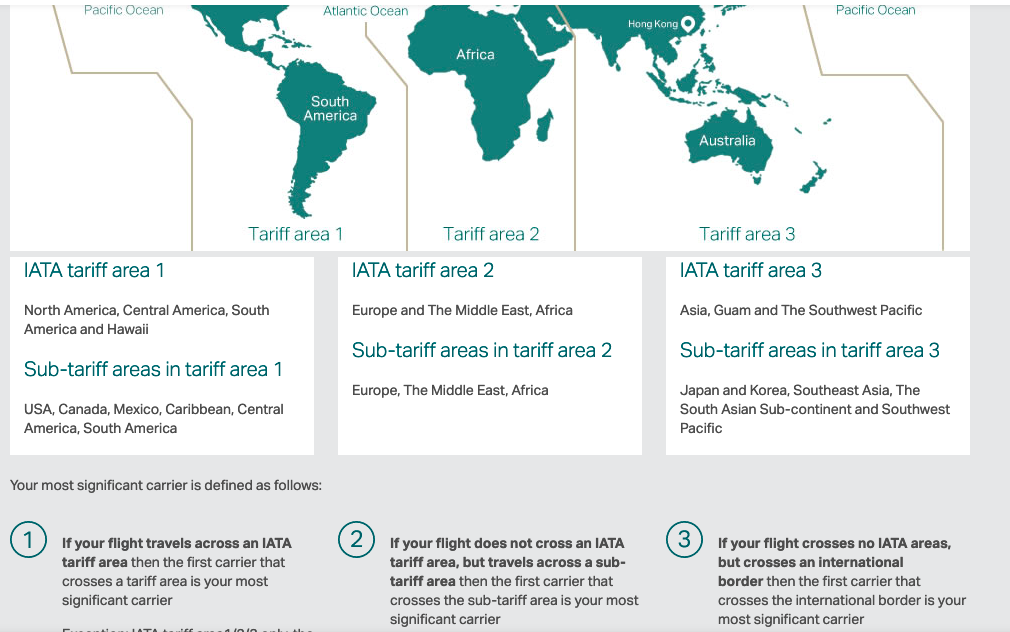
Thanks - it's pretty wild though. So basically, in our case, our trip was in IATA Tariff Area 3, but crossed 2 sub-tariff areas, first between Japan and Koera area and South-East Asia area (Narita-KL), then between South-East Asia area and the South Asian Subcontinent are (KL-Male). In this situation, Rule Number 2 applies, i.e. the first carrier to cross the sub-tariff area is the Most Significant Carrier. This is JAL, on which the flight was booked, crossing from Japan and Korea tariff area to South-East Asia tariff area on the Narita-KL outbound leg. However, and this is where it seems particularly perverse, if I understand correctly, this Most Significant Carrier rule doesn't apply to the whole flight, but to each check-in, thus resetting on the return leg! So in our case, even though JAL was our Most Significant Carrier as per Rule 2, this did not carry over to the return flight, which resets the calculation at check-in. On the return leg, the first carrier to cross a sub-tariff area was Malaysian Airlines, between the South Asian Subcontinent and South-East Asia tariff areas (Male-KL), thus becoming our Most Significant Carrier... Wild. I've been air-travelling since I was in my mother's womb and have lived/worked in many different areas of the world, but I've never encountered a situation where the luggage allowance was reduced on the return leg of a single codeshare flight bought on a national carrier like JAL. It's good to know about the Most Significant Carrier check-in reset rule, i.e. that the Most Significant Carrier is determined at check-in, thus resetting on the return leg. If confirmed, this is really something to look out for, especially since you usually return with a similar amount of luggage on most return trips 😆 I guess it's not a super common situation, but definitely worth looking out for on codeshare flights within the same tariff zone...
-
Yes, we tried that, but even then the extra luggage surcharge at the gate was ridiculous. Malaysian staff told us the price per kilo would have been cheaper if prebooked, but as explained, we thought the main carrier rule would apply, especially since we were well within our limits on boarding and returning with the same luggage. I didn't know this kind of situation was possible and thought the Male-KL leg allowance was a misprint. The photographer knew someone high up at JAL and contacted him, but even then we couldn't get things to move. It was complex also because the Malaysian ground staff at Male had to go through their bosses in KL, which didn't help. We got lucky in the end (basically, a technical failure helped us), but we almost missed the flight.
-
The Keldan used is a actually an ambient-light model, so the colour temperature is shifted in the light itself to emulate what you would get when using an ambient-light filter, but without the loss of power caused by the filter, usually around 1.5 to 3 stops depending on the filter. Great for mixed lighting, but limiting for macro/night diving applications for instance. And not sure it would work well in the Med's greener water for instance Meh... The test would have been more useful if it had measured the amount of light actually falling on the subject, using a fixed camera exposure. He could then have measured the exposure adjustment required to bring the scene to the same level with different lights. The waveform of the pool wall doesn't really tell us much. Lux or candela measurements would also have been very useful of course, but require equipment. Other aspects worth testing would be beam angle and edge sharpness, whether the light maintains constant output or dims as it discharge (mean the lumen output is not constant), light runtime at full power for instance. Super important data, and easily measureable in a pool. Then there's the question of durability of both the light and the battery pack, which is probably the hardest data point to measure, as it requires actual feedback from actual heavy users. Alex Lindbloom once wrote an article about his 1,000-dive test of his Solas and other brands, which he was using daily while working on a liveaboard. That kind of real-world data is gold.
-
Yes - there is also something called the main carrier rule for tickets bought through one company, but that codeshare with another one for a section of the trip. Up to now, I'd never had an issue. The initial baggage allowance was kept throughout the flight, or in some cases actually increased to the level of the flight providing the highest allowance in the trip (e.g. a La Paz-Mexico City-LA-Tokyo flight on Aeromexico, where the luggage allowance for the whole ticket was based on the LA-Tokyo flight, hence more generous than it would have been on the La Paz-Mexico City-LA leg...) I'd never had it reduced like on this JAL flight from Tokyo to Male, with the return flight applying Malaysian Airlines' rules on the Male to KL section only (since we didn't have any issues on the KL to Male section)... This was a return flight fully booked on JAL, the longest leg of the trip was on JAL, so normally main carrier rules. But nope, not always... Yes, but keep in mind that I'm talking about a single flight here - we didn't buy multiple flights, and it wasn't multi-city - it was a single Japan Airlines return flight from Tokyo to Male and back, bought directly through JAL. However, it transited through Kuala Lumpur, and the KL-Male-KL leg was codeshared with Malaysian Airlines. Given that this was bought as a single JAL flight, and that the longest leg of the trip was on JAL, normally this is where the main carrier rule applies (as it did on the outbound leg). But not always, as we discovered... the luggage allowance on this single JAL flight went: Outbound check-in: Tokyo > Kuala Lumpur : JAL luggage allowance Kuala Lumpur > Male: JAL luggage allowance Return check-in: Male > Kuala Lumpur : Malaysian airlines luggage allowance Kuala Lumpur - Tokyo : JAL luggage allowance
-
Absolutely - all through JAL / Japan Airlines, in Japan, booked direct. The ticket was booked on JAL, codeshared on Malaysian, so JAL on Narita to KL, KL to Male on Malaysian, return Male to KL on Malaysian, KL to Narita on JAL. The ticket did reflect the changes in the luggage rules on the Male return leg, but we figured the main carrier rule would apply and we wouldn't end up with a lower allowance than what we started with, especially since the photographer who booked the flight has high-flyer status on JAL, so we didn't look into it any further. We contacted JAL and apparently the main carrier rule doesn't always apply, so you can end up, like us, with a smaller luggage allowance on the return flight than on the outbound leg, even when booking on a single airline... I've had this happen to me once for a Denpasar-Labuan Bajo, as the return leg was operated by Lion's Wings Air rather than Lion Air, but the excess luggage charge was IDR 10,000 per kilo or something, which was mostly waived after a smiley chat in Bahasa at the counter, aduh... And we're talking about Lion Air in Indonesia, not a national carrier like Japan Airlines... Not the same thing at Male, when dealing with Malaysian Airlines personnel at check-in...
-
As a sidenote, I flew to the Maldives in March/April accompanying a Japanese photographer. It was a return flight on JAL from Tokyo to Male and back, with a stopover in KL, codeshared with Malaysia Airlines. Turned out the return flight had different baggage rules despite being booked in Japan through JAL (and the extra allowance given by his JAL member status). We managed to wiggle our way out of it just before boarding after hours of back and forth in Male, but we were looking at a USD $1,500 luggage fee for our camera/dive gear, just because the ticket home had different rules. Again, the flight was bought in Japan, directly through JAL... never seen this before, other than on a return flight from Bali to Labuan Bajo (switch from Lion to Wings rules) years ago, but this was on a totally, totally different financial scale... Hellish... Lesson learned: double-check return ticket allowance, even with major companies like Japan Airlines... At least they didn't give us any issues with cabin luggage 😆
-
Overwhelmingly Nauticam. I see one Kraken diopter, a subsee but very few (none?) AOI lenses. Interesting, because their Pro range is stellar. Price vs. notoriety, perhaps?
-
down here in Japan as well... Error code: PR_END_OF_FILE_ERROR
-
Mainland China / Shenzhen, if I'm not mistaken?
-
As a side note, stabilisation is very much an issue for video - I think this applies to both Marelux and Nauticam conversion lenses. From what I understood, the change in focal length confuses lens stabilisation calculations and the image bounces all over the place. I use the MFO3 with the Sony 100mm macro on the A7SIII, and turned off lens OSS (but didn't have to change anything with IBIS), no issues. I've heard similar feedback from someone shooting video on the Nikon Z8. But it's very much a video related issue. I think Davide had noticed a similar issue with another lens conversion for video - seems like the changes in focal length and real time lens stabilisation leads to issues. Manually setting the focal length in camera might be a work around if your camera allows it.
-
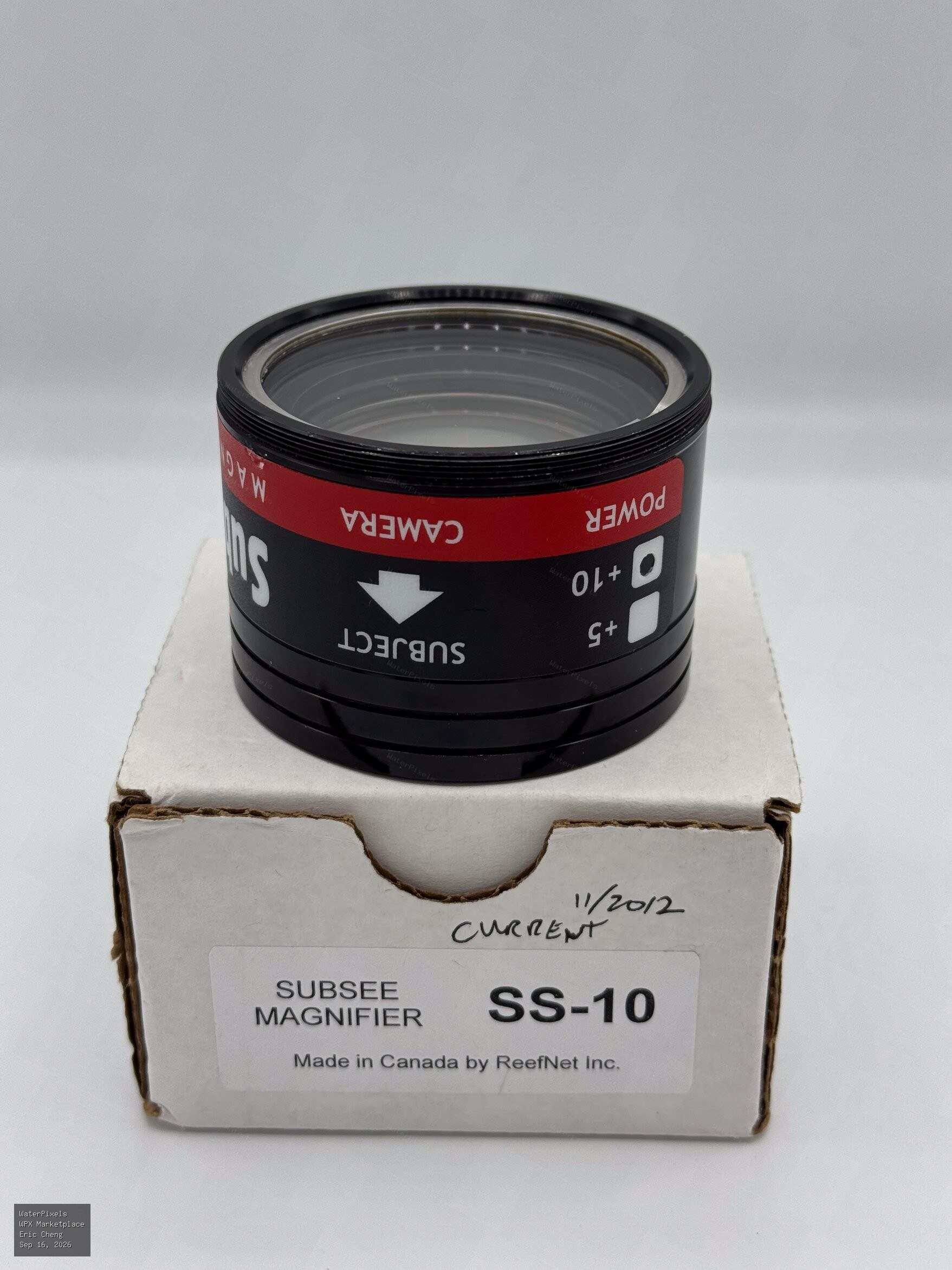
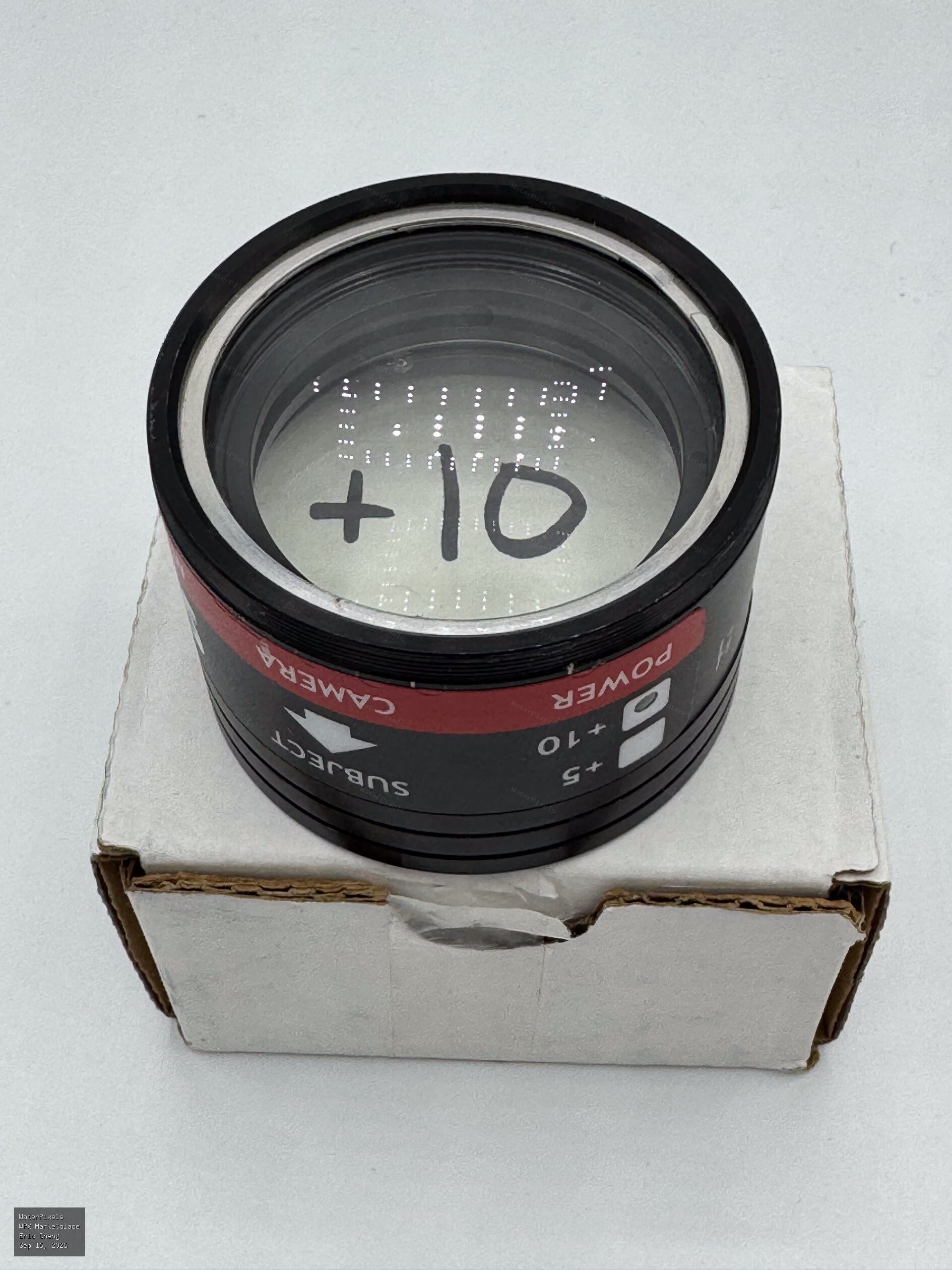 Free USA
Hi Eric, I’d be very interested in on one of these for underwater video, if you’re able to ship to Japan. Thanks a lot! Ben
-
Gili Air and Komodo are not the easiest for photography, especially macro - I love Komodo and it has great macro, especially in the south but it's Komodo and not many sites are protected. With a 90mm, in the central part a site like Waeniliu is great for macro but not dived that often, not in my days anyway. And the south is more seasonal. I've never been to Gili Air but did dive Gili Meno in 2014, and I imagine it's not very different. Good "fun diving", lots of courses but not the best settings for imaging (unless you work there that is) and a little lacking in subjects perhaps? Yes, I definitely second Tim's Lembeh recommendation - otherwise Bali's Tulamben will have plenty of subjects and good spotters, and lots of photography oriented resorts and diving When it comes to dive operations, Lembeh and Tulamben are probably the most photocentric diving areas in the country. Plenty of others of course (Triton Bay, Alor, Raja4 to some extent, etc) but in terms of imaging-friendly areas, these two areas really stand out I think.
-
Thanks, interesting test and interesting discussion in this thread as well. I would be great to have something like this for the murky world of video lights. A little bird recently told me CRI measurements are not really representative, since CRI evaluates colour rendering on only 8 pastel and low-saturated colour samples for instance. And beyond light quality, burn times/battery life, constant output (or not), actual lumen/lux/candela output, edges and beam angle, button ergonomics, weight and buoyancy...
-
Yes, I totally agree. In this light, it's interesting to revisit the discussion in this September 2024 thread as well: https://waterpixels.net/forums/topic/1704-number-of-camera-sold-worldwide/ Let's see how how the prediction holds up in two years 👁️🗨️ Who knows, maybe by then we'll all have smart dive masks giving us augmented-reality dives in real time 😁 In the meantime, hold on to your hoverboards...
-
Yes, absolutely. Smartphones are vastly bigger in volume and a huge amount of imaging technology research is now clearly driven by the smartphone market. Where it's a little weak in the knees is to use this fact to predict that the dedicated cameras will effectively disappear fast. It seems to me the market is evolving into something rather different: smartphones dominate general-purpose photography, while dedicated cameras survive - and in some segments are actually growing again ( built-in-lens camera shipments is forecast to grow by 13.6% this year for instance by Japan's Camera & Imaging Products Association) - because they offer things a phone can't, despite being a cumbersome dedicated tools. And then we also have action cams on the video front, which in a way seem to be mutating into some high end neo-camcorder function. I guess it's more about different tools for different purposes, and this makes predictions a little more complicated as society, users and uses evolve as well. Video, as a medium rather than a format, has little to do now with what it was 20, even 10 years ago. And we see weird things in the music sector as well. I suppose the lesson is that predicting market dominance is easier than predicting actual market extinction.
-
still remember a couple of years ago, when compact cameras were pronounced dead and buried for good in one such report - and of course, in our cozy forum pages. 😁😁😁 Isn’t 2026 the year we were all supposed to be shooting underwater on our phones, BTW? 😁
-
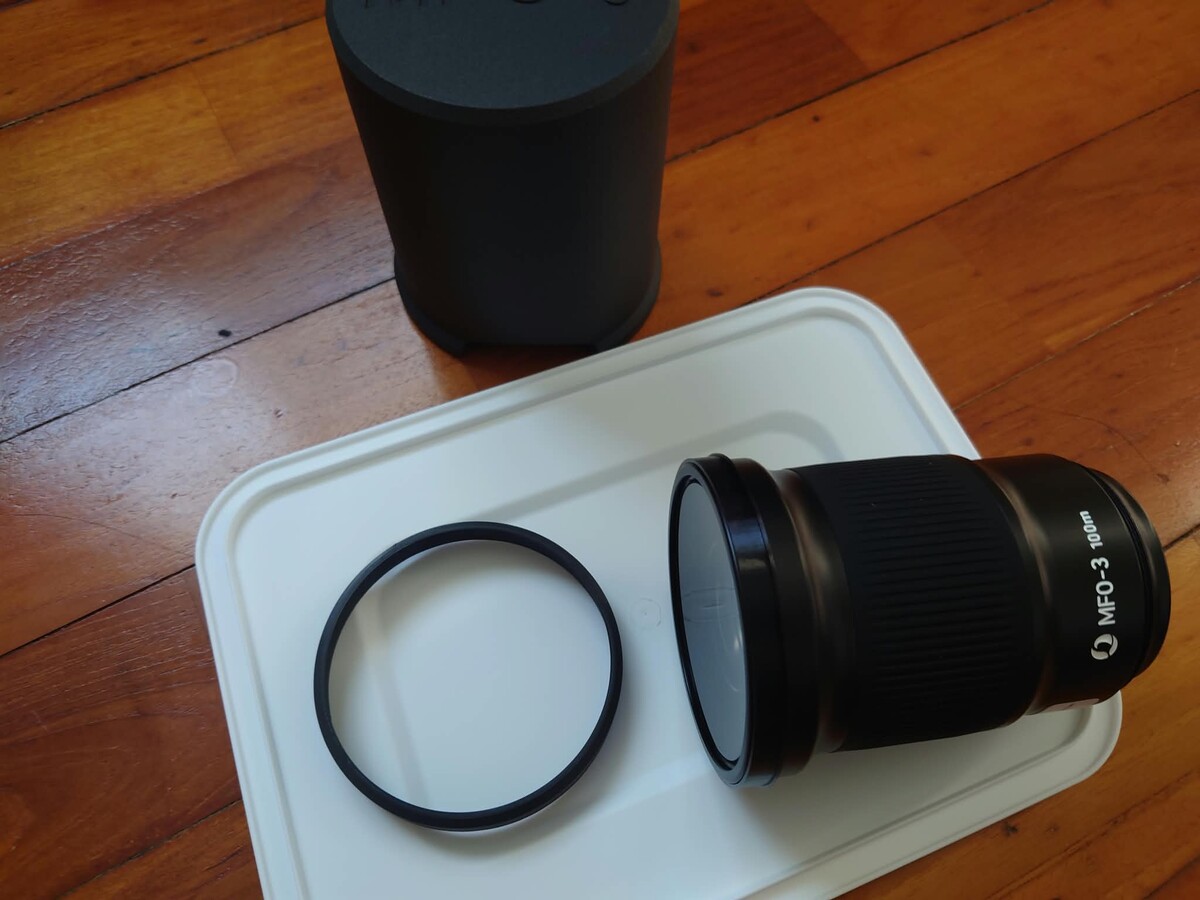
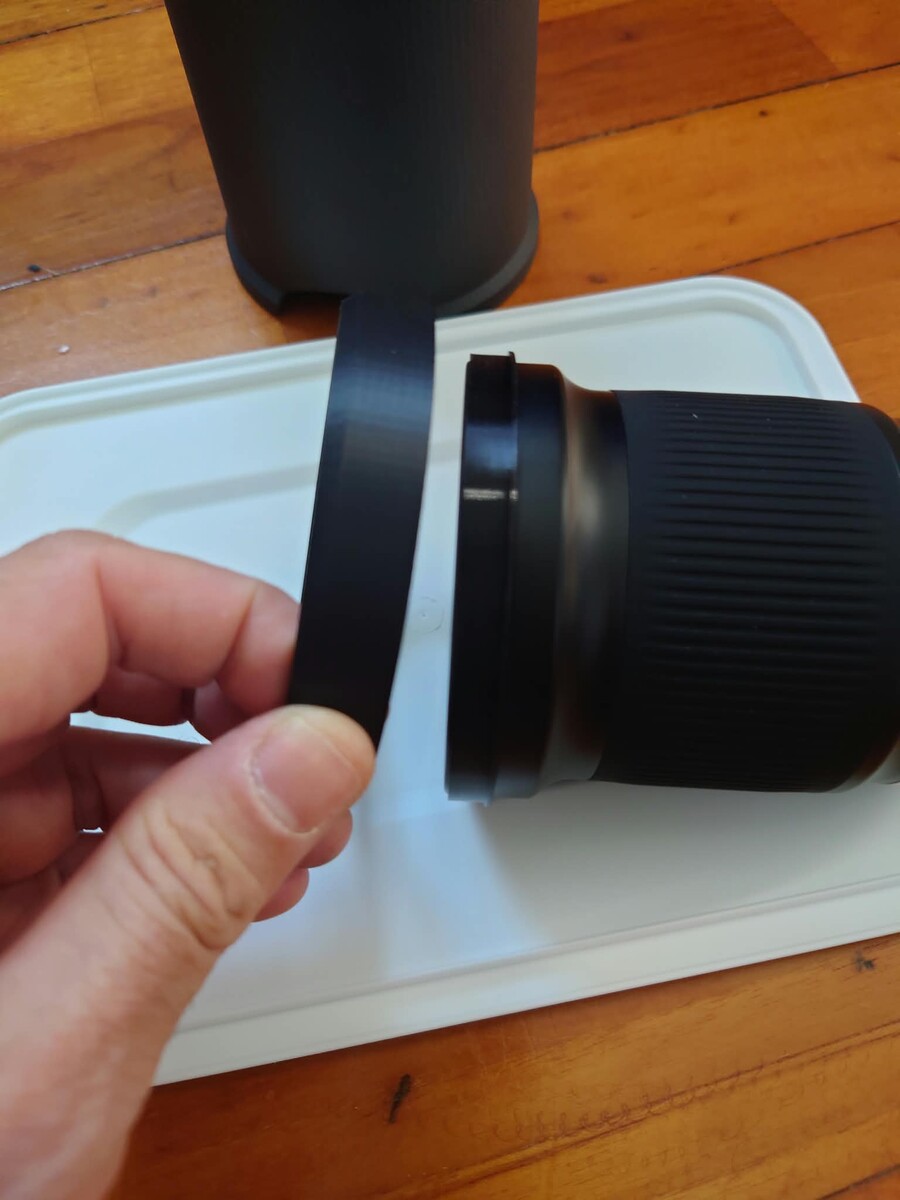
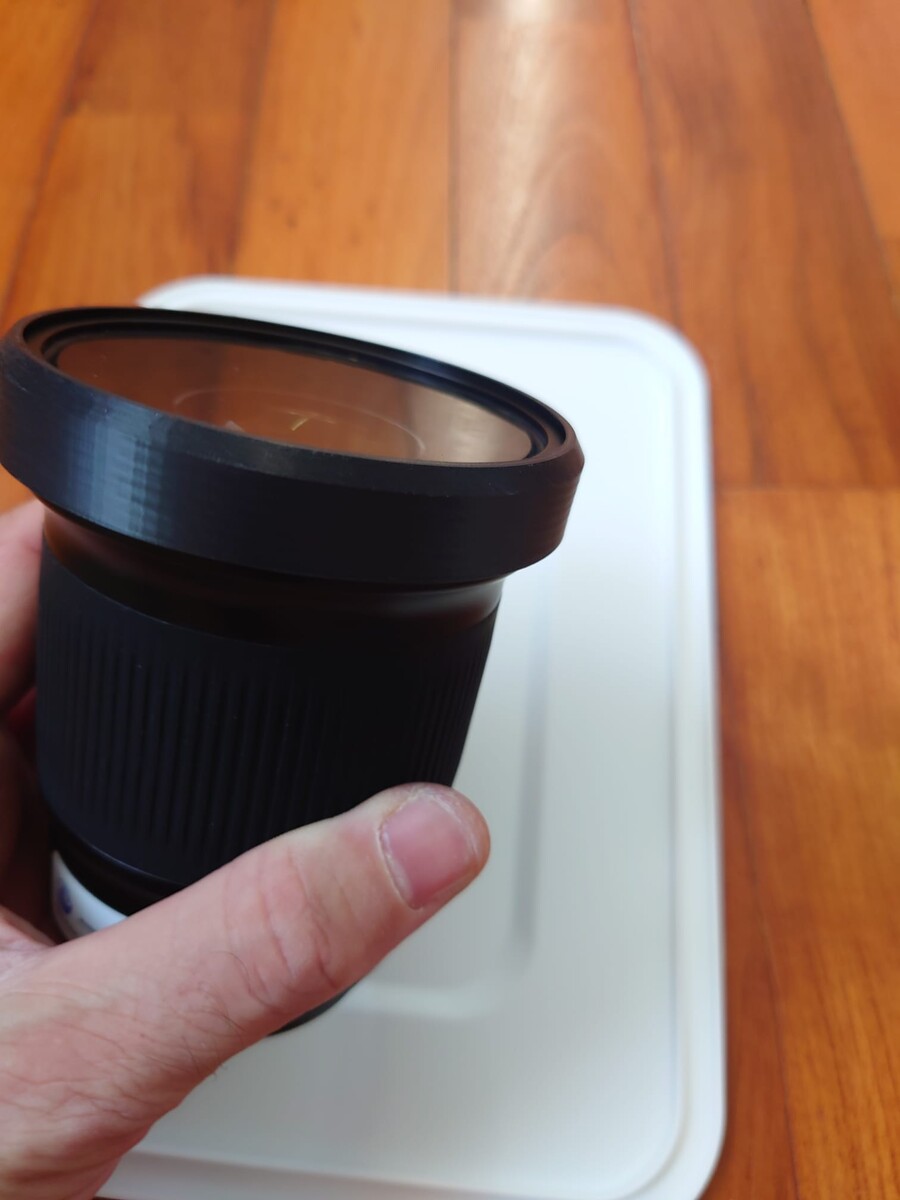
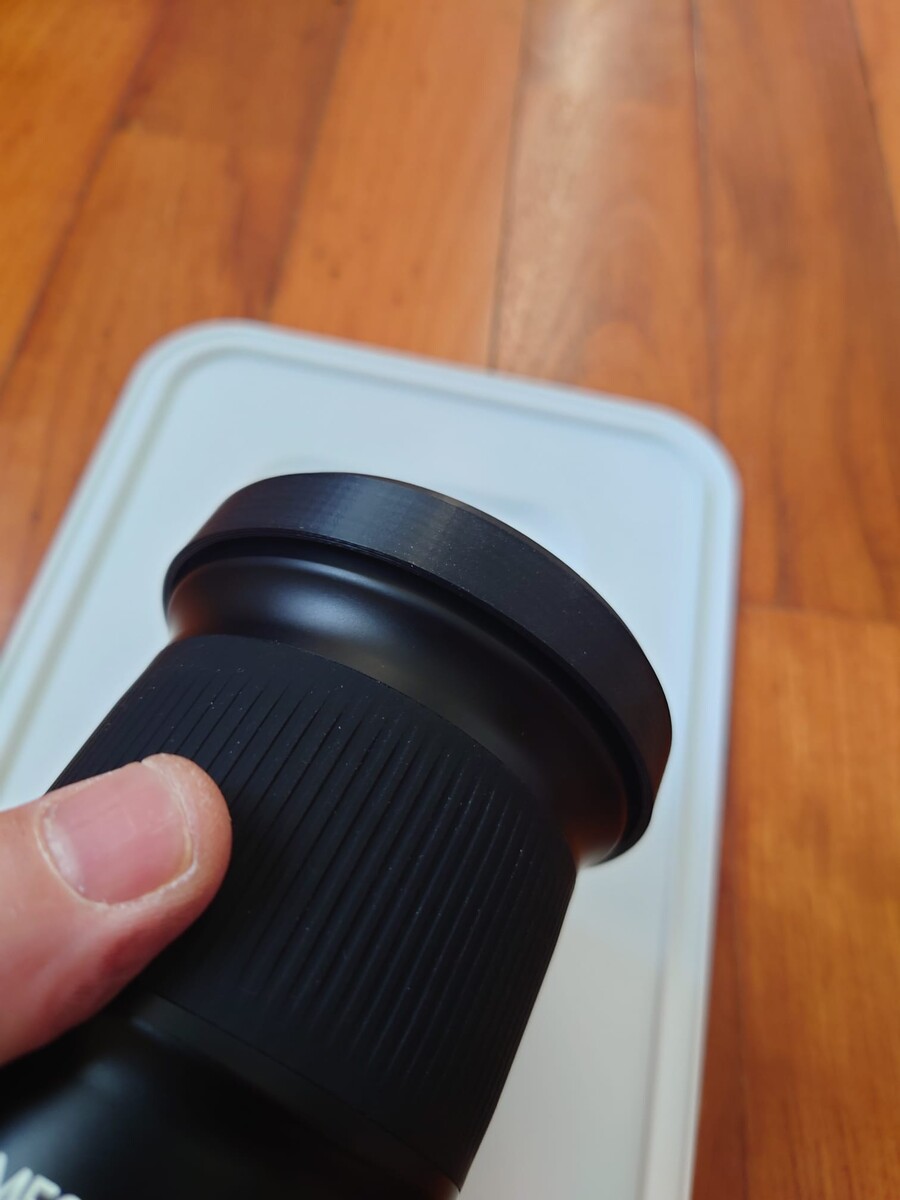
Hi Tino I've just have this printed in China (JLCPCB) but not sure how it works. On my print, the larger ring slips off the smaller retainer ring - did you glue it on? Or maybe I'm mounting it wrong / the material used. thanks! EDIT - after trying multiple combination I managed to make it click on somehow, but not sure if this is the "correct" way, as it looks a little different from your pic:
-
Yes, very interesting thought. On quite a lot of cameras you do need to fill the WB calibration square/rectangle completely to get an accurate balance, which is why a larger slate at arm's length is quite common. I really like this contraption here: https://waterpixels.net/forums/topic/3745-sony-fx5-released/#findComment-26786 There were multiple WB threads on Wetpixel back in the heydays of underwater video, and yes, sand usually works quite well as it covers a large enough area for calibration. But it also depends on the type of sand. I've had very mixed results with brown/muddy sand, and black volcanic sand is also a no-go. Another recommendation that came up a lot, especially from Nick Hope who did a lot of testing at the time, was using the palm of your hand as a WB reference.
-
I can't help with the question, but the Kraken Hydras have auto on-off and can be connected with an optical fiber cable or just use light from the strobes. I have the discontinued 1500, and it's powered by a standard 21700 battery. https://krakensports.ca/product/hydra-1800wsr/