



-
@waso Yeah you are right I didn’t have split shots in mind. While invertinf a water mask would work well adding a sky mask would add an extra comfort.
-
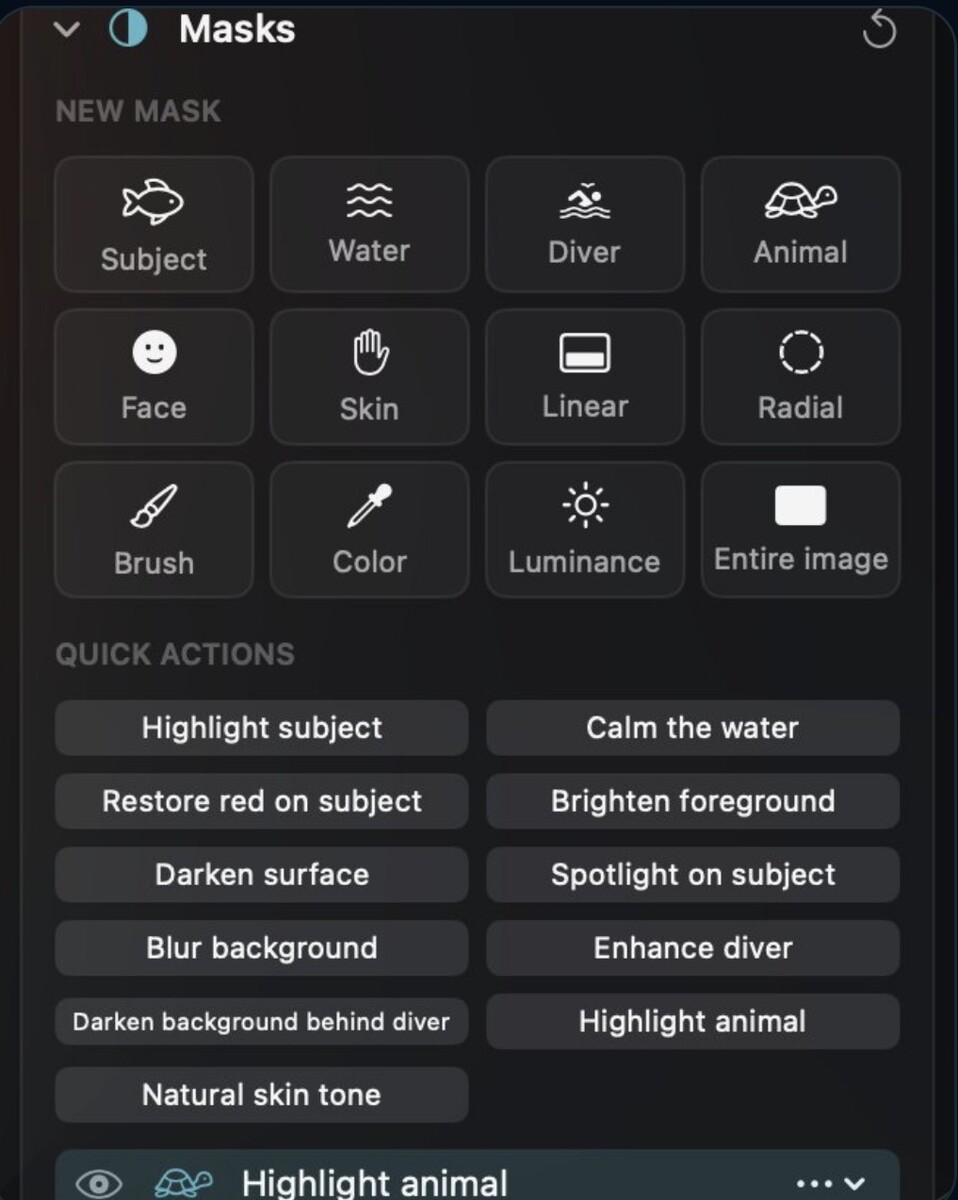
@waso yes brush and luminance are both quite important. In my app I included the following mask types did I miss something?
-
@jyuny1 Thanks for sharing your workflow! That’s an interesting approach, especially when travelling for diving. Being able to import RAW files directly on an iPad and have everything synced to the cloud must be really convenient when you want to travel light. I didn’t realize that Lightroom Classic only syncs Smart Previews to the cloud rather than the original RAW files. That’s definitely something to keep in mind. Personally, I still prefer working on a desktop, especially when it comes to detailed masking and selective adjustments, but I can see the advantages of your setup when travelling.
-
@Chris Ross Thanks for the detailed explanation, Chris! Your approach with luminosity masks sounds really interesting, especially for adjusting shadows, highlights and midtones separately. I haven’t explored that technique in depth yet, so I’ll definitely take a closer look at the Tony Kuyper tools. I mainly use masking underwater for selective sharpening and noise reduction, but also for adjusting specific areas of an image independently. The tricky part is often getting clean selections, especially when there isn’t much contrast between the subject and the background. It’s interesting that you still use CS6 together with Capture One. It’s a good reminder that newer software isn’t necessarily better for every workflow! 🙂 Best, Jurgen
-
@Rich W Thanks for sharing your workflow, Rich! Interesting that you use DxO PureRAW before Lightroom. I’ve heard quite a bit about it, and it seems to work well for many photographers. I agree that the catalogue and keywording side of Lightroom is extremely important, especially when you have a large collection of images. At the same time, it’s a shame that we sometimes have to put up with the limitations of the software just to keep everything organized. I might give Backscatter Exterminator another try with masking, as you suggested. There’s always something new to learn! 🙂
-
-
wow really nice shots
-
Really nice shoots and welcome. Hope to see more of your photos in the future.
-
Welcome on board Richard.
-
Welcome Daniel.
-
Welcome to waterpixels.
-
Beautiful images! 😊 It’s a shame the trip didn’t go as planned, but I’m glad you’re sharing these stunning photos with us!
-
Welcome, Eric! 😊 You’re in the right place. Looking forward to seeing your underwater photography!
-
Thanks for sharing I never was there but I think now you give me a reason to go. 😊
-
I forgot, there is now also Black & White, made for underwater. One key (V) turns any photo into black and white, and an underwater-aware auto mix darkens the water and lifts the subject, set per photo. - An 8-band gray mixer, toning via Color Grading and three looks (Wreck, Shark / Sun rays, Macro) let you fine-tune every tone, and masks and Smart Points keep working. - Light, form and texture take over: no more fighting green water or a blue cast. - See the before/after and all settings here: https://depthlight-site-c9a456.gitlab.io/blackwhite.html

.jpg.857dbbfbdc4d79d9c6ebf7b4ba96ed1b.jpg)

