



-Edit.jpg.0739718b849caea17a4f73bb93954a2a.jpg)

-
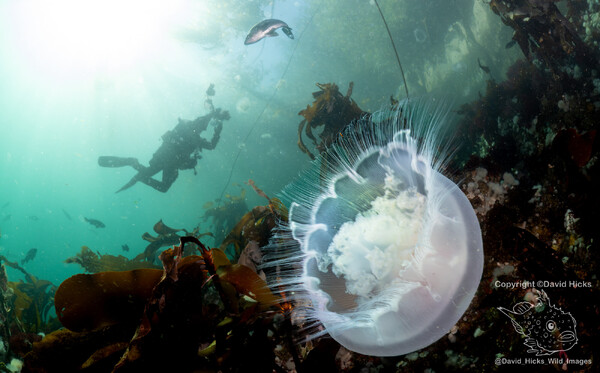 Browning Wall is famous for it's dense and colorful walls full of life. But the shallows at the top are also pretty amazing on a sunny day. Clear water lets the trees up above show up in the this image, along with hundreds of jellyfish, rockfish, and divers. Nikon Z8 w/8-15mm Fisheye lens + 1.4TC, f14@1/40s iso500, Pair of Retra Maxi strobe
© @david_hicks_wild_images
-
You got me thinking with this brain-teaser! 😜 Is it a better idea to spend 10-thousand scuba bucks to get a high end beast of the FCP dome, matching lens, and end up with barely measurable but incrementally better quality? Or better to spend Zero scuba-bucks to put together a grab-bag-hobo-hodge-podge of leftover parts and end up with barely measurable but incrementally worse quality? Or do you just slap your forehead in the realization that the problem was with the strobes and lighting all along??!!
-
I use it with the Nikon Z8 and I find it useful. The best part of it is that it allows the lens to focus a little bit closer but also extends the focus out to a meter unlike with most diopters. I don't see a lot of advantage with autofocus performance the Z8 is pretty awesome at that already. I think it probably improves the image quality a little bit but again I haven't noticed a huge difference from shooting without it.
-
I use about 1/3 of a sponge. Straight lines are recommended.
-
.jpg.a7831eaed08455ae0ee35ca872a1c4a5.jpg) Two of my dive buddies; Joaquin and Dave! Together again on Sunrise Reef. Dave can't breath seawater like Joaquin, so he is wearing a whole get up. 🤿 Nikon Z8 w/24-50mm, WWL-C, f13@1/50s iso800, Pair of Retra Maxi strobes
Two of my dive buddies; Joaquin and Dave! Together again on Sunrise Reef. Dave can't breath seawater like Joaquin, so he is wearing a whole get up. 🤿 Nikon Z8 w/24-50mm, WWL-C, f13@1/50s iso800, Pair of Retra Maxi strobes© David_Hicks_Wild_Images
-
That is okay for very light scratches or finishing but you really need Micromesh sandpaper. https://www.amazon.com/dp/B0H5B49QWX
-
It is 90 degrees. Interesting gizmo perhaps designed for those who are unwilling to reposition their strobes? It's not that big of a deal, but it does take a few seconds. But so would unlocking and rotating the housing in this contraption. I like cool innovations in the UW photography space, but this does not unlock or enable anything new.
-
Very snug! That is going to require a clever port cap solution or that glass is going have a short shelf life
-
They work great. I've pressure tested and iterated the design and printing process until they are very robust. I have been using my n120 rings for months and many dozens of dives, and I have tested the n100 rings to even great depths than I can dive. I did a price quote with a CNC vendor and it was around $200 for a single copy. Printing them myself is much less expensive and the reliability has been great. Heads up that it's not a simple print to replicate without really knowing what you are doing and dialing everything in just so. PM if you are interested in any size n100 extension ring. I have not shared this particular design, sorry.
.jpg.3d77266ae8b523600c9882a102479501.jpg)
-
Sure, no one ever accused Lightroom of being intuitive. But if you learn how to use and configure the Import module you can make it do almost anything you need or want.
-
Of course you can do this. Put your files wherever you want. Sync that folder structure into lightroom Turn on XMP files in Lightroom settings. Go edit your photos with Lightroom. Your edits are annotated into the sidecar XMP files on disk adjacent to your RAWs. The RAW files plus edits can be viewed in Bridge or Photoshop, or reimported into Lightroom years later. The XMP capability (plus exporting to JPG, etc) completely take Lightroom's library system out of the picture. You don't have to rely on it if that doesn't work for you.
-
Only it does. The import module of Lightroom is very flexible and powerful. It also does exactly what you say it does not. I import every days photos into distinct folders with my the Folder name of the Event, files renamed to that event + date info, and placed in sub-folders named by date. Photos +++ 2026 +++ Gods Pocket Sept 2026 +++ Sept 6 2026 +++ Gp-Sept26_Photo1 I have 20 years of photo organized this way using lightroom and it is very simple to parse and discover using just the file system. LR goes beyond that with a system of tags and metadata in the library but i don't really use that.
-
I don't delete the RAW files ever. As i grow my editing skills over time and find new tools i have often gone back to a favorite image from prior years and re-edited from scratch. JPG is a end product consumption format and never re-edited again.
-
The free Adobe Bridge app can read and convert all of your edited RAW files. Just tell LRc to generate XMF? metadata for all of your pictures. Cancel your subscription any time. In my workflow i export to JPG all of the files I tag and post process. Those jpgs go to cloud storage for backup and portability.
-
For Sale
PM sent.



.jpg.857dbbfbdc4d79d9c6ebf7b4ba96ed1b.jpg)

