Expanding our media coverage, celebrating members’ work, and keeping the community at the heart of what comes next. By Rich Newberger A photograph that makes you stop and look. A useful answer to a question you have been struggling with. A conversation that introduces you to someone who shares your enthusiasm for the underwater world. These are the things I want us to keep in mind as WaterPixels grows. As a longtime diver and underwater photographer, I value the friendships, shared knowledge, and encouragement that come from being part of a community. WaterPixels exists to give underwater image makers a place to connect and collaborate, whether they are just starting or have years of experience. We are now expanding the publishing side of WaterPixels: more original articles, more industry coverage, more conversations with the people behind the equipment, and more opportunities to share members’ work. The intention is not to replace a community with a publication. It is to build a stronger publication around the community we already have. More coverage, with a reason behind itThe refreshed homepage brings member photographs, articles, and community discussions together, with routes into the forums, gallery, and marketplace. That is an important part of the direction we are taking: making more of WaterPixels visible without leaving the conversations behind. But a different layout is only part of the work. What matters is what we put into it. We want equipment coverage that explains why a development might matter to an underwater photographer, not simply that something new is available. We want interviews that get beyond a product description and explore the decisions, challenges, and ideas behind it. There is room for practical technique articles, members’ experiences, conservation stories, and the wider issues that affect our diving and photography. There should also be room to explain something clearly for someone encountering it for the first time. The questions members ask can help guide that work. A recurring discussion might point to a subject that deserves a fuller explanation. A thoughtful comment could become a question for an interview. A member’s experience might lead to a feature developed with their involvement and proper credit. An article should give the conversation somewhere to begin, not announce that the discussion is finished. Members Choice: your photographs, your sayMembers Choice gives that community-first approach a visible place on the site. Each month, likes on Member Showcase photographs determine the first-, second-, and third-place images, with first place receiving the Members Choice title. The results are counted on the first of the following month. The placed photographs are featured on the homepage with their photographers credited, and the results remain available in the archive. Members are helping choose the images that introduce WaterPixels to its visitors. For me, the value is not simply in having a winner. It is in encouraging people to share their work, spend time looking at one another’s photographs, and discover an image maker they might otherwise have missed. A photograph can lead to a conversation about an encounter, a technique, a destination, or a creative decision. Recognition is a welcome part of that, but it should not become the only reason to participate. An image does not need to place to be worth sharing. And you do not need to submit a photograph to take part: looking, liking, and offering encouragement all contribute to the community. Industry supported, with members at the centerKeeping WaterPixels free to join is important to us. Our approach combines merchandise sales, voluntary community support, and selected advertising partnerships to help meet the costs of running the site. Industry support belongs in that picture. Manufacturers, retailers, dive operators, and other businesses can help sustain a useful resource while reaching people who care about what they do. We welcome that relationship. We also want it to offer more than a logo on a page. A company representative who helps explain a design decision, answers a practical question, or listens to members’ experiences can make a valuable contribution. The distinction we intend to maintain as we grow is straightforward: support helps us do the work; it should not determine what we say. An advertising arrangement should not be a promise of a favorable review, and a partnership should not prevent respectful questions or honest discussion. Commercial relationships should be clear, and readers should be able to distinguish a product announcement from an opinion or a report based on actual use. We want partners who see the value in that approach. A community is worth supporting because people trust it and find it useful—not because everyone can be expected to agree. More voices, not a narrower definition of belongingAs our coverage develops, I do not want WaterPixels to become a place where only established names, expensive systems, or distant destinations receive attention. There is room for a first photograph made with a phone and a carefully planned image made with an advanced camera system. There is room for filmmakers, still photographers, and people who enjoy both. A local shore dive or freshwater project can deserve attention just as much as an overseas expedition. We should be interested in what someone has noticed, learned, or wants to share—not only in how impressive their equipment or travel history might sound. That also means keeping responsible diving and respect for marine life within the conversation. We want to celebrate photographs without forgetting the care that should go into making them. Not every contribution needs to become a feature article. A helpful reply, a constructive critique, or a welcoming message to a new member can be just as important to the experience of being here. Help shape what comes nextThere are plenty of things we would like to develop, but we want to build at a pace we can sustain. More coverage is worthwhile when it gives members something useful, interesting, or worth discussing. Publishing simply to fill space is not the goal. Tell us what you would like to read. Suggest a person we should interview, a question that deserves a better answer, or a project more people should know about. Share the work of another member when it catches your attention, and bring your own experiences into the discussion. To everyone who contributes photographs, answers questions, helps keep the site running, or supports it financially: thank you. Those contributions give us something worth building on. We want WaterPixels to become a more useful source of underwater-imaging news, ideas, and inspiration without losing the pleasure of knowing there are people here who understand why we enjoy it. Community focused. Industry supported. Shaped by the people who take part.





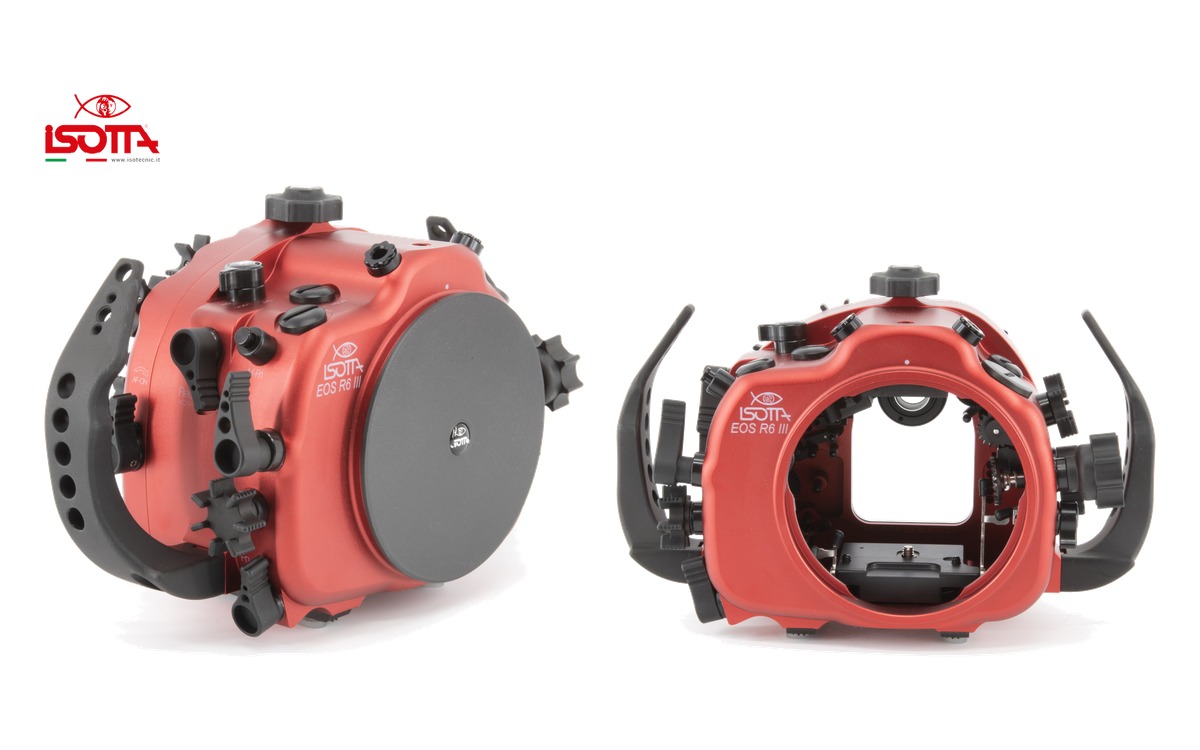 Isotta has released an underwater housing for the Canon EOS R6 Mark III. Built from red anodized aluminium, it is rated to 100 metres and uses the company’s B120 bayonet port mount. Photo: Isotta The housing provides access to the camera’s main shooting controls, with a focusing and shutter lever designed for use with gloves, a locking camera tray and a fully detachable rear section secured by a single-hand closing knob. Photo: Isotta Key specificationsDepth rating: 100 metres Dimensions: 292 × 186 × 138 mm Port mount: B120 bayonet with safety lock Strobe connections: two fibre-optic connections; optional trigger required Accessory openings: three M16 and one M24 Sealing: double O-rings on all buttons and removable parts Monitoring: moisture sensor with LED indicator; vacuum system optional Viewfinder: standard Isotta viewfinder included Warranty: two years from the manufacturer, excluding batteries The package includes handles, a front lid, the standard viewfinder, humidity sensor, fibre-optic connection bulkhead, replacement O-ring kit and silicone lubricant. Photo: Isotta Isotta lists the housing at €2,899 excluding tax. The optional vacuum system is €195 and the manual trigger is €239, also excluding tax. Shipping availability has not been confirmed. Full specifications and options
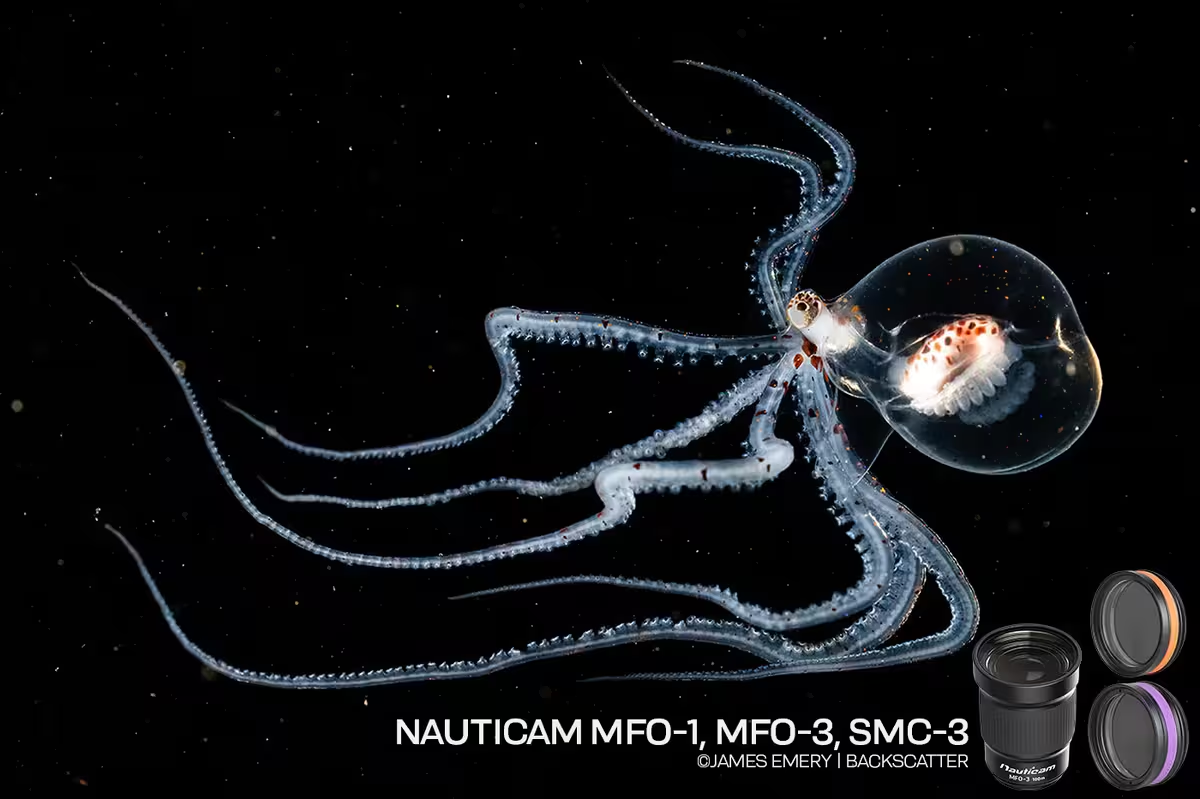 James Emery at Backscatter has published a review and a field video of three Nauticam wet lenses that mount on the same macro port: the MFO-1, the SMC-3, and the MFO-3II. All three are 67mm lenses, so on a flip holder you can move among them on one dive without changing the camera lens. They do different jobs. The MFO-1 is the everyday optic: a little magnification, and a shorter focus range so autofocus stops hunting the water column. The SMC-3 is the super-macro lens, about 2.3:1, for the smallest subjects. The MFO-3II opens a 90mm, 100mm, or 105mm toward a 60mm view, which is the one for larger subjects and blackwater. Read the Full review · Watch the video
 Expanding our media coverage, celebrating members’ work, and keeping the community at the heart of what comes next. By Rich Newberger A photograph that makes you stop and look. A useful answer to a question you have been struggling with. A conversation that introduces you to someone who shares your enthusiasm for the underwater world. These are the things I want us to keep in mind as WaterPixels grows. As a longtime diver and underwater photographer, I value the friendships, shared knowledge, and encouragement that come from being part of a community. WaterPixels exists to give underwater image makers a place to connect and collaborate, whether they are just starting or have years of experience. We are now expanding the publishing side of WaterPixels: more original articles, more industry coverage, more conversations with the people behind the equipment, and more opportunities to share members’ work. The intention is not to replace a community with a publication. It is to build a stronger publication around the community we already have. More coverage, with a reason behind itThe refreshed homepage brings member photographs, articles, and community discussions together, with routes into the forums, gallery, and marketplace. That is an important part of the direction we are taking: making more of WaterPixels visible without leaving the conversations behind. But a different layout is only part of the work. What matters is what we put into it. We want equipment coverage that explains why a development might matter to an underwater photographer, not simply that something new is available. We want interviews that get beyond a product description and explore the decisions, challenges, and ideas behind it. There is room for practical technique articles, members’ experiences, conservation stories, and the wider issues that affect our diving and photography. There should also be room to explain something clearly for someone encountering it for the first time. The questions members ask can help guide that work. A recurring discussion might point to a subject that deserves a fuller explanation. A thoughtful comment could become a question for an interview. A member’s experience might lead to a feature developed with their involvement and proper credit. An article should give the conversation somewhere to begin, not announce that the discussion is finished. Members Choice: your photographs, your sayMembers Choice gives that community-first approach a visible place on the site. Each month, likes on Member Showcase photographs determine the first-, second-, and third-place images, with first place receiving the Members Choice title. The results are counted on the first of the following month. The placed photographs are featured on the homepage with their photographers credited, and the results remain available in the archive. Members are helping choose the images that introduce WaterPixels to its visitors. For me, the value is not simply in having a winner. It is in encouraging people to share their work, spend time looking at one another’s photographs, and discover an image maker they might otherwise have missed. A photograph can lead to a conversation about an encounter, a technique, a destination, or a creative decision. Recognition is a welcome part of that, but it should not become the only reason to participate. An image does not need to place to be worth sharing. And you do not need to submit a photograph to take part: looking, liking, and offering encouragement all contribute to the community. Industry supported, with members at the centerKeeping WaterPixels free to join is important to us. Our approach combines merchandise sales, voluntary community support, and selected advertising partnerships to help meet the costs of running the site. Industry support belongs in that picture. Manufacturers, retailers, dive operators, and other businesses can help sustain a useful resource while reaching people who care about what they do. We welcome that relationship. We also want it to offer more than a logo on a page. A company representative who helps explain a design decision, answers a practical question, or listens to members’ experiences can make a valuable contribution. The distinction we intend to maintain as we grow is straightforward: support helps us do the work; it should not determine what we say. An advertising arrangement should not be a promise of a favorable review, and a partnership should not prevent respectful questions or honest discussion. Commercial relationships should be clear, and readers should be able to distinguish a product announcement from an opinion or a report based on actual use. We want partners who see the value in that approach. A community is worth supporting because people trust it and find it useful—not because everyone can be expected to agree. More voices, not a narrower definition of belongingAs our coverage develops, I do not want WaterPixels to become a place where only established names, expensive systems, or distant destinations receive attention. There is room for a first photograph made with a phone and a carefully planned image made with an advanced camera system. There is room for filmmakers, still photographers, and people who enjoy both. A local shore dive or freshwater project can deserve attention just as much as an overseas expedition. We should be interested in what someone has noticed, learned, or wants to share—not only in how impressive their equipment or travel history might sound. That also means keeping responsible diving and respect for marine life within the conversation. We want to celebrate photographs without forgetting the care that should go into making them. Not every contribution needs to become a feature article. A helpful reply, a constructive critique, or a welcoming message to a new member can be just as important to the experience of being here. Help shape what comes nextThere are plenty of things we would like to develop, but we want to build at a pace we can sustain. More coverage is worthwhile when it gives members something useful, interesting, or worth discussing. Publishing simply to fill space is not the goal. Tell us what you would like to read. Suggest a person we should interview, a question that deserves a better answer, or a project more people should know about. Share the work of another member when it catches your attention, and bring your own experiences into the discussion. To everyone who contributes photographs, answers questions, helps keep the site running, or supports it financially: thank you. Those contributions give us something worth building on. We want WaterPixels to become a more useful source of underwater-imaging news, ideas, and inspiration without losing the pleasure of knowing there are people here who understand why we enjoy it. Community focused. Industry supported. Shaped by the people who take part.
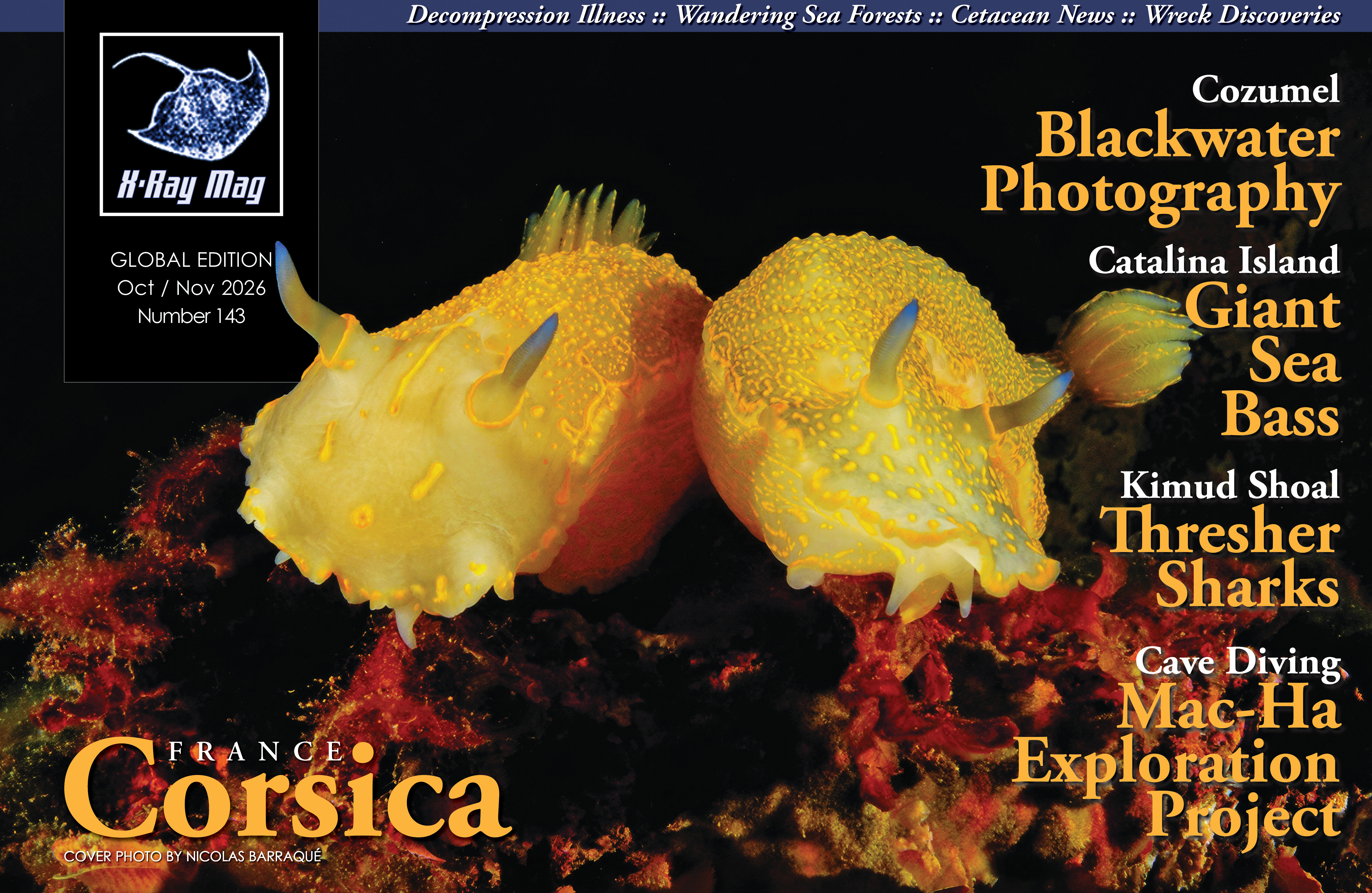 https://xray-mag.com/magazines/143 https://xray-mag.com/magazines/143