
Everything posted by RichN
-
Should be good now.. 👍
-
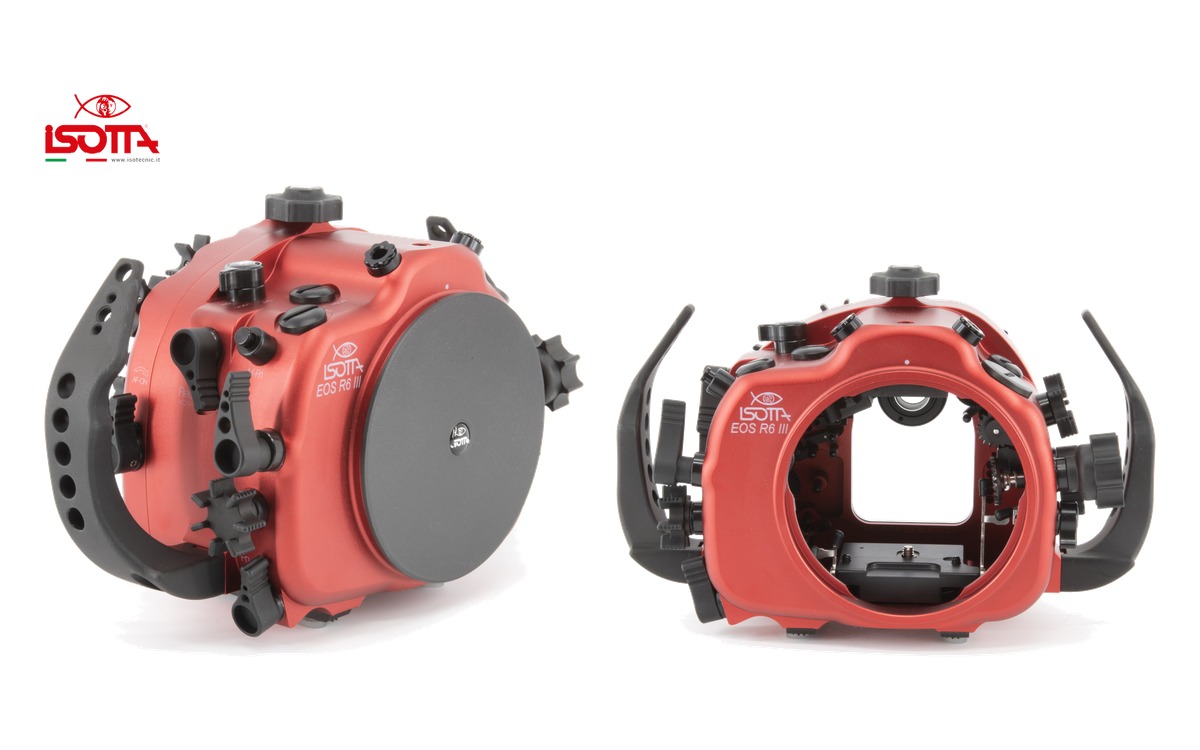 Isotta has released an underwater housing for the Canon EOS R6 Mark III. Built from red anodized aluminium, it is rated to 100 metres and uses the company’s B120 bayonet port mount. Photo: Isotta The housing provides access to the camera’s main shooting controls, with a focusing and shutter lever designed for use with gloves, a locking camera tray and a fully detachable rear section secured by a single-hand closing knob. Photo: Isotta Key specificationsDepth rating: 100 metres Dimensions: 292 × 186 × 138 mm Port mount: B120 bayonet with safety lock Strobe connections: two fibre-optic connections; optional trigger required Accessory openings: three M16 and one M24 Sealing: double O-rings on all buttons and removable parts Monitoring: moisture sensor with LED indicator; vacuum system optional Viewfinder: standard Isotta viewfinder included Warranty: two years from the manufacturer, excluding batteries The package includes handles, a front lid, the standard viewfinder, humidity sensor, fibre-optic connection bulkhead, replacement O-ring kit and silicone lubricant. Photo: Isotta Isotta lists the housing at €2,899 excluding tax. The optional vacuum system is €195 and the manual trigger is €239, also excluding tax. Shipping availability has not been confirmed. Full specifications and options
 -
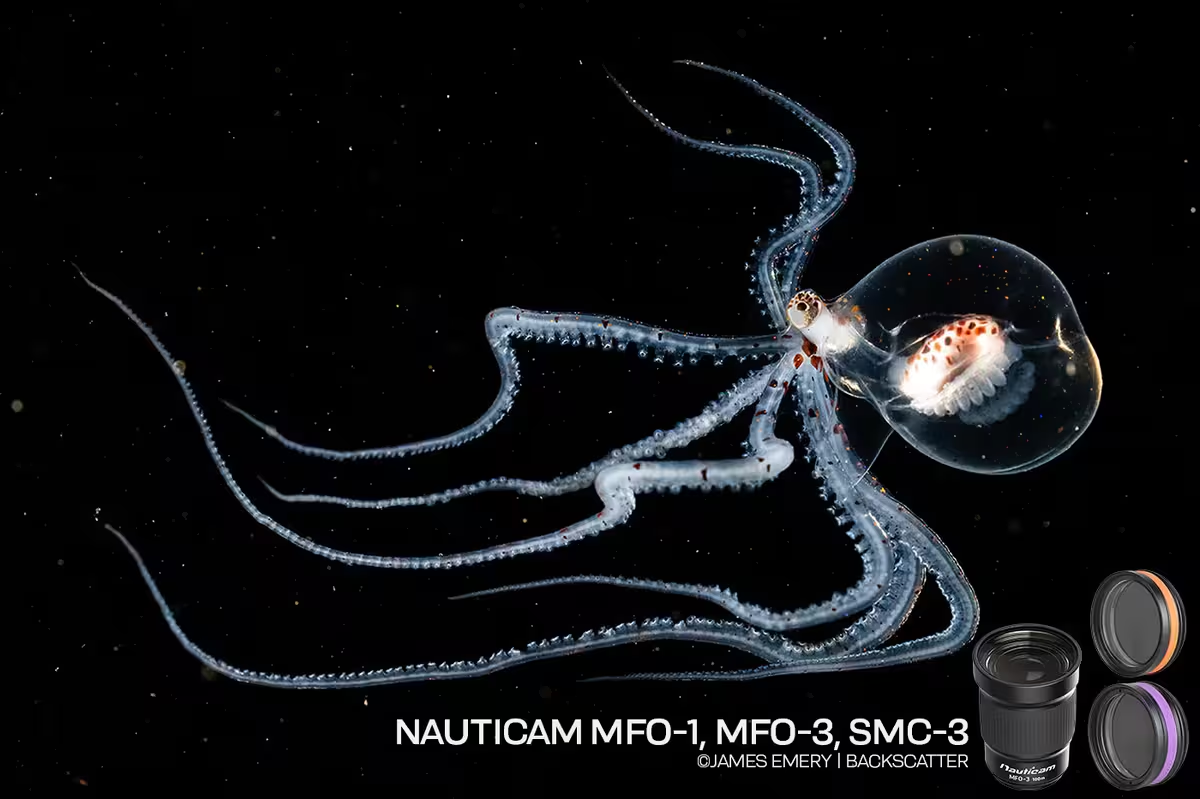 James Emery at Backscatter has published a review and a field video of three Nauticam wet lenses that mount on the same macro port: the MFO-1, the SMC-3, and the MFO-3II. All three are 67mm lenses, so on a flip holder you can move among them on one dive without changing the camera lens. They do different jobs. The MFO-1 is the everyday optic: a little magnification, and a shorter focus range so autofocus stops hunting the water column. The SMC-3 is the super-macro lens, about 2.3:1, for the smallest subjects. The MFO-3II opens a 90mm, 100mm, or 105mm toward a 60mm view, which is the one for larger subjects and blackwater. Read the Full review · Watch the video
 -
Welcome aboard, Eric! Great to have you here, and thanks for joining WaterPixels. You’re definitely in the right place to learn—there’s a lot of experience here and plenty of people happy to help as you get started with underwater photography. Looking forward to seeing what you create!
-
Welcome aboard!
-
As part of our continued effort to grow and strengthen WaterPixels, I’m happy to share that WaterPixels is now a member of DEMA — the Diving Equipment & Marketing Association. This feels like an important next step for us as WaterPixels continues to develop not only as a community, but also as a stronger source for original articles, industry news, interviews, product information and broader coverage of the underwater imaging world. I’ll also be attending DEMA Show 2026 next month on behalf of WaterPixels. My schedule is tight, so I expect to be there for one full day, and possibly part of a second, but I plan to make the most of the time — meeting with manufacturers and industry partners, learning what’s coming next, and bringing that information back to the community. WaterPixels will always be community first, but I’m excited to keep building the media side around it in a way that adds more value for our members and helps us grow responsibly. If there’s a company, product, topic or question you’d like me to look into while I’m at DEMA, let me know. I’d like the community to help shape some of what we cover while we’re there. Also if you are attending let me know, always good to put faces to names.. Community focused. Industry supported.
-
Update — October 14, 2026: WaterPixels received a response from Quintana Roo’s tourism authority, SEDETUR, on October 13. They reiterated that tourists’ sporting equipment is recognized as personal baggage and directed us to Mexico’s customs agency, ANAM, for guidance and assistance. However, the response did not clarify how specific underwater camera equipment is classified or confirm the current status of Cozumel’s reported suspension of disputed charges. We also asked whether further written guidance would be available around DEMA Show 2026, but that question remains unanswered. We are continuing to seek clarification. For now, this response should not be taken as confirmation that the disputed charges have been resolved. We’ll share further updates here.
-
 Expanding our media coverage, celebrating members’ work, and keeping the community at the heart of what comes next. By Rich Newberger A photograph that makes you stop and look. A useful answer to a question you have been struggling with. A conversation that introduces you to someone who shares your enthusiasm for the underwater world. These are the things I want us to keep in mind as WaterPixels grows. As a longtime diver and underwater photographer, I value the friendships, shared knowledge, and encouragement that come from being part of a community. WaterPixels exists to give underwater image makers a place to connect and collaborate, whether they are just starting or have years of experience. We are now expanding the publishing side of WaterPixels: more original articles, more industry coverage, more conversations with the people behind the equipment, and more opportunities to share members’ work. The intention is not to replace a community with a publication. It is to build a stronger publication around the community we already have. More coverage, with a reason behind itThe refreshed homepage brings member photographs, articles, and community discussions together, with routes into the forums, gallery, and marketplace. That is an important part of the direction we are taking: making more of WaterPixels visible without leaving the conversations behind. But a different layout is only part of the work. What matters is what we put into it. We want equipment coverage that explains why a development might matter to an underwater photographer, not simply that something new is available. We want interviews that get beyond a product description and explore the decisions, challenges, and ideas behind it. There is room for practical technique articles, members’ experiences, conservation stories, and the wider issues that affect our diving and photography. There should also be room to explain something clearly for someone encountering it for the first time. The questions members ask can help guide that work. A recurring discussion might point to a subject that deserves a fuller explanation. A thoughtful comment could become a question for an interview. A member’s experience might lead to a feature developed with their involvement and proper credit. An article should give the conversation somewhere to begin, not announce that the discussion is finished. Members Choice: your photographs, your sayMembers Choice gives that community-first approach a visible place on the site. Each month, likes on Member Showcase photographs determine the first-, second-, and third-place images, with first place receiving the Members Choice title. The results are counted on the first of the following month. The placed photographs are featured on the homepage with their photographers credited, and the results remain available in the archive. Members are helping choose the images that introduce WaterPixels to its visitors. For me, the value is not simply in having a winner. It is in encouraging people to share their work, spend time looking at one another’s photographs, and discover an image maker they might otherwise have missed. A photograph can lead to a conversation about an encounter, a technique, a destination, or a creative decision. Recognition is a welcome part of that, but it should not become the only reason to participate. An image does not need to place to be worth sharing. And you do not need to submit a photograph to take part: looking, liking, and offering encouragement all contribute to the community. Industry supported, with members at the centerKeeping WaterPixels free to join is important to us. Our approach combines merchandise sales, voluntary community support, and selected advertising partnerships to help meet the costs of running the site. Industry support belongs in that picture. Manufacturers, retailers, dive operators, and other businesses can help sustain a useful resource while reaching people who care about what they do. We welcome that relationship. We also want it to offer more than a logo on a page. A company representative who helps explain a design decision, answers a practical question, or listens to members’ experiences can make a valuable contribution. The distinction we intend to maintain as we grow is straightforward: support helps us do the work; it should not determine what we say. An advertising arrangement should not be a promise of a favorable review, and a partnership should not prevent respectful questions or honest discussion. Commercial relationships should be clear, and readers should be able to distinguish a product announcement from an opinion or a report based on actual use. We want partners who see the value in that approach. A community is worth supporting because people trust it and find it useful—not because everyone can be expected to agree. More voices, not a narrower definition of belongingAs our coverage develops, I do not want WaterPixels to become a place where only established names, expensive systems, or distant destinations receive attention. There is room for a first photograph made with a phone and a carefully planned image made with an advanced camera system. There is room for filmmakers, still photographers, and people who enjoy both. A local shore dive or freshwater project can deserve attention just as much as an overseas expedition. We should be interested in what someone has noticed, learned, or wants to share—not only in how impressive their equipment or travel history might sound. That also means keeping responsible diving and respect for marine life within the conversation. We want to celebrate photographs without forgetting the care that should go into making them. Not every contribution needs to become a feature article. A helpful reply, a constructive critique, or a welcoming message to a new member can be just as important to the experience of being here. Help shape what comes nextThere are plenty of things we would like to develop, but we want to build at a pace we can sustain. More coverage is worthwhile when it gives members something useful, interesting, or worth discussing. Publishing simply to fill space is not the goal. Tell us what you would like to read. Suggest a person we should interview, a question that deserves a better answer, or a project more people should know about. Share the work of another member when it catches your attention, and bring your own experiences into the discussion. To everyone who contributes photographs, answers questions, helps keep the site running, or supports it financially: thank you. Those contributions give us something worth building on. We want WaterPixels to become a more useful source of underwater-imaging news, ideas, and inspiration without losing the pleasure of knowing there are people here who understand why we enjoy it. Community focused. Industry supported. Shaped by the people who take part.
 -
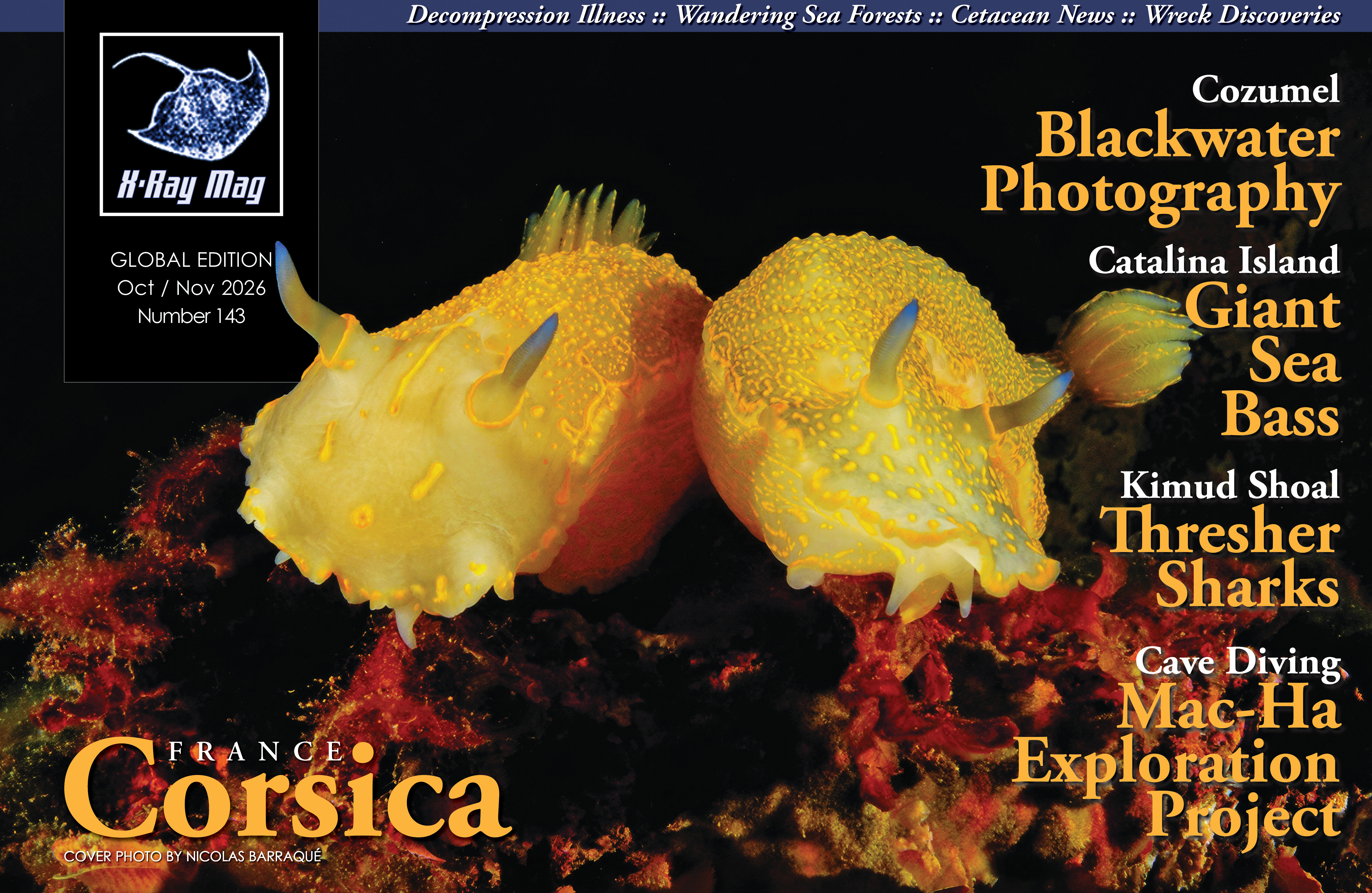 https://xray-mag.com/magazines/143 https://xray-mag.com/magazines/143
 -
Thanks, Mike. I share your concerns. We can’t keep treating the ocean as though its resources and resilience are unlimited, and loving diving doesn’t excuse the impact we have. That responsibility extends into everyday life too—what we buy, eat, throw away, and how we travel—even when we’re nowhere near the sea. That’s part of what I hoped to get across in the article: our images can help people care about a world they may never see themselves, but that care has to carry through into our own actions. We all have a responsibility to respect the ocean and give those stories a chance to continue.
-
Welcome aboard Suds!
-
-
We have a good team, to keep it going!! 🙏🏼
-
Hi Larry, glad we got you set up and it’s good to see you here! Fifty years and 2,359 dives is certainly nothing to downplay. You may be retiring from diving, but there’s still plenty to talk about here! Looking forward to seeing some of those photos as you work through the backlog and hearing a few stories along the way. Welcome aboard!
-
@Mike Saunders Thanks, that’s exactly it. We do it because we enjoy it, not because we expect to win anything… and in doing so, hopefully we get a few more people to appreciate what’s down there and want to protect it. @Troporobo Thank you, that really means a lot. A “WP Manifesto”… I’ll take that! We all enjoy talking about the gear, but there’s more to it than that. It’s about sharing what we see, learning from each other and respecting not only the marine life and the places we’re visiting, but each other too. That’s what I hope WaterPixels is about. Glad that came through.
-
Welcome aboard Clark.. glad you made it in..
-
Thanks @ChipBPhoto @TimG we hope so..
-
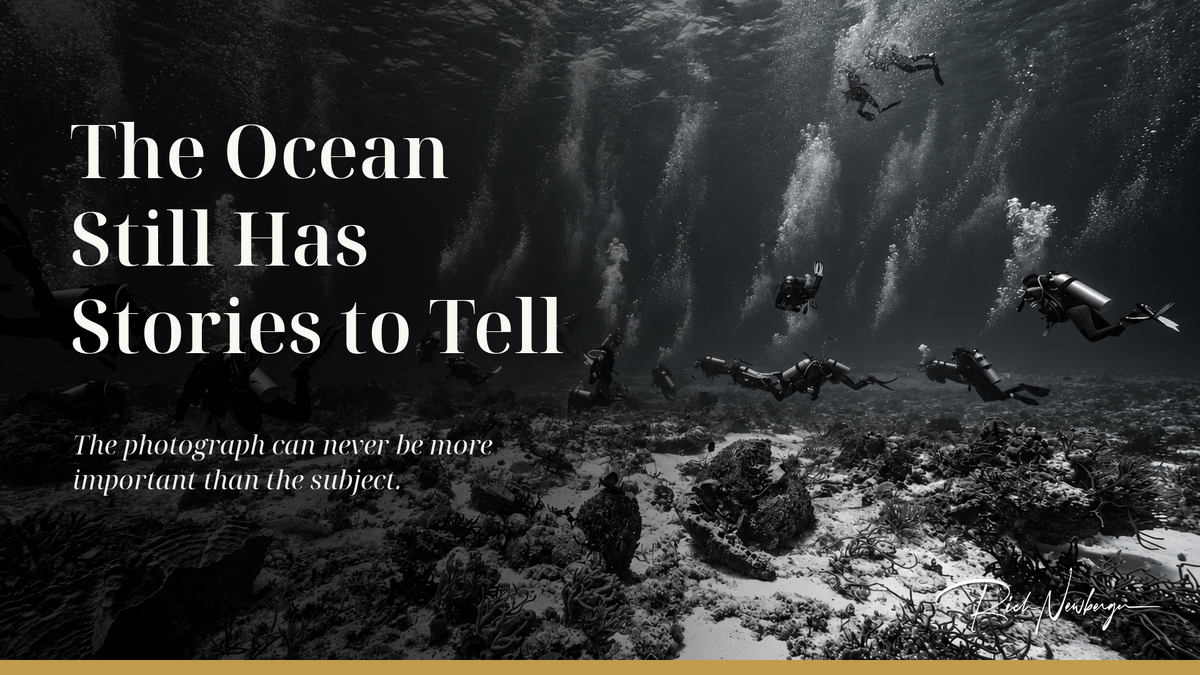 I have spent a lot of years looking through a viewfinder, both above and below the surface. Photography has always been about capturing something that would otherwise pass — a person, a place, a fraction of a second that would be gone if we did not make the effort to preserve it. Sometimes the result is artistic, sometimes documentary, sometimes neither, and sometimes a little of both. But some of the moments that have stayed with me the most are the ones when I’ve stopped thinking about the photograph. On one dive, I saw a huge loggerhead turtle in the distance. My first instinct was to move closer. You see the subject, you imagine the photograph, and your mind immediately starts working through distance, angle, light, and composition. Then I stopped. There were already so many divers around it or heading toward it — multiple dive groups, people trying to get closer, some waiting their turn and others not. The turtle had enough going on without me adding myself to the crowd. Watching so many people converge on its space was unsettling to me. So I stayed back and took a photograph of the scene as it was. It wasn’t a photograph I had planned to make, and I certainly wasn’t thinking about composition or creating something for a portfolio. It was really just a snapshot for reference — a record of what I was seeing. Divers seemed to fill the water in every direction, spread across the reef and throughout the water column, with streams of bubbles rising toward the surface. And somewhere beyond all of that activity was the reason everyone had gathered there: the turtle. The turtle isn’t even in the photograph. I had started toward it hoping to make a photograph of a loggerhead. Instead, I photographed what was happening around it. The photograph I came away with was not really about the turtle at all. It was about us. It became a reminder of how easily our excitement can become pressure on the very animals we came to see. I wrote about that moment afterward and summed it up with a simple thought: No shot is worth stressing or damaging anything. That still reflects how I feel. There are times when we can approach carefully, make an image and move on. There are other times when the right decision is simply to watch. Knowing the difference is part of being an underwater photographer, just as much as knowing how to set a strobe or choose a lens. The moment we descend beneath the surface, we become visitors. Being a good visitor means leaving as little evidence of our presence as possible. The photograph can never be more important than the subject. That responsibility does not limit creativity. If anything, it asks more of us. We should create through the way we see, frame, light and interpret a scene — not by disturbing an animal or changing the environment to manufacture a better picture. The turtle encounter became meaningful because I stepped back and noticed something beyond the image I had first imagined. Underwater imaging, like photography above the surface, is an art form. We make choices about light, composition, perspective, movement, color and mood. Two people can photograph the same subject on the same dive and come back with completely different images because each person sees the scene differently. Sometimes the goal is to show exactly what was there. Other times it is to communicate what it felt like to be there. The camera is only the tool. The image comes from the person using it. Those tools can look very different: a large housed camera with strobes, a compact, an action camera, or a smartphone in a housing. What connects us is the desire to bring something back and show someone what we saw. A photograph of a tiny nudibranch can introduce someone to an animal they never knew existed. A healthy reef can show what is still worth protecting. Bleaching coral, discarded fishing gear, or a landscape changed by human activity can tell a very different story. Our cameras document beauty, but they also document change. That is one of the things that has always fascinated me about underwater photography. Divers get to see things much of the world never will. We notice when a reef looks different from the last time we visited — storm damage, fewer fish or plastic tangled around coral. We also see recovery, new growth and marine life returning to places that have been given a chance to heal. Dive after dive, year after year, underwater image makers are building a visual record, often without ever setting out to become historians. Some of those images may never win a contest or receive much attention. Many will sit quietly on hard drives or phones for years. Yet an ordinary photograph can preserve something important: a reef, a wreck, a species or an ecosystem at a particular moment in time. As the ocean changes, an image that seems unremarkable today may become valuable for what it allows us to remember. Underwater photography may increasingly become part of the ocean’s memory as well as our own. That connection between observation, creativity, and responsibility is why I believe conservation belongs naturally alongside underwater imaging. A photograph can make something distant feel personal. Someone who has never worn a mask or taken a breath from a regulator can still look into the eye of a shark, see the complexity of a coral reef, or recognize the vulnerability of an animal surrounded by divers. Sometimes that connection is enough to make someone care, and caring is often where conservation begins. It is also part of why WaterPixels matters to me. WaterPixels was built not only to restore or continue a community, but around the idea that underwater photographers and image makers should have a place to share photographs, knowledge, experiences, mistakes, and discoveries. The same impulse that makes us bring a camera on a dive, makes us want to talk about what happened afterward. What did we see? How did we make the image? What would we do differently next time? When I think about the turtle encounter, that last question matters especially. Sharing the photograph also meant sharing the decision behind it: why I stayed back and what I noticed when I did. Those are the kinds of conversations I want us to have alongside discussions about technique. An image can give us something to learn from even when the lesson has little to do with camera settings. Photography has changed enormously over the years, from film to digital and through advances in autofocus, lighting and editing. Action cameras opened underwater imaging to a much wider group of people, and smartphones are now doing the same. A phone in a housing can document a reef, an encounter or an environmental change just as meaningfully as a large dedicated camera system. That wider participation is good for a community built on sharing. Someone asks about a lens and another photographer explains what worked for them. Someone shares a lighting technique they struggled for years to understand. A diver posts about an encounter from halfway around the world. A photographer with decades of experience helps someone preparing for their first trip with a housing. Eventually, that new photographer becomes the person answering someone else’s question. That is how a community stays alive. Of course, underwater photographers can spend endless hours talking about equipment. We are exceptionally talented at debating domes, wet lenses, strobes, ports, sensor sizes, autofocus settings, corner sharpness and probably several hundred other subjects that most people would never understand nor care about. Those discussions are part of the fun for some, and good advice can save someone a great deal of frustration. But the value of an image (or video for that matter) has never depended entirely on the equipment used to make it. A technically perfect photograph with razor-sharp corners can be beautiful. So can a grainy, imperfect image made at exactly the right moment. Underwater imaging can be scientific, documentary, journalistic, artistic, or deeply personal. Sometimes, it is several of those things at once. What matters is what the image says. Underwater photography exists because the underwater world exists. Without healthy oceans, the cameras do not matter very much. Conservation should not feel like a separate subject we occasionally add to a photography community. It is already present in the choices we make every time we enter the water. After enough years behind a camera, it would be easy to think everything has already been photographed. It hasn’t. A familiar reef changes with the light. An animal behaves in a way we have never seen before. A new photographer notices something an experienced photographer may have passed a hundred times without seeing. There is still room to be surprised, and more people than ever have the ability to record those discoveries and share them. The world does not necessarily need more photographs simply for the sake of having more photographs. What it needs are more people willing to look carefully, learn, create, and share what they discover — and to protect the places that make those discoveries possible. Sometimes looking carefully means recognizing that the photograph we came for is not the most important thing happening in front of us. That is what I hope WaterPixels continues to be: a place where great underwater images are celebrated, curiosity matters, creativity is encouraged and knowledge is freely shared. A place where wildlife is respected and the health of the ocean matters as much as the photograph. A place where someone with the most expensive & latest system and someone with a smartphone can both contribute something meaningful. Long after today’s cameras are obsolete and the technology we currently obsess over has been replaced, the reason we carried those cameras underwater will remain. There will still be another reef to explore, another animal to encounter, another photographer discovering this world for the first time, and another moment worth remembering. What we choose to notice, preserve, and share will still matter. And somewhere beneath the surface, the ocean still has stories to tell...
 -
The WetPixel Archive has been assembled and rebuilt from old Wetpixel forums as a read-only archive, for historical reasons only, link below and will be in the site navigation under Community. https://waterpixels.net/wp-archive/ Wetpixel was founded in 2000 and became an important resource for underwater photographers, filmmakers, divers, manufacturers, and researchers. This archive is that record. The discussions are kept as they were written. It is not current advice, product information, or a statement of anyone’s views today. WaterPixels is an independent community. We are not affiliated with Wetpixel, and we are not its successor. The Wetpixel name and the material in the posts remain with their owners. Copyright stays with the people who created the work. If you are a rights holder and something in the archive should not be shown, the notice on the archive page explains how to send a removal request. We will review it. The Wetpixel Wiki is a synthesis of the material held in this archive: https://wetpixel.echeng.com The Wiki will start to point old Wetpixel forum links back into the archive at some point. When the Wiki refers to an old thread, that link should open the same discussion here, so those references stay inside the historical record. Nothing new is posted in the archive. It is there to be read. In addition the site search will show additional options so that results will show from both the Live forums and the Archive.
-
These items should be fixed now.. thanks for bringing them to our attention.
-
Thanks I’ll dig in to it later and get it sorted.
-
Welcome aboard! Great to have you here.
-
Welcome to WaterPixels, Bob! Great to have you here. Looking forward to seeing some of your images and having you join the discussions. Make yourself at home!
-
Update — September 24, 2026: Local reports from Cozumel indicate that the disputed Customs charges on cameras and specialized diving equipment are currently no longer being applied following discussions between local business groups and federal Customs officials. César Cepeda Escamilla, representing Cozumel nautical-service operators, told Quequi that an agreement had been reached providing greater flexibility for visiting divers. This is an encouraging development, but WaterPixels has not yet located a written directive from Mexico’s National Customs Agency (ANAM) formally confirming the change or establishing it as nationwide policy. For now, divers and underwater photographers traveling to Mexico should therefore continue to exercise caution, particularly when entering through airports outside Cozumel. WaterPixels continues to monitor the situation and has contacted both Quintana Roo tourism officials and Mexican Customs directly for clarification
-
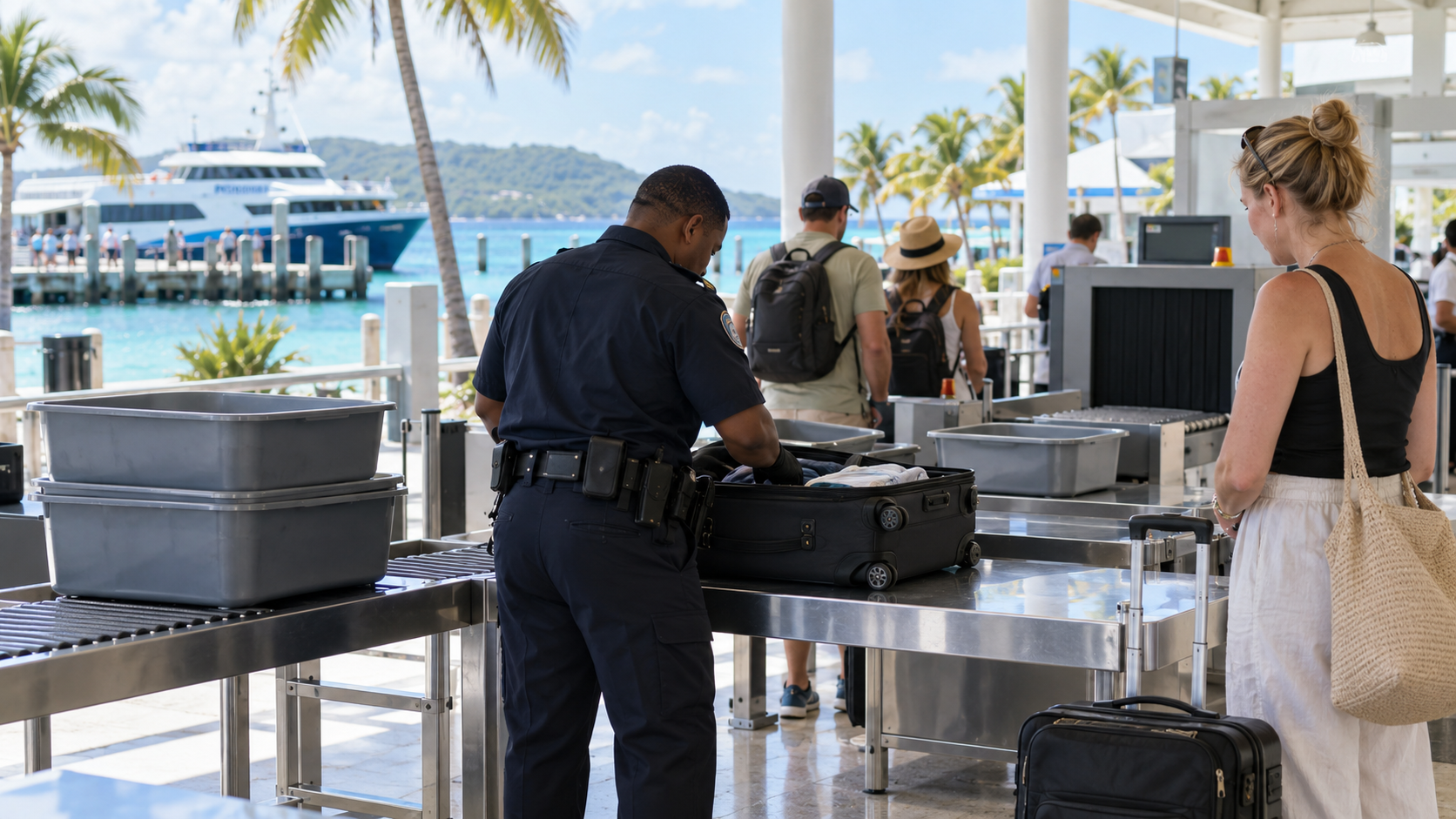 Underwater camera housings traveling with their corresponding cameras are to be treated as photographic accessories, while dive computers are to be classified as sporting equipment, according to Cozumel tourism officials following meetings with Mexican Customs. Broader questions about strobes, ports, wet lenses and whether the interpretation applies throughout Mexico remain unresolved. September 21, 2026 — WaterPixels There may finally be some movement in the long-running dispute over how Mexican Customs treats the specialized equipment carried by visiting divers and underwater photographers. Following meetings between Mexican Customs officials, the Quintana Roo Tourism Secretariat (SEDETUR) and representatives of the diving industry, Cozumel tourism officials say two particularly important pieces of equipment now have clearer treatment when visitors enter the destination: dive computers and underwater camera housings. According to Elías Farah Ceh, Cozumel's Director of Tourism and Economic Development, dive computers brought by tourists are to be classified as sporting equipment rather than laptops or tablets during Customs inspections. For underwater photographers, an even more significant clarification concerns camera housings. Farah Ceh said that underwater camera housings will be considered camera accessories when they travel with the corresponding camera. If a housing is transported separately from its camera, however, it may instead be counted against the passenger's duty-free merchandise allowance and could become subject to tax if the applicable allowance is exceeded. The clarification was reported September 19 by Mexican news outlet Ruptura 360, following a meeting in Cancún involving Customs personnel, SEDETUR and representatives of Cozumel's diving community. Customs shown how modern dive equipment is actually usedThe issue appears to have gone beyond a conventional meeting between government and tourism officials. During the discussions, experienced diver Alberto Friscione reportedly demonstrated equipment used for both ocean and cave diving, helping Customs personnel distinguish specialized dive equipment from ordinary consumer electronics. That distinction is particularly relevant to dive computers. Although today's units may resemble sophisticated smartwatches or electronic devices, their primary function is as life-support-related diving instrumentation, tracking information such as depth, dive time, decompression status and other parameters needed during a dive. Treating such a device as a laptop or tablet can therefore create problems when Customs officers apply passenger allowances intended for conventional electronics. The same problem has affected underwater photography equipment. To someone familiar with underwater imaging, a camera housing is clearly part of the system required to operate a camera underwater. But Mexico's published passenger-baggage rules refer more generally to cameras and “photographic material,” leaving considerable room for interpretation when Customs encounters housings, ports, strobes and other specialized components. The latest Cozumel clarification appears to address at least the housing portion of that problem. Quintana Roo confirms underwater photography equipment is being discussedThe Government of Quintana Roo has separately confirmed that underwater imaging equipment is part of the current discussions with Customs. In a September 18 statement, SEDETUR said representatives met with Cancún Customs officials and members of the nautical and diving sectors specifically to review the equipment now being brought into the Mexican Caribbean by visiting divers. That review included equipment used for cave and cavern exploration as well as specialized underwater photography and video equipment. Cancún Customs chief General Luis Antonio Balcázar Bustos participated in the meeting along with senior officials responsible for legal affairs, passenger services and Customs operations. According to SEDETUR, the meetings are intended to produce several improvements: better training for Customs personnel; direct communication between Customs authorities and representatives of the diving sector; and clearer information for tourists arriving with specialized equipment. Additional Mexican reporting published September 21 says those efforts are continuing as officials work to establish procedures that make entry into the Mexican Caribbean with personal and specialized diving equipment more predictable. SEDETUR Secretary Bernardo Cueto Riestra said more than half a million tourists visit the Mexican Caribbean annually to dive, making resolution of these issues particularly important to the region's tourism industry. Complaints and cancellations put pressure on officialsThe discussions follow a period of increasing frustration among international divers and underwater photographers. WaterPixels has followed reports involving Customs treatment of underwater imaging equipment in Mexico since 2024, including complaints associated with Cancún, Cozumel and Los Cabos. More recently, local Cozumel business representatives have said uncertainty and disputed Customs charges have contributed to cancellations by visiting dive groups. The issue gained additional attention this summer as individual divers and underwater photographers began publicly calling for travelers to avoid Mexican dive destinations until the Customs situation was clarified. The current discussions between Customs, tourism officials and the dive industry appear to be a direct attempt to reduce that uncertainty. Important questions remainThe latest development is encouraging, but underwater photographers should be careful not to interpret it as a complete resolution of the Mexican Customs issue. WaterPixels has not yet located a published national directive from Mexico's National Customs Agency (ANAM) formally stating that the camera-housing interpretation applies at every Mexican port of entry. The current information comes from Cozumel tourism officials describing agreements reached during discussions with Customs. It also addresses only part of a typical underwater imaging system. Questions remain concerning equipment including: dome and flat ports; interchangeable lenses; underwater strobes; video and focus lights; wet wide-angle and macro lenses; external viewfinders; extension rings and gears; strobe arms and related accessories. A serious underwater photography system can contain all of these components while still involving only one personal camera. How Mexican Customs classifies that complete system remains the key question for traveling photographers. There is also an important geographic question. Are these interpretations being used only in Cozumel and Cancún, or will Customs officers apply the same criteria in other Mexican entry points, including Los Cabos? Until that question is answered by ANAM or another federal authority, travelers should not assume that procedures will necessarily be identical throughout Mexico. WaterPixels has requested official clarificationWaterPixels has sent a detailed bilingual media inquiry to Quintana Roo Tourism Secretary Bernardo Cueto Riestra and Cancún Customs, asking for clarification directly from the authorities involved. Among the questions we have asked: whether a camera housing traveling with its camera is officially considered part of the personal photographic system; how ports, strobes, lenses, wet optics, lights and other underwater imaging accessories should be classified; whether limits exist on the number or value of those accessories; whether these interpretations apply nationally; what procedure travelers can use to challenge an assessment they believe was made incorrectly; whether an ATA Carnet is expected for recreational photographers; and when the proposed clearer equipment guidance will be published. We have also asked officials to clarify the status of the temporary Customs arrangements reported earlier this summer and reports of new complaints after September 1. At the time of publication, WaterPixels had not yet received a response. For now, the recognition that an underwater housing accompanying its camera should be treated as a camera accessory, and that a dive computer should be treated as sporting equipment, represents a potentially meaningful step toward resolving the problem. The larger question is whether those interpretations will now become clear, written and consistently applied Customs policy across Mexico. This report is based on official statements from the Government of Quintana Roo and SEDETUR, recent Mexican news coverage, and documented reports from the WaterPixels community. WaterPixels has requested additional clarification from SEDETUR and Cancún Customs and will update this story as new official information becomes available.