
Everything posted by RichN
-
Glad it’s working
-
Google Sign in is now fixed. Apple Sign in works although on singing in you will get a can't find page error, if you hit the refresh button or go to the Waterpixels.net URL in your browser it will actually sign you in and load. Working on it.
-
Yes I did thanks @CaolIla
-
@Toque try to reply again, IM just testing some settings. Possibly the Notification settings where reset on the upgrade. I only had mine set to go to the notification list not to email. I just set it to email so I'll see if your reply goes to my inbox.
-
I’ll check it out.. Test
-
Seems to be an issue with both Apple ID and Google Sign ins. im going to rekey them and work on getting it to work. A pre apologies if anyone needs to reset or do anything.. Will report back on the fix...
-
I’ll check it out thanks for letting us know.
-
-
 UwP144 · May/Jun 2025 RELEASED - Click here UwP144 · May/Jun 2025 RELEASED - Click here
 -
Welcome!
-
Welcome, great to have you and look forward to hearing your ideas.
-
I've tried a various amount of ways to try to duplicate the issue but I can not seem to. Def try pasting to notes then copy & paste from notes and see if that works. If you want to attach a copy of your word doc then I can test it maybe there is a formatting that is being copied that the forum does not like so it is not allowing it to paste?
-
Should have no problem pasting in to a reply. This version of the forums does strip some formatting but should paste as plain text without a problem.
-
Welcome Maria! Glad you’re joining us and thanks much!!
-
Hi, Yes you need to make a new post here https://waterpixels.net/forums/forum/13-member-introductions/ then it will auto update your account and you can reply anywhere.
-
Welcome Dave...
-
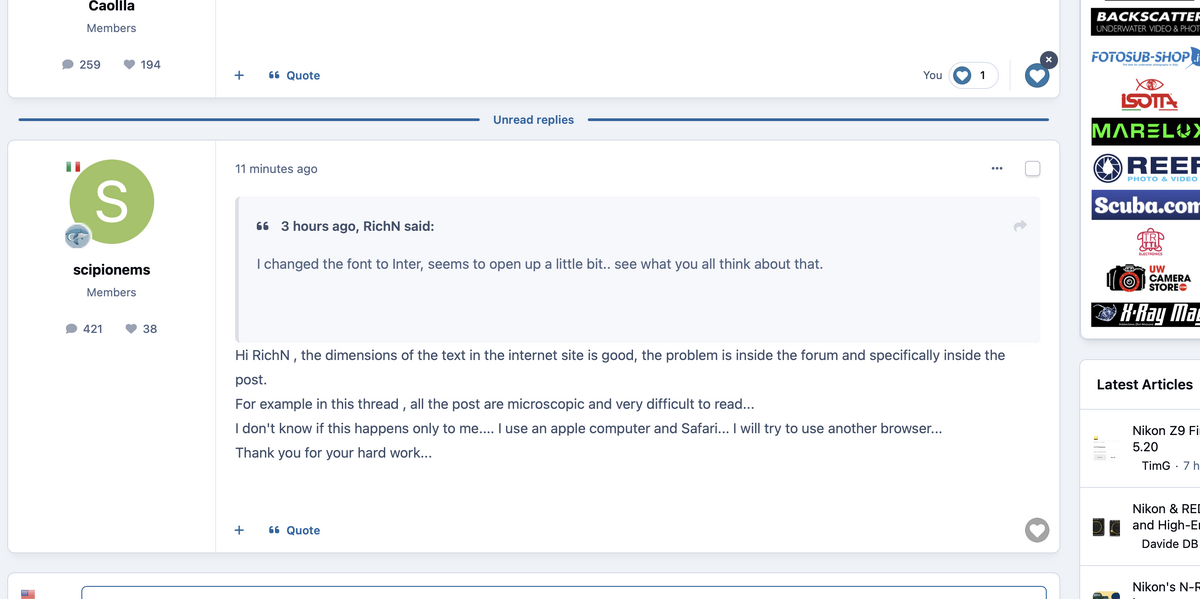
hey send me a screen shot so I can see, I user a Mac and Safari and in the forum things are bigger then everywhere else. All user posted content will be slightly bigger then the default text everywhere else one the site. OR Should be... example is the best way for me to see... I'll attach a sample on how it looks here.
-
I changed the font to Inter, seems to open up a little bit.. see what you all think about that.
-
gotcha.. ill look in to it.. There is a site Text size, that adapts internally for certain things (ex. headers, menus etc). This default size is baked in for the entire site. We also have the option to increase user input size.. so you will notice the forums might be or feel slightly bigger then other parts of the site because I already have increased it. Also bumping the size up im starting to see some shifts in things. Saying all that, we could A) try another font B) I can look over the css and see what I can adjust in a custom template. or c) Both haha. Ill do some digging...
-
Yes, once the dust settles from the move and & see where the tax is on the server, I'll start tweaking it. from when we went live I actually increased font size. I do believe it is 1pt larger then the old site now. Im sure lots of little adjustments will be made over the coming days, weeks.....
-
took way longer, which you could say is expected but not expected 😁 Im sure there will be little things ill be changing over the next day or so as well as tuning the server. Please comment if you notice anything or have questions.
-
If all goes as planned, I will begin the migration on Monday, April 14, 2025, at 12 PM EST (UTC-5). The migration is estimated to take approximately 4 hours. During this time, the site will enter maintenance mode and remain inaccessible until the migration is completed. Once everything is fully migrated and set up, the DNS will be updated to point to the new server. I will update the maintenance page if the migration takes longer than expected or if any issues arise. If there are any changes to the migration schedule, I will post updates here. Thanks
-
My pleasure..
-
-
Welcome aboard! Glad to have you.