




Everything posted by waterpixel
-
How about something between a fisheye and a rectilinear with zoom versatility? WWL-1/WACP-C/WACP. All of them have excellent optic quality (many topics on this forum on them)
-
I could see this being useful for someone with low mobility on hands/arms but it's a very very niche use case
-
excellent shot! the second in black and white does the trick for me, love it!
-
Same or more expensive (I went), HK seems to be the cheapest ! In PRC You’d also want to refund VAT which is an extra hassle at the airport (or train station in Shenzhen) on departure.
-
No, the one near Causeway bay in HK! For grey market prices, you'd want to see on price.com.hk but the retailers that offer the cameras will make their margin on lenses/SD cards that you'd need to buy it with, otherwise they won't accept the sale (too much hassle for too little margin)
-
I bought mine at the sony store in Asia, messaged them on whatsapp to keep the last camera they had in store. International warranty as well
-
To be fair, Adobe still does not have the latest profiles for A7V (released last year) and they have tons of devs behind it (or at least i hope). It's a sidenote comment, but there are also a lot of issues with Adobe and i really hope that open source projects like this, rapidraw or rawtherapee will accelerate the development in a good way of Adobe (fixing functionalities rather than adding ai slop features)
-
I picked up housing and camera in HK, no taxes. You'd get the same if you pick it up in Cayman Islands, or EU and then get VAT reimbursed. In HK/Taiwan, you can get a grey market A7RVI for even cheaper, comes without warranty (bulk buy), straight new.
-
Very nice, will install it and try it for a bit. I also enjoyed RapidRaw, fast development cycle and quick bit of software, although lack of advanced library management, which is key for many of us
-
Thank you for such a detailed response! Then it's a gen 2 that I have I think a gen 1 wouldn't work on mirrorless. Based on what you say, the protruding element makes the lens longer, and my guess would be that it would not fit the adaptor (Nauticam). I would even question whether the adaptor works for a Gen 1 Lens. (admins, feel free to move my lens to the correct thread)
-
Curious and a bit offtopic, but how do you tell the various generations apart from the lenses? I have one but no idea if its a gen 1 or , thanks!
-
Welcome!! where do you dive in Taiwan? i've only ever visited the cities but never tried diving there!
-
I will happily boycott Mexico diving.. plenty of other places to spend $$ and with good diving!
-
This is in French but subtitles in English work. Some beautiful shots and i discovered that there are kelp forests in the Mediterranean?!!
-
Which company are you going with out of curiosity? , i'm tempted to try this too and there are many providers.. Thanks!
-
Heard good things about Djibouti. Downside: Hormuz..
-
100% agree with Dave and John here. Your housing will not break down because you don't soak it overnight for a 6 days diving trip (let alone a 14 days diving one if you're doing it). Just rinse it, take a shower with it if you want to make sure, and then dry it properly by bringing it in your cabin. I've seen more floods of cameras/gopros that were left in rinse tanks than from being underwater! :)
-
Which itinerary will you be doing? If it's a southern one, or "sharktastic", i'd skip the macro one. If it's best of Maldives, there's macro choice, fish portraits typically, but also anemone fishes, and hawk fishes to shoot :)
-
i don't think it's related at all, it's just that these are poorer countries and when they see someone with gears that cost $$$, they smell blood. I doubt you'll see Saudi taxing any photographers for their gear when they will go diving in the red sea!
-
Anyone carrying their housing directly with them fully setup? I wonder if it could be a good approach?
-
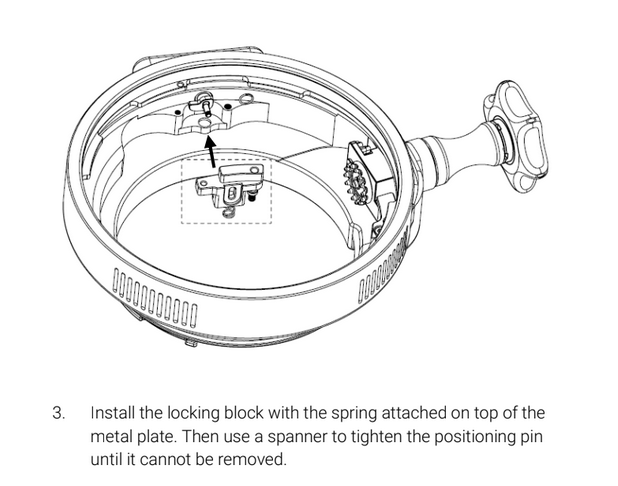
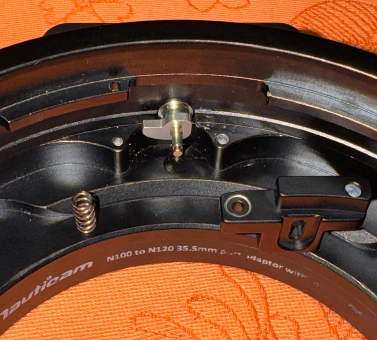
thanks all! I was able to install it but it took me about 3-4 hour as i didn't have the right tool at hand. The hardest part was actually inserting the spring below this locking block. I just tried again and again with a tweezer until it was in the right position. Inserting the C-ring (eclip/circlip) wasn't easy either.. Would not recommend doing it (or ask someone with tiny hands to do it) Ultimately, I did insert the spring, but have no idea which of the two springs they provided to use, as the Nauticam adaptor i have (37303, bought in 2018) wasn't listed in the manual. however, it now works and holds the vaccum. Chris : the adaptor I have (37303), without the upgrade, would not let me lock on the newer WACP 1B which I had bought. It would slide in, but would not lock. Now that i have updated it, it works and seems to hold the vaccum. that locking block is a few mm lower in the grooves of the port.
-
THANK YOU, this is exactly what I needed - super helpful! Can I ask you which part do you own (37305? 37303/37304) ? I'll keep everyone posted on this, i hope i don't have any more questions :)
-
Hi, I am currently upgrading my old Nauticam sony adapter (100 to 120) using https://www.nauticam.com/products/upgrade-lock-mechanism-for-port-adaptorscompatible-36064-37304-37305 Instructions https://drive.google.com/file/d/1ZsoDwPUN7HLy37r4JZpkj9ujNsKk_PPV/view I'm struggling to understand how and where to insert the spring on part 3. I just can't seem to fit it (esp the "on top"? the chart seems that it is behind it) Can a charitable soul send me a picture of their locking mechanism so that i can see where the spring fits? Thank you so much! Alex
-
Fantastic info, thank you everyone for sharing! And beautiful pictures!
-
By the looks of it, the first pic is definitely with flash while the others are not



