Skip to content

Photography Gear and Technique / Archived topic

OM-D EM-1

Started by RogerC ·

  • 135Posts
  • 135Replies

Read-only discussion

OM-D EM-1

135 posts
  1. Anybody know what kind of strobe connections the Aquatica housing will have for the E-M1?


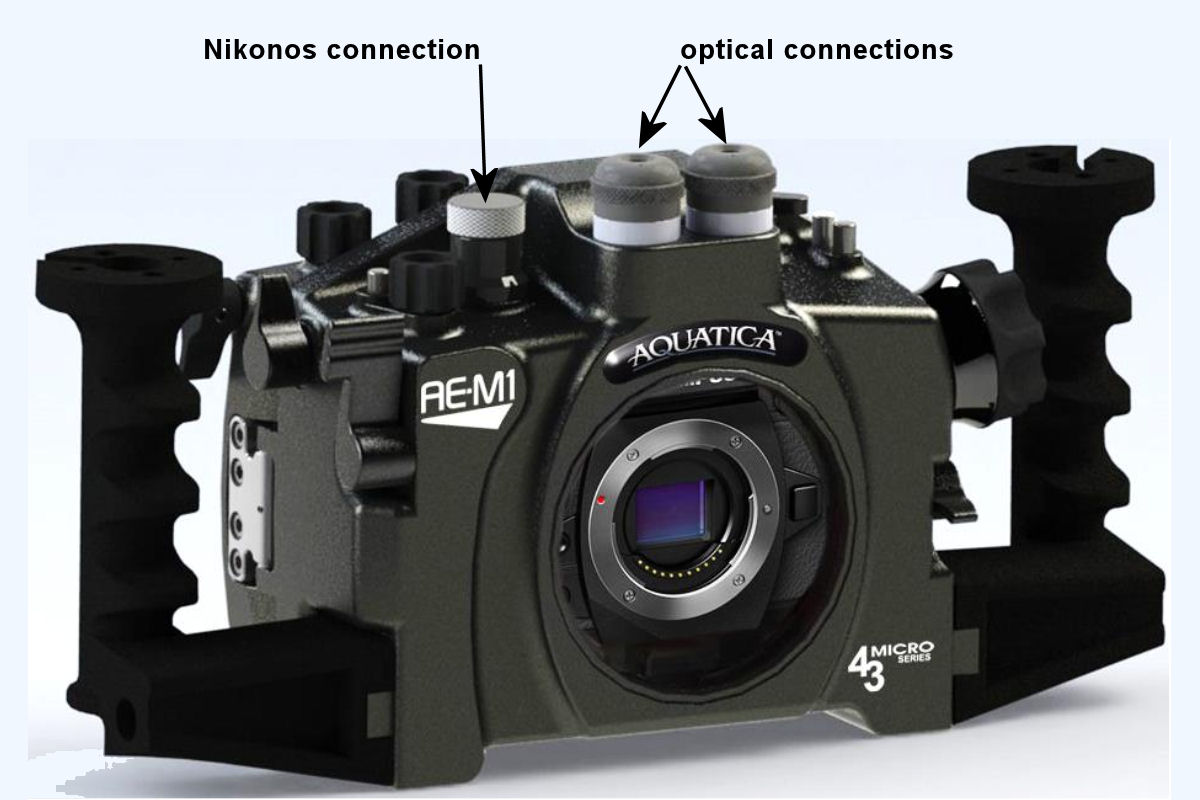
    It will accept the popular "off the shelves" optical sync cord with straight tip (as found on Inon strobes) and with angled plugs (as found on the Sea & Sea and Olympus Strobes), the option of having a Nikonos type bulkhead strobe connector is also being offered. From this connection you can run two strobes with a dual sync cord

  2. Nauticam has a 4" curved port for the Olympus 9-18 mm lens, but Aquatica just announced their port for this lens, which is a much larger 8" dome port.


    What matters is the optical radius of the port, the 4" Nauticam semi-dome has the same optical radius as the 6" port for the 7-14mm. The Aquatica may have a larger optical radius being that the dome is 8" (but maybe not because it appears to be a portion of an 8" dome, and the 6" nauticam port, which the 4" dome is a part of is also a part of a larger than 6" dome). It's difficult to tell from the size of the dome itself. But there are other factors that affect image quality, like where the lens sits in relation to the dome.


    When you put a dome underwater, it actually creates a virtual image that is very close to the camera (very roughly 4 times the optical radius of the dome, for objects that are at infinity underwater). But the virtual image is strongly curved (like the dome) and so the corners of this virtual image are much closer to the camera than the centre. You need the depth of field just to get the corners sharp even for objects that are all far away underwater. However, larger domes and stopping down are not the only way to improve corner sharpness underwater. A simple +2 diopter can provide nice corner sharpness with the 9-18mm lens even with a small 4" dome (see Storker's post here):

    http://wetpixel.com/forums/index.php?showtopic=51969&p=343523


    That Aquatica housing does look beautiful though...

    Edited by coroander
  3.  

    It will accept the popular "off the shelves" optical sync cord with straight tip (as found on Inon strobes) and with angled plugs (as found on the Sea & Sea and Olympus Strobes), the option of having a Nikonos type bulkhead strobe connector is also being offered. From this connection you can run two strobes with a dual sync cord

    Thanks Jean. I'm trying to figure out from the photos in the press release where the optical sync cords will plug into the housing. I see two knobs on the top center with holes in them, but I assumed they were threaded sockets.

  4. Indeed that is where the opticals are plugged in, the Nikonos connector passthrough is on the right hand, top sideof the housing

  5. Indeed that is where the opticals are plugged in, the Nikonos connector passthrough is on the right hand, top sideof the housing

    Thanks - makes sense. So I guess if you wanted to attach a focusing light, that would have to go elsewhere like a strobe arm.

  6. There is still a 1/4-20 hole on top of the housing ready for attaching accessories such as a Focus light :-)

  7. There is still a 1/4-20 hole on top of the housing ready for attaching accessories such as a Focus light :-)

    Thanks - do I have the connections right in this graphic? I'm trying to figure out where the 1/4-20 hole is located

    post-45440-0-62893400-1393612341_thumb.jpg

    Edited by Sea Lion
  8. Hi Karen,

    maybe you need only an adapter ring for a different diameter.

    Which port are you using?

    The macro port or the 12 - 50mm port?

    NAUTICAM Macro Port 65 for Olympus M.Zuiko Digital ED 60mm F2.8 Macro (with M67 thread )

    or

    NAUTICAM Macro Port Olympus M.Zuiko Digital ED 12-50mm F3.5-6.3 EZ ( with M77 thread )

    if its the second, you just need a ring with M77 to M67.

    Greetings,

    Wolfgang


    I ended up purchasing the new Subsee +10 that screws directly onto the Macro Port 65. I contacted ReefNet and they didn't make an adapter for the old style Subsee I had… so will try and sell that along with the adapter to suit the Nikon 105 Seatool port.


  9. Thanks - do I have the connections right in this graphic? I'm trying to figure out where the 1/4-20 hole is located


    Its right behind (and hidden by) the optical connector :-)

  10. Some more pics of the adapter in situ...


    First the 50mm macro snout! You can see the control knob is nicely placed.

    attachicon.gifIMG_20140131_105323.jpg


    The adapter is the correct length to allow full extension (close focus) of this lens.

    attachicon.gifIMG_20140131_105152.jpg


    The gearing works correctly to allow manual focus but with the 50mm only allows fine adjustment since the oly gear has end stops.

    Fine for photos since AF can do most of the work but I shall need to come up with a custom gear for video.

    (n.b. it takes several full rotations to focus the 50mm infinity to close - and it is velocity sensitive too but you don't get much speed up on the knob)

    attachicon.gifIMG_20140131_105021.jpg


    On with the dome - it actually goes on a few more mm than this pic shows and closes up the gap you see here.

    But then you have to re-adjust the petals and I couldn't be bothered for this little shoot

    attachicon.gifIMG_20140131_104755.jpg


    From above

    attachicon.gifIMG_20140131_104731.jpg


    The lovely 8mm sitting where it should

    attachicon.gifIMG_20140131_104655.jpg


    Now the 11-22mm with "customised" (draught excluder) gear from a 7-14mm.

    A bit tricky to assemble as the knob has to stay in it's pulled out position.

    But it all works as it shold which means the even larger 7-14mm would fit in this rig too.

    attachicon.gifIMG_20140131_104504.jpg


    With dome and per-02 extender.

    I do not think this is at the nodal point at all and need to get a per-01 instead.

    However there is no vignetting from the dome so it is worth testing in the water.

    attachicon.gifIMG_20140131_104214.jpg


    And finally the lovely leak light showing I am leak free

    attachicon.gifIMG_20140131_104312.jpg


    Simon

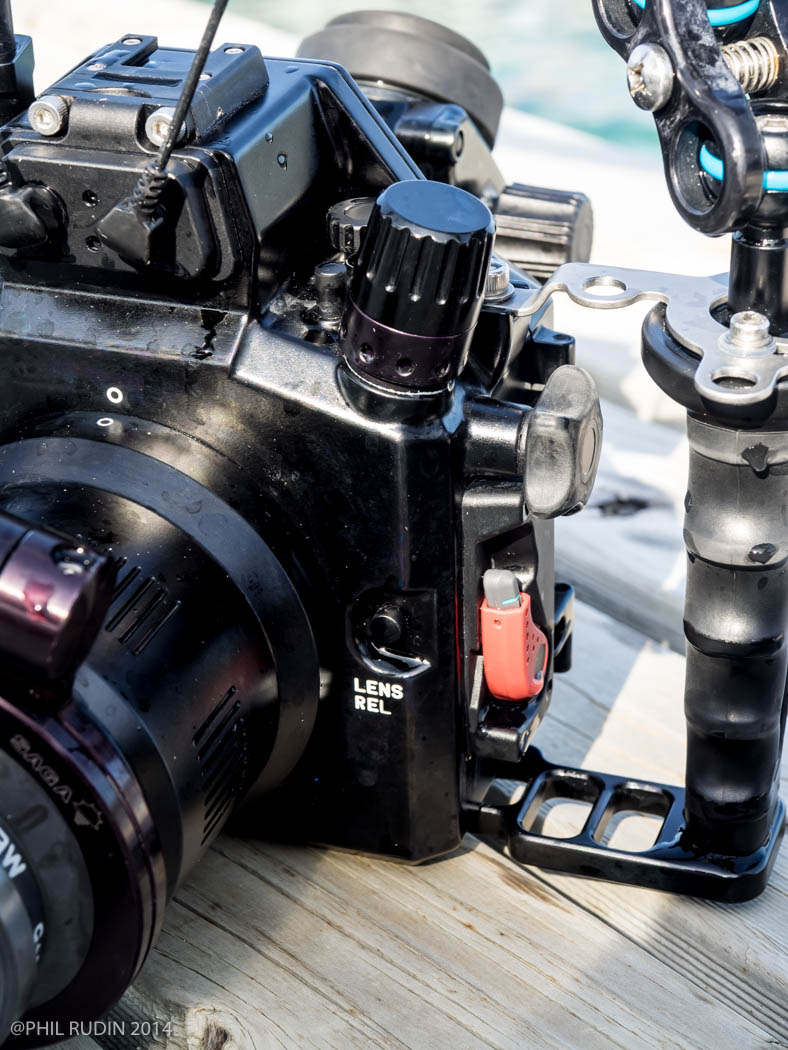
    Simon, what is the large looking "knob" on the LHS top of the housing. My housing has a flat looking plug with a straight cut in it for maybe a straight edge screwdriver. Is is possibly for sync cords? Cheers - Karen


  11. I think u mean the connection for the vacuumvalve.

    U can remove the large cap and then u can open or close the underlaying valve. It also has a o-ring so a second precosion against flooding.

    Frank

  12. Attached is a photo of the Nauticam NA-EM1 with the vacuum valve installed on the housing. This is an option and can be user installed. The valve comes with the pump for drawing the vacuum and I would guess that the Aquatica's system works much the same.


    Phil Rudin

    post-2618-0-46505600-1394289466_thumb.jpg

    Edited by Phil Rudin
  13. And here one more view of the NA-EM1 with the optional Nauticam M14 Offset Vacuum Valve which comes with sync cable connection...


    P0080138.jpg


    Oktay Calisir


  14. I have just acquired the E-M1 and Nauticam housing, and now I'm about to get the housing wet for the first time. I'd be interested if anyone has further refined the settings presets for underwater shooting (wide-angle, macro) since the earlier posts on this thread and for the E-M5?

    Thanks!

  15. I have a field review of this system in the current issue of UWPMAG.com. This is a free PDF download and you may find some of the information of use before your first dives with the system.


    Phil Rudin

  16. Hi Folks,


    If anyone in the Portland, Seattle, Vancouver Area are interested in a touchy feel-y :dancing: experience with the new Aquatica AE-M1 housing. We will have one on display at the SLS Photography Booth (No.812) at the Seattle Scuba H20 Adventure show this weekend!


     

    Cheers


    Stu

  17. Hi guys i need a little help with my new OMD EM1, i need to fire the internal flash flipped down to fire the external strobes using a fiber optic cable, and for this i need to Change the Flash Mode so that the flash will fire even when flipped down, where i can configure this on the menu of OMD EM1 ?, i am using the new AE-M1 Aquatica Housing, if anyone have more informations for the correct setup for this housing i really appreciate.

  18. Hi Kadu,


    The only way to fire the flash while flipped down is to set the camera to underwater mode...this will limit your control of the camera...

    I don't use Aquatica and would like to ask: why do you want to keep the flash flipped down?


    Oktay


    Sent from my iPhone using Tapatalk

  19. because its impossible to put the flash open, probably have a set to use the flash flipped down with a full control, thas what i try to discovery, my Aquatica Housing arrive today and i start to test...and stop on this problem

  20. Hi Kadu,


    The only way to fire the flash while flipped down is to set the camera to underwater mode...this will limit your control of the camera...

    I don't use Aquatica and would like to ask: why do you want to keep the flash flipped down?


    Oktay


    Sent from my iPhone using Tapatalk


    I'm not sure about the EM-1, but on the EM-5 once you set underwater mode the flash will fire in the flipped down position, you can then change mode with the mode dial to whatever you normally use (eg M) and the flash will continue to fire in the flipped down position

Account

Navigation

Search

Search

Configure browser push notifications

Chrome (Android)
  1. Tap the lock icon next to the address bar.
  2. Tap Permissions → Notifications.
  3. Adjust your preference.
Chrome (Desktop)
  1. Click the padlock icon in the address bar.
  2. Select Site settings.
  3. Find Notifications and adjust your preference.