Everything posted by eocean-eu
-
It's probably worth noting that photo and video are two different worlds and mindsets. If you want to enter competitions, it's probably better to focus first and for a long time on photo or video but not both at the same time. A camera can capture both photos and videos but the post-processing of a picture has not much in common with editing a full movie even a 3-5 minutes one. There are far more photo contests than video ones. Aside from the big names quoted above, there are also international nature/ocean festivals in many places. Some have photo contests, some have video contests, some have both. Some are junk and some have been around for years and are highly reputable. You also have the CMAS world cup/championship. Participating in the world championship implies to be selected to be part of a national team. To do so, you also need to have a good record track in national competitions. Not the easiest. If you intend to participate into competitions, do it for fun and to progress into the hobby, not for money or fame as the return of investment is pretty bad (although a nice prize is always welcomed).
-
From what I've read, they provide special lenses for the underwater housing.
-
Having setting custom options other than on/off on monitors is to me helpful. For example, a feature that is available on the camera display might not be transferred through the HDMI cable to the monitor or might not be available on the camera but available on the monitor and therefore it may be interesting to be able to activate it while diving. For example: Nikon have their zoom function on the screen but not on the monitor . I use the one on the monitor through a button Many camera can not revert display underwater which would be useful when using a lens reverting the picture (e.g. EMWL without relay lens). I use the one on the monitor through a button.
-
The really annoying thing is infos are only coming from dive shops with nothing official to support their claim and a few of them while recognizing there is a problem, have also been good lately at minimizing it offering weak advices on how to pack photo gear, stating that only "professional" equipment is taxed therefore it is better to show up with a gopro where real life experience at the custom gates has been strongly invalidating those advices with people being charged for bringing backup dive computers, TG in polycarbonate housing... Vacation time and good diving equipment are coming from hard-earned money and are not cheap for many people and I don't think many people aware of this are willing to take a bet on getting taxed or not where there are other islands in the Caribbean that provides peace of mind on arrival. It's unacceptable to have to pay additional tax on temporary imported personal equipments. I would love to go to Cozumel but Mexico in general has been a big NO for years because of all the madness going on with customs.
-
I've been using the EMWL since its release in 2020 mainly with the relay. On the GH5s, I made a small tray at the back of the housing with a bayonet holder to store the full system assembled to enter/exit water. On the Z8, that system was impossible to set. I go to the water with the EMWL fully attached on my on the BCD D-rings. I have printed caps on both ends to protect the lenses Depending on your setup, an alternative solution - especially if you don't use the relay - is to enter/exit the water with focus unit installed and other lens tips stored on the EMWL arm bayonet holder or in small mesh individual mesh bags. In all cases, you have to install/clean all EMWL components underwater. While I haven't used it, I think the EMWL flip system is too complex to be practical in the field (and I must admit, I've never seen anyone using it on trips).
-
In the past, I had some good result with a water burnt diopter using California Gold water spot remover. That product is no longer manufactured but maybe any car water spot remover could possibly do the trick. I haven't tried other products.
-
Bigger housings are not buoyant as well therefore in the end, you also end up adding more floats to them than what you add on a smaller camera.
-
But in any cases, it does not really explain why a Nauticam glass dome would more resistant to water burn than a Nauticam wet angle lens. Something is not right here or port and wetlens have different type of glasses. At the end of the day, I wouldn't buy any second hand "burnt' WWL without seeing that it has no impact on image quality underwater.
-
Lens coating can be used to prevent various things. If there is no problem with your other dome glass, then coatings are probably different between dome and WWL There is also a big difference between a port and a wet lens. For the port, you only have one layer of glass before your camera lens. For the WWL, there are several layers of optical elements. I suspect (it has to be confirmed) that the coating on the WWL has optical reason like reducing glares, internal reflection or other things that might affect optical quality.
-
Most dome ports are made of plastic . They don't have the coatings dome glasses have. The water burn (it's called like that) also depends a lot of where you are diving. Some freshwater attacks harder than other including anodization on aluminum housings. The real limiting thing is to wash in freshwater and blow immediately some dry air to remove any moisture from the glass.
-
Thanks. I certainly should revisit that topic I had read a long time ago before getting more into blackwater but I won't derail the L10 thread here with the frustrating and exciting world of blackwater which adds another load of problems when shooting fast moving macro subjects :)
-
-
This is what I got years ago with the LX100 (mark I) and CMC-1 I think on video. It's 4K that I cropped to Full HD and then stabilized.
-
If you want to measure what you really need in terms of powerbank, I would buy one of those USB-C charge monitor that inserts between power source and equipment. check the values on the screen of V, Amps, Watt when the camera is on and running. This will tell you the PD mode in place and amounts of watts needed. consider a powerbank that is able to deliver the same amount of watts (W) to its pins. Warning: between modes and phases (camera turning on, record starting), that can change. then consider the capacity of the powerbank (Wh) of the battery you need by deriving the number of mAh needed to cope with the PD mode which will set Amps and Volts to deliver the needed watts. You can also do something else: Consider the power the internal battery deliver : P = Vout x mAh = Wh Add a multiplier factor of P to the capacity (and time) you want to add up in extra to the battery Look for a powerbank of that capacity. The first method is probably more precise. The tricky thing is to think in terms of capacity (Wh) rather than fiddling with V and I as this is the principle of PD. The powerbank is doing the work to output power properly.
-
I remember on the LX100 I, I used to switch battery on every dive for video but more to make sure I don't run out of battery while diving.
-
You should have a look in the manual for the amount of power required for the USB-PD input of the camera. Most of the time, the manual will tell that the camera usb-c power input is compatible with any PD adaptor of at least xxx Watts. Then the powerbank or whatever USB-PD circuit designed to power the camera should be of that power. It's worth having a look at that wikipedia page https://en.wikipedia.org/wiki/USB_hardware#USB_Power_Delivery and that one to understand how USB-C pins are used https://en.wikipedia.org/wiki/USB-C#USB%E2%80%91C_receptacle_pin_usage_in_different_modes and one of the module I was mentioning to connect a li-po drone battery (some are much smaller as this one is 100W) https://fr.aliexpress.com/item/1005008518344389.html?dp=CjwKCAjw5s_QBhAdEiwADD_gBl6Sf4CpfA7MDLyOTQeTNwrb3FBRLP2ptaQk2ObaTm2RnVpEbncBzBoCf6EQAvD_BwE%40251641
-
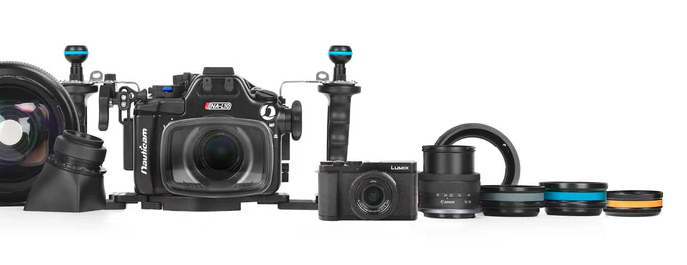
This housing is very NA-LX100 looking (and there is an error during the product photoshoot with a Canon lens showing up along with some accessories).
-
USB-C PD is some sort of a IC-controlled way to power a device as there are a few handshakes between power source and IC inside the camera to ajust volt and currents. It's super risky to assume you can power a USB-C port without following that protocol. There are circuits that connects on li-ion or li-po batteries or whatever types of power source into USB-C PD compatible outputs. They won't fry the camera and batteries won't burn and they are just a few dollars/euros.
-
I don't think it's a very relevant comparison to compare the L10 with the Gopro ILS because those are two vastly different products for different use and customers. You can compare it to a RX100 or any compact camera but action cam are not comparable to compact expert cameras. Action cam by default are not photo dedicated and have been since a long time consistently bad at replacing compact and smartphones for photos. And for video there are things that you easily do with an action cam that cannot be easily done with a compact and the opposite is also very true. Different tools for different jobs. That being said, the LX100 mark I was called a baby GH4 at the time because of its good video performance. The L10 might be a baby GH7. I enjoyed a lot my time with the LX100 for several years of video before moving to the GH5s.
-
It is very similar to the LX100/LX100II. I had 10 yrs ago the LX100 and it was a very good compact camera for underwater use especially for video. I just hope the LX10 does not have the LX100 plague i.e. a non dustproof lens barrel as it was an expensive repair to have the sensor cleaned.
-
Just as a remark, previous circuit board using CR2032 were less power hungry than than CR2450. I totally agree with that: NA-GH5 : CR2032. Lasts a week even with the system always on. NA-Z8 : CR2450. 2-3 days despite those cells are twice the capacity of CR2032.
-
I actually did that mod on the NA-GH5 with a reed switch (magnetic) but there is a big trick behind as you are right: the circuit needs to sense the vacuum forming when one to go from yellow to green. That implies removing the vacuum during "rest time", turning off the circuit then turning it back on and restoring vacuum. The pushbutton Nauticam puts on their housing that allows to rearm the alarm when switching ports is not a "normally open" pushbutton but a "normally close" model. Contact is broken with the pushbutton is pushed which meaning it just turn off momentarily the circuit when you press it. So you need to solder in parallel to that switch a "normally close" reed switch which are hard to find unless you use a reed switch with 3 pins (the common one, a Normally close and a Normally open pin). By locating the reed capsule close to a wall of the housing and placing externally a strong magnet, you can then arm and disarm vacuum. You then don't have to open the housing, just release and redo vacuum before diving. With a usb-c bulkhead, I did a 10 days cruise like that without ever opening the back of the housing. The bulkhead was used to charge battery and download files. Every morning I just had to remove the external magnet so the circuit was ready and then start to pump.
-
I got mine from Diveinn for 55 euros last month but now both models are about 80-85 euros.
-
A big advantage of the Kraken bulkhead over the Nauticam one is that the Kraken is compatible with a higher number of Nauticam housings than the Nauticam plug because the cable on the Nauticam is not removable and the one on the Kraken is which makes a huge difference in favor of Kraken. I experienced this on the NA-GH5: the 90° USB-C plug simply won't go through the M16 port while on other housing like NA-Z8, it inserts well into the M16. The difference on the housing is just the thread length on the NA-GH5 that is longer than its equivalent on NA-Z8. I wish Nauticam has made a bulkhead with a removable cable. I've solved this issue on the NA-GH5 by using Kraken bulkheads. With the proper adapter (like I it), you can even fit it on a M14 port.
-
Only after a few days GOPRO released infos on their new Mission series including the ILS version with MFT lens (without electric contact), a few infos have leaked from Insta360 about a compact camera with MFT mount and this time with electric pins on the MFT mount. The Insta360 model is bigger than the new Gopro and probably not aimed at the same public, it could be a nice compact camera on a segment that has been left behind by Panasonic and Olympus in favor of bigger and more expensive camera bodies like the GH series. https://thenewcamera.com/insta360-mirrorless-camera-first-hands-on-photos-rumored-specs-and-expected-release-date/