Skip to content

Lights, Strobes, and Lighting Technique / Archived topic

RETRA Strobe Thread

Started by guyharrisonphoto ·

  • 698Posts
  • 698Replies

Read-only discussion

RETRA Strobe Thread

698 posts
  1. 7 hours ago, Tom_Kline said:

    We will have to hear from Oskar.  Meanwhile I was curious about the black cap over the optical sensor. I have never used these on my ori. Retras and have only used the similar part on my Inons when using them as slaves. The Inon part fits on the Retra Pro but the Retra part does nor fit on the Inons due to the larger diameter of the sensor - at least on the Z220 model. The hole in the Inon part has a larger diameter.

    It's perfectly working with sea&sea connectors (I used ysd2J before my new retra and don't need to change my fiber 

  2. I received notification from Retra Tuesday (2/11/2020) that my first two Retra Primes have been shipped complete with the DHL tracking number. DHL notified me that there was a $58.25 import duty tax on them, which I was able to pay online. As of now, they are in Miami, FL, with an expected delivery around the end of the day Thursday.

  3. 12 hours ago, Flo said:

    It's perfectly working with sea&sea connectors (I used ysd2J before my new retra and don't need to change my fiber 

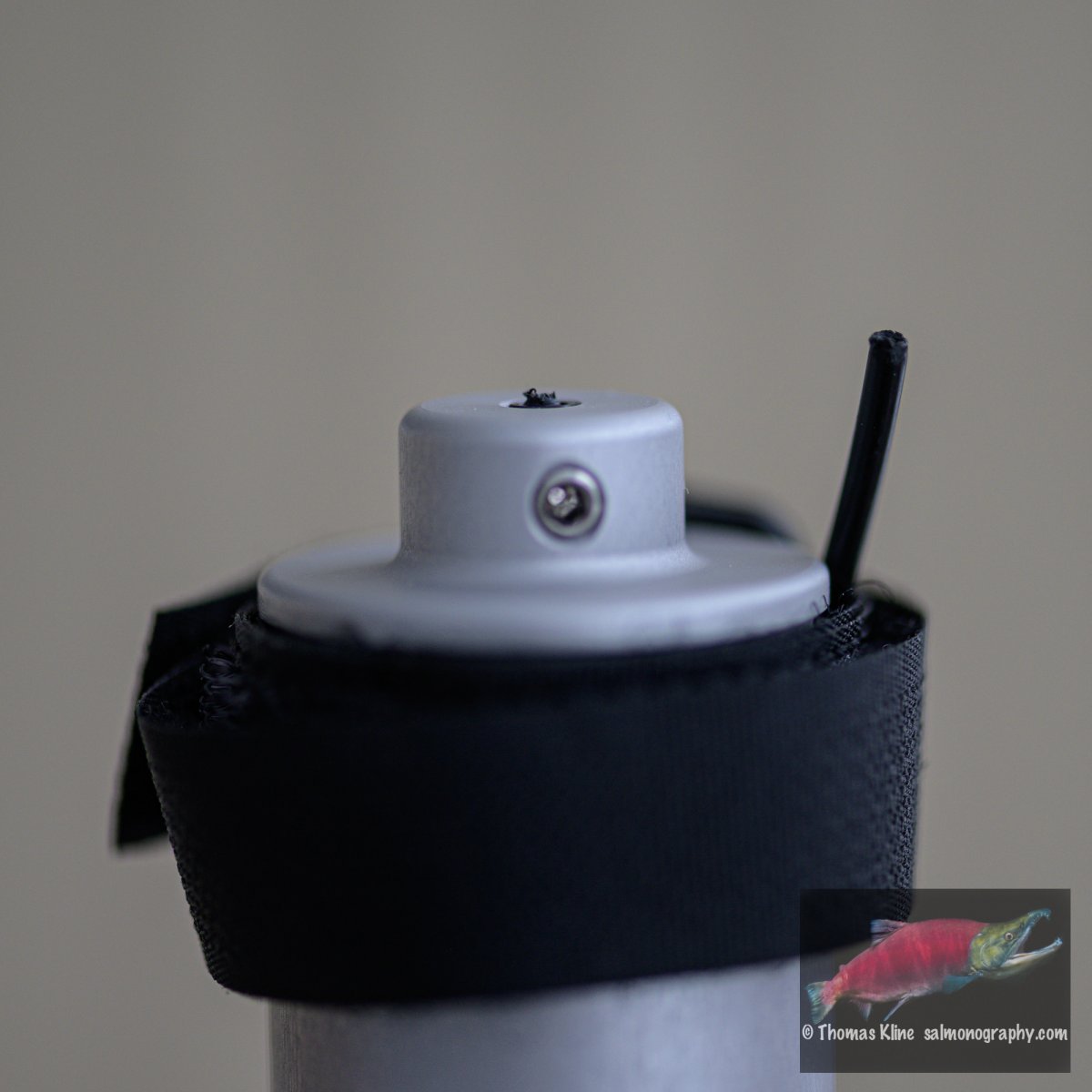
    I have some S&S connectors as well but they are of the wired kind so do not work on the new strobe models. I had some trouble getting my new strobes to work. Optical adapter #1 would not trigger yet I could see the red flash at the end of the fiber. I tired both of my new pros as well as one of my originals. No dice. To make sure it was not the camera I was able to confirm the strobe worked by using the wired connector.

    Then I unpacked adapter #2 and it worked on the new strobes! Was able to fire each pro but not able to fire the old Retra. So looking more carefully at adapter #1 I noticed red light coming out from around the fiber cable where it comes out of the adapter but did not see this with #2. So I decided to re-terminate #1. While looking for a matching Allen wrench size to loosen the set screw the cable broke off completely - see pic. Looks like a very bad design to me if the cable crimped where it comes out from the adapter. It might be better to have a bigger hole to match the one on the strobe fitting and have the same part on each end of the cable. This would make exchanging cables at each end much easier. I am not sure how to proceed now as there is not much to grab on to. The fiber optic did not just drop out after loosening the set screw. I tucked in the broken end of the fiber optic under the velcro strap for the pic.


    _Z6X5324.jpg

    Edited by Tom_Kline
  4. Hi Tom

    It seems to me that this cable on the E-Opto converter was twisted a lot since it broke just on the edge. Can you confirm? *

    Both of your converters should trigger the old and new flashes without any issue even if the connector is pulled out of the sensor cap for a few milimeters. Please note that the old flashes need to be positioned to "SL mode" for triggering with optical sensor. If this is not the case I would say that both fibres are already damaged and should be checked/refreshed. To refresh the fibres they should just be pulled out (not twisted) and cut with a sharp knife to remove the part which is damaged.

    If you need any help exchanging this cable or further assistance on how to get the cable out please write to: develop@retra-uwt.com. Thank you. 

    Edit 1 - *We tried to recreate this situation and the only way we could do it was to press the cable at a 90º angle at the edge of the housing and twist it about 15-20 times around it's axis. The cable broke and then it took some more twisting and pulling while the cable was still held by the screw to brake the jacket as well. Maybe with colder conditions it can happen sooner. We agree that this is a potential weak point and we will now be looking into it for improvement. For the time being please avoid twisting the cable unnecessarily and especially while it is at an angle. Mount the E-Opto converter first to your flash arm and then plug it into the flash. Movements of the flash while mounted like this should be no problem for the cable. 

    Edit 2 - A little backstory: When we were testing the E-Opto converter and Alex was using the prototype on his trips we already encountered such issues but then sourced a much more robust optical cable which we are using now. Alex tested again to confirm and didn't get problems. We were then considering to make "do not twist" stickers for the cable but after testing the durability we decided to skip on the stickers since it seemed to us that so much twisting will not be possible as to completely brake away the cable. Anyway, I am amused to see that it can still happen and of course we need to look into this some more.

    Edited by Oskar@RetraUWT
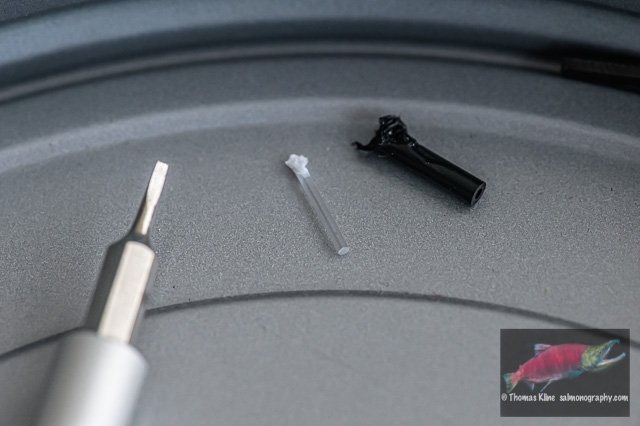
  5. Oskar, Thank you for your reply. I had success times two but before that let me address your question. The only twisting was incidental. Nothing at all like described in edit 1 which I did not see until after doing the repair this morning. The strobe was mounted on a ball at the top of the housing (ball normally used for pole cam or focusing lights). So the only movement came from plugging and unplugging the plastic end into the strobe and incidental movement to move the cabling out of the way - I used a standard curly Seacam S6 - S6 cable. After the initial failure I started swapping strobes so there was a little more movement of the cable. First the old model. When it failed I got a Seacam S6 - S&S cable which I attached to the opposite bulkhead to confirm functionality of strobe and camera which turned out OK. Then I went for the second adapter - at this point I had not yet opened the box containing the 2nd strobe plus accessories. Number 2 worked OK as I described yesterday.

    Today. I first fixed the problematic adapter. It was challenging to remove the broken bit. I found success by using a micro screw driver to wedge it out about 0.5mm. I was then able to grab hold of it with a small needle-nose pliers - the one I had in my UWP tool kit. The transparent part came out first. Following a little more digging with the screwdriver I got enough of the black part out to grab with the pliers. The screwdriver I used as well as the two parts of the cable that I removed are in the attached pic. One can see the wear on the ends resulting from my extraction technique.

    I then attached it to my housing after mounting the old strobe. Made sure it was on SL and it worked! I think I had it on to just "on" yesterday. So success on both the cord as well as the old strobe working via fiber optics.

    My suggestion is to have the hole at metal end of the adapter part be of dimensions compatible with the plug that is on the strobe end of fiber optic and use the same plastic part on each end. Think double-ender like a Viking ship. One could unplug the fiber optic part from the adapter part for traveling making them easier to pack. Fiber optic cords could be packed separately into a more or less flat compartment. This would reduce stress on the fiber optic part since it would not have a heavy object attached to the end (the adapter part). People like me would be happy if you sold the plastic plugs by the boxload (2 dozen or even 50!). I like having backups plus the cords could be made for different lengths. The set screws could even go in a small ziplock bag saving the labor of installing them.

    Thanks, Tom

    _Z6X5327.jpg

    Edited by Tom_Kline
  6. I have a further suggestion for the adapter. That is to make it possible to bolt it in place. For example, have the diameter be thicker where the set screw is located so the side opposite to the set screw could be flattened a bit, then drilled and tapped for either M6 or 1/4-20. One could either bolt something on directly on or use a ball fitting similar to the one on the strobe. M8 would be overkill. For example: https://www.unterwasserkamera.at/shop/catalog/en/product_info.php?info=p1630_u-l-c-s--ad-6-ball-adapter.html

  7. Has anyone had a chance to use the new Retra Pro in TTL with existing UW Technic or Nauticam TTL triggers?
     

    I know it’s early days, but wondering what to do regarding a TTL trigger for upcoming trip in April


    ian

  8. 3 hours ago, ianmarsh said:

    Has anyone had a chance to use the new Retra Pro in TTL with existing UW Technic or Nauticam TTL triggers?

    Only on dry land so far; I will have it in the water in two weeks. With the UW-Technics converter, manual mode works fine, but TTL categorically does not work - it always fires with the same fairly low power, both in mode 1 (Inon Z-240) and in mode 6 (Ikelite DS-160); I'm not sure why, maybe I'm doing something wrong? Oddly, with the pop-up flash on my Sony A6300, the TTL mode appears to work fairly well - I was getting the same exposure at f/11 and f/22 (ISO set to 100, shutter speed to 1/160), although wider apertures were getting overexposed. Can't test HSS because my camera won't let me select a shorter exposure than 1/160 - need a new firmware revision for the converter to enable it. Pavel wrote a week ago on tetis.ru forus that he's expecting a sample in two weeks, and then he will try making a TTL profile for it.

  9. Thanks so much

    That is EXACTLY what I need to know:)

    (I am assuming you are on Nikon?)

    ian

    Edited by ianmarsh
  10. I plan to build TTL profiles for Retra strobe in a week. First turn is for Sony, some later for Nikon / Canon / Olympus / Panasonic. 

    By the way, i also have some additional information for today, - few days ago Retra team tested new strobe with TTL-Converter UWTechnics #11031-II (Nikon TTL), it worked good enough using existing profile YS-D2 or YS-D1, only required some correction at the end of working range.

    Edited by Pavel Kolpakov
  11. 1 hour ago, ianmarsh said:

    (I am assuming you are on Nikon?)

    No, I'm on Sony A6300.

    4 minutes ago, Pavel Kolpakov said:

    By the way, i also have some additional information for today, - few days ago Retra team tested new strobe with TTL-Converter UWTechnics #11031-II (Nikon TTL), it worked good enough using existing profile YS-D2 or YS-D1, only required some correction at the end of working range.

    Very interesting - I'll try the YS-D1/YS-D2 settings today after work. Positions 2 and 3 on the selector dial, right?

  12. 1 hour ago, Barmaglot said:

    Very interesting - I'll try the YS-D1/YS-D2 settings today after work. Positions 2 and 3 on the selector dial, right?

    Yes, positions 2 or 3 of onboard switch.

    Pay attention:  optical cable must be exactly 613-fiber type, because of transmission index.  LEDs must be accurately positioned to core center. Those details are important for TTL LED control.

    That test info was only for Nikon TTL board #11031.

    I did not check such test by myself yet, cause i still don't have a strobe sample, but hope to get it in a week. I will notify about the results then.

    Edited by Pavel Kolpakov
  13. 12 hours ago, ianmarsh said:

    Has anyone had a chance to use the new Retra Pro in TTL with existing UW Technic or Nauticam TTL triggers?
     

    I know it’s early days, but wondering what to do regarding a TTL trigger for upcoming trip in April


    ian

    So far my experience is this

    Set the converter to S&S YS-D1.

    At F4 no compensation was needed 

    At F8 something around +1.5

    At F16/22 something around +2 or even more depending on the subject. 

    Of course those are initial impressions, I will need more time using then to assert that. 


  14. 5 hours ago, Pavel Kolpakov said:

    Yes, positions 2 or 3 of onboard switch.

    Pay attention:  optical cable must be exactly 613-fiber type, because of transmission index.  LEDs must be accurately positioned to core center. Those details are important for TTL LED control.

    That test info was only for Nikon TTL board #11031.

    I did not check such test by myself yet, cause i still don't have a strobe sample, but hope to get it in a week. I will notify about the results then.

    Just out of curiosity, when the TTL converter board communicates with the camera, can it get information on what aperture the camera is set like the SB-900 can? focal distance? 

    It would be nice if the user could create a "custom TTL profile" on the converter based on his equipment/preferences...

    Regards

    Marcelo. 

  15. 29 minutes ago, Marcelo Krause said:

    Just out of curiosity, when the TTL converter board communicates with the camera, can it get information on what aperture the camera is set like the SB-900 can? focal distance? 

    Yes, of course. During the communication TTL Converter and camera exchange a lot of information, analyze it, perform different actions. This is intellectual protocol. 

  16. I just tested dial positions 2 and 3 and... it's weird. I'm using A6300 with 90mm macro lens, ISO 100, shutter speed 1/160, rear curtain sync, 0 flash compensation in camera or strobe, shooting a piece of black plastic (the sync connector cover from the strobe) on a white backdrop, and it's exposing reasonably well as long as I keep the aperture in f/14...f/22 range. As soon as I drop to f/13 or larger aperture, the resulting picture turns totally black. The only reasonable explanation that I can come up with is that I'm having light transmission or LED alignment problems, and the weaker pulse generated for larger apertures does not come through to the flash. I can see it actually flash, but that it probably just the pre-flash, not the main exposure, which gets missed. I'll try to investigate deeper over weekend.

  17. 15 hours ago, Pavel Kolpakov said:

    I plan to build TTL profiles for Retra strobe in a week. First turn is for Sony, some later for Nikon / Canon / Olympus / Panasonic.

    I’d be grateful for the Canon version. ;) Are you talking in terms of days or weeks when you say ‘some later’, Pavel?

  18. 4 hours ago, Barmaglot said:

    I just tested dial positions 2 and 3 and... it's weird. I'm using A6300 with 90mm macro lens, ISO 100, shutter speed 1/160, rear curtain sync, 0 flash compensation in camera or strobe, shooting a piece of black plastic (the sync connector cover from the strobe) on a white backdrop, and it's exposing reasonably well as long as I keep the aperture in f/14...f/22 range. As soon as I drop to f/13 or larger aperture, the resulting picture turns totally black. The only reasonable explanation that I can come up with is that I'm having light transmission or LED alignment problems, and the weaker pulse generated for larger apertures does not come through to the flash. I can see it actually flash, but that it probably just the pre-flash, not the main exposure, which gets missed. I'll try to investigate deeper over weekend.

    The strength of the pulse does not change only the duration - maybe the white BG is producing a flash duration that is too short for the protocol to cope with? Maybe try a different subject or move back from it?

  19. Testing the TTL output will be easier on a grey subject with some contrast in the middle for easier focusing. Our box is quite good for this. Below please see screenshot of 5 exposures done with the UW Technics 11031-II board for Nikon set to YS-D1 setting (#3 on the dial of this converter). The images were made with spot metering  at ISO100, approximately 0,6 meters distance from flash to subject and the Retra Flash was set to +3 for all exposures.

    Pavel is currently working with the new Retra Flash and will release more accurate profiles in due course. For the time being we encourage you to try YS-D1 profiles and setting +2 or +3 on the flash.

    Screen Shot 2020-02-19 at 17.00.34.png

  20. 42 minutes ago, Oskar@RetraUWT said:

    Pavel is currently working with the new Retra Flash and will release more accurate profiles in due course. For the time being we encourage you to try YS-D1 profiles and setting +2 or +3 on the flash.

    Hi Oskar,

    Even with the Nauticam TTL Converter (D850) ?

    Thanks

Account

Navigation

Search

Search

Configure browser push notifications

Chrome (Android)
  1. Tap the lock icon next to the address bar.
  2. Tap Permissions → Notifications.
  3. Adjust your preference.
Chrome (Desktop)
  1. Click the padlock icon in the address bar.
  2. Select Site settings.
  3. Find Notifications and adjust your preference.