Everything posted by ChipBPhoto
-
 Great find Jon!
 -
Agreed. Really depends on item and the dollars being discussed. I got $500 for my 11 year Canon T2i body and Nauticam housing. Based on the camera prices on eBay I estimate I sold the $2400 housing in good shape for $400, or an 83% discount. Then again, I had 11 very good years of use. More recently, I sold my Nauticam NA-2020 (Sony a7RIV housing) for $2900 right when the NA-a7RV started shipping, but was not available. That was roughly a 27% discount, but I think that amount is no longer possible. I had 3 years of use. It also looked like new and included the box and accessories. All depends on timing and condition.
-
Another important tip…post clean, well lit photos. It’s important for the buyer to feel comfortable with both the item and its realistic condition. For “clean” images, be sure to use a blower or even hairdryer on cool to blow off the dust. It is remarkable how much dust shows up on an image, especially when we photograph a darker subject such as housings and extensions. Similarly, spend a few minutes to thoroughly clean the glass when posting a port or lens. Spending a few minutes to clean water spots, remove dust, etc. will help the item sell faster and at a higher price. Good luck!
-
Great topic thread @TimG - thanks for starting! Biggest suggestion - be realistic in setting the price. Do this in the beginning to capitalize on the new listing curiosity and interest. Unfortunately, the resale market for used uw photo gear is extremely small. As such, the value is not what we want as the seller, but rather is really what the limited buyers are willing to pay. Price it too high and the buyer will simply opt for a new, and most likely more recent model for not much more. As such, if we are really honest, the depreciation is extremely high making the price we get often much lower than we would like or personally believe it is worth. This is especially true when selling an older housing once new camera models are released. In my experience: (Your mileage may vary….) 30% Discount - if it’s a current product that is still useful to many 60%+ Discount - if older product, has been replaced by newer model, or not widely desired Yes, I am too am guilty of pricing too high. Eventually, once I released a few more dollars in my bank account is more valuable than gear I no longer use sitting on my shelf, I priced it more to the market and made the sale. Both buying and selling can be ugly. (Self medicate as needed 😂) Just like how we often have to hold our breath and just click the “buy” button for new gear, we must do the same when we post a For Sale listing. This is especially true if we want the sale to happen in a relatively quick time frame.
-
Quest for new gear, whether needed or not. Hey, I have to have at least one vice. 😂
-
Outstanding images Dave!
-
Congratulations!! It only hurts when you get the credit card bill. 😂 Look forward to hearing what you think.
-
I must say I do like mine. The WACP-C is considered 1 stop of sharpness below the WACP-1 and 1 stop sharper than the WWL-1. In the “real world”, and after owning both, I can’t tell a huge difference in IQ for the WACP-C over the WWL-1, but I like the overall feel. Not needing to “burp” the lens like the WWL is also a win in my opinion. With that said, I am curious as to the over all, real image zoom range overlap between the FCP and WACP-C. I’m not thrilled about the weight, but you may want to hang on a couple weeks to see results once more FCPs are used in the wild. You may also be able to pick up a nice previously loved WACP-C from someone going FCP. 😉
-
That’s actually a very interesting idea. Unfortunately I have no connections in the glass industry to explore the cost and min quantity needed for an affordable production run.
-
Completely agree! The biggest reason I went to Sony over my Canon R5 was for the water contact option and there were none affordable for Canon at the time. Went WWL-1B with the Sony 28-60 and loved it! Total game changer over large domes. My Sony body has changed over the years and I’m now on a WACP-C to keep the rig smaller. It’s a premium, but worth it in my opinion.
-
Yep - seen the same. A clean one was on eBay for $2K last week. It sold and the only one I can find now is $3K. Too bad…
-
Bummer about missing them. Inon not announcing if/when they will make the next series is a let down. There seems to be a lot of chatter about people upgrading to the new Retras. As a result I would not be surprised if more 330s don’t pop up, but they will go fast. Perhaps post a WTB notice on all the sites for the 330s to see if anyone responds. That would at least get you to the top of the buyer list. Until then you can def do some nice natural light work in the conditions you described.
-
Perhaps also take a look at the Anglerfish 5”. I’ve heard some really good things for brightness and overall usage. It’s a thin panel as well. Around the same price as the Kraken 5”.
-
Hey @brightnight - congrats on building your first rig! You will be able to do a lot with the 5D4 for sure. I agree with the terrific info shared by others. The various scenarios and distances are spot on. IMO you made the right decision to try and get the Z-330s (type 2, the most current). For the money, I have found Inon to be the most dependable choice with best coverage overall. If you don’t get the Z-330s, the Z-240 (type 4) would be a next choice. I would not suggest the S220s as they are a smaller light head. Personally I’m not a fan of Sea and Sea due to dependability issues over time. A tip for the Inon strobes: Don’t over tighten the battery cap. Excess tightening can cause the cap to crack. Best of luck and enjoy!
-
Very cool critter find!
-
What a truly amazing experience and video! Definitely an experience just a few will ever do. Well done!
-
Terrific image Simón; nicely lit!
-
Very cool - Congrats on your new system!
-
Yep, sounds like you already have the path laid out. Biting the $5K bullet now certainly hurts, but you won’t need to hassle with trying to sell the ports/extensions to build a new rig. Besides, your new NA-Z8 will “feel” very familiar to what you have now. When you’re back from Raja you’ll be happy with your results and the price will be a past memory, as long as you don’t pull up the past credit card bill. 😁 Click the “buy” button and have an amazing trip!
-
Cayman last year was 28 c (78-79 f) and I wore a fleece with a hooded vest fleece underneath; just could not get warm. (Was also repetitive diving which makes a big difference) Ironically when I moved to Florida I would dive the natural springs, which are 72 (22 c), in just a swimsuit. Now that’s 5mm water! 🥶 😂
-
Thanks so much for the details on your setup - really helps! Totally makes sense. I’ll give it a try. And I agree about the darker version; it has grown on me.
-
Very interesting! I haven’t seen these before. Please do let us know what you think. Like @Andrej Oblak I’d rather keep my Z-330s a little longer before dropping $3K on a pair of Retra Pro Max w/ superchargers.
-
Agreed - good call!
-
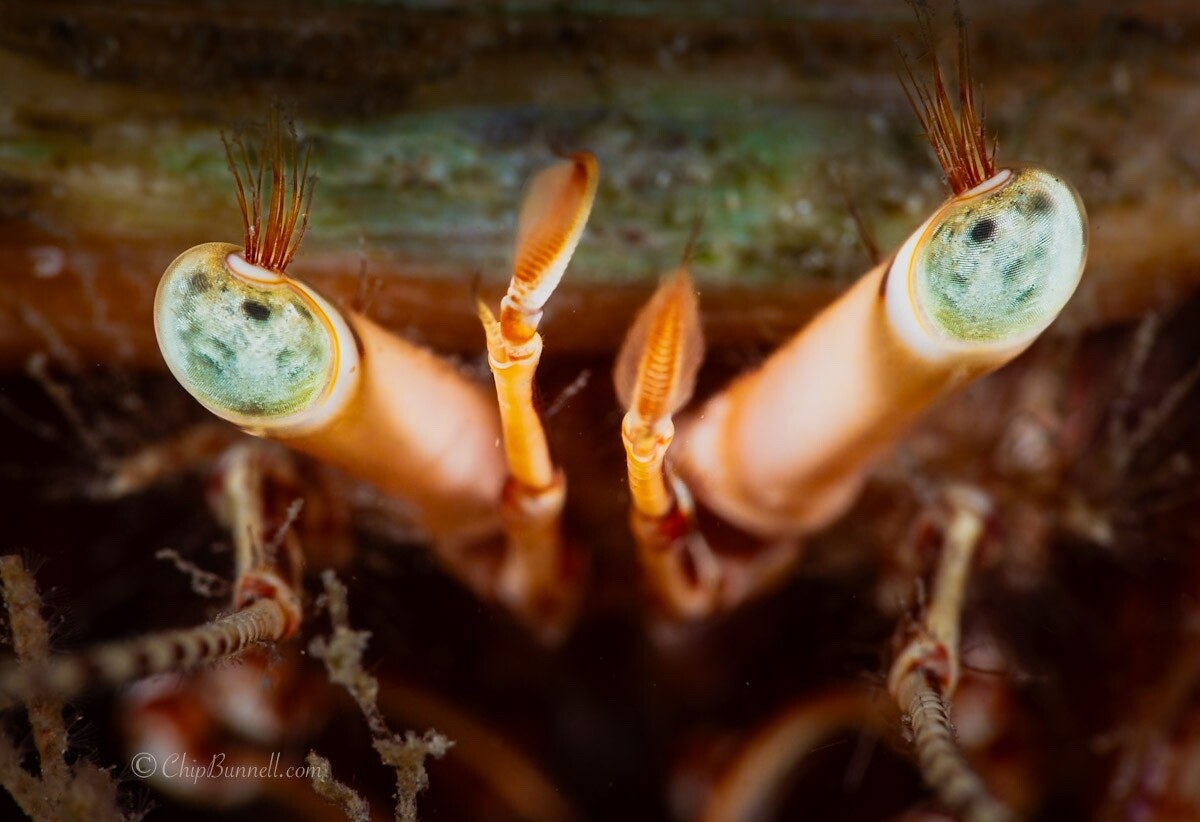
Great - thanks! Really appreciate the feedback. After letting it sit for a bit, I agree the darker is a better story. Ideally it would be awesome to have the lashes and eye stalks backlit to have them pop more. I’m not sure that kind of patience is in my bag of tricks. 😁 Until then, perhaps positioning the strobes to each side of the lens and then back so only about 10-20% of the strobe is in front of the lens could give a naturally darker background. Setting one as a key light and dropping the power of the other could also give it more dimensionality. Everyone's comments and suggestions have given me some new things to try!
-
Thanks a lot @Klaus ! I had initially toned it down in LR, but here is a darker version. What does everyone think about this version? Too dark, or too fake looking? Or more on track? Or should it be darker still?