Dave_Hicks
Members
-
Joined
-
Last visited
-
Currently
Viewing Topic: Sony a6500 vs Canon R7 -
Country
United States
Everything posted by Dave_Hicks
-
Float arms, which brands provide good quality at reasonable price?
A very clever solution. Hide the ugly foam floats on the port and stuff it with buoyancy in a sleek wrapper! Genius! What is the dry weight over the whole port float unit?
-
SMC-3 or MFO-1?
They are all over the place at Alki Junkyard. I am not good at spotting them, but my buddy was!
-
SMC-3 or MFO-1?
Here are two photos from the same dive this last week. I used the MFO-1 and Subsee +10, which is similar to the SMC-3. (2.2x at 105mm) I use the MFO-1 90% of time. The SMC-3/+10 is ONLY useful for super close up tiny subjects. MFO-1: Diamond Back Nudibranch (Tritonia festiva) about 8cm long Subsee +10: Seaspider with eggs. Body is maybe 1 to 1.5 cm across.
-
Float arms, which brands provide good quality at reasonable price?
Maybe, send me a private message.
-
Float arms, which brands provide good quality at reasonable price?
I solved this with custom printed port floats. Pictured here are the port87 and port60+20 versions that I use most often. I also have a version for the port60 alone. They bolt into the otherwise useless M3 holes Nauticam uses to mount a plastic hotshoe that I have never seen anyone use. This provides a solid connection for the float. They are seamless and streamlined for totally natural handling of the housing. Dry weight is 200g and they provide about 350g of buoyancy. The little fins you see on the bottom float on the left are "sacrificial" structures to take the wear and tear of sitting on the sand or boat decks without scratching or dinging the ABS plastic of the hollow float itself. I've been diving these for at least a year on many dozens of dives and tested to about 100 feet / 30 meters.
-
What Is the Sharpest Lens for Underwater Photography in Modern Mirrorless Systems?
If only lens resolution and sharpness were the lowest hanging fruit for improvement of underwater images! Realistically, there are about a dozen things that are likely to have a greater impact on creating better images than lenses or camera sensors. Sorry if that's not a helpful comment!
-
Preview of the Retra Maxi Strobe
Please let me know what you'd like to see or hear more about as I continue to evaluate the new Retra Maxi strobes! Any questions, configurations, or test case suggestions would be greatly appreciated. As an added note, I have the Backscatter HF-1, Backscatter Atom, Inon 330, and a buddies Retra v1 strobes available for comparison.
-
Preview of the Retra Maxi Strobe
This post represents an initial start on a review of the new Retra Maxi strobe. I've had the strobes for just 1 week and wanted to provide some initial experience and images taken over my first three dives with the Maxi's. I'll be building up to a full review as I use in a wider range of environments over the next couple of months. Introduction Reta was very generous and agreed to provide me with a pair of their new Maxi strobes for evaluation. I’ve been shooting the Backscatter HF-1 for over a year now and have often made comparisons with Retra’s strobes. To be perfectly honest, I have been critical of Retra’s highest end Pro Max and Max II strobes due to their relatively high price compared to the HF-1, and their use of older AA battery technology. I consider AA power outdated in a lithium-ion era, resulting in limitations to core features like recycle time, video lighting, and run-time. The new Maxi strobe seems to have answers to each of these critiques. I appreciate their confidence in allowing me to consider their new product. Retra included the required batteries, and two sets of their Reduction rings and Wide Angle / 4500k color diffusers. I am very happy to have these accessories as they match what I routinely use with my HF-1 strobes. First Impressions I was not able to do a proper unboxing unfortunately as my Maxi’s were provided in generic packing materials rather than Retail packaging. However, the hardware lives up to Retra’s familiar high level of refinement and precision in manufacturing. The Maxi’s silver-gray aluminum construction and controls are directly comparable to the Max II strobes despite being sold at nearly half the retail price. I spent some time reading the manual and exploring the controls and features. I won’t regurgitate the specs in this preview, but I suggest reviewing Retra’s web site for details. I am a Manual mode shooter, so I have not experimented with any of the TTL modes, and I don’t have a trigger capable of HSS. My Nauticam Z8 housing comes standard with a Nauticam manual mode flash trigger. Configuring the strobe in “M” mode, it shot perfectly in both single shot and rapid bursts at 1/8 to 1/4 power levels. I didn’t notice any loss of power in short 3 burst images. The Spotting light is dead center of the strobe, making for easy and accurate aiming with a snoot or super-macro reduction rings. The spotting light is approximately 300-400 lumens with a 50% and 100% modes. I can’t find this documented in the specs or manual, so hopefully Retra will provide this detail in the future. My Maxi’s include the optional Video Light, which is capable of an impressive 6000 lumens. Conveniently the Power Knob provides fine grained levels from 0 to 100% in its 17 positions. This is a very nice feature, but I suspect most users will just go to 100% if shooting occasional videos. I don’t have enough time in the water with the strobes yet to comment on battery life. On the two macro focused dives conducted so far, I had one of the strobes running with the spotting light on for nearly a full 70 minutes. The battery indicator never left the green-zone of 100-75% power remaining. From my experience with earlier AA power Retra strobes, running the spotting light was sure way to drain the battery. This seems like a solid improvement so far. Configuring my RigBefore setting out on some initial test dives I swapped out my HF-1 strobes with the Maxi’s. My first dive would be limited to Macro shooting only as recent flooding in the Pacific Northwest have wreaked havoc on the usually excellent winter visibility. Rather than my usual Snooting setup for macro with the combo of an MF-2 + Snoot and HF-1, I used the two Maxi’s with reduction rings. I shot with a Nikon Z8, 105z lens, and double diopters MFO-1 and Subsee +10. The first point of comparison is the weight of the entire rig in and out of the water. The Maxi strobes are just slightly heavier than the HF-1s using identical battery cells. (Nitecore 5300mah) In the photo above, I have a custom ring float on the macro port that adds about 400 grams of buoyancy. I had to remove it after my initial dive with the Maxi’s as my rig became positively buoyant and wanted to go belly up! The in-water weight of the Maxi’s is essentially neutral while the HF-1 are about 250 grams negative, each. The Maxi is a bit larger and 20 grams heavier than the HF-1. However, the additional volume seems to be quite deliberate in order to achieve near-neutral buoyancy. Image - Bottom to top: Retra Maxi, Backscatter HF-1, Backscatter Atom After removing the port float, I took the following measurements: Dry Underwater Maxi x 2 11.34 kg 0.1 kg HF-1 x 2 11.30 kg 0.63 kg Preview imagesAs of this writing I have done three dives in the last week with the Retra Maxi’s. Two macro dive, one set for Wide angle. The Wide Angle dive ending up being a challenge, so I only got a few usable photos. This was due to fairly poor and hazy water clarity and strong currents at the start of the dive, and worsening visibility at the end of the dive once the current slackened. I’ll get a better sample of photos in the next few weeks. Scalyhead Sculpin (Artedius harringtoni) on a bit of frayed rope. Redondo Beach Park, WA, USA Nikon Z8 w/Nikkor 105mm lens, MFO-1 diopter, f13@1/200s iso200, Pair of Retra Maxi strobes Pacific Red Octopus (Octopus rubescens) in a bottle Redondo Beach Park, WA, USA Nikon Z8 w/Nikkor 105mm lens, MFO-1 diopter, f10@1/200s iso320, Pair of Retra Maxi strobes Diamond Back Nudibranch (Tritonia festiva) Alki Beach, Seattle WA, USA Nikon Z8 w/Nikkor 105mm lens, MFO-1 diopter, f5.6@1/200s iso64, Pair of Retra Maxi strobes Sea Spider Alki Beach, Seattle WA, USA Nikon Z8 w/Nikkor 105mm lens, Subsee +10 diopter, f16@1/200s iso250, Pair of Retra Maxi strobes Diamond Back Nudibranch (Tritonia festiva) Alki Beach, Seattle WA, USA Nikon Z8 w/Nikkor 105mm lens, MFO-1 diopter, f5.6@1/200s iso64, Pair of Retra Maxi strobes Stubby Squid (Rossia pacifica) Alki Beach, Seattle WA, USA Nikon Z8 w/Nikkor 105mm lens, MFO-1 diopter, f14@1/200s iso160, Pair of Retra Maxi strobes Female Wolf eel (Anarrhichthys ocellatus) collecting an urchin snack Sunrise Beach Park, Gig Harbor WA, USA Nikon Z8 w/Nikon 60mm lens, Kraken KRL09 WA, f5.6@1/40s iso500, Pair of Retra Maxi strobes, Wide Angle 4500k dome filters Pacific Red Octopus (Octopus rubescens) with fist-sized urchins Sunrise Beach Park, Gig Harbor WA, USA Nikon Z8 w/Nikon 60mm lens, Kraken KRL09 WA, f11@1/80s iso500, Pair of Retra Maxi strobes, Wide Angle 4500k dome filters Red Irish Lord (Hemilepidotus hemilepidotus) Sunrise Beach Park, Gig Harbor WA, USA Nikon Z8 w/Nikon 60mm lens, Kraken KRL09 WA, f13@1/80s iso500, Pair of Retra Maxi strobes, Wide Angle 4500k dome filters Hazy visibility with diver and Sea Lemon nudibranch Sunrise Beach Park, Gig Harbor WA, USA Nikon Z8 w/Nikon 60mm lens, Kraken KRL09 WA, f6.3@1/40s iso1000, Pair of Retra Maxi strobes, Wide Angle 4500k dome filters
-
Any ideas for family trip ?
The Cabo "tax" scam is a menace, but it's a play the odds scenario really. Most of the time the screening is random, and you might increase your odds by putting camera gear in a boring looking suitcase. For Mag Bay you also don't need a lot of gear. Just a housing, 1 port, 1 lens. No strobes or light as you will be snorkeling the entire time. You might have a pay 100-200 usd, but that's a small expense you can plan for in a much more expensive trip. I've been there about 4 times since they started taxing photographers, but I have not been hit yet. So it's not a sure thing.
-
Any ideas for family trip ?
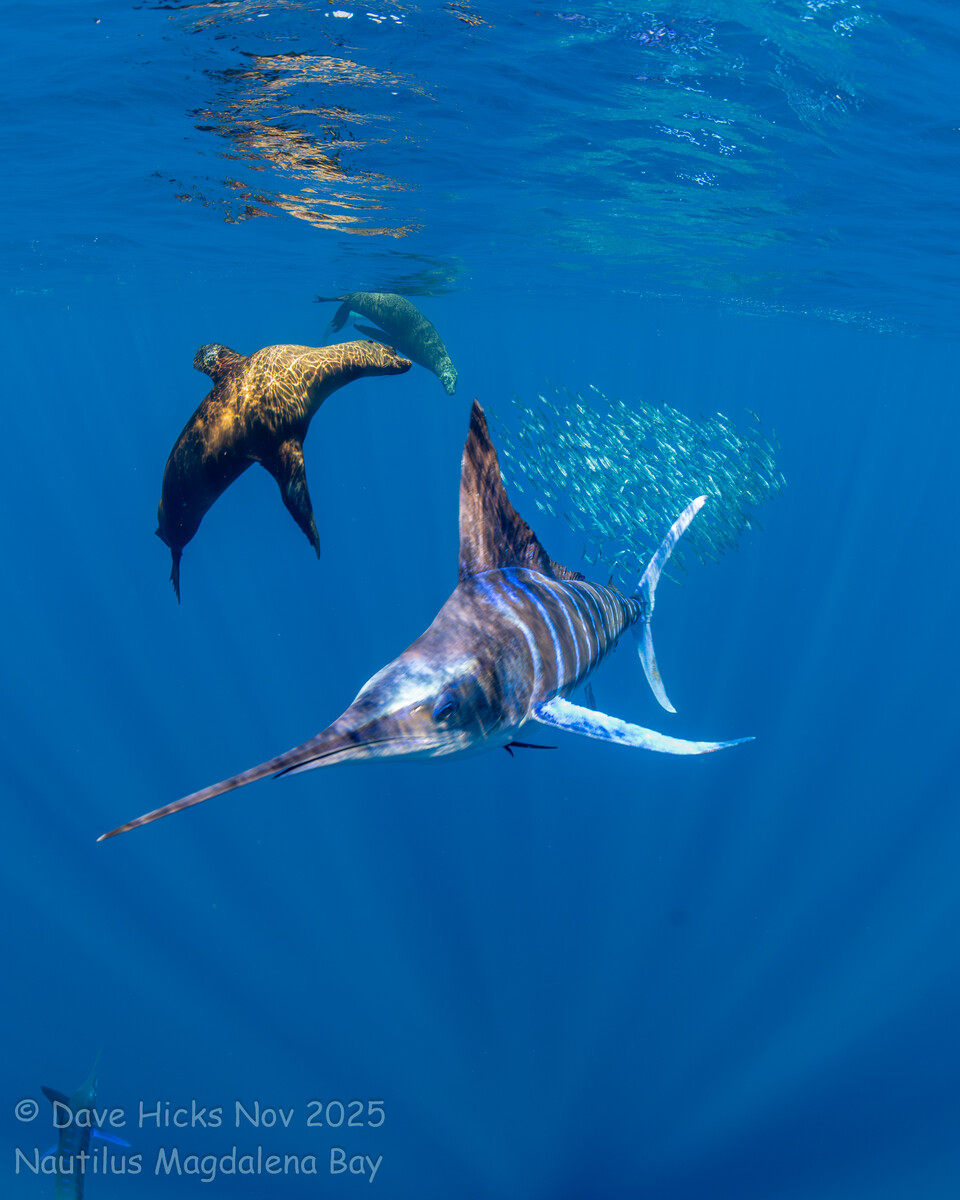
Nautilus Liveaboards - Striped Marlin & Bait Balls Mexico Sardine Run You should reconsider Baja! I did a snorkeling-based trip to Magdalena Bay a couple of months ago that is the ultimate family trip and checks most of your requirements. Snorkeling, Whales, Sea Lions (1000's), Dolphins. Add Marlin and Sail Fish, Turtles, and more. All from a great liveaboard taking off from Cabo San Lucas. Which is a fun town with lots to offer travelers with great hotels, resorts, food, shopping. (Whales, Dolphins, Sea Lions, Marlin in photos. :) )
-
SONY 2x TC + Canon 8-15mm FIsheye - Sony Nauticam Housing, 140mm Dome Port + Extensions
I don't really see an issue with some minor dropping of corner sharpness in an image like this. If you don't like the look, you can try a smaller aperture next time, or crop in a little tighter clipping off the edges. I personally like an 8x10 or 1x1 ratio for a lot of my photos. I do a lot of large format prints and find these to be the best options for display.
-
Lot's a server timeout the last couple of days
Is there a problem with the hosting service? I've gotten quite a few instances when the site won't load and times out.
-
Float arms, which brands provide good quality at reasonable price?
It is tough to do better than good old ULCS aluminum grid arms with Stix Jumbo float blocks. They cost less than the Nauticam float arms and they WILL last a lifetime. They are pretty much indestructible. I am still using ULCS arms that I bought 20 years ago. Change the o-rings every decade or so, and you'll be set.
-
Which Strobe
December 1st
-
Which Strobe
I just got a shipping notice today for my Atom.
-
Looking for input on less-than-colorful Nikon viewfinder image
If you are not using a focus light, you need to get one. Image enhancement can only go so far, you need light to see detail in dim light. Assuming you have the viewfinder set to Ease/Auto, this is your problem.
-
Looking for input on less-than-colorful Nikon viewfinder image
From the Z8 Nikon PDF Manual: pg 595 d8: View Mode (Photo Lv) Two modes: [Show effects of settings] [Adjust for ease of viewing] Most of the time you want "Adjust for ease of viewing". This is basically night vision, you can see in the dark, but does NOT represent what the image will look like. The other setting "Show effects of settings" is good for ambient light photography, like in the shallows. You see a representation of what the photograph will look like with the current camera settings, but obviously not the impact of FLASH. It's a good way to expose for the background colors, etc. You say you have ease of viewing enabled, but there are more customizations that perhaps you tinkered with. Change it to Ease of Viewing / AUTO and the viewfinder boosts exposure of what you see in the eyepiece. [Adjust for ease of viewing] The effects of changes to settings such as white balance, Picture Controls, and exposure compensation are not visible in the shooting display. Pressing C when [Adjust for ease of viewing] is highlighted displays [Auto] and [Custom] options. . [Auto]: Color, brightness, and other settings are adjusted for ease of viewing during prolonged periods of use. . [Custom]: Press @ to make individual adjustments to [White balance], [Set Picture Control], and [Brighten shadows]. - [White balance]: Choose from [Preview current setting], [Auto], and [Choose color temperature]. Select [Choose color temperature] to choose the color temperature for the shooting display. - [Set Picture Control]: Choose from [Preview current setting] and [Adjust for ease of viewing]. - [Brighten shadows]: Choose whether or by how much the camera brightens shadows (dark areas) in the display; the available options are [Off], [+1], [+2], and [+3]. The higher the value, the greater the effect. . ME will appear in the shooting display.
-
Backscatter HF-1 Strobe battery compartment flood
Information from Deoxit Gold product sheet. Very interesting and relevant to this discussion. https://acct113328.app.netsuite.com/core/media/media.nl?id=793&c=ACCT113328&h=cf9f74b54878595f50b4&_xt=.pdf Also, some Copilot AI research of the topic. TLDR; Even a little oxidation/resistance can make a big drop of voltage at these power levels. When a 3.7 V battery capable of 20 A current is used in high-powered electronic devices (e.g., advanced LED arrays, portable amplifiers, or hobbyist drones), battery contact degradation due to oxidation or corrosion is a significant concern. The mechanisms and implications for performance in such devices can be analyzed systematically. 1. Electrochemical BasisMetal Oxidation at Contacts Contacts are often made of copper, brass, nickel, or tin-plated alloys. Exposure to moisture, oxygen, and trace electrolyte can initiate the formation of oxides: Cu+12O2→CuOorNi+O2→NiOCu+21O2→CuOorNi+O2→NiO In high-current scenarios, oxidation is accelerated due to local potential differences generated at microscopic imperfections. Localized Electrolytic Effects Even in dry conditions, leakage currents or minute electrolyte residues create micro-electrochemical cells, further catalyzing oxidation. High amperage increases the rate of these redox reactions proportionally (Faraday’s law of electrolysis). 2. Thermal and Electrical FactorsJoule Heating Power dissipated at a contact: P=I2RP=I2R, where I=20 AI=20 A and RR is the contact resistance (~milliohms). Even low voltage (3.7 V) produces: P=(20)2×R≈400R WP=(20)2×R≈400RW Local temperature rises accelerate oxidation and plating degradation, creating microcracks that exacerbate corrosion. Voltage Drop and Contact Resistance Oxidation increases resistance at the interface. Voltage drop across contacts: Vdrop=I⋅RoxideVdrop=I⋅Roxide In high-power devices, even 0.01 Ω can cause noticeable voltage loss: Vdrop=20 A×0.01 Ω=0.2 V(∼5% of 3.7 V)Vdrop=20A×0.01Ω=0.2V(∼5% of 3.7 V)
-
O ring maintenance question
A black hair wrapped around an oring could only happen if the oring was removed. That is not likely from wiping and lubing in place.
-
O ring maintenance question
I have seen many divers yanking on their orings luke they were pulling taffee while applying lube. Stretching them out horribly. It's not necessary to remove orings most of the time, so just don't unless it looks like a day at the beach!
-
from 8-15 to Wet lens
The Kraken must be used with a 60mm lens. The Nikon af-s 60mm in my case on a Z8. The corners and overall quality is inferior to the WWL-C that I use. However, it is a great tool some conditions. The shark pictures above were taken in crappy summer visibility conditions. The dive plan was 90 feet for 30 minutes looking for Sixgills. Then up to the shallows in to shoot small macro creatures with the 60mm and a diopter. You are able to combine true wide angle with true macro. This is a lot more range and flexibility than what some people are trying to do with the MFO-3 these days. Nikon Z8 w/Nikon 60mm lens, Kraken KRL09 WA, f14@1/200s iso200
-
from 8-15 to Wet lens
Here are a couple of more at f8: Nikon Z8 w/Nikon 60mm lens, Kraken KRL09 WA, f8@1/50s iso800 Eight-foot long Sixgill shark on a very dark and murky summer night, range of inches.
-
O ring maintenance question
Yeah, don't remove those small orings. Very lightly lube them with each battery change.
-
O ring maintenance question
Did you build a sand castle around your housing?! 😀
-
from 8-15 to Wet lens
I don't really care a lot about corners. I crop many/most photos anyway. Here are a couple of images shot at f10 with the Kraken krl-09s. These are CFWA, taken from inches away from the subject.