



.jpg.c5e6bd876847a2be9e8f7ad68dd32d7c.jpg)

Everything posted by Davide DB
-
We talked about how often to service the housing and its price... But has any DIY hero ever tried to change the o-rings on a single button or a wheel? I remember seeing it done once on a Nauticam housing, and it didn't seem like rocket science to me. Provided you have the right spare parts and tools. It seems to me that once the micro circlip/e-clip is removed, the mechanism just slides out. I'm aware that different brands have different designs. Am I crazy?
-
Did you try to clean it? Inside there'a a mushroom valve and a spring. Maybe you have some debris or salt deposit on the membrane.
-
So, There are two possibilities: the electronic circuit or the valve itself. I didn't understand if you had tested whether, regardless of the light, opening the latches made the back come off, or if you felt air escaping when pressing the valve. Anyway, now that you've removed the valve from the housing, try washing it. If you have access to someone who services regulators or a jeweler, try cleaning it in an ultrasonic bath. Otherwise, soak it in vinegar for a while and actuate the valve by hand several times. Then rinse it and run clean hot water through it first, followed by air. It might just be that the internal mushroom membrane is dirty. I wouldn't dare take it apart. To avoid to ruin the valve, you need that tool or something like that.
-
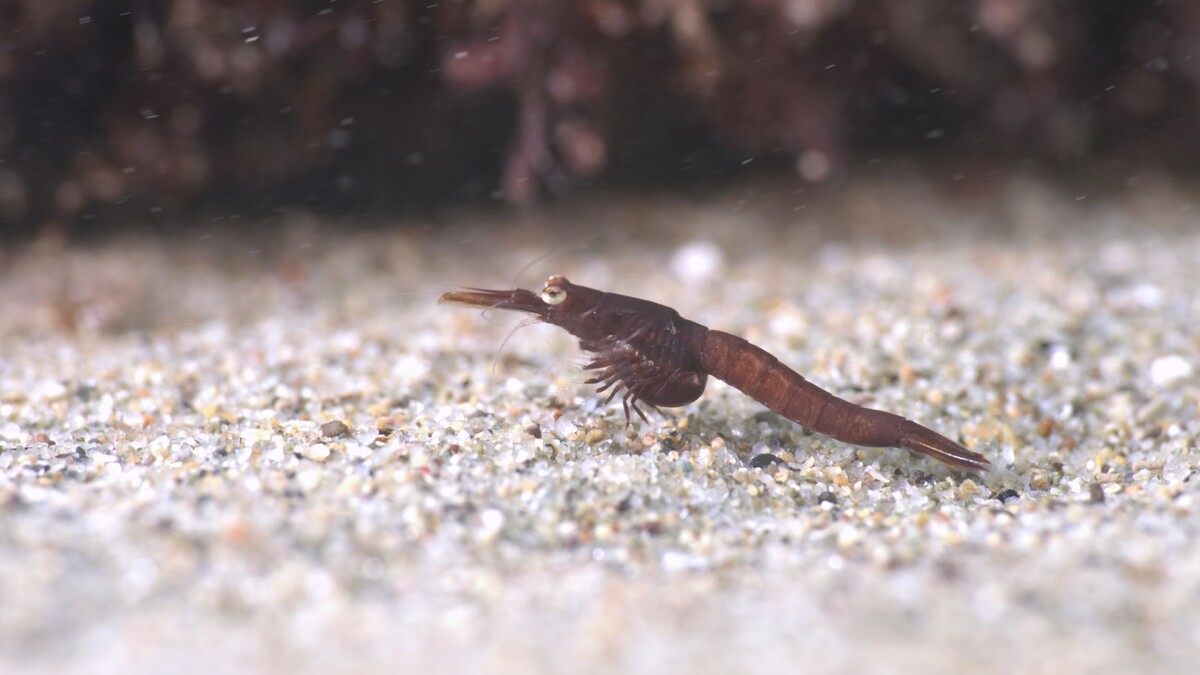
I should start by saying I only shoot video with a GH5. I have the CMC-2 and I use it with a Leica 45mm or the Pana 14-42mm (a combination I hate). With the zoom, the situation is more complex because, as Chris said, the depth of field is a function of magnification, and many times I work at minimum zoom, almost to the edge of vignetting. With only the 45mm, the DOF is acceptable. This creature is about 9/10 mm long, and if you look at the grains of sand, you realize the DOF (1/100, f/10). I definitely could have gotten closer, but it was running like there was no tomorrow. However, with the 45 mm + CMC-2 even a Caprella sp. goes out of focus if it moves. Years ago, I had the opportunity to test the CMC-1, CMC-2, and Subsee +5 on several dives. The Subsee was the least powerful but easiest to use. The CMC-1 was the opposite. The deciding factor for me was the focus range (5 vs 10 cm). For video and the types of subjects I usually encountered, the CMC-1 was truly difficult to use, so I chose the 2, which was a bit of an all rounder. Now that I've gotten the hang of it, I wish I had the CMC-1, maybe something even more extreme. Naturally, only for static subjects.

-
https://waterpixels.net/forums/topic/1731-essential-spares-for-underwater-photography/#findComment-10796
-
A drop of diluted citric acid (20%)
-
I don't even believe my own mother anymore 😁 It's a real shame that for any video, we are now forced to ask ourselves if it's AI. And fundamentally, if we're wrong about a video of dolphins and whales, who gives a damn! But now I see skepticism everywhere. I've read absurd discussions regarding images of war, from Palestine to Ukraine, about things we shouldn't have the slightest doubt about. Returning to the whale, at the 27-second mark, the fin on the left of the screen grows disproportionately large. I don't know if it was too far away and in shadow before, but it's suspicious. P.S. I was given a temporary Google Gemini Pro account, and a few weeks ago, just for fun, I tried to generate a small piece of video. Crazy. Essentially, I gave it the last frame of one clip I had and the first frame of another clip, and I asked to construct a particular scene in the middle t The result was "almost" perfect. It connected perfectly because it started and ended with my own frames.I should have tried with different prompts, but then I got bored and quit. Just six months ago, this wasn't remotely possible.
-
We have an old similar thread here: https://waterpixels.net/forums/topic/729-having-a-housing-serviced/
-
I always say this: if only a small percentage of smartphone technology were used in action cameras, we would see a leap in their performance. And regardless, sooner or later, we'll find these features in our mirrorless cameras. The sensor has already gone into production, and the first smartphones incorporating it will be seen in a few months. Sony has unveiled the LYTIA LYT-901, a massive new image sensor (1/1.12-type, 200MP) that could fundamentally change smartphone cameras. Here is the brief summary: AI Zoom Breakthrough: The sensor integrates an industry-first on-chip AI processing circuit that handles intensive remosaicing in real-time. 4x Digital Zoom Quality: This allows the sensor to deliver high-quality, 4x digital zoom performance (up to 4K/30fps video) using only a single lens, achieving results previously limited to dedicated telephoto modules. Performance: It features high dynamic range (over $100\text{ dB}$ claimed) and supports up to 8K/30fps and 4K/120fps video capture. Implications: If successful, this technology will allow phone manufacturers to use fewer lenses, leading to smaller camera bumps, reduced costs, and more space inside the phone for components like larger batteries. In short: Sony is trying to replace the dedicated telephoto lens with a single, high-res sensor plus integrated AI processing. CineDDeath of the Triple-Camera Phone? Sony LYTIA 901 Sensor D...Sony LYTIA 901 packs 200MP and on-chip AI for 4x zoom quality, potentially replacing multi-camera smartphone setups.
-
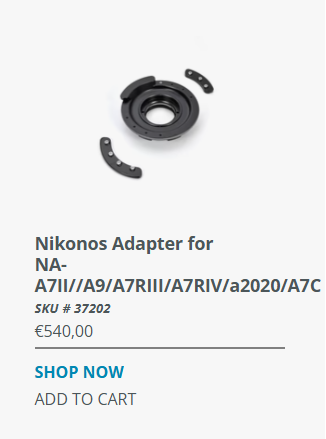
It is definitely a mistake, and even 540 euros is a lot!
-
It must be an incredible experience. Bravo!
-
So Ikelite won the race to publish the first Nikon ZR underwater video! The magenta tone escaped in some clips 😉
-
Folks, We all get our information online. For our passion, YouTube has certainly become—for better or worse—one of the main sources, and over the years, each of us has their own reference channels. However, however... I would like to avoid exchanges of opinion about what is best turning into a competition of "who has the last link." It would be great if we discussed things through our own personal experiences, and not through videos with sensationalistic titles made by people who film their dirty laundry in their bedrooms. In short, I would like our forum to be a different place. A place for the exchange of first hand informations and not an echo chamber for other people's opinions. Ciao
-
Welcome aboard Oliver!
-
If someone is not satisfied with the SMC-3, I'm here 😀
-
Amazing macro details. The gills are incredible!
-
There's one on Abebooks for 463 USD 😱
-
Do you have some clip to see it in action?
-
Yes, sorry, you are right, I said something stupid. I was thinking about my 45mm. It doesn't make sense on this lens; in fact, I think it's practically impossible to mount a diopter. My only doubt is what would happen if I mounted an MFO-3. I edited my post.
-
The Panasonic 30mm lens is very underrated, fundamentally because it reaches its maximum magnification practically on the port glass. But actually, for many situations, in my opinion, it is excellent. All reports say that its AF is snappier compared to its 45mm and 90mm macro cousins. If you then need greater magnification, you can always compensate with a light diopter.
-
BTW, on Instagram I saw an interview of Aquatica by Underwater Photography Guide. They have a prototype of a Nikon ZR housing https://www.instagram.com/reel/DRQ6IaWETB1/?utm_source=ig_web_button_native_share&igsh=ZDNlZDc0MzIxNw%3D%3D
-
I came across this video of the NA-ZR housing. It shows the new Nauticam blue port Locking mechanism. basically a green led signals you correctly attached the port. It should be standard on new housings https://www.facebook.com/cghdive/posts/pfbid0n1uVSfkkhGXUdMx9mcNyHQh9xwA8spaaH3GLXA7kmcFumDdwdeHs2PUCbfLhRUBPlOr, even better, showing where you come from, during a photographic safari? 😁
 Come on, guys! What's better than a nice steaming coffee in a Waterpixels mug?






Important Information
Terms of Use Privacy Policy Guidelines We have placed cookies on your device to help make this website better. You can adjust your cookie settings, otherwise we'll assume you're okay to continue.
